1. Введение
Thank you for choosing the iScooter i14 Electric Scooter with Seat. This manual provides essential information for the safe assembly, operation, and maintenance of your new electric scooter. Please read it thoroughly before your first ride and keep it for future reference. Proper use and care will ensure optimal performance and longevity of your scooter.
2. Информация по технике безопасности
Your safety is paramount. Always wear a helmet and appropriate protective gear (knee pads, elbow pads) when riding. Familiarize yourself with local laws and regulations regarding electric scooter use. Do not ride in adverse weather conditions or on slippery surfaces. Avoid riding under the influence of alcohol or drugs. Regular maintenance checks are crucial for safe operation.
- Всегда надевайте шлем и защитное снаряжение.
- Check brakes, tires, and all fasteners before each ride.
- Соблюдайте местные правила дорожного движения.
- Не превышайте максимальную грузоподъемность в 264 фунтов.
- Avoid riding in heavy rain, snow, or on icy roads.
3. Содержимое упаковки
После распаковки, пожалуйста, проверьте наличие всех компонентов:
- i14 Электрический скутер
- Зарядное устройство
- Руководство пользователя (этот документ)
- Набор инструментов
4. Настройка и сборка
Follow these steps to assemble your iScooter i14 Electric Scooter. A detailed assembly video is provided below for visual guidance.
4.1 Распаковка и первоначальный осмотр
Осторожно извлеките все компоненты из упаковки. Осмотрите их на предмет возможных повреждений, полученных при транспортировке.

Figure 4.1: The iScooter i14 Electric Scooter with Seat.
4.2 Front Wheel and Fender Installation
Attach the front wheel and fender to the scooter's fork using the provided tools. Ensure all bolts are securely tightened.
4.3 Сборка руля
Insert the handlebar stem into the main frame and secure it. Adjust the handlebar height to your preference and tighten the quick-release clamp. Attach the handlebar to the stem and secure it with the provided screws.

Figure 4.2: Adjusting the height of the handlebar for comfortable riding.
4.4 Установка сиденья
Insert the seat post into the designated slot on the scooter frame. Adjust the seat height for comfortable riding and secure it with the quick-release lever. Ensure the seat is firmly in place.

Figure 4.3: Adjusting the seat height to suit individual rider preferences.
4.5 Rear Basket Attachment
Secure the rear storage basket to the designated mounting points on the scooter's rear rack using the provided hardware. Ensure it is stable and can safely carry items.

Figure 4.4: The spacious rear basket for carrying personal belongings.
4.6 Видеоинструкция по сборке
Video 4.1: This video demonstrates the assembly process for the iScooter i14 Electric Scooter with Seat, including unboxing, attaching the front wheel, handlebar, seat, and rear basket.
5. Инструкция по эксплуатации
Understand the controls and features of your iScooter i14 for a safe and enjoyable ride.
5.1 Power On/Off and Key Ignition
Insert the mechanical key into the ignition slot and turn it to the 'ON' position to power on the scooter. The LCD display will illuminate. Turn the key to 'OFF' to power down.
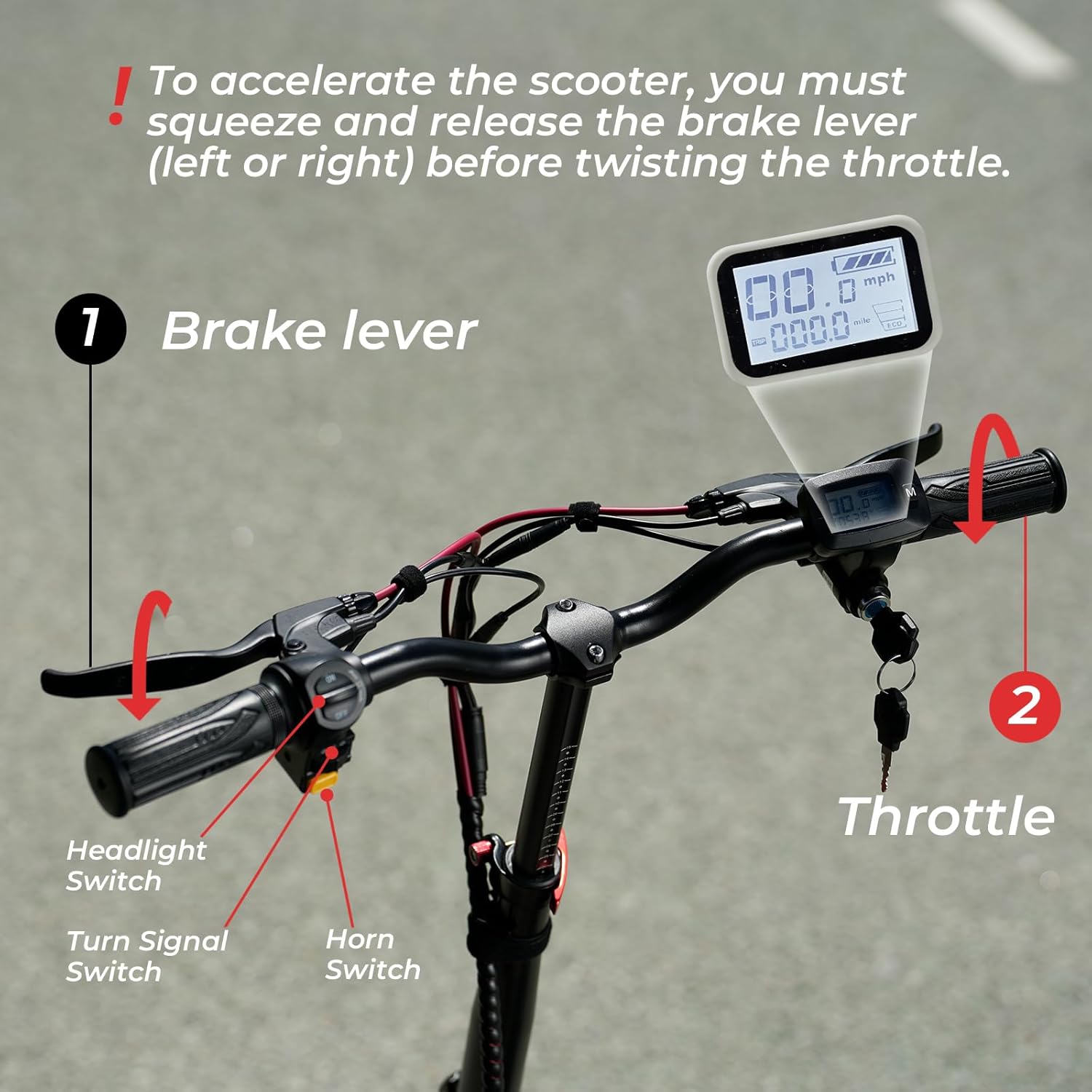
Рисунок 5.1: Болееview of the handlebar controls, including the LCD display, key ignition, and switches.
5.2 Режимы скорости
The iScooter i14 offers 3 adjustable speed modes: 9 MPH, 21 MPH, and 28 MPH. To switch between modes, press the 'M' button on the display twice. Select the appropriate speed mode based on your riding environment and experience level.
5.3 Работа дроссельной заслонки
To accelerate, you must first squeeze and release either the left or right brake lever before twisting the throttle. This safety feature prevents accidental acceleration. Twist the throttle gently to control your speed.
5.4 Фары, звуковой сигнал и поворотники
Use the dedicated switches on the handlebar to activate the front and rear LED lights for visibility, the horn for alerts, and the turn signals to indicate your direction to others.

Figure 5.2: The bright front LED light enhances visibility during low-light conditions.

Figure 5.3: The rear LED light ensures you are seen from behind, improving safety.
5.5 Тормозная система
The scooter is equipped with front and rear disc brakes, along with an electric lock system, for powerful and reliable stopping performance. Apply both brake levers gently and evenly to slow down or stop. Avoid sudden, harsh braking, especially at high speeds.

Figure 5.4: The robust disc brake system provides effective stopping power.
6. Операция зарядки
To charge your iScooter i14, locate the charging port on the scooter's deck. Connect the charger to the port, then plug the charger into a standard wall outlet. The indicator light on the charger will typically turn red during charging and green when fully charged. A full charge takes approximately 8 hours.
Video 6.1: This video demonstrates the charging process for the iScooter i14 Electric Scooter.
7. Техническое обслуживание
Регулярное техническое обслуживание гарантирует долговечность и безопасную эксплуатацию вашего скутера.
- Давление в шинах: Check the pressure of the 14-inch pneumatic tires regularly. Maintain the recommended PSI as indicated on the tire sidewall for optimal ride comfort and range.
- Проверка тормозов: Periodically inspect the front and rear disc brakes for wear and proper function. Adjust brake cables if necessary to ensure responsive braking.
- Уборка: Очистите скутер с помощью рекламыamp Ткань. Избегайте попадания струй воды под высоким давлением непосредственно на электрические компоненты.
- Уход батареи: Store the scooter in a cool, dry place. If storing for extended periods, charge the battery to approximately 50-70% and recharge every 1-2 months to prevent deep discharge.
- Крепеж: Регулярно проверяйте все винты, болты и быстросъемные механизмы, чтобы убедиться в их надежности и прочности.
8. Поиск Неисправностей
Вот некоторые распространенные проблемы и их возможные решения:
| Проблема | Возможная причина | Решение |
|---|---|---|
| Самокат не включается | Low battery; Key not fully turned; Loose connections | Charge battery; Ensure key is in 'ON' position; Check all visible cable connections. |
| Двигатель не включается | Brake lever not released before throttle; Faulty throttle; Motor issue | Ensure brake lever is released; Contact customer support if issue persists. |
| Тормоза кажутся слабыми | Изношенные тормозные колодки; Ослабленный тормозной трос; Воздух в гидравлической системе (если применимо) | Inspect brake pads for wear and replace if needed; Adjust brake cable tension; Consult a professional for hydraulic brake issues. |
| Необычные шумы во время работы | Ослабленные компоненты; Мусор в колесах/тормозах; Проблемы с двигателем | Check all fasteners; Inspect wheels and brakes for obstructions; Contact customer support. |
9. Технические характеристики
| Особенность | Спецификация |
|---|---|
| Бренд | iСкутер |
| Название модели | и14 |
| Мощность двигателя | 800 Вт |
| Максимальная скорость | 28 миль/ч |
| Максимальный диапазон расстояний | 34 миль |
| Аккумулятор | 48В 10.4Ач |
| Время зарядки | 8 часов |
| Размер шин | 14 дюйма |
| Тип шин | Пневматический |
| Тип подвески | Двойная подвеска (передняя и задняя) |
| Тип тормоза | Double Disc Brakes & EABS Braking Systems |
| Максимальный вес | 264 фунта |
| Вес товара | 72 фунта |
| Размеры продукта (ДxШxВ) | 43"Д x 17"Ш x 45"В |
| Материал рамы | Алюминий |
| Особые возможности | 800W Motor, 28MPH Top Speed, 34MILES Long Range, Dual Suspension, Adjustable Height, Adjustable Seat |
| Рекомендуемое использование | Поездки на работу |
10. Гарантия и поддержка
10.1 Информация о гарантии
iScooter offers a 12-month or 180-day warranty on different components of your product. Please refer to the specific warranty terms provided with your purchase for detailed coverage.
10.2 Поддержка клиентов
For any questions, concerns, or assistance with your iScooter i14, please contact our customer support team:
- Колл-центр: +1 (855) 916-2366
- Онлайн-чат/Электронная почта: support@iscooterglobal.com
Наша служба поддержки клиентов всегда готова вам помочь.

Figure 10.1: iScooter customer support details for assistance.


