1. Введение
Welcome to the user manual for your new Motorola G57 Power 5G smartphone. This guide provides essential information to help you set up, operate, maintain, and troubleshoot your device. Please read this manual thoroughly to ensure optimal performance and longevity of your smartphone.
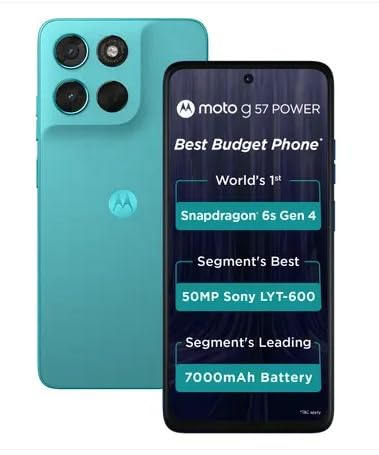
Изображение 1.1: Вид спереди и сзади view of the Motorola G57 Power 5G.
2. Настройка
2.1 Распаковка
При открытии упаковки убедитесь в наличии всех компонентов:
- Motorola G57 Power 5G Smartphone
- Зарядное устройство (может отличаться в зависимости от региона)
- USB-кабель
- Инструмент для извлечения лотка SIM-карты
- Краткое руководство пользователя
2.2 Установка SIM-карты
- Найдите лоток для SIM-карты на боковой панели устройства.
- Вставьте инструмент для извлечения лотка SIM-карты в небольшое отверстие рядом с лотком и аккуратно нажмите, пока лоток не выдвинется.
- Вставьте карту Nano-SIM и/или карту microSD (если поддерживается) в лоток золотыми контактами вниз. Убедитесь, что они правильно установлены.
- Аккуратно вставьте лоток обратно в телефон до щелчка.
2.3 Первоначальное включение и настройка
- Нажмите и удерживайте кнопку питания, пока не появится логотип Motorola.
- Следуйте инструкциям на экране, чтобы выбрать язык, подключиться к сети Wi-Fi и войти в систему, используя свою учетную запись Google.
- You will be guided through setting up security features like fingerprint unlock or face unlock, and data transfer from an old device.
3. Управление вашим устройством
3.1 Дисплей и навигация
The Motorola G57 Power 5G features a 6.72-inch FHD+ display with a 120Hz refresh rate for smooth visuals and up to 1050 nits peak brightness for clear outdoor visibility. Navigation is primarily through Android's intuitive gesture system or traditional on-screen buttons, configurable in settings.
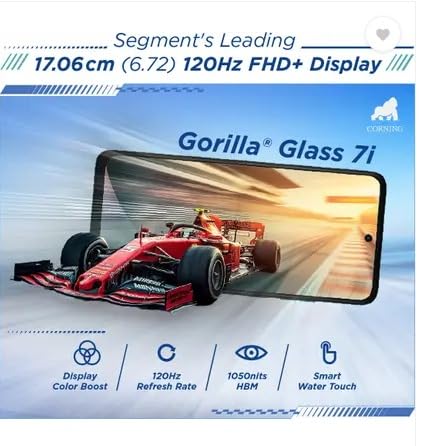
Image 3.1: The Motorola G57 Power 5G's 120Hz FHD+ display.
3.2 Использование камеры
Ваше устройство оснащено универсальной системой камер:
- Основная камера: 50MP LYT-600 sensor for high-resolution photos.
- Сверхширокоугольная камера: 8 Мп для съемки более широких сцен.
- Фронтальная камера: 8 Мп для селфи и видеозвонков.
Utilize the camera app to switch between modes (Photo, Portrait, Video, Pro, etc.), adjust settings, and apply filters. The integrated moto ai features enhance image processing for improved results.

Image 3.2: Rear camera module of the Motorola G57 Power 5G.
3.3 Управление аккумулятором
The Motorola G57 Power 5G features a large 7000mAh silicon carbon battery, designed for extended usage. It supports 33W TurboPower fast charging. To optimize battery life:
- Отрегулируйте яркость экрана.
- Отключите неиспользуемые функции подключения (Wi-Fi, Bluetooth, GPS).
- Закройте фоновые приложения.
- Используйте режимы экономии заряда батареи.
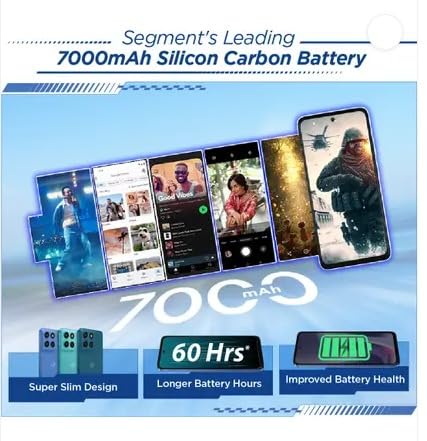
Image 3.3: Visual representation of the 7000mAh battery.
3.4 Связь
Your device supports 5G cellular networks for high-speed data. It also includes Bluetooth for connecting to accessories and Wi-Fi for internet access. Manage these connections through the Quick Settings panel or the Settings app.
3.5 Программное обеспечение и обновления
The Motorola G57 Power 5G runs on Android 16, with a promised upgrade to Android 17 and three years of security updates. Regularly check for and install software updates to ensure your device has the latest features and security patches. Navigate to Настройки> Система> Обновления системы.
4. Техническое обслуживание
4.1 Очистка устройства
To clean your phone, use a soft, lint-free cloth. Avoid abrasive materials or harsh chemicals. For the screen, a screen cleaner specifically designed for electronics can be used. Ensure no liquids enter ports.
4.2 Поддержка программного обеспечения
- Regularly update your operating system and applications.
- Clear cache and data for apps that consume excessive storage.
- Perform periodic backups of your important data.
4.3 Управление хранением
The device comes with 128GB of internal storage. To manage storage effectively:
- Удалить ненужное fileс и приложения.
- Move photos and videos to cloud storage or an external device.
- Utilize the 'Files' app or 'Storage' section in settings to identify and manage large files.
5. Поиск Неисправностей
5.1 Общие проблемы и решения
- Устройство не включается: Убедитесь, что аккумулятор заряжен. Подключите устройство к зарядному устройству как минимум на 15 минут, затем попробуйте включить.
- Приложения вылетают или зависают: Close the app and reopen it. If the issue persists, clear the app's cache and data (Settings > Apps > [App Name] > Storage > Clear cache/Clear data).
- Плохое сетевое соединение: Check if airplane mode is off. Restart your device. Verify your SIM card is properly inserted.
- Низкая производительность: Close background apps, clear storage, and restart your device.
5.2 Сброс к заводским настройкам
A factory reset will erase all data from your phone and restore it to its original factory settings. This can resolve persistent software issues but should be used as a last resort after backing up all important data.
- Перейти к Настройки > Система > Сброс настроек.
- Выбирать Удалить все данные (сброс настроек к заводским).
- Подтвердите свое решение и введите PIN-код/пароль, если будет предложено.
6. Технические характеристики
| Особенность | Спецификация |
|---|---|
| Модель | Motorola G57 Power 5G |
| Операционная система | Android 16 (с возможностью обновления до Android 17) |
| Процессор | Snapdragon 6s Gen 4 |
| БАРАН | 8 ГБ LPDDR4X |
| Внутреннее хранилище | 128 ГБ UFS 2.2 |
| Отображать | 6.72-inch FHD+ LCD, 120Hz refresh rate, up to 1050 nits brightness |
| Задняя камера | 50MP LYT-600 (Main) + 8MP (Ultrawide) |
| Передняя камера | 8МП |
| Аккумулятор | 7000mAh Silicon Carbon, 33W TurboPower charging |
| Связность | 5G, Bluetooth, Wi-Fi |
| Размеры (Д x Ш x В) | 16.62 х 7.65 х 0.86 см |
| Масса | 210.6 г |
| Прочность | IP64 dust and splash resistance, MIL-STD 810H tested |
7. Информация о безопасности и нормативная информация
Please refer to the separate safety and regulatory guide included with your device for important information regarding safe usage, disposal, and compliance with local regulations. Always use approved accessories to prevent damage or injury.
8. Гарантия и поддержка
Your Motorola G57 Power 5G comes with a limited warranty. For detailed warranty terms, conditions, and to register your product, please visit the official Motorola support website. For technical assistance or service, contact Motorola customer support.
Более подробную информацию и ресурсы поддержки вы можете найти на сайте Магазин Motorola на Amazon.


