1. Продукт закончилсяview
The BN-LINK WiFi Smart Plug (Model CP-J31WT) allows you to control your home appliances remotely, set schedules, and use voice commands for a smarter, more convenient lifestyle. This compact plug is designed for ease of use and integrates seamlessly with popular smart home platforms.

Image: BN-LINK WiFi Smart Plug overview with icons for WiFi, timer, app control, voice control, remote operation, and group control.
Основные характеристики:
- Дистанционное управление: Turn appliances ON/OFF from anywhere using your smartphone.
- Голосовое управление: Совместимость с Alexa и Google Home для управления без помощи рук.
- Функция таймера: Schedule appliances to turn ON/OFF automatically, saving energy and preventing overcharging.
- Компактный дизайн: Small size ensures it doesn't block adjacent outlets.
- Функции безопасности: Equipped with high-temperature flame-retardant material, overload protection, electric shock prevention, and anti-tracking design.

Image: Diagram highlighting the smart plug's features: LED indicator, ON/OFF button, WiFi connection, timer function, remote operation, and voice control.
2. Информация по технике безопасности
Перед использованием данного изделия внимательно ознакомьтесь со всеми инструкциями по технике безопасности. Несоблюдение этих инструкций может привести к поражению электрическим током, возгоранию или серьёзной травме.
- Не разбирайте и не модифицируйте устройство.
- Не использовать во влажных помещениях или вблизи воды.
- Убедитесь, что вилка полностью вставлена в розетку.
- Не превышайте максимальную номинальную нагрузку 15А / 1500Вт.
- Хранить в недоступном для детей месте.
- Перед чисткой отключите устройство от розетки.
- Данный продукт предназначен только для использования внутри помещений.
Встроенные функции безопасности:
- High-Temperature Flame-Retardant Material: Reduces fire risk.
- Защита от перегрузки: Автоматически отключает питание, чтобы предотвратить повреждения от чрезмерного тока.
- Electric Shock Prevention Design: Enhanced safety against accidental contact.
- Anti-Tracking Design: Prevents dust accumulation and potential short circuits.
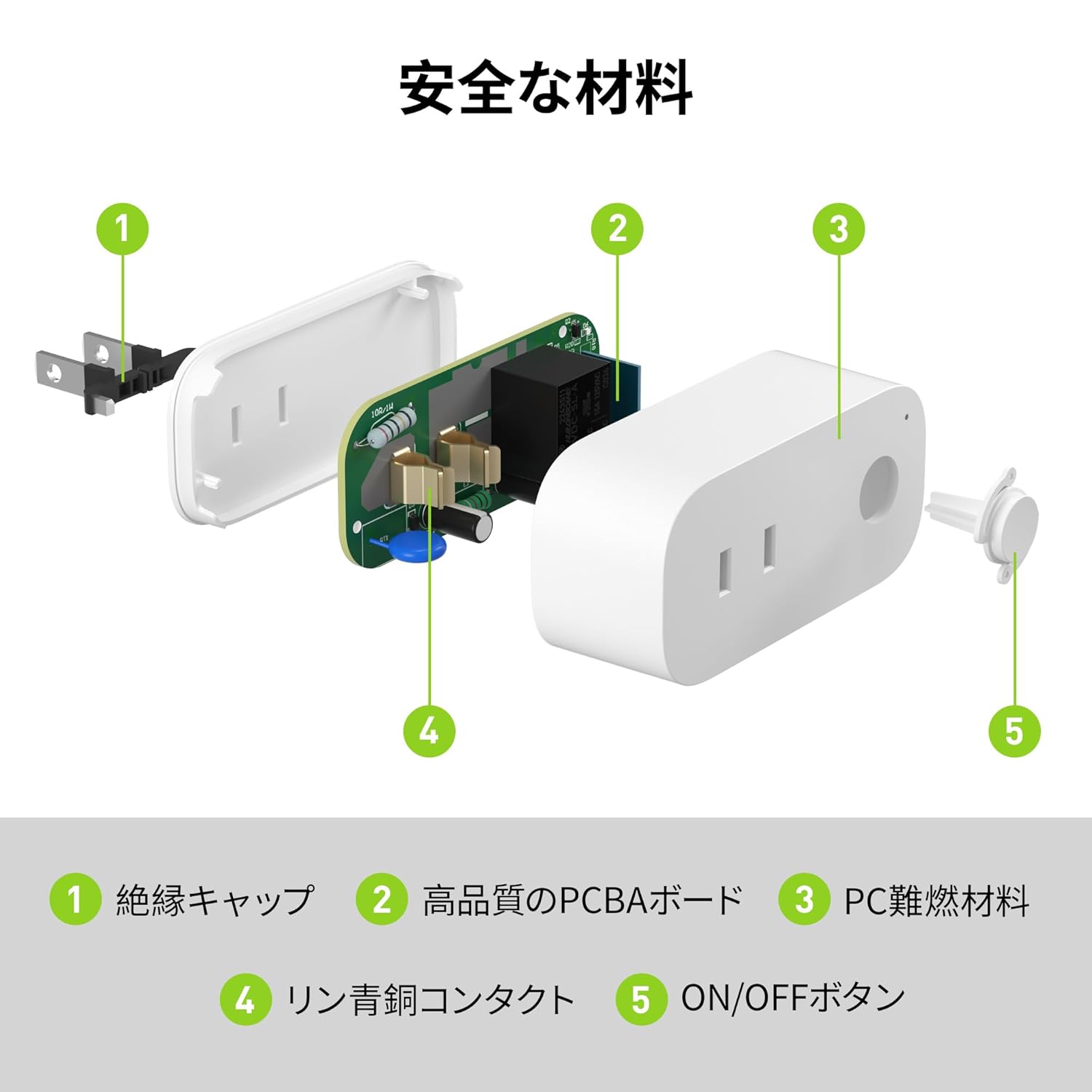
Image: Internal components of the smart plug, highlighting safety features such as the insulation cap, high-quality PCBA board, PC flame-retardant material, phosphor bronze contacts, and the ON/OFF button.
3. Инструкции по настройке
3.1. Начальная настройка
- Unpack the BN-LINK Smart Plug from its packaging.
- Plug the smart plug into a standard wall outlet.
- Observe the indicator light on the plug. It should start blinking. If it does not blink, press and hold the ON/OFF button for approximately 5 seconds until it starts blinking rapidly.
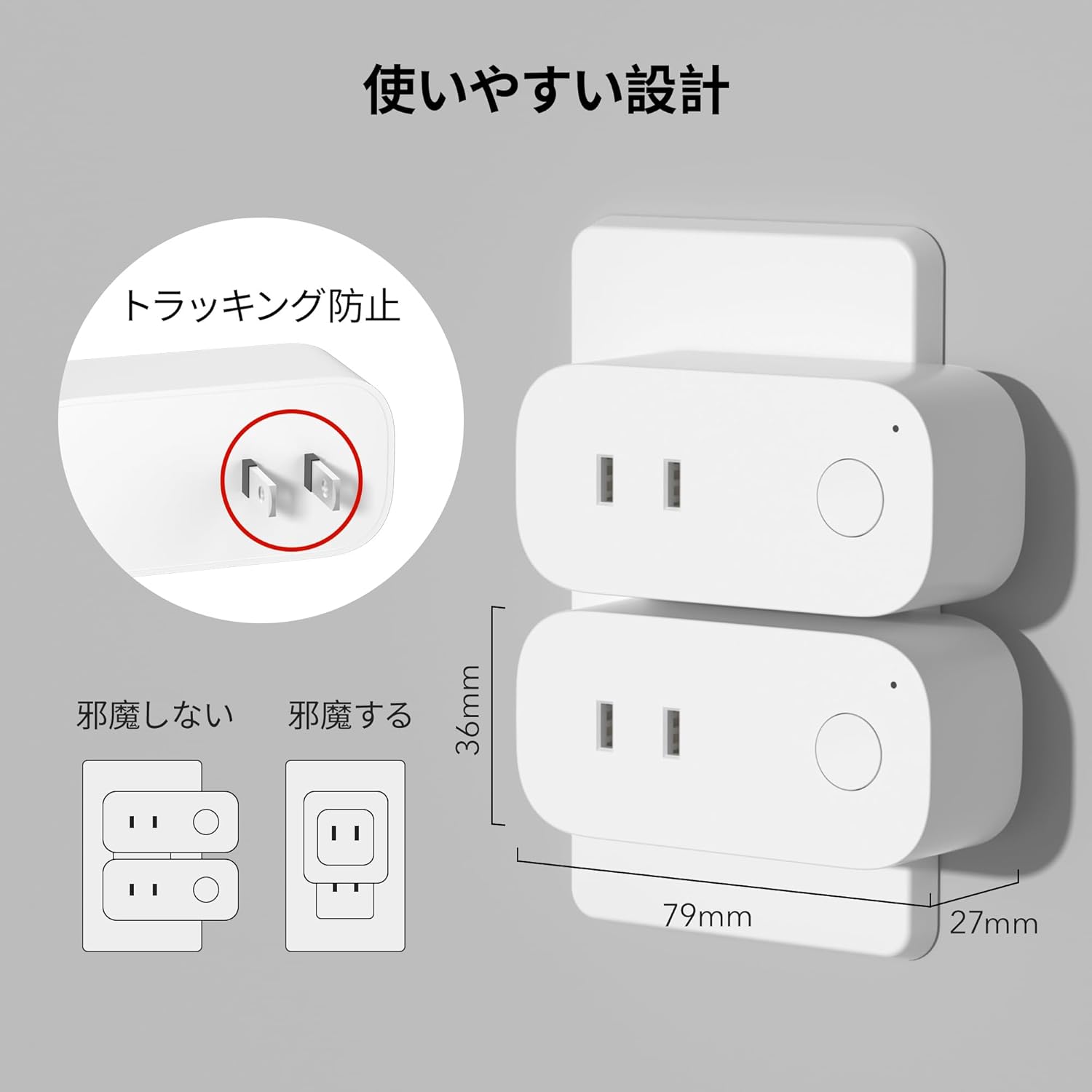
Image: The compact design of the smart plug, illustrating how it fits into an outlet without obstructing the adjacent one. Dimensions are also shown.
3.2. Установка приложения и подключение к Wi-Fi
To utilize all smart features, you need to install the BN-LINK app and connect the plug to your 2.4GHz Wi-Fi network. This device only supports 2.4GHz Wi-Fi.
- Download the "BN-LINK" app from your smartphone's app store (Google Play Store for Android or Apple App Store for iOS).
- Откройте приложение и создайте учетную запись или войдите в систему, если она у вас уже есть.
- Нажмите значок «+» или «Добавить устройство», чтобы начать процесс сопряжения.
- Выберите «Умная розетка» в списке устройств.
- Follow the on-screen instructions to connect the smart plug to your 2.4GHz Wi-Fi network. Ensure your phone is also connected to the 2.4GHz network during setup.
- Once connected, you can rename your smart plug for easy identification (e.g., "Living Room Lamp"Кофеварка").
Video: This video demonstrates the process of connecting the smart plug to the BN-LINK app and your Wi-Fi network, including resetting the device and confirming indicator light status.
Video: This video provides a step-by-step guide on setting up the ePlugBT and connecting it to Wi-Fi, which is similar to the BN-LINK Smart Plug setup process.
4. Инструкция по эксплуатации
4.1. Удаленное управление через приложение
Once connected to Wi-Fi, you can control your appliances from anywhere with an internet connection.
- Open the BN-LINK app.
- Tap on the device name you wish to control.
- Use the ON/OFF toggle button within the app to switch your appliance on or off.

Image: Remote operation of the smart plug via the BN-LINK app on a smartphone. The image shows the app's ON/OFF control for a device connected to the smart plug, with a WiFi router in the background.

Image: A user controlling a smart plug remotely with their smartphone in a modern kitchen environment.
4.2. Голосовое управление
Integrate your smart plug with Amazon Alexa or Google Home for convenient voice commands.
- Ensure your smart plug is successfully connected to the BN-LINK app and your Wi-Fi network.
- Откройте приложение Alexa или Google Home.
- Follow the app's instructions to add a new device or skill, searching for "BN-LINK" or "Smart Plug."
- После установления соединения вы сможете использовать голосовые команды, например:
- "Алекса, включи [название устройства]."
- «Привет, Google, выключи [название устройства]».

Image: A user in a living room controlling a lamp connected to a smart plug using voice commands with an Alexa device. The image also indicates Google Home compatibility.

Image: A smart plug connected to an outlet, being controlled by a Google Home device. A person is shown in bed, illustrating hands-free operation.
4.3. Timer Function and Scheduling
Set custom schedules to automate your appliances and manage energy consumption.
- In the BN-LINK app, select your smart plug.
- Перейдите в раздел «Таймер» или «Расписание».
- Set specific ON/OFF times for your appliances. You can create daily, weekly, or one-time schedules.
- Use the countdown timer for temporary automation, such as turning off a charger after a set period to prevent overcharging.

Image: The BN-LINK app displaying timer and scheduling features. Examples show a coffee maker turning on at 7:15 AM and a lamp turning off at 10:00 PM, demonstrating automated control.

Image: A smart plug connected to a microwave, with the app interface showing a timer set to turn the device ON at 7:00.
5. Техническое обслуживание
To ensure optimal performance and longevity of your BN-LINK Smart Plug, follow these maintenance guidelines:
- Уборка: Disconnect the smart plug from the power outlet before cleaning. Use a dry, soft cloth to wipe the surface. Do not use liquid cleaners or sprays.
- Хранилище: If not in use for an extended period, unplug the device and store it in a cool, dry place away from direct sunlight and moisture.
- Инспекция: Periodically check the plug and outlet for any signs of damage, wear, or overheating. If any issues are found, discontinue use and contact customer support.
6. Поиск Неисправностей
If you encounter issues with your BN-LINK Smart Plug, refer to the following common problems and solutions:
| Проблема | Возможная причина | Решение |
|---|---|---|
| Устройство не может подключиться к Wi-Fi. | Incorrect Wi-Fi password, 5GHz Wi-Fi network, weak signal, or device not in pairing mode. |
|
| Пульт дистанционного управления не работает. | No internet connection on phone or smart plug, or app issue. |
|
| Голосовое управление не отвечает. | Incorrect device name, smart assistant not linked, or internet connection issue. |
|
| Вилка не отвечает. | Мощность outage, device malfunction, or firmware issue. |
|
7. Технические характеристики
| Особенность | Деталь |
|---|---|
| Бренд | БН-ЛИНК |
| Номер модели | CP-J31WT |
| Вес товара | 70 г |
| Размеры упаковки | 8.2 х 4.7 х 4.3 см |
| Размер | 1 шт. в упаковке |
| Тип переключателя | 1-х полосный |
| Включенные компоненты | Smart Plug body, Instruction Manual |
| Batteries Used | Нет |
| Режим работы | ВКЛ ВЫКЛ |
| Текущий рейтинг | 15 Amps |
| Рабочий объемtage | 100 Вольт |
| Тип разъема | Плагин |
| Материал | Пластик |
| Тип цепи | 1-х полосный |
8. Гарантия и поддержка
BN-LINK products are designed for quality and reliability. For warranty information and customer support, please refer to the contact details provided in the product packaging or visit the official BN-LINK webсайт.
For further assistance, you may also contact the seller directly through the Amazon platform.
Интернет-ресурсы:
- Official BN-LINK Webсайт: www.bn-link.com (Обратите внимание: это заполнитель URL(замените на фактические данные, если они имеются)
- Страница продукта на Amazon: Amazon.co.jp Product Page


