1. Введение
This manual provides detailed instructions for the installation, operation, and maintenance of your AINAVI 11.5-inch Car Radio Stereo. This advanced system is designed to upgrade your vehicle's infotainment experience with Android 13.0, wireless CarPlay, Android Auto, GPS navigation, and various multimedia features. Please read this manual thoroughly before installation and use to ensure proper functionality and safety.
2. Продукт закончилсяview
The AINAVI 11.5-inch Car Radio Stereo is a high-performance multimedia system compatible with specific Jeep Wrangler JK, Dodge Grand Caravan, and Dodge Ram models. It features an 11.5-inch QLED touchscreen with 1280x800 resolution, running on Android 13.0 with 4GB RAM and 64GB ROM for smooth operation. Key features include:
- 11.5-дюймовый сенсорный QLED-экран: G+G full lamination technology with 178° full-viewугол наклона.
- ОС Android 13.0: Latest operating system for enhanced performance.
- Беспроводная/проводная поддержка CarPlay и Android Auto: Бесшовная интеграция со смартфоном.
- GPS-навигация: Поддерживает онлайн и офлайн карты.
- 5G WiFi и Bluetooth 5.4: Fast internet connectivity and stable device pairing.
- AM/FM/RDS радио: Access to various radio stations.
- Управление на рулевом колесе: Сохранены оригинальные органы управления автомобилем.

Image: The 11.5-inch HD IPS Touch Screen, showcasing its vibrant display and full lamination technology for clarity and responsiveness.
3. Содержимое упаковки
Убедитесь, что все перечисленные ниже предметы входят в комплект. Если какие-либо предметы отсутствуют или повреждены, обратитесь в службу поддержки клиентов.
- 11.5-inch Car Head Unit for Jeep Wrangler JK
- Пластиковая рамка
- AHD 1080P Задняя View Camera + Extension Power Cable
- Микрофон
- GPS-антенна
- USB 4-контактный кабель
- USB 6-контактный кабель
- Руководство пользователя (этот документ)
- Силовой кабель
- Power Harness with CAN BUS (for some models)
- Инструмент для удаления синей рамки
- RCA кабель
- Трос управления задним ходом
Note: The specific cables included may vary slightly depending on the vehicle model.
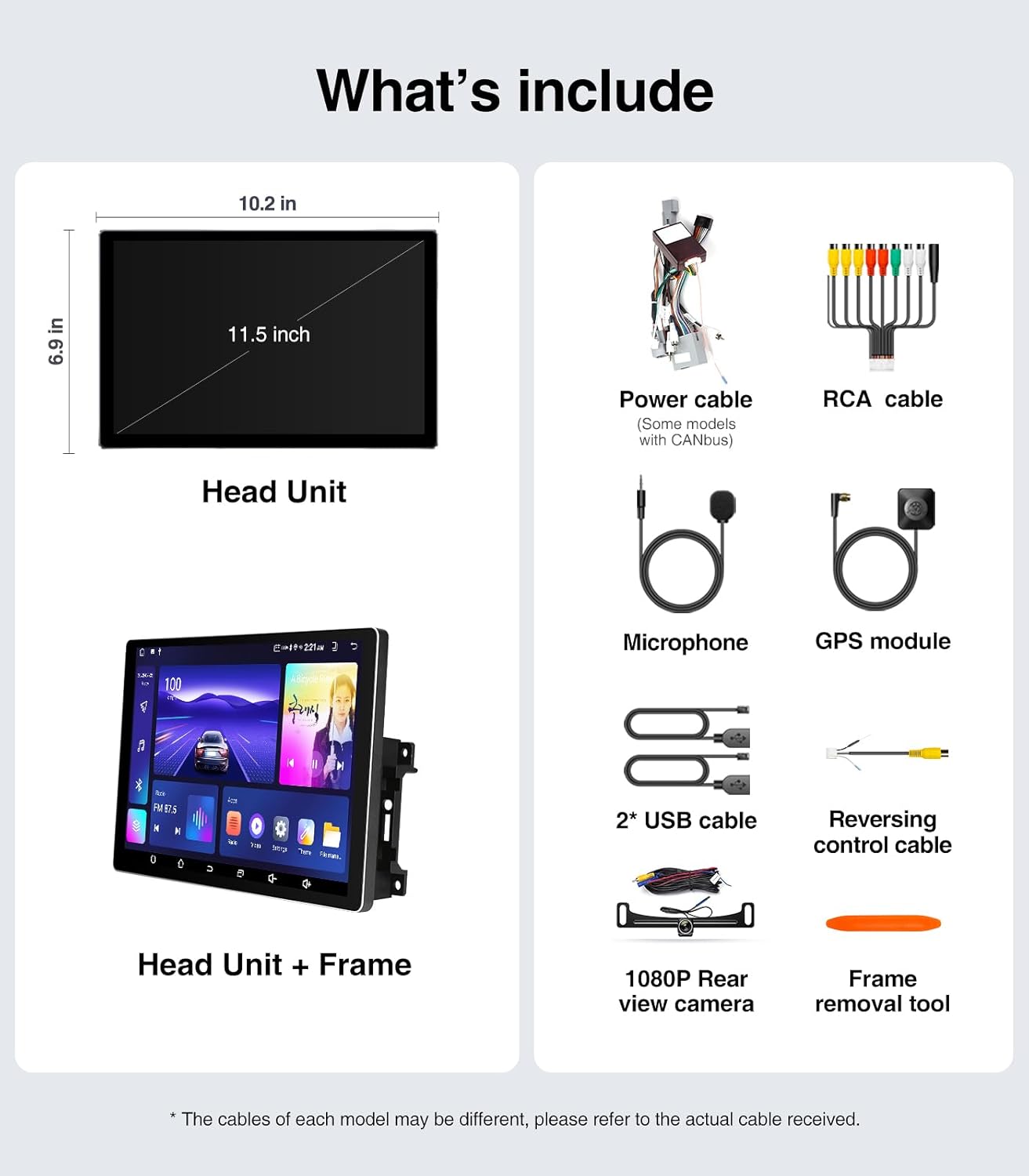
Image: A visual representation of all components included in the package, such as the head unit, frame, various cables, camera, microphone, and tools.
4. Руководство по установке (настройке)
The AINAVI Car Radio Stereo is designed for a plug-and-play installation for compatible vehicles. However, professional installation is recommended if you are unfamiliar with car audio system wiring.
4.1 Проверка перед установкой
- Ensure your vehicle is compatible with the head unit (Jeep Wrangler JK 2007-2018, Dodge Grand Caravan 2011-2020, Dodge Ram 2009-2012, etc.).
- Gather all necessary tools, including the provided frame removal tool.
- Disconnect the vehicle's battery before starting the installation to prevent electrical shorts.
4.2 Этапы установки
- Carefully remove the original car radio and dashboard trim using the frame removal tool. Refer to your vehicle's service manual for specific trim removal instructions.
- Connect the provided power harness and CAN BUS (if applicable) to the vehicle's wiring. Ensure all connections are secure.
- Connect the GPS antenna, USB cables, microphone, and rear view camera cables to the corresponding ports on the new head unit.
- Mount the new 11.5-inch head unit into the dashboard opening. Ensure it fits securely within the plastic frame.
- Снова подключите аккумуляторную батарею автомобиля.
- Turn on the vehicle's ignition and test the head unit's basic functions (power, audio, touch screen).
- Установите на место декоративные панели приборной панели.

Image: A comparison showing the vehicle's dashboard before and after the installation of the AINAVI 11.5-inch car radio stereo, highlighting the significant visual upgrade.

Image: Illustrates the plug-and-play nature of the installation, showing a user connecting wiring harnesses, along with icons indicating support for Steering Wheel Control and AMP.
5. Инструкция по эксплуатации
5.1 Основные операции
- Включение/выключение питания: The unit powers on with the vehicle's ignition. Press and hold the power button (if available) for manual power control.
- Сенсорный экран: Navigate the Android interface by tapping, swiping, and pinching gestures.
- Регулятор громкости: Adjust volume using the on-screen controls or your vehicle's steering wheel buttons.
5.2 Беспроводная/проводная поддержка CarPlay и Android Auto
Connect your iPhone or Android smartphone for seamless integration of navigation, communication, and entertainment apps.
- Убедитесь, что Bluetooth включен на вашем смартфоне и головном устройстве.
- На головном устройстве откройте приложение CarPlay или Android Auto.
- For wireless connection, pair your phone via Bluetooth. For wired, connect your phone using a USB cable to the designated USB port.
- Для завершения подключения следуйте инструкциям на экране.
Once connected, you can use voice commands (e.g., "Hey Siri" or "Hey Google") for hands-free operation.

Image: A visual of the head unit displaying the Wireless CarPlay and Android Auto interface, with a smartphone icon indicating connectivity and various app logos.
5.3 GPS-навигация
Устройство поддерживает как онлайн, так и офлайн навигацию.
- Онлайн-карты: Connect the head unit to a WiFi hotspot (e.g., from your phone) to access real-time traffic information and updated maps.
- Оффлайн карты: Download maps for your region to the unit's internal storage. This allows navigation without an internet connection.
- Use the pre-installed navigation app or download your preferred app from the Google Play Store.
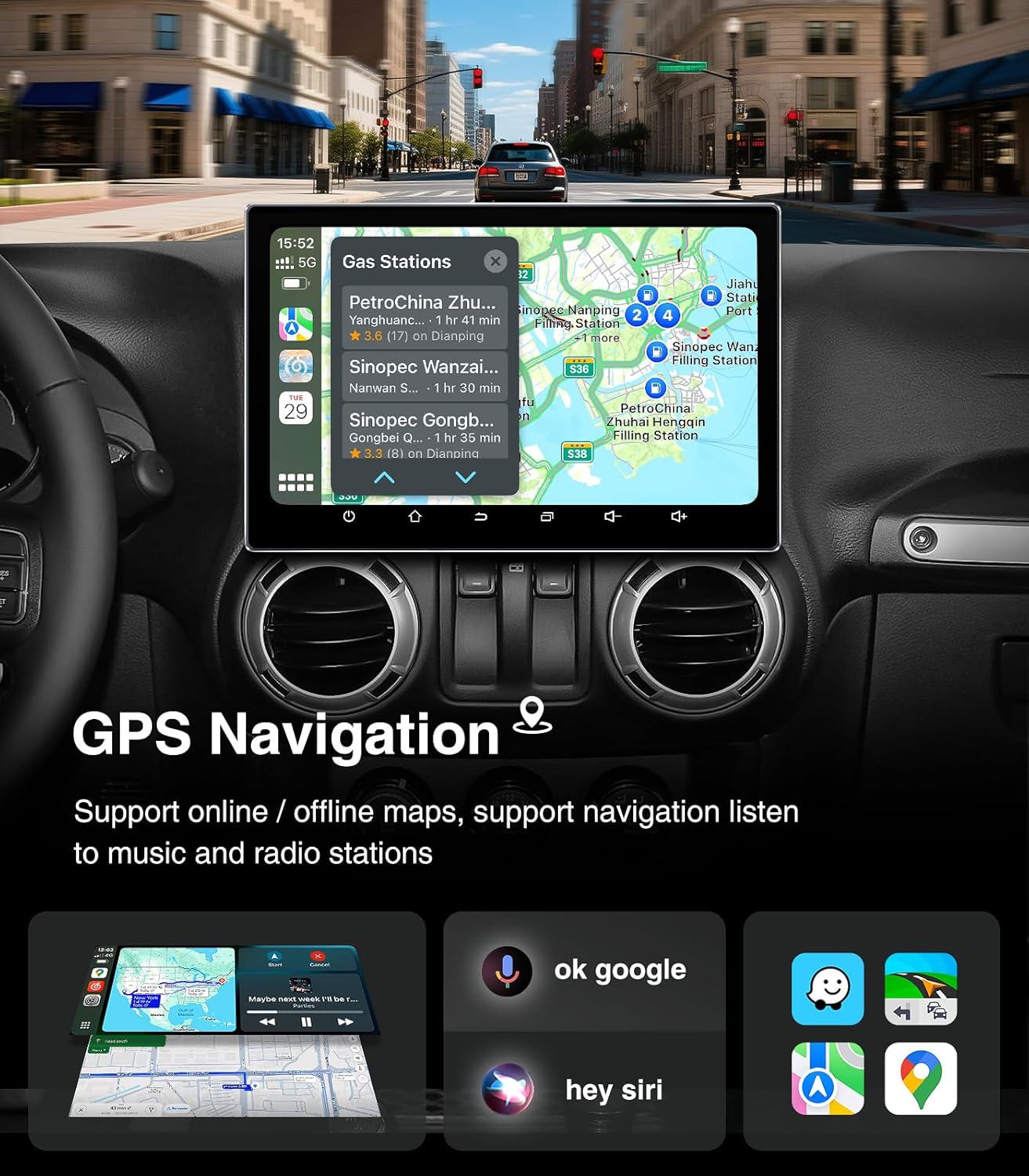
Image: The head unit displaying a GPS navigation map with points of interest and traffic information, alongside icons for voice commands like "ok google" and "hey siri".
5.4 AM/FM/RDS радио
Access your favorite radio stations with the built-in tuner.
- Open the "Radio" application on the head unit.
- Выполните поиск доступных станций или настройтесь вручную на определенную частоту.
- Сохраните ваши любимые станции в качестве предустановок для быстрого доступа.
- The RDS (Radio Data System) feature displays station information where available.

Image: The head unit displaying the AM/FM/RDS radio interface, showing frequency tuning and preset options, with a scenic road background.
5.5 5G WiFi Hotspot & Bluetooth Connection
Enhance your connectivity with fast WiFi and stable Bluetooth.
- Wi-Fi: Connect to a mobile hotspot or home WiFi network to browse the internet, download apps, and stream content. Supports dual-band 2.4GHz & 5GHz.
- Bluetooth 5.4: Pair your smartphone for hands-free calls, Bluetooth music streaming, and phonebook synchronization.

Image: The head unit displaying a phone dialer interface, indicating Bluetooth connectivity with a smartphone, and icons for various supported apps like Google Play, Chrome, YouTube, Instagram, and Netflix.
6. Техническое обслуживание
To ensure the longevity and optimal performance of your AINAVI Car Radio Stereo, follow these maintenance guidelines:
- Очистка экрана: Аккуратно протрите сенсорный экран мягкой безворсовой тканью. Для удаления стойких загрязнений слегка потрите.ampСмочите ткань водой или безопасным для экранов чистящим средством. Избегайте использования агрессивных химикатов и абразивных материалов.
- Обновления программного обеспечения: Periodically check for system updates through the unit's settings menu. Keeping the software updated ensures optimal performance, security, and access to new features.
- Контроль температуры: Avoid exposing the unit to extreme temperatures for extended periods. While designed for automotive environments, prolonged exposure to direct sunlight or freezing conditions can affect performance.
- Кабельные соединения: Убедитесь, что все кабели надежно подключены. Ненадежные соединения могут привести к периодическим проблемам.
7. Поиск Неисправностей
If you encounter issues with your car radio stereo, refer to the following common problems and solutions:
| Проблема | Возможная причина | Решение |
|---|---|---|
| Устройство не включается | Ненадежное соединение электропитания, перегоревший предохранитель, проблема с аккумулятором транспортного средства. | Проверьте силовые кабели и предохранитель. Убедитесь, что аккумулятор автомобиля заряжен. |
| Нет звука | Слишком низкая громкость, отключен звук, проблема с проводкой динамиков, неправильный источник звука. | Увеличьте громкость, проверьте состояние отключения звука, проверьте подключение динамиков, выберите правильный источник звука. |
| Сенсорный экран не отвечает | Программный сбой, проблема с калибровкой экрана. | Restart the unit. If issue persists, perform a factory reset (data will be lost). |
| CarPlay/Android Auto не подключается | Bluetooth/USB issue, phone settings, app not updated. | Ensure Bluetooth is on and paired. Try a different USB cable. Update phone OS and apps. |
| Сигнал GPS потерян или неточен | Помехи для антенны GPS, плохой прием спутникового сигнала. | Убедитесь, что антенна GPS имеет чистое пространство. view неба. Проверьте подключение антенны. |
If these solutions do not resolve the issue, please contact AINAVI customer support.
8. Технические характеристики
| Особенность | Деталь |
|---|---|
| Бренд | АЙНАВИ |
| Операционная система | Андроид 13.0 |
| Емкость памяти | 64 ГБ (ПЗУ) |
| БАРАН | 4 ГБ |
| Размер экрана | 11.5 дюйма |
| Тип дисплея | QLED, G+G Full Lamination |
| Разрешение | 1280x800 |
| Технология связи | Bluetooth 5.4, USB, Wi-Fi (2.4Ghz & 5Ghz), Wireless CarPlay, Wired Android Auto |
| Особые возможности | AM/FM/RDS radio, 5G WiFi, CarPlay+Android Auto+Mirror Link+AirPlay, Split Screen Function, Touch Screen |
| Совместимые устройства | Смартфон, iPhone |
| Тип крепления | Крепление на приборную панель |
| Режим аудиовыхода | Стерео |
| Тип обслуживания автомобиля | Машина |
9. Гарантия и поддержка
AINAVI provides technical support for this product. If you have any questions regarding installation, operation, or troubleshooting that are not covered in this manual, please do not hesitate to contact us via Amazon email. We are committed to providing prompt assistance.
Please retain your proof of purchase for warranty claims. Specific warranty terms and conditions may apply and are available upon request or through the product's purchase platform.


