Введение
Thank you for choosing the vretti PB821 Portable Thermal Printer. This compact and versatile device is designed for convenient, inkless printing from various devices, including smartphones, tablets, and laptops. Its portability makes it ideal for business, office, home, and travel use. This manual provides essential information on setting up, operating, maintaining, and troubleshooting your printer to ensure optimal performance.
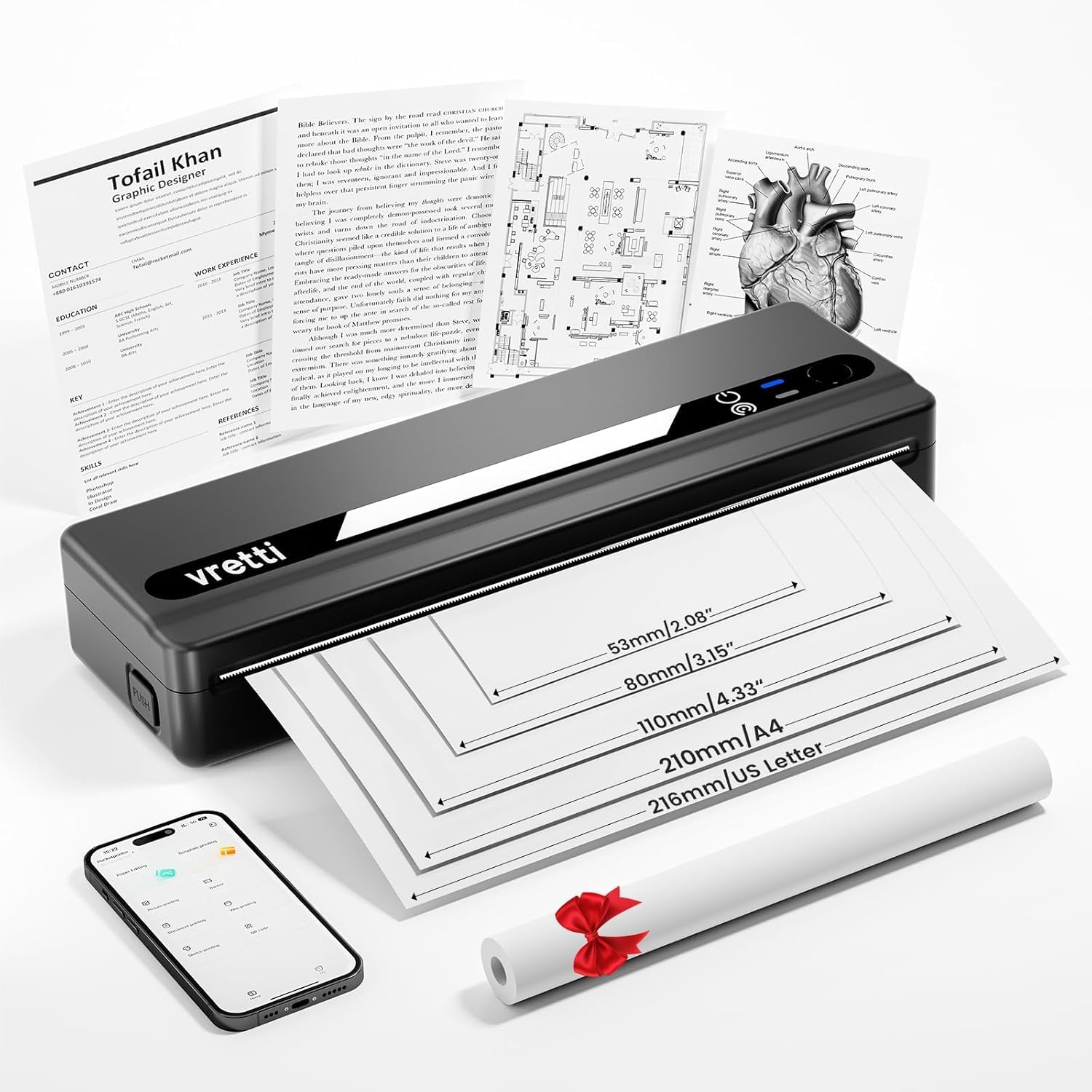
Image: The vretti PB821 Portable Thermal Printer, a sleek black device, ready for use.
Содержимое упаковки
Пожалуйста, проверьте комплектность после распаковки, чтобы убедиться в наличии всех предметов:
- Портативный термопринтер vretti PB821
- 1 Roll of Thermal Paper
- Зарядный кабель USB-C
- Руководство пользователя
Продукт болееview
Основные характеристики
- Беспроводная печать через Bluetooth: Connects wirelessly to phones and tablets via the "XLifePro" app.
- Портативный и компактный: Small and lightweight design for easy transport.
- Экономичная безчернильная печать: Utilizes advanced thermal printing technology, eliminating the need for ink, toner, or ribbons.
- High-quality Printing: Delivers clear prints with a 203 DPI resolution.
- Долговечный аккумулятор: Встроенный перезаряжаемый аккумулятор емкостью 1500 мАч позволяет распечатать до 223 листов формата A4 на одном полном заряде.
- Поддержка бумаги разных размеров: Compatible with A5, A4, Letter, and 2-4 inch labels.
Варианты подключения

Image: The vretti PB821 printer supports both Bluetooth and USB connections for versatile use with Android, iOS, iPad, Windows, Mac OS, Linux, and Chromebook devices.
The vretti PB821 printer offers flexible connectivity, allowing you to print wirelessly via Bluetooth from mobile devices or directly via USB from computers. This ensures compatibility across various operating systems and devices.
Портативный дизайн

Image: A visual comparison highlighting the compact and portable design of the vretti PB821 printer against a larger, traditional printer, emphasizing its convenience.
The PB821 is designed for maximum portability, making it easy to carry in a backpack or bag. Its compact form factor does not compromise on functionality, offering easy setup and smooth, inkless printing.
Настраивать
1. Первоначальная зарядка
Before first use, fully charge the printer using the provided USB-C cable. Connect the cable to the printer's USB-C port and a compatible power adapter (not included) or computer USB port. The charging indicator light will show the charging status.

Image: Visual representation of the printer's 1500mAh battery capacity, USB-C charging, and its ability to print up to 223 A4 sheets on a single charge.
2. Загрузка термобумаги
The vretti PB821 supports various thermal paper types. To load paper:
- Откройте крышку отсека для бумаги принтера.
- Вставьте термобумагу стороной с изображением для печати вверх. Убедитесь, что бумага правильно выровнена в соответствии с направляющими.
- Плотно закройте крышку отсека для бумаги.

Image: The vretti PB821 printer showcasing its compatibility with different thermal paper types, including folding thermal paper and roll paper, along with various paper sizes.
3. Подключение через Bluetooth (мобильные устройства)
Для беспроводной печати со смартфона или планшета:
- Download the "XLifePro" app from the App Store (iOS) or Google Play Store (Android).
- Turn on the vretti PB821 printer. The Bluetooth indicator light will blink.
- Open the XLifePro app, navigate to the device connection settings, and select the PB821 printer from the list of available Bluetooth devices.
- После подключения индикатор Bluetooth загорится постоянным светом.

Image: Step-by-step guide on connecting the vretti PB821 printer via Bluetooth, including downloading the XLifePro app and pairing the device.
4. Подключение через USB (компьютеры)
To print from your Windows, Mac OS, or Linux computer:
- Download the appropriate printer driver from the official vretti webсайт: vrettitech.com/pages/p83-support.
- Install the driver on your computer following the on-screen instructions.
- Connect the vretti PB821 printer to your computer using the provided USB-C cable.
- The computer should recognize the printer, and you can now select it as your printing device.

Image: Instructions for USB connection, detailing driver download from the vretti website and connecting the PB821 printer to a laptop.
Инструкция по эксплуатации
Printing from Mobile Devices
После подключения по Bluetooth:
- Откройте документ, изображение или file you wish to print within the XLifePro app. The app supports various formats including TXT, PDF, Excel, and Word documents.
- Выберите опцию печати в приложении.
- Confirm print settings such as paper size and quantity.
- Начать печать.
Printing from Computers
Once connected via USB and drivers are installed:
- Откройте документ или file Вы хотите распечатать на своем компьютере.
- Select the print option from your application (e.g., File > Печать).
- Choose "vretti PB821" from the list of available printers.
- При необходимости отрегулируйте параметры печати (например, размер бумаги, ориентацию).
- Нажмите «Печать».
Поддерживаемые типы и размеры бумаги
The PB821 printer is compatible with various thermal paper types and sizes, including:
- А4 (210 мм)
- Letter (8.5" x 11" / 216mm)
- А5 (148 мм)
- B5 (175 мм)
- 2-inch (53mm) labels
- 3-inch (80mm) labels
- 4-inch (110mm) labels

Image: The vretti PB821 printer demonstrating its support for multiple paper sizes, including standard document sizes and various label sizes.
Using the XLifePro App
The XLifePro app provides additional functionalities beyond basic printing, including:
- Access to multiple templates for creative printing.
- Options for document printing, picture printing, and more.
- Customization features for various printing needs.

Image: Screenshots of the XLifePro app interface, illustrating its diverse range of templates and printing options.
Обслуживание
Чистка принтера
To maintain print quality and prolong the printer's lifespan:
- Ensure the printer is turned off and disconnected from power before cleaning.
- Используйте мягкую, безворсовую ткань, слегкаampened with water or isopropyl alcohol to gently wipe the print head and paper path.
- Не используйте абразивные чистящие средства или растворители.
- Allow the printer to dry completely before turning it on.
Уход за аккумулятором
Чтобы оптимизировать время работы от батареи:
- Избегайте частой полной разрядки аккумулятора.
- Если принтер не используется в течение длительного времени, храните его в прохладном, сухом месте.
- Регулярно заряжайте принтер, даже если он не используется часто, чтобы предотвратить глубокий разряд.
Поиск неисправностей
| Проблема | Возможная причина | Решение |
|---|---|---|
| Принтер не включается | Низкий заряд батареи; кнопка питания нажата неправильно | Зарядите принтер; нажмите и удерживайте кнопку питания в течение нескольких секунд. |
| Невозможно подключиться через Bluetooth | Bluetooth на устройстве отключен; принтер не находится в режиме сопряжения; проблема с приложением. | Ensure Bluetooth is enabled; Restart printer; Reinstall XLifePro app |
| Плохое качество печати | Low battery; Dirty print head; Incorrect paper type | Charge printer; Clean print head; Use recommended thermal paper |
| Замятие бумаги | Неправильная загрузка бумаги; Поврежденная бумага | Turn off printer, carefully remove jammed paper, reload correctly; Use undamaged paper |
| Принтер не распознается компьютером | Отсутствуют/неправильные драйверы; Неисправен USB-кабель/порт. | Install/reinstall drivers from vretti website; Try a different USB cable/port |
Технические характеристики
| Особенность | Деталь |
|---|---|
| Модель | ПБ821 |
| Бренд | вретти |
| Технология печати | Термальный |
| Технология связи | Bluetooth, USB |
| Максимальное разрешение печати | 203 DPI (Black and White) |
| Печатные СМИ | Термобумага (обычная) |
| Поддерживаемые размеры листов | 2'', 3'', 4'', A4, 8.5''x 11'' US Letter |
| Максимальная емкость входного листа | 30 листов |
| Емкость аккумулятора | 1500 мАч (литий-ионный) |
| Размеры продукта | 25.7 х 7 х 4.7 см |
| Вес товара | 900 г |
| Двусторонняя печать | Нет |
| Цвет чернил | Черный |
Гарантия и поддержка
The vretti PB821 Portable Thermal Printer comes with a standard manufacturer's warranty. For specific warranty details, technical support, or service inquiries, please refer to the warranty card included in your package or visit the official vretti webСохраните чек о покупке в качестве подтверждения покупки для предъявления гарантийных претензий.
Видеоролик о продукте
Video: An official product video demonstrating the features and usage of the vretti PB821 Portable Thermal Printer, including its compact design, wireless connectivity, and printing capabilities.


