1. Продукт закончилсяview
The KLIM Cassette Player Boombox is a versatile audio device combining classic cassette playback with modern features like AM/FM radio, Bluetooth connectivity, and USB playback/recording. Its portable design allows for use at home or on the go.
Основные характеристики:
- Кассетный плеер и рекордер
- AM/FM радиотюнер
- Bluetooth Connectivity for wireless streaming
- USB-порт для воспроизведения и записи MP3-файлов.
- Integrated Microphone for direct recording
- Headphone Jack for private listening
- Dual Power: AC power cord or 4 x C-type batteries (not included)
- Portable design with a carrying handle
Что в коробке:
- KLIM Cassette Player Boombox
- Шнур питания переменного тока
- Руководство пользователя

Рисунок 1: Передняя часть view of the KLIM Cassette Player Boombox, showcasing its controls and cassette compartment.
2. Настройка
Питание устройства:
The KLIM Cassette Player Boombox can be powered in two ways:
- Питание переменного тока: Connect the included AC power cord to the device's power input and then to a standard wall outlet.
- Мощность аккумулятора: For portable use, insert 4 x C-type batteries (not included) into the battery compartment located on the underside of the device. Ensure correct polarity.

Рисунок 2: Нижняя сторона view showing the battery compartment for portable power.
3. Инструкция по эксплуатации
3.1. Cassette Player/Recorder
- Slide the function selector to 'TAPE'.
- Press the 'OPEN' button to open the cassette compartment.
- Insert a cassette tape with the open side facing up.
- Закройте кассетный отсек.
- Use the 'PLAY', 'STOP/EJECT', 'FFWD' (Fast Forward), and 'REW' (Rewind) buttons to control playback.
- To record, ensure a blank tape is inserted. Press the 'REC' button to start recording from the built-in microphone, radio, or USB.

Рисунок 3: Вверху view of the boombox with a cassette tape inserted into the compartment.
3.2. AM/FM-радио
- Slide the function selector to 'RADIO'.
- Для оптимального приема выдвиньте телескопическую антенну.
- Use the 'BAND' switch to select between AM and FM frequencies.
- Rotate the 'TUNING' knob to find your desired radio station.
3.3. Bluetooth-подключение
- Slide the function selector to 'BT' (Bluetooth).
- The device will enter pairing mode, indicated by a flashing light or audible prompt.
- На смартфоне или планшете включите Bluetooth и выполните поиск доступных устройств.
- Select 'KLIM Cassette Player' (or similar name) from the list to pair.
- После сопряжения вы сможете транслировать аудио по беспроводной сети с вашего устройства.
3.4. Воспроизведение и запись через USB.
- Slide the function selector to 'USB'.
- Вставьте USB-флеш-накопитель с аудиофайлами в формате MP3. files в порт USB.
- The device will automatically begin playing the audio files. Use the playback controls (play/pause, skip) to navigate.
- To record to USB, ensure a USB drive is inserted. Press the 'REC' button while in radio or cassette mode to record the audio source directly to the USB drive.
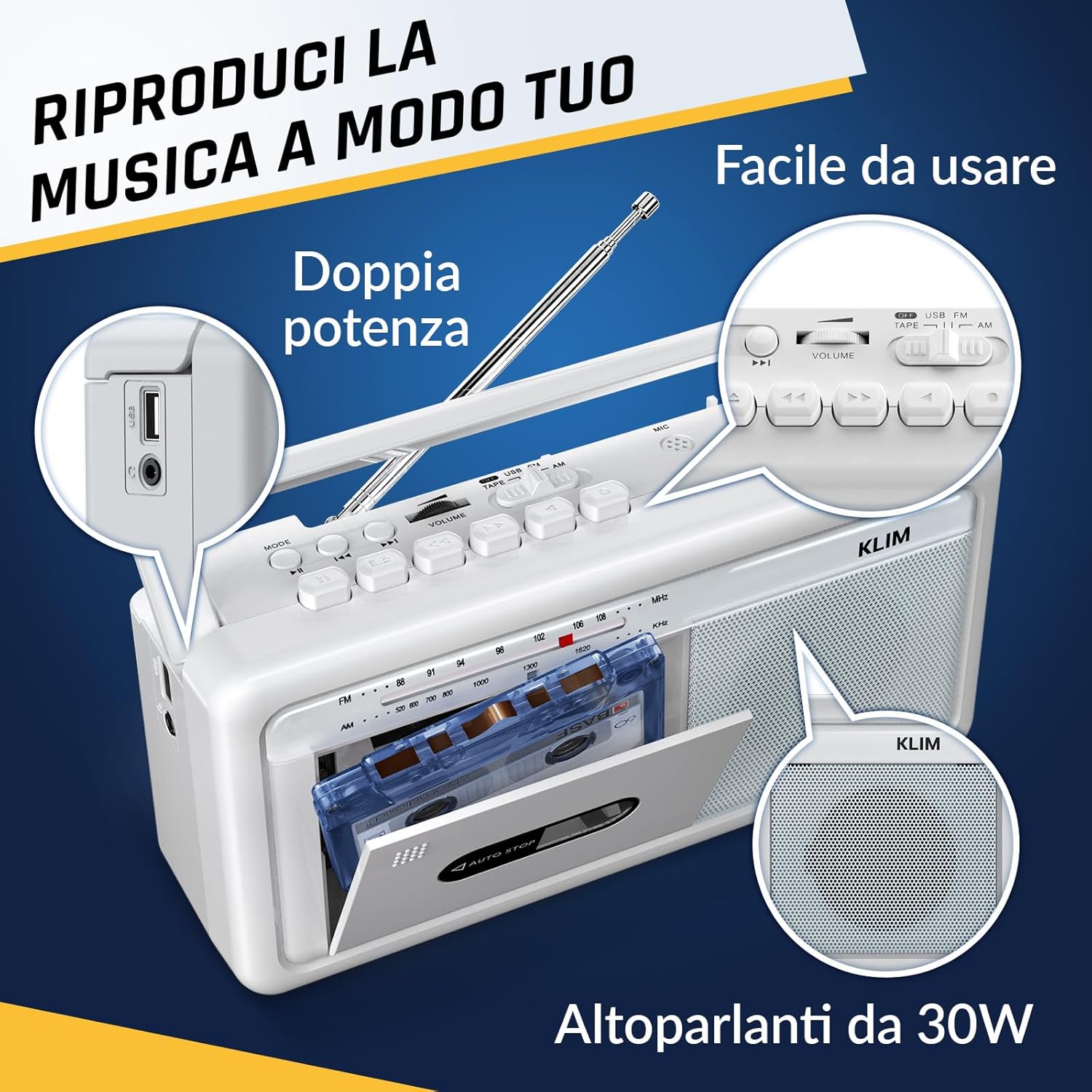
Рисунок 4: Сторона view highlighting the USB port for media playback and recording.
3.5 Использование наушников
Connect standard 3.5mm headphones to the headphone jack for private listening. The internal speakers will automatically mute when headphones are connected.
Video 1: Instructions on how to record a tape to USB using the WTB-795 model. This video demonstrates the USB recording functionality.
Видео 2: Оверview of a retro cassette player with USB, Bluetooth, and AM/FM radio features, similar to the KLIM Cassette Player Boombox.
4. Техническое обслуживание
- Поддерживайте чистоту устройства, протирая его мягкой сухой тканью. Избегайте использования жидких чистящих средств и растворителей.
- Regularly clean the cassette head and pinch rollers with a cotton swab lightly dampОбработано изопропиловым спиртом для обеспечения оптимального качества звука и предотвращения повреждения ленты.
- Keep the device away from direct sunlight, heat sources, and excessive dust or moisture.
- При длительном неиспользовании извлекайте батарейки, чтобы предотвратить их протечку.
5. Поиск Неисправностей
| Проблема | Возможное решение |
|---|---|
| Нет электричества | Check if the AC power cord is securely connected. If using batteries, ensure they are inserted correctly and are not depleted. |
| Нет звука от динамиков | Increase the volume. Ensure headphones are not connected. Check the function selector is in the correct mode (TAPE, RADIO, BT, USB). |
| Плохой прием радиосигнала | Extend the telescopic antenna fully. Adjust the antenna direction. Try moving the unit to a different location. |
| Кассета не воспроизводится/не записывается | Ensure the tape is inserted correctly. Check if the tape is damaged. Clean the cassette head and pinch rollers. |
| Bluetooth не подключается | Ensure the unit is in Bluetooth mode. Make sure your device's Bluetooth is enabled and within range. Try unpairing and re-pairing the device. |
| Проблемы с воспроизведением через USB | Убедитесь, что USB-накопитель отформатирован правильно (FAT32) и содержит совместимые аудиофайлы. files (MP3, WAV, WMA, AAC, FLAC). Try a different USB drive. |
6. Технические характеристики
- Бренд: КЛИМ
- Модель: Кассетный плеер
- Размеры продукта: 25 х 13.1 х 7.6 см
- Вес товара: 1 кг
- Совместимые устройства: MP3-плеер, смартфон, планшет
- Режим аудиовыхода: Стерео
- Поддерживаемые аудиоформаты: Cassette, Analog Radio, MP3, WAV, WMA, AAC, FLAC, Bluetooth
- Источник питания: Corded Electric (AC) / 4 x C-type Batteries (not included)
- Технологии подключения: USB-порт, Bluetooth-порт
- Цвет: Морозно-белый
- Номер товара: KLSIN4825
7. Гарантия и поддержка
The KLIM Cassette Player Boombox comes with a Гарантия 5 год. For any questions, technical assistance, or warranty claims, please contact KLIM customer support. Our team is available 24/7 to assist you.
Please refer to the contact information provided in your product packaging or visit the official KLIM webсайт для получения дополнительной информации.