1. Введение
The DNT Optics HS650 Hydra is a versatile multi-function thermal device designed for various applications. It can operate as a standalone thermal scope, a clip-on thermal attachment for existing optics, or a handheld thermal monocular. This manual provides essential information for the proper setup, operation, and maintenance of your HS650 Hydra device.
2. Продукт закончилсяview
2.1 Основные характеристики
- Универсальность 3 в 1: Functions as a standalone scope, clip-on attachment, and handheld monocular.
- Elite Thermal Imaging: Features a 12 µm, ≤18 mK uncooled infrared sensor with a 640×512 resolution and 50mm objective lens.
- AI-Powered Image Super Resolution (ISR): Enhances image clarity and detail, especially at higher digital zoom levels.
- Прочная конструкция: IP67-rated for waterproof and dustproof protection, shock-resistant housing handles recoil up to .50BMG.
- DNT App Connectivity: Connects to your smartphone for live feed viewing, management, editing, and sharing of content.
2.2 Содержимое упаковки
Убедитесь, что в посылке присутствуют все предметы:
- HS650 Thermal Scope ×1
- PMS (Picatinny 0 MOA Short) Mount ×1
- Eye Cup ×1
- Flip Up Cover ×1
- 18650 Flat Top Battery ×2
- Battery Charger ×1
- USB-кабель × 2
- Руководство пользователя ×1
- Lens Cleaning Cloth ×1
2.3 Визуальное завершениеview


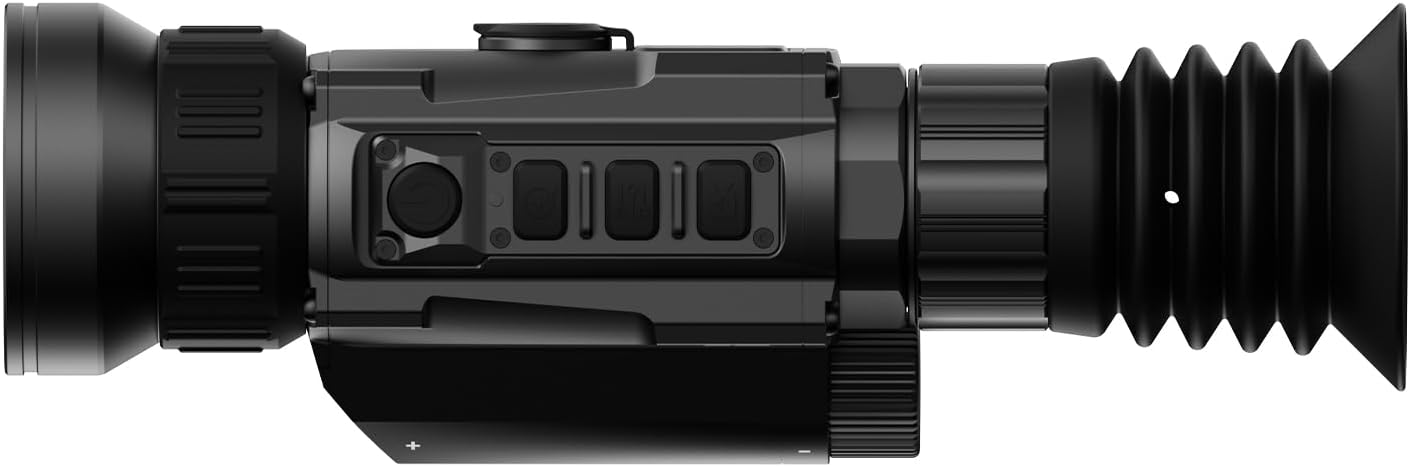


3. Настройка
3.1 Установка аккумулятора
- Найдите аккумуляторный отсек на устройстве.
- Insert two 18650 Flat Top Batteries, ensuring correct polarity.
- Надежно закройте батарейный отсек.
3.2 Варианты монтажа
The HS650 Hydra can be used in several configurations:
- Standalone Scope: Attach the provided PMS (Picatinny 0 MOA Short) mount to a compatible rail system. Ensure all screws are tightened to the recommended torque.
- Накладной: Utilize an appropriate quick-detach mount (e.g., DNT QDM150 or QDS150, sold separately) to attach the device in front of your primary optic.
- Handheld Monocular: Use the device without any mounting for portable observation.
3.3 Первоначальное включение и подключение к приложению
- Нажмите и удерживайте кнопку питания, чтобы включить устройство.
- Download the DNT App on your smartphone.
- Follow the in-app instructions to connect your HS650 Hydra to your smartphone for live viewing and feature control.
4. Инструкция по эксплуатации
4.1 Основные элементы управления
Refer to the device's physical buttons for power, menu navigation, zoom, and recording functions. Detailed button assignments are available in the full user manual.
4.2 Режимы тепловизионной съемки
The HS650 Hydra offers various thermal imaging modes to optimize viewing for different environments and preferences. These typically include:
- Природные: Provides a balanced thermal view.
- Enhanced: Increases contrast for better detail recognition.
- Выделять: Emphasizes hot spots for quick target identification.
4.3 Image Super Resolution (ISR)
The AI-Powered Image Super Resolution (ISR) feature enhances image detail, especially when using digital zoom. This feature can be toggled on or off via the device menu or connected app.
4.4 Цифровой зум
The HS650 Hydra features a 2.5x base magnification with digital zoom capabilities up to 10x. Use the designated zoom buttons to adjust magnification levels.
4.5 Видео, активируемое отдачей
The device supports Recoil Activated Video recording, which automatically captures footage when recoil is detected. This ensures important moments are recorded without manual intervention.
5. Техническое обслуживание
5.1 Очистка
- Use the provided lens cleaning cloth to gently wipe the objective and eyepiece lenses. Avoid abrasive materials.
- Для корпуса устройства используйте мягкий, прозрачный материал.amp ткань для удаления грязи и мусора.
5.2 Охрана окружающей среды
The HS650 Hydra is IP67-rated, meaning it is protected against dust ingress and can withstand immersion in water up to 1 meter for 30 minutes. While robust, avoid unnecessary exposure to extreme conditions.
5.3 Хранение
Храните устройство в прохладном, сухом месте, вдали от прямых солнечных лучей и экстремальных температур. При длительном хранении извлеките батареи.
6. Поиск Неисправностей
If you encounter issues with your DNT Optics HS650 Hydra, consider the following:
- Устройство не включается: Check battery charge and ensure batteries are inserted with correct polarity.
- Плохое качество изображения: Ensure lenses are clean. Adjust focus and brightness settings. Verify ISR is enabled if desired.
- Проблемы с подключением приложения: Ensure Bluetooth/Wi-Fi is enabled on your smartphone and the device. Restart both the device and the app.
- Mounting stability: Re-check all mounting screws for proper tightness.
For further assistance, please contact DNT Optics customer support.
7. Технические характеристики
| Бренд | DNT Optics |
| Название модели | HS650 |
| Стиль | 640-50 |
| Цвет | Черный |
| Размеры продукта | 8.4"Д x 2.7"Ш x 2.2"В |
| Вес товара | 1.02 фунта (16.3 унций) |
| Материал | Metal or High-Quality Plastic |
| Диаметр объектива | 68.58 миллиметра |
| Минимальное увеличение | 2.5 х |
| Совместимые устройства | Rifle, Shotgun, Handgun |
| Тип крепления | PMS - Picatinny 0 MOA Short |
| Ночное Видение | Нет (тепловизионное исследование) |
| Тип сетки | Цифровой |
8. Гарантия и поддержка
For information regarding product warranty, returns, or technical support, please refer to the official DNT Optics webили обратитесь напрямую в службу поддержки клиентов. Контактная информация обычно указана на упаковке производителя или webсайт.
You can visit the DNT Optics Store for more information: Магазин оптики DNT


