1. Введение и окончаниеview
This manual provides detailed instructions for the setup, operation, and maintenance of your Tilta Khronos Lite Handheld Kit for iPhone 17 Pro Max. This kit is designed to enhance your mobile filmmaking experience, offering improved ergonomics, control, and accessory compatibility.
The Khronos Lite Handheld Kit includes a protective case, a Bluetooth control handle, a 58mm filter tray, a universal magnetic backplate, and a screen protector, all custom-designed for iPhone 17 Pro Max smartphones. Its lightweight design ensures professional performance in a compact package, while the ergonomic handle provides comfortable operation. The kit supports focus and zoom control via the Blackmagic Camera App and accommodates various 58mm filter choices.
Видео 1: Introducing the Khronos Lite for iPhone 17-series. This video provides a general overview of the product's features and design.
2. Что в коробке
- 1 x Khronos Lite iPhone 17 Pro Max Case - Light Gray (33102.04458.00.00)
- 1 x Khronos Lite Control Handle for iPhone - Light Gray (TKL-CH-LG)
- 1 x Khronos 58mm Filter Tray for iPhone 17 Pro Max - Black (TK-IP17-FT58M-B)
- 1 x Khronos Universal Magnetic Backplate - Silver (21103.00037.00.00)
- 1 x Khronos Screen Protector for iPhone 17 Pro Max (51199.00028.00.00)

Изображение 1: All components included in the Khronos Lite iPhone 17 Pro Max Handheld Kit.
3. Настройка
Follow these steps to set up your Tilta Khronos Lite Handheld Kit:
- Powering On the Control Handle: Press and hold the record button on the control handle to power it on. LEDs on the side will indicate the current battery life. To charge, connect a USB cable to the port below the record button. Note: The battery indicator only works when the unit is powered on.
- Connecting to Your iPhone (Native Camera App):
- Убедитесь, что на вашем iPhone включен Bluetooth.
- If the handle does not appear in your Bluetooth devices, triple-tap the function button on the handle to switch to native camera app mode.
- Select the handle from your iPhone's Bluetooth settings to pair.
- In your iPhone's Accessibility settings, navigate to 'Zoom' and ensure it is activated. This is required for the handle's zoom functionality.
- Connecting to Your iPhone (Blackmagic Camera App):
- First, ensure the handle is нет connected via your iPhone's native Bluetooth settings. If it is, 'Forget This Device' in Bluetooth settings.
- Triple-tap the function button on the handle to switch to Blackmagic app mode.
- Open the Blackmagic Camera App, go to 'Settings', then 'Accessories'.
- Ensure 'Use Bluetooth' is toggled on and select 'Nucleus Wireless Lens Control'. Tap to connect to the handle.
Видео 2: Setup Guide for Tilta Khronos 17 Lite Control Handle. This video demonstrates the pairing process for both native camera and Blackmagic apps, and how to attach the handle and filter tray.
- Attaching the Control Handle to the Case:
- Align the pins on the control handle with the mount on the Khronos Lite case.
- Push the handle into place and slide it over until it locks, securing it with the tab on the side. This configuration is ideal for horizontal shooting.
- For vertical shooting or use with other magnetic devices, remove the handle by hitting the side tab and sliding it out. Then, connect the handle to the universal magnetic backplate by aligning the pins and sliding it over until it locks.

Изображение 2: The Khronos Lite case with the control handle attached for horizontal use.

Изображение 3: The universal magnetic backplate, allowing for vertical mounting or use with other magnetic accessories.
- Attaching the 58mm Filter Tray:
- The 58mm circular filter holder has tracks on the inside. Align these tracks with the phone case.
- Hold the filter tray slightly off-center, press it in, and then spin until the tab snaps, indicating it is locked into place.
- Once the filter tray is attached, you can magnetically connect a polarizer or variable ND filter. Align the tabs on the filter with the slots on the holder, drop it into place, and spin until it clicks.
- To remove the entire filter assembly, press down on the tab, and the unit will slide off.
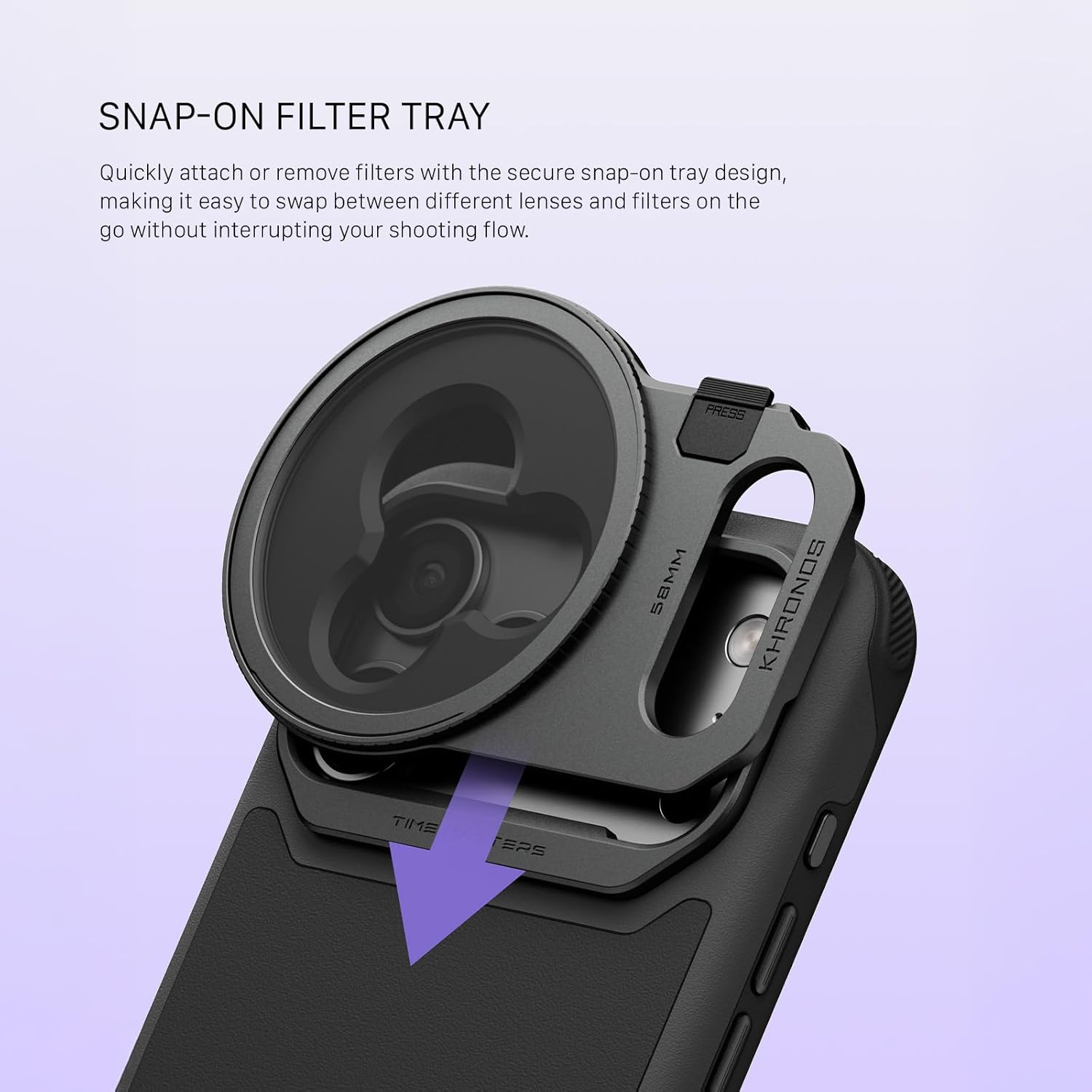
Изображение 4: The 58mm filter tray attached to the Khronos Lite case.

Изображение 5: Close-up of the snap-on filter tray mechanism.
4. Operating the Control Handle
The control handle provides intuitive control over your iPhone's camera functions:
- Диск масштабирования: Rotate the dial to zoom in or out. Holding the function button while rotating the zoom dial will adjust the zoom speed.
- Кнопка спуска затвора:
- Native Camera App: Half-press to focus, full press to take a photo.
- Blackmagic Camera App: Single click to start recording.
- Кнопка записи:
- Native Camera App: Single click to take a photo or record video.
- Blackmagic Camera App: Single click to start recording.
- Focus Control Dial: (Blackmagic Camera App only) Use this dial for stepless focus adjustment. This feature is not available with the native camera app.

Изображение 6: The control handle with its various buttons and dials labeled for function.
5. Техническое обслуживание
To ensure the longevity and optimal performance of your Tilta Khronos Lite Handheld Kit, follow these maintenance guidelines:
- Уборка: Use a soft, dry cloth to clean the case, handle, and filter tray. Avoid abrasive materials or harsh chemicals that could damage the surfaces.
- Хранилище: Храните комплект в прохладном, сухом месте, вдали от прямых солнечных лучей и экстремальных температур.
- Уход батареи: For the control handle, ensure regular charging to maintain battery health. Avoid fully discharging the battery for extended periods.
- Уход за фильтром: Handle filters with care to prevent scratches. Use a lens cleaning cloth and solution specifically designed for optical surfaces.
6. Поиск Неисправностей
If you encounter issues with your Tilta Khronos Lite Handheld Kit, refer to the following common troubleshooting steps:
- Control Handle Not Connecting via Bluetooth:
- Ensure the control handle is powered on and fully charged.
- Убедитесь, что Bluetooth включен на вашем iPhone.
- Triple-tap the function button on the handle to cycle between native camera app mode and Blackmagic app mode. Ensure you are in the correct mode for the app you are using.
- If issues persist, press the function button five times to clear the handle's Bluetooth history, then attempt to re-pair.
- For Blackmagic app connection, ensure the handle is нет paired in your iPhone's native Bluetooth settings. If it is, 'Forget This Device' before attempting to connect through the Blackmagic app.
- Zoom or Focus Not Responding:
- For native camera app zoom, ensure 'Zoom' is enabled in your iPhone's Accessibility settings.
- Focus control via the dial is only supported by the Blackmagic Camera App, not the native camera app.
- Confirm the handle is correctly paired and in the appropriate mode for the camera app in use.
- Ручка закреплена ненадежно:
- Ensure the pins on the handle and the mounting points on the case or magnetic backplate are clean and free of debris.
- Verify that the handle is fully slid into place and the side tab has engaged to lock it.
7. Технические характеристики
| Особенность | Спецификация |
|---|---|
| Номер модели | TKL-IP17-PMA-LG |
| Совместимые устройства | Cellphone: iPhone 17 Pro Max |
| Цвет | Светло-серый |
| Вес товара | 1.72 фунта |
| Размеры упаковки | 9.06 x 6.69 x 4.33 дюйма |
| СКП | 810193520076 |
| Производитель | Тилта |
8. Гарантия и поддержка
Warranty and specific support information for the Tilta Khronos Lite Handheld Kit for iPhone 17 Pro Max is not provided in the available product data. Please refer to the official Tilta website or contact Tilta customer support for detailed warranty terms and technical assistance.
Tilta Store: Visit the Tilta Store on Amazon


