1. Введение
This manual provides detailed instructions for the operation and maintenance of your Maycall MC-720 Global Walkie Talkie. Please read this manual thoroughly before using the device to ensure safe and optimal performance. The MC-720 is a Push-to-Talk Over Cellular (PoC) radio designed for long-range communication using 2G/3G/4G LTE networks.
2.Основные характеристики
- Lifetime Service with No Hidden Fees: Utilizes major U.S. carriers (Verizon, AT&T, T-Mobile) with automatic switching based on signal strength, offering lifetime use without subscription fees.
- Связь с неограниченным радиусом действия: Achieves communication range exceeding 3,000 miles via advanced 2G/3G/4G LTE technology, supporting individual and group calls.
- Versatile Calling Modes & High-Fidelity Audio: Supports one-on-one calls and group chats with advanced noise-canceling technology for clear conversations. Features a responsive Push-to-Talk (PTT) button.
- 3000mAh Long-Lasting Battery Performance: Provides up to 3 days of continuous use or 7 days on standby, with smart power-saving mode and USB-C charging compatibility.
- Встроенный яркий фонарик: Includes a 300-lumen LED flashlight for emergency use, with a smooth, ergonomic casing for easy grip.
- Встроенная антенна: The antenna is integrated and inseparable, designed to enhance signal reception and acceptance distance.
- Поддержка двух SIM-карт: Features smart dual SIM card slots for enhanced network flexibility.
- Функция SOS: Equipped with an SOS one-click alarm for emergencies.
- Водонепроницаемый дизайн: Designed with a waterproof rating for durability in various environments.
3. Содержимое упаковки
Please check the package contents upon unboxing. If any items are missing or damaged, contact Maycall customer support.

Image: The packing list for the Maycall MC-720 walkie talkie, showing the radio unit, two batteries, two back clips, an instruction manual, two Type-C lines, two charging heads, and two SIM cards.
- Maycall MC-720 Walkie Talkie Unit
- Батарея (x2)
- Задний зажим (2 шт.)
- Руководство по эксплуатации
- Зарядный кабель Type-C (x2)
- Зарядная головка (2 шт.)
- SIM-карты (2 шт.)
4. Продукт закончилсяview
Familiarize yourself with the main components of your Maycall MC-720 walkie talkie.

Изображение: Спереди view of the Maycall MC-720 walkie talkie, highlighting its dimensions (141.5mm height, 58mm width, 31mm thickness) and key features such as 5000km global distance, 3000mAh battery, single/group call, smart dual SIM cards, high-brightness flashlight, USB charging, 2G/3G/4G network support, and SOS one-click alarm.
- Антенна: Integrated for signal reception.
- Ручка питания/громкости: Поверните, чтобы включить/выключить и отрегулировать громкость.
- Кнопка РТТ: Кнопка «Нажми и говори» для связи.
- Кнопка фонарика: Активирует встроенный светодиодный фонарик.
- Экран дисплея: Shows status, menu, and call information.
- Кнопки навигации: Для навигации по меню и выбора.
- Микрофон: Для голосового ввода.
- Спикер: Для аудиовыхода.
- Порт зарядки (USB-C): Located at the bottom for charging.
- Разъем для наушников: Located on the side, covered by a protective flap.
- Слоты для SIM-карты: Located under the battery cover for dual SIM cards.
5. Руководство по установке
5.1. Установка SIM-карты и батареи
- Снимите крышку батарейного отсека на задней панели рации.
- Insert the provided SIM cards into the designated slots. Ensure correct orientation.
- Insert the main 3000mAh battery into the compartment, ensuring it is securely seated.
- Установите на место крышку батарейного отсека.
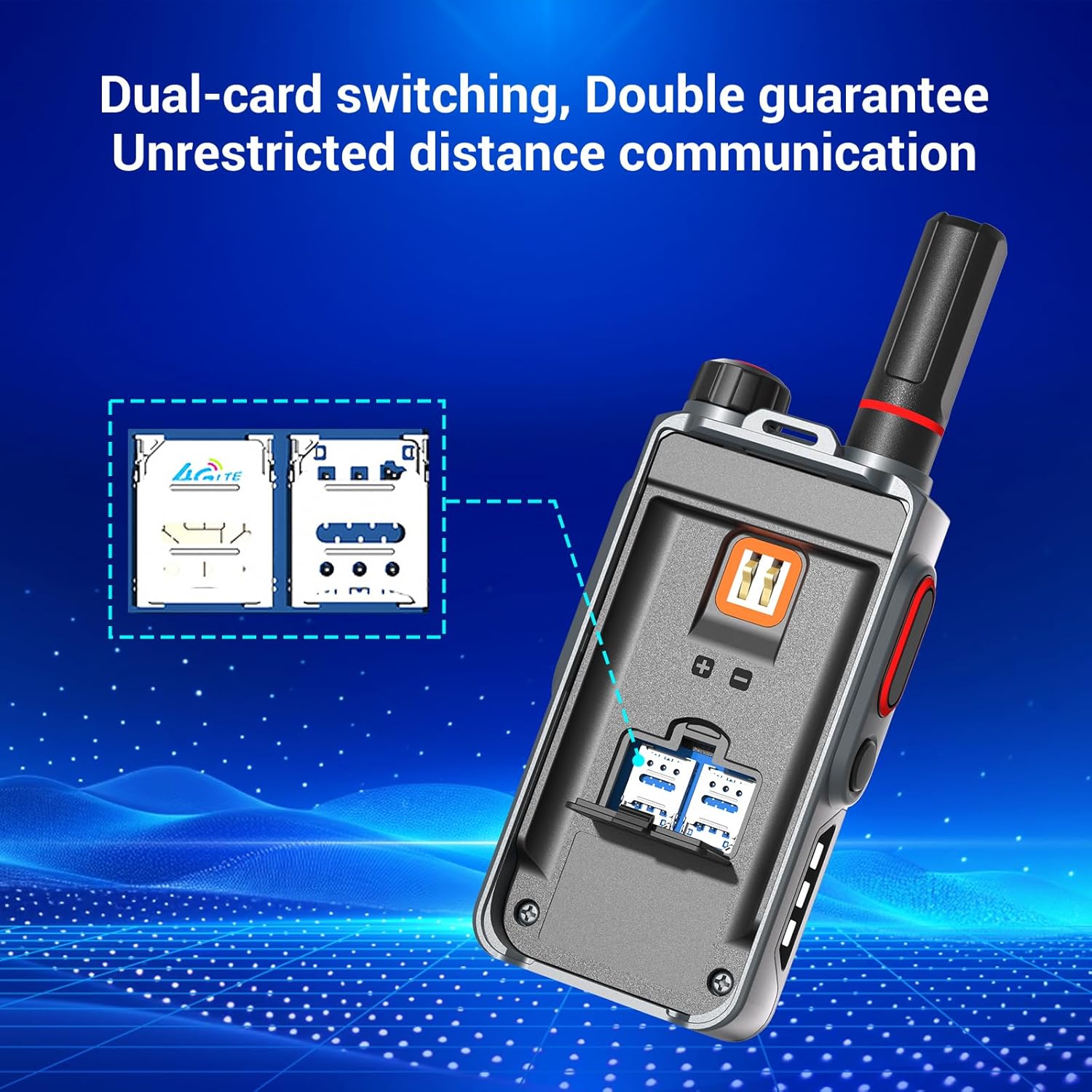
Изображение: сзади view of the Maycall MC-720 walkie talkie with the battery cover removed, illustrating the dual SIM card slots for network connectivity.
5.2. Первоначальная зарядка
Before first use, fully charge the walkie talkie. Connect the USB-C charging cable to the port at the bottom of the device and plug the charging head into a power outlet. The charging indicator will show the charging status.

Изображение: Внутренний view of the Maycall MC-720 walkie talkie, showcasing its 3000mAh battery and indicating 24 hours of working time and 8 days of standby time.
5.3. Device Activation and Registration
To activate your walkie talkie and register for lifetime service, scan the QR code provided on the product packaging using your mobile phone's browser. Follow the on-screen instructions to enter your recipient's phone number and desired username. This process links your device to the Maycall network for unlimited range communication.

Image: A Maycall walkie talkie with text emphasizing "No Renewal SIM Cards" and "Lifetime Free Unlimited Data" using high-speed IoT SIM cards from AT&T and T-Mobile.
6. Инструкция по эксплуатации
6.1. Включение/выключение питания и регулировка громкости.
- To power on the device, rotate the Power/Volume knob clockwise until the screen illuminates.
- To power off, rotate the knob counter-clockwise until the device shuts down.
- Adjust the volume by rotating the same knob clockwise (increase) or counter-clockwise (decrease) when the device is on.
6.2. Совершение звонка (нажмите, чтобы говорить)
- Ensure the device is powered on and connected to the network (4G indicator visible).
- Select the desired contact or group from the menu using the navigation buttons.
- Press and hold the large PTT (Push-to-Talk) button on the side of the walkie talkie to transmit your voice.
- Чётко говорите в микрофон.
- Отпустите кнопку PTT, чтобы услышать ответ.
6.3. Использование фонарика
- Press the dedicated Flashlight button to activate the high-brightness LED flashlight.
- Press it again to cycle through different lighting modes (e.g., steady on, flashing red/blue, SOS).
- Нажмите в третий раз, чтобы выключить фонарик.

Image: The Maycall MC-720 walkie talkie with its built-in flashlight illuminated, showing a bright white light.
Image: Two Maycall MC-720 walkie talkies demonstrating the flashlight feature. One shows a steady white light, and the other shows a red and blue rapid-flashing light, indicating emergency or signaling modes.
6.4. Функция SOS
In an emergency, press the dedicated SOS button (if available and configured) to send an alert to pre-programmed contacts or groups. Refer to the device's menu for SOS configuration options.
6.5. Навигация по меню
Use the navigation buttons below the screen to access and navigate through the device's menu. Options typically include Group Select, Member Select, Friend Select, Location Info, and Settings. Press the 'Enter' button to select an option and 'Back' to return to the previous screen.
7. Техническое обслуживание
- Уборка: Протрите устройство мягкой, дamp ткань. Не используйте агрессивные химикаты или абразивные чистящие средства.
- Уход батареи: Избегайте частой полной разрядки аккумулятора. Регулярно заряжайте аккумулятор, чтобы поддерживать его работоспособность.
- Хранилище: Храните рацию в прохладном, сухом месте, вдали от прямых солнечных лучей и экстремальных температур.
- Водостойкость: While waterproof, avoid prolonged submersion or exposure to high-pressure water jets. Ensure all port covers are securely closed.
8. Поиск Неисправностей
| Проблема | Возможная причина | Решение |
|---|---|---|
| Устройство не включается. | Разряженный аккумулятор; неправильная установка аккумулятора. | Зарядите аккумулятор; убедитесь, что аккумулятор установлен правильно. |
| Невозможно совершать и принимать звонки. | No network signal; SIM card not properly installed or activated; incorrect group/contact selected. | Check network signal strength; re-install SIM card; verify activation; select correct contact/group. |
| Плохое качество звука. | Weak signal; microphone/speaker obstructed; volume too low. | Move to an area with better signal; clear obstructions; adjust volume. |
| Фонарик не работает. | Разряжена батарея; неисправна кнопка. | Charge the battery; contact support if issue persists. |
9. Технические характеристики
| Особенность | Деталь |
|---|---|
| Бренд | Мейколл |
| Модель | МС-720 |
| Цвет | MC-720 (Grey/Black) |
| Количество каналов | 10000 |
| Специальная характеристика | Дальний диапазон |
| Максимальный диапазон разговора | 3000 миль |
| Уровень водонепроницаемости | Водонепроницаемый |
| Размеры продукта | 4.45"Д x 1.4"Ш x 2.36"В |
| Основная батарея | 3000 мАч (перезаряжаемый) |
| Дополнительные батареи | 2 LR44 batteries (included, likely for minor internal functions) |
| Включенные компоненты | Walkie Talkie Unit, Main Battery, LR44 Batteries, Back Clip, Instruction Manual, Type-C Charging Cable, Charging Head, SIM Card |
| Совместимые устройства | Maycall two-way radios, standard two-way radio accessories |
10. Информация по технике безопасности
- Do not operate the device in explosive atmospheres (e.g., near flammable gases, dust, or powders).
- Do not disassemble or modify the device. This can void the warranty and cause damage.
- Держите устройство вдали от экстремальных температур, прямых солнечных лучей и влаги.
- Use only Maycall-approved accessories and charging equipment.
- Утилизируйте батареи и устройство в соответствии с местными правилами.
11. Гарантия и поддержка
Your Maycall MC-720 Global Walkie Talkie comes with a standard manufacturer's warranty. For specific warranty terms and conditions, please refer to the warranty card included in your package or visit the official Maycall webсайт.
For technical support, troubleshooting assistance, or service inquiries, please contact Maycall customer service through the contact information provided on the product packaging or official webсайт.