1. Введение
The LAUNCH CRP123I V3.0 Elite OBD2 Scanner is an advanced diagnostic tool designed for comprehensive vehicle system analysis. This device offers enhanced diagnostic capabilities for engine, anti-lock braking system (ABS), supplemental restraint system (SRS), and transmission systems, alongside a suite of reset functions and full OBD2 modes. It features a new processor, Android 8.1 operating system, a 5-inch touchscreen, and a 6000mAh rechargeable battery for efficient and reliable performance.

Изображение 1.1: оконченоview of the LAUNCH CRP123I V3.0 Elite OBD2 Scanner's key features, including 4 system diagnostics and 7 special functions.
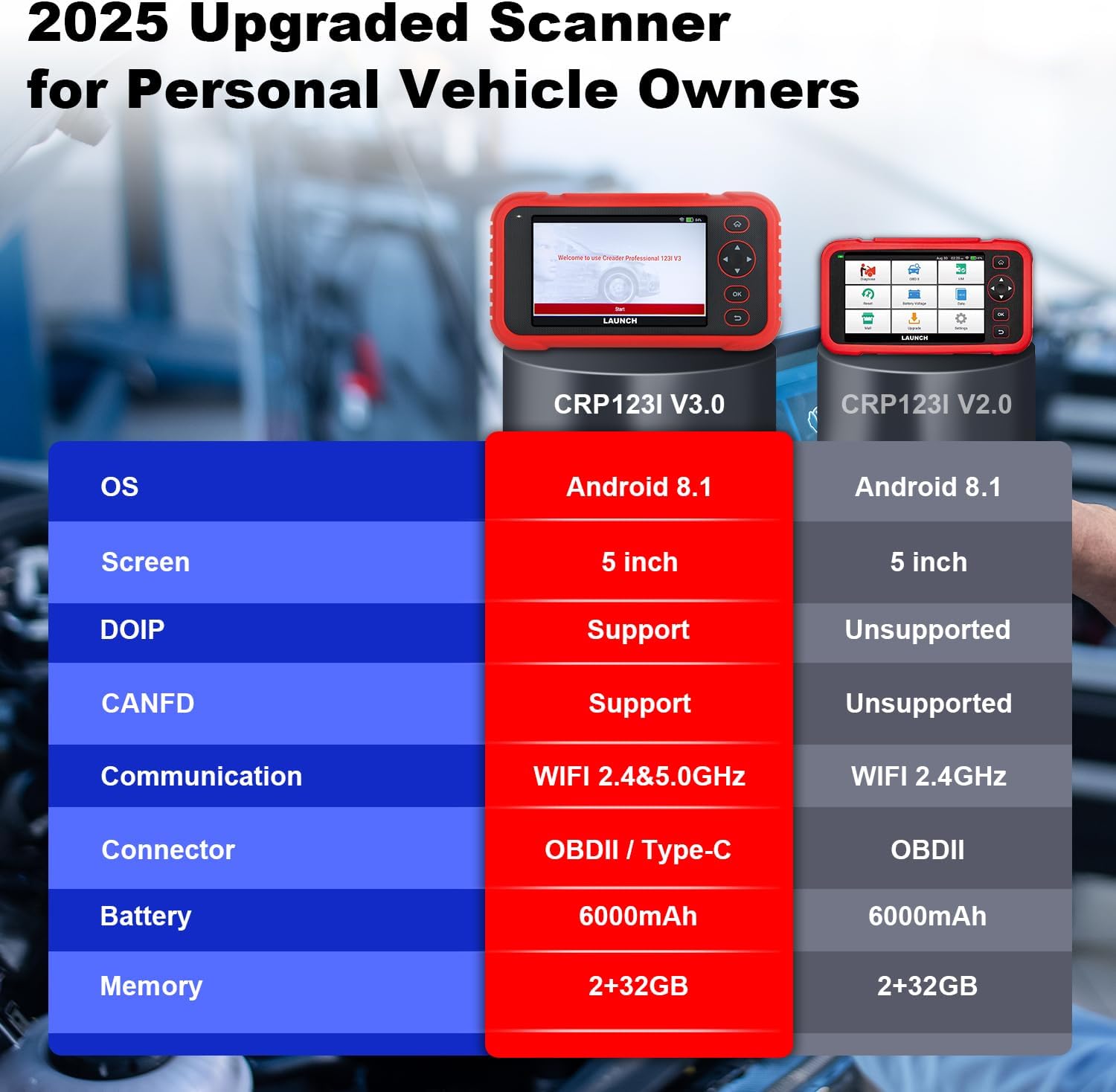
Image 1.2: Feature comparison between the CRP123I V3.0 and its predecessor, highlighting upgrades such as DOIP, CANFD, and dual-band WiFi.
2. Содержимое упаковки
После распаковки убедитесь в наличии всех компонентов:
- CRP123I V3.0 Scan Tool
- Диагностический кабель OBDII
- USB-кабель
- Руководство пользователя
- Чехол для переноски

Image 2.1: The complete package contents, including the scan tool, cables, user manual, and carrying case.
3. Настройка
Для первоначальной настройки и подключения выполните следующие действия:
- Включение питания: Ensure the device is charged. The CRP123I V3.0 features a 6000mAh rechargeable battery.
- Подключиться к автомобилю: Locate your vehicle's OBDII port, typically under the dashboard on the driver's side. Connect the diagnostic cable from the scanner to the vehicle's OBDII port. The device supports OBDII and Type-C connections.
- Первоначальная загрузка: The scanner will power on automatically or prompt you to press the power button. The 5-inch touchscreen will display the LAUNCH logo and then the main interface.
- Подключение к сети: For updates and online features, connect the device to a Wi-Fi network. The CRP123I V3.0 supports 2.4GHz and 5GHz dual Wi-Fi. Navigate to 'Settings' > 'Wi-Fi' to connect.
- Обновление программного обеспечения: It is recommended to perform a software update upon first use to ensure you have the latest features and vehicle coverage. Access the 'Upgrade' menu for one-touch lifetime free updates.
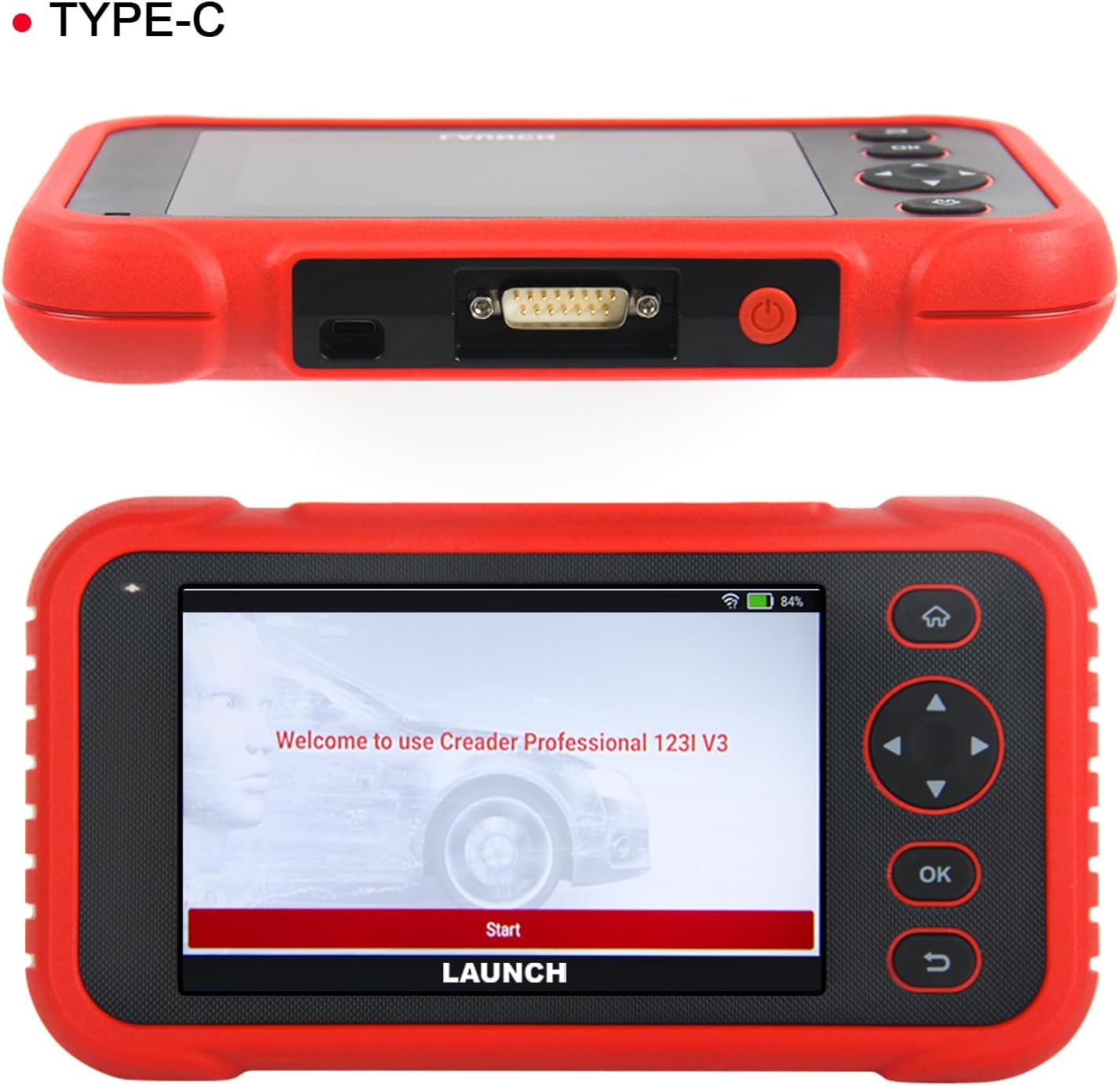
Изображение 3.1: Верх view of the scanner showing the OBDII connector, and front view displaying the initial welcome screen.
4. Инструкция по эксплуатации
4.1. 4-Системная диагностика
The CRP123I V3.0 allows for in-depth diagnostics of four major vehicle systems:
- Система двигателя: Считывает и удаляет коды неисправностей двигателя. views live data, and turns off the Malfunction Indicator Lamp (МИЛ).
- Антиблокировочная система тормозов (ABS): Diagnoses ABS issues, reads/clears codes, and monitors live data related to braking performance.
- Дополнительная система пассивной безопасности (SRS/подушка безопасности): Detects and clears airbag system fault codes, ensuring proper functionality of safety components.
- Система трансмиссии: Analyzes transmission performance, reads/clears codes, and displays live data such as transmission temperature.

Image 4.1: Visual representation of the four OE-level systems (Engine, SRS, Transmission, ABS) that the scanner can diagnose.
4.2. 7 Функции сброса
The tool provides 7 frequently used reset functions for common maintenance tasks:
- Сброс масла: Сбрасывает систему срока службы масла после его замены.
- Electric Throttle Relearn: Восстанавливает положение дроссельной заслонки после очистки или замены.
- Сброс угла поворота руля (SAS): Сбрасывает датчик угла поворота рулевого колеса.
- Кровотечение из АБС: Выполняет прокачку системы ABS для восстановления чувствительности тормозов.
- Согласование батарей (сброс BMS): Сбрасывает систему управления батареей после ее замены.
- Сброс тормозной системы (EPB): Сбрасывает настройки электронных тормозных колодок стояночного тормоза после их замены.
- Сброс сажевого фильтра: Выполняет регенерацию сажевого фильтра дизельного двигателя.
Note: The availability of specific service functions may vary by vehicle make, model, and year.

Image 4.2: An illustration of the seven hot reset services available on the CRP123I V3.0.
4.3. Полный набор функций OBDII
The CRP123I V3.0 supports all 10 OBDII test modes for comprehensive emissions-related diagnostics:
- Прочтите коды: Отображает диагностические коды неисправностей (DTC).
- Очистить коды: Erases DTCs and turns off the MIL.
- Живые данные: Отображает поток данных в реальном времени с датчиков автомобиля.
- I / M Готовность: Проверяет готовность систем контроля выбросов.
- Стоп-кадр: Stores a snapshot of vehicle operating conditions when an emission-related fault occurs.
- Тест датчика кислорода: Получает результаты проверки датчика O2.
- Тест бортового монитора: Получает результаты по компонентам и системам силовой установки, связанным с выбросами.
- Тест EVAP: Инициирует проверку системы испарительных выбросов.
- Информация о транспортном средстве: Retrieves vehicle identification information (VIN, CID, CVN).
- Поиск кода DTC: Предоставляет определения для общих и специфических для производителя кодов.

Image 4.3: A comprehensive display of the professional full OBDII functions supported by the scanner.
4.4. Live Data Streams and Smog Test
Monitor up to 4 real-time data streams simultaneously on one screen. This allows for quick diagnosis and verification of repairs without switching views. The I/M Readiness function helps check emission system status, assisting in preparation for smog tests by identifying potential issues like faulty sensors or catalytic converter problems.

Image 4.4: The 4-in-1 live data graphic display feature, enabling visualization and analysis of multiple data streams.

Image 4.5: A real-time voltage monitor display, useful for assessing battery and charging system health.
4.5. Vehicle Identification and Diagnostic Reports
The scanner supports automatic VIN (Vehicle Identification Number) detection for quick vehicle identification. For vehicles that do not support AUTO VIN, you can manually input the VIN. After diagnosis, the tool can generate and allow you to share or print detailed diagnostic reports.

Image 4.6: The AUTO VIN feature, simplifying vehicle identification.

Image 4.7: The VIN scan function and options for sharing and printing diagnostic reports.
4.6. Страхование транспортных средств
The CRP123I V3.0 is compatible with all U.S. road vehicles manufactured after 1996 that comply with OBD2/EOBD/JOBD standards. This includes over 10,000 models, covering most gasoline cars, many 12V diesel vehicles, light-duty trucks, and a small range of gasoline-electric hybrid vehicles. It also supports AutoAuth for FCA SGW to access 2018+ FCA SGW-equipped models.

Image 4.8: An illustration of the extensive vehicle coverage across different regions and vehicle types.
5. Техническое обслуживание
To ensure optimal performance and access to the latest features and vehicle compatibility, regularly update the scanner's software. The CRP123I V3.0 offers lifetime free software updates.
- Обновления программного обеспечения: Connect the device to Wi-Fi and navigate to the 'Upgrade' section on the main menu to download and install available updates.
- Уборка: Для чистки устройства используйте мягкую сухую ткань. Избегайте использования абразивных чистящих средств и растворителей.
- Хранилище: Store the scanner in its carrying case in a cool, dry place when not in use.

Image 5.1: The 'Lifetime Free Updated' feature ensures the scanner remains current with the latest vehicle data and functions.
6. Поиск Неисправностей
If you encounter issues with the CRP123I V3.0, consider the following:
- Устройство не включается: Ensure the battery is charged or the device is properly connected to the vehicle's OBDII port.
- Проблемы с подключением: Verify the OBDII cable is securely connected to both the scanner and the vehicle. Ensure the vehicle's ignition is on.
- Нет связи с транспортным средством: Check if your vehicle is OBDII compliant (generally 1996 and newer for U.S. vehicles). Ensure the vehicle's battery has sufficient voltage.
- Функция не работает: Some functions are vehicle-specific. Confirm compatibility for your vehicle's make, model, and year.
- Низкая производительность: Ensure the device has sufficient memory. Perform regular software updates.
For specific fault code definitions, use the built-in DTC Library or the Fault Codes Google Search feature.

Image 6.1: The DTC Search function, providing quick access to fault code explanations via Google.
7. Технические характеристики
| Производитель | ЗАПУСК |
| Модель | CRP123I |
| Операционная система | Андроид 8.1 |
| Размер экрана | 5 Inches (720P) |
| Память | 32 ГБ |
| Аккумулятор | 6000 мАч литий-ионный (в комплекте) |
| Связность | 2.4 & 5GHz Dual WiFi, OBDII / Type-C |
| Поддерживаемые протоколы | CANFD & DoIP, OBD2/EOBD/JOBD |
| Вес товара | 2.27 фунта |
| Размеры упаковки | 9.84 x 7.09 x 2.76 дюйма |
| Тип посадки автомобиля | Универсальная посадка |
8. Гарантия и поддержка
The LAUNCH CRP123I V3.0 Elite OBD2 Scanner comes with a 5-year warranty. Enjoy lifetime free software updates to keep your diagnostic tool current with the latest features and vehicle compatibility. For any inquiries, technical assistance, or support, please contact our dedicated customer service team.
Электронная почта поддержки клиентов: nina@hilson.com.cn
Our 24/7 professional service team is committed to providing one-on-one customer service to ensure your satisfaction.


