Введение
The REDTIGER F17 Plus is an advanced 4-channel dash camera system designed to provide comprehensive 360° coverage for your vehicle. Featuring a 2.7K front camera with STARVIS 2 Sensor, 1080P front and rear cabin cameras, and a 1080P rear camera, it captures critical details from all angles. This manual provides essential information for setup, operation, and maintenance of your F17 Plus dash cam.
Что в коробке?
- 1 * F17 Plus 2.7K Dual Dash Cam
- 1 * 1080P Dual Lens Rear Camera
- 1 карта памяти 128 ГБ
- 1 * 11.5-футовый кабель питания с автомобильным зарядным устройством
- 1 * Adhesive Mount built-in GPS
- 1 кабель для задней камеры длиной 21.3 фута
- 5 кабельных зажимов
- 1 * Руководство пользователя
- 1 * Car Wire Trim Tool
- 1 * Adhesive (extra)
- 1 * Electrostatic Sticker (extra)

Image: All components included in the REDTIGER F17 Plus package.
Характеристики продукта
4-Channel 360° Full Coverage
The F17 Plus offers unparalleled coverage with its 4-channel recording system: a 2.7K front camera, two 1080P cabin cameras (front and rear), and a 1080P rear camera, it captures critical details from all angles. This setup ensures all angles around and within your vehicle are monitored, capturing the road ahead, both cabin views, and side blind spots. You can customize recording modes (1CH/2CH/3CH/4CH) as needed.

Image: Visual representation of the 360° coverage provided by the 4-channel dash cam system.
360° Rotatable Dual-Lens Rear Camera
The upgraded rear camera features two lenses, one for external rear traffic and one for the cabin interior. Its 360° rotatable design allows flexible adjustment to monitor children, pets, or valuables inside the car, while also covering potential side window break-ins and the road behind.

Image: The dual-lens rear camera demonstrating its 360° rotation capability for versatile monitoring.
STARVIS 2 & Dual IR Night Vision
Equipped with a STARVIS 2 sensor, the front camera excels in low-light conditions, capturing clear license plates and road details. Both front and rear cabin lenses incorporate infrared night vision, enabling reliable recording of passengers or pets without visible light, ensuring day and night protection.

Image: Night vision capabilities of the dash cam, featuring STARVIS 2 for the front and IR lights for cabin cameras.
5.8GHz WiFi & GPS & APP Control
The built-in GPS records your route, speed, and location, useful for incident verification. With ultra-fast 5.8GHz WiFi, you can connect the dash cam to your phone via the Redtiger Cam app for real-time previews, 4X faster download speeds (up to 20MB/s), easy setting adjustments, and GPS tracking.

Image: Connectivity features including 5.8GHz WiFi and GPS for seamless app integration and data management.
Hands-Free Control & Reliable Performance
Control the 4-camera dash cam hands-free using voice commands or through its sleek touchscreen for footagэто сноваview and settings adjustments. Powered by a long-lasting super capacitor, it offers reliable performance in extreme temperatures. An 18-month warranty and 24/7 support are included.
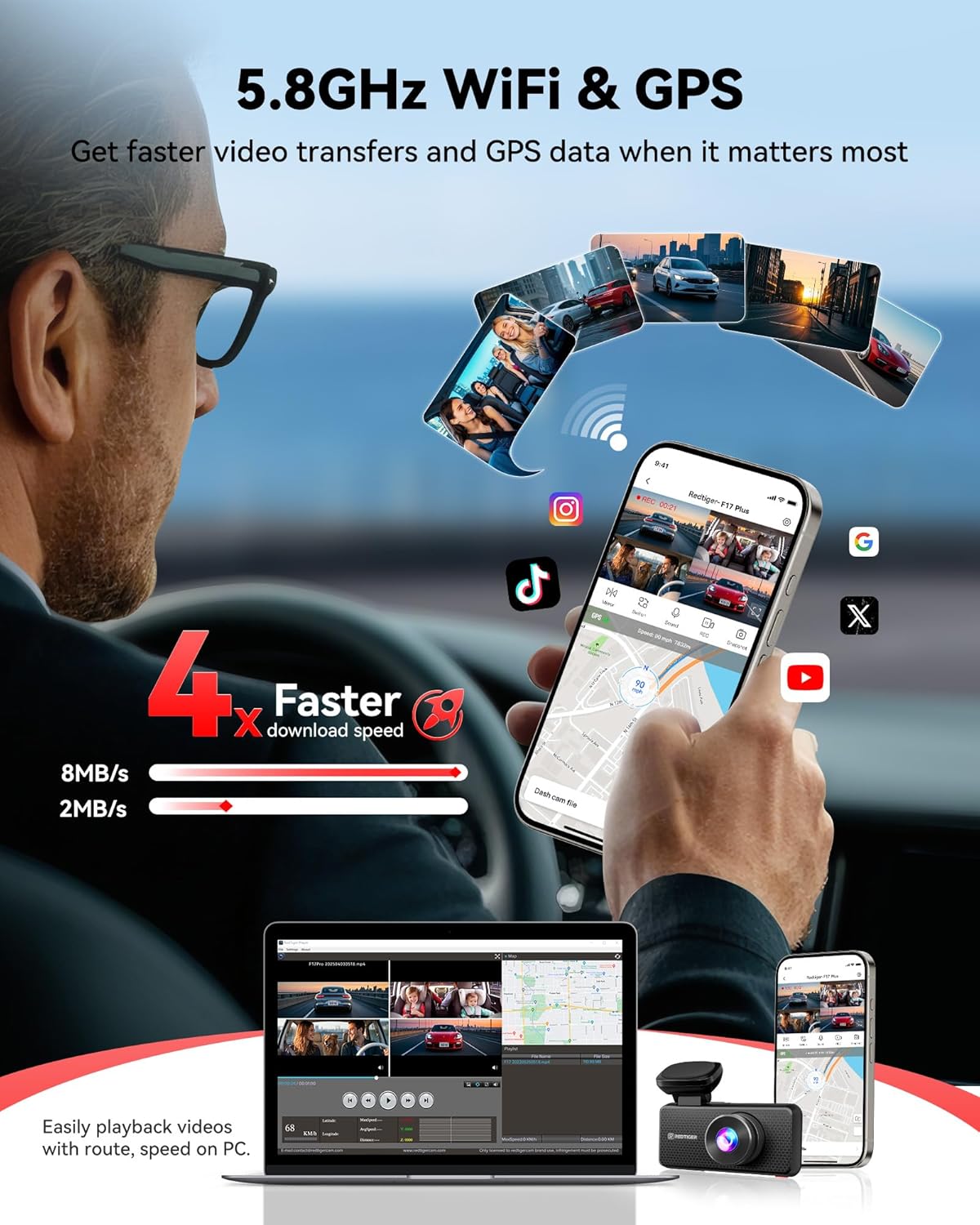
Image: User interaction with the dash cam via touchscreen and voice commands.
Parking Mode & G-sensor & Loop Recording
The dash cam provides 24/48H protection with time-lapse video for continuous recording. A G-sensor automatically triggers and locks footage of suspicious activity or accidents. With four lenses covering all views and an included 128GB card, the F17 Plus safeguards your car. Note: Hardwire kit required for Parking Mode.

Image: Visual explanation of loop recording and G-sensor functionality.

Image: The 24-hour parking monitor feature, illustrating protection against impacts and vandalism.
Настройка и установка
Dash Cam Installation (Front)
- Очистите область на лобовом стекле, где вы собираетесь установить видеорегистратор.
- Прикрепите электростатическую наклейку к очищенной поверхности.
- Peel off the 3M adhesive from the GPS mount and firmly press it onto the electrostatic sticker.
- Slide the F17 Plus dash cam onto the mounted GPS base.
- Connect the power supply cable to the dash cam.
Image: Step-by-step guide for installing the main dash cam unit.
Video: Detailed installation guide for the REDTIGER F17 Plus dash cam.
Установка задней камеры
- Clean the area on your rear windshield where you intend to mount the rear camera.
- Attach an electrostatic sticker to the cleaned area.
- Peel off the 3M adhesive from the rear camera mount and firmly press it onto the electrostatic sticker.
- Connect the rear camera cable to the rear camera module and route the cable discreetly along the headliner and A-pillar to the main dash cam unit.

Image: Visual guide for installing the rear camera.
Установка комплекта проводного подключения (для режима парковки)
To enable the 24-hour parking monitor feature, a hardwire kit (sold separately) is required. Connect the B+ (yellow) wire to a constant power fuse and the ACC (red) wire to an ignition-switched fuse in your vehicle's fuse box. Ensure the GND (black) wire is securely connected to a metal grounding point. Refer to your vehicle's manual for fuse box location and specific fuse types.

Image: Components of the hardwire kit for continuous power.
Подключение приложения
Download the "Redtiger Cam" app from your smartphone's app store. Turn on the dash cam's Wi-Fi (usually enabled by default). Connect your phone to the dash cam's Wi-Fi network (default password: 12345678). Open the app, add your device, and follow the on-screen instructions to manage settings and view фуtage.
Video: Instructions on how to connect the dash cam to the mobile app via Wi-Fi.
Инструкция по эксплуатации
Голосовое управление
The F17 Plus supports hands-free voice commands. You can activate features like "Take Picture," "Lock the Video," "Turn On/Off Wi-Fi," "Turn On/Off Screen," "Turn On/Off Recording," "Show Front Camera," and "Show Rear Camera" by speaking the commands clearly.
Управление с помощью сенсорного экрана
The 3-inch touchscreen allows intuitive navigation through menus, settings, and footage playback. Tap icons to select options, swipe to browse, and use the physical buttons for additional control.
Viewин Фуtage
Фуtagе может быть viewed directly on the dash cam's screen or through the Redtiger Cam app on your smartphone. The app provides real-time previews and allows for easy download and management of recorded videos and photos.
Циклическая запись и G-сенсор
Видеорегистратор ведет непрерывную запись, перезаписывая самые старые записи. fileКогда карта памяти заполнена. Важная информацияtage triggered by the G-sensor (due to sudden impact or movement) is automatically locked and protected from being overwritten.
Монитор парковки
When connected via a hardwire kit, the parking monitor provides 24-hour surveillance. It uses time-lapse recording and the G-sensor to detect and record incidents like hit-and-runs or vandalism while your vehicle is parked.
Обслуживание
- Форматирование SD-карты: For optimal performance, it is recommended to format the 128GB memory card once a month using the dash cam's settings. This helps maintain smooth recording and prevents data corruption.
- Чистка линз: Regularly clean the camera lenses with a soft, lint-free cloth to ensure clear video quality. Avoid abrasive materials that could scratch the lenses.
- Обновления прошивки: Check the Redtiger Cam app periodically for firmware updates to ensure your dash cam has the latest features and bug fixes.
Поиск неисправностей
- Видеорегистратор не включается: Ensure the power cable is securely connected and the vehicle's power outlet is functioning. If using a hardwire kit, verify all connections to the fuse box.
- Проблемы с подключением к Wi-Fi: Double-check the Wi-Fi password (default: 12345678). Ensure your phone is within range of the dash cam and that the Redtiger Cam app has necessary permissions (location, local network access).
- Плохое качество видео: Clean the camera lenses. Ensure the dash cam is set to your desired resolution (e.g., 2.7K for front camera). Format the SD card regularly.
- Режим парковки не работает: Verify that the hardwire kit is correctly installed and receiving constant power. The parking mode requires a hardwire connection to function.
- Голосовое управление не отвечает: Ensure the voice control feature is enabled in the dash cam settings. Speak commands clearly and directly to the dash cam.
Технические характеристики
| Размеры продукта | 2.56 x 4.33 x 3.27 дюйма |
| Вес товара | 6.9 унции |
| Название модели | F17 Plus |
| Разрешение видеозахвата | 1944p (фронтальная панель) |
| Поле View | 360 Degrees (4-channel coverage) |
| Технология связи | Wi-Fi (5.8 ГГц) |
| Особые возможности | STARVIS 2 Sensor, Automatic Incident Detection, Loop Recording, 128GB Memory Card Included, Touch Screen, Voice Control, Built-In GPS, Night Vision, Parking Monitor, Built-In Microphone & Speaker, 3 inch Display, Built-In Supercapacitor, Support 512GB Max |
Гарантия и поддержка
The REDTIGER F17 Plus comes with an 18-month reliable warranty. For any questions, technical assistance, or warranty claims, please contact REDTIGER customer support. You can find contact information in your user manual or on the official REDTIGER webсайт.
Электронная почта: help@redtigercam.com


