1. Введение
This manual provides detailed instructions for the Bikevee GPS Bike Computer. This device is designed to track various cycling data, including speed, distance, time, and altitude, with features like auto start/stop, auto backlight, and IPX7 waterproofing. Please read this manual thoroughly before using the product to ensure proper operation and maintenance.
2. Что включено
Убедитесь, что в упаковке присутствуют все компоненты:
- Велокомпьютер (основной блок)
- Кабель для зарядки (USB-C)
- Выносное переднее крепление
- Винт с шестигранной головкой
- Шестигранный ключ
- Губка
- Руководство пользователя

Image: All components included in the Bikevee GPS Bike Computer package.
3. Настройка и установка
3.1 Установка велокомпьютера
The Bikevee GPS Bike Computer uses a wireless design for easy installation. Follow these steps to mount the device:
- Attach the Out Front Extended Mount to your bicycle's handlebar. Use the provided Hexagon Socket Screw and Hexagon Wrench to secure it firmly.
- Slide the Bike Computer onto the mount until it clicks securely into place.

Image: Simple installation of the wireless GPS bike computer on the handlebar mount.
3.2 Первоначальное включение и получение GPS-сигнала
After mounting, press the power button to turn on the device. The computer will automatically search for GPS signals. It utilizes a 5-satellite system (GPS, BDS, Glonass, Galileo, QZSS) for accurate and stable positioning. The initial connection time may be longer, but subsequent connections will be faster.

Image: The bike computer's 5-satellite positioning system for enhanced accuracy.
3.3 языковых настроек
The device supports 9 languages. Refer to the user manual for specific instructions on how to navigate to the language settings and select your preferred language.

Image: The bike computer displaying data in multiple languages.
4. Инструкция по эксплуатации
4.1 Display Pages and Data Types
The Bikevee GPS Bike Computer features a 2.4" LCD screen that displays various cycling data across 6 functional pages. You can cycle through these pages using the device's buttons. The data types include:
- Высота по GPS
- Часы
- Speed (MPH and KM/H)
- Время в пути
- Расстояние поездки
- Общее время
- Общее расстояние
- Средняя скорость
- Максимальная скорость
- Состояние подсветки

Изображение: Бывшийamples of the 6 functional data display pages.
4.2 Auto Start/Stop Function
The device automatically starts recording data when you begin cycling and pauses when you stop, conserving battery life and ensuring accurate trip data.
4.3 Автоматическая подсветка
To turn the backlight on or off, press both the left and right buttons simultaneously. Once activated, the backlight remains on throughout your ride. You can turn off the backlight during the day to save battery power, or keep it on for clear visibility at night.
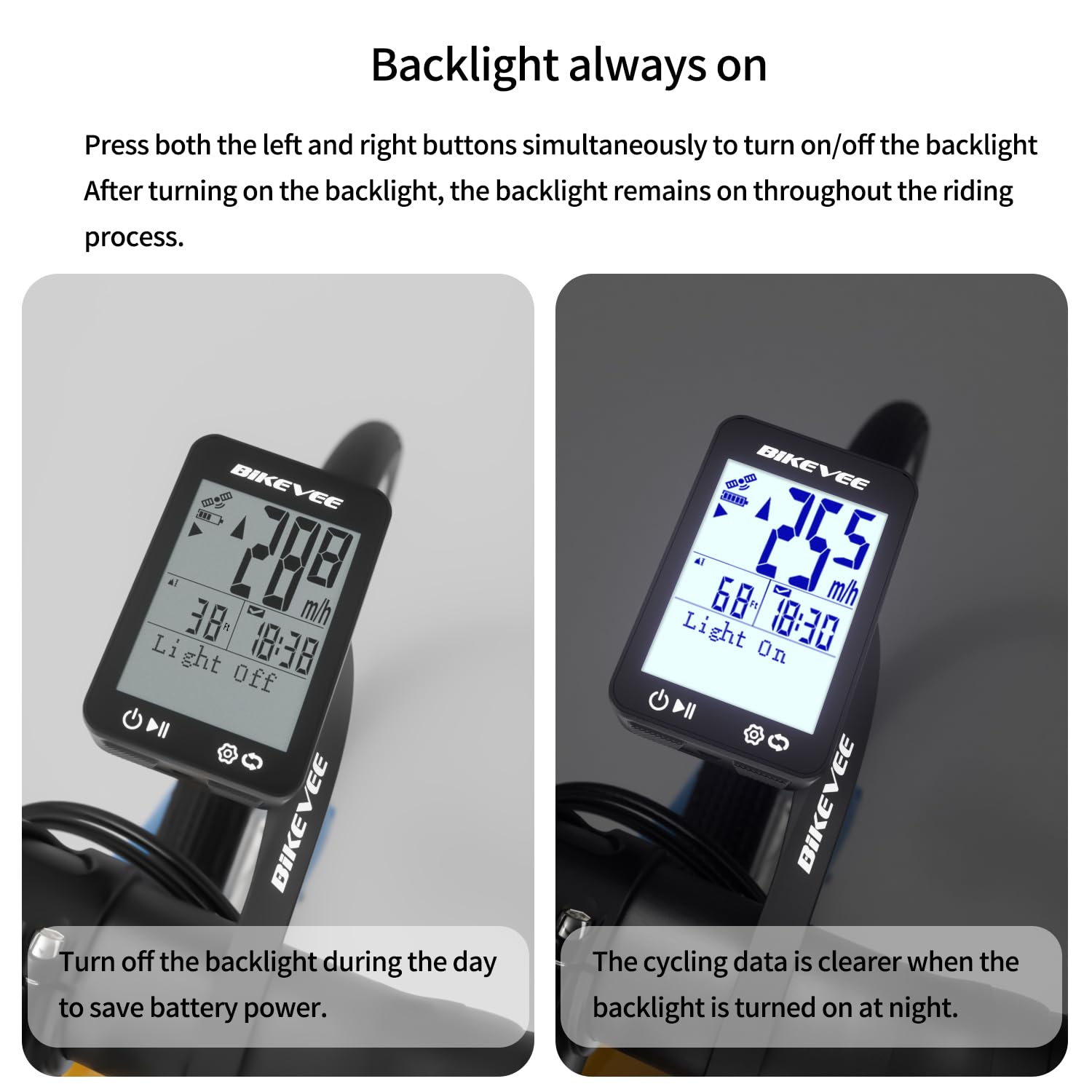
Image: Backlight functionality, showing display with backlight off and on.
5. Техническое обслуживание и уход
5.1 Очистка
Протрите устройство мягкой, дamp Не используйте абразивные чистящие средства или растворители, так как они могут повредить экран илиasing.
5.2 Гидроизоляция
The Bikevee GPS Bike Computer has an IPX7 waterproof rating, meaning it can withstand immersion in water up to 1 meter for 30 minutes. This protects it from rain and splashes during your rides. However, avoid prolonged submersion or high-pressure water jets.
5.3 Зарядка аккумулятора
The device is equipped with a 650mAh Lithium Ion battery, providing up to 28 hours of continuous use. Charge the device using the provided USB-C charging cable when the battery indicator is low.
6. Поиск Неисправностей
If you encounter issues with your Bikevee GPS Bike Computer, consider the following:
- Устройство не включается: Убедитесь, что батарея заряжена. Подключите устройство к зарядному кабелю и дайте ему зарядиться не менее 30 минут, прежде чем снова пытаться включить его.
- Сигнал GPS не получен: Убедитесь, что вы находитесь на открытой местности с чистым view of the sky. Initial GPS acquisition can take longer. If indoors or under heavy tree cover, signal acquisition may be difficult.
- Неточные данные: Ensure the device is securely mounted and has a clear GPS signal. Verify that the correct units (MPH/KM/H) are selected in the settings.
- Экран не виден: Check the backlight setting. If the backlight is off, press both left and right buttons simultaneously to activate it.
Для получения дополнительной помощи обратитесь к контактной информации в разделе «Гарантия и поддержка».
7. Технические характеристики
| Особенность | Спецификация |
|---|---|
| Бренд | Байкви |
| Номер модели | SF20250929B0FN818NDK |
| Цвет | Черный |
| Размеры продукта | 45L x 16W x 70H миллиметров |
| Вес товара | 50 грамм |
| Размер экрана | 2.4 дюйма |
| Тип дисплея | ЖК-дисплей |
| Срок службы батареи | 28 часов |
| Состав аккумуляторной батареи | Литий-ионный |
| Международный рейтинг защиты | IPX7 |
| Тип крепления | Крепление на руль |
| Ввод через человеческий интерфейс | Кнопки |
| Страна происхождения | Китай |

Image: Summary of key product features and specifications.
8. Гарантия и поддержка
8.1 Гарантия качества
Bikevee is committed to providing dependable products. This GPS Bike Computer is designed for lasting satisfaction.
8.2 Поддержка клиентов
For any questions, technical support, or warranty claims, please contact Bikevee customer service through the retailer where you purchased the product or visit the official Bikevee webсайт для контактной информации.


