1. Введение
This manual provides detailed instructions for setting up, operating, and maintaining your MAONO MaonoCaster E2 Gen2 Podcast Equipment Bundle. This all-in-one solution is designed for two-person podcasting and streaming, offering high-quality audio capture and versatile control for content creators.

Image: The MAONO MaonoCaster E2 Gen2 Podcast Equipment Bundle, showcasing the mixer, two microphones, and two headphones, set up for a two-person podcast.
2. Что включено
Your MAONO Podcast Equipment Bundle includes the following components:
- 1 x Audio Interface (MaonoCaster E2 Gen2)
- 1 x USB-A/USB-C to USB-C Cable
- 1 аудиокабель 3.5 мм
- 1 х Руководство пользователя
- 2 x XLR Dynamic Microphones (PD100)
- 2 x XLR Cables
- 2 x Studio Headphones (MH700)
3.Основные характеристики
- Upgraded 2-Person Podcast Setup: Dual XLR combo inputs with 60dB preamps for clear co-host audio.
- Studio-Grade XLR Clarity: Предусилитель с низким уровнем шумаamps and built-in noise reduction for pristine audio.
- 8 Custom Sound FX Buttons: Upload 20-second audio clips for intros, jingles, or sound bites.
- Efficient Streaming Tools: One-touch mute, real-time voice monitoring, Loopback function for single-PC streaming, and 8-hour battery life.
- Voice Effects & Mood Control: Pitch-shifting (fun/privacy modes) and 6 reverb presets. SingAlong mode for private vocal monitoring.
- Мультиплатформенное подключение: Bluetooth for background music, AUX-IN/USB-C for phone/PC connections.
- Широкая совместимость: Supports computers, smartphones, and tablets (Mac, Windows, Android).

Изображение: Оверview of the MaonoCaster E2 Gen2's key features, highlighting its 8 customizable soundpads, dual XLR inputs, 2-level noise reduction, Loopback function, and support for two-person podcasts.
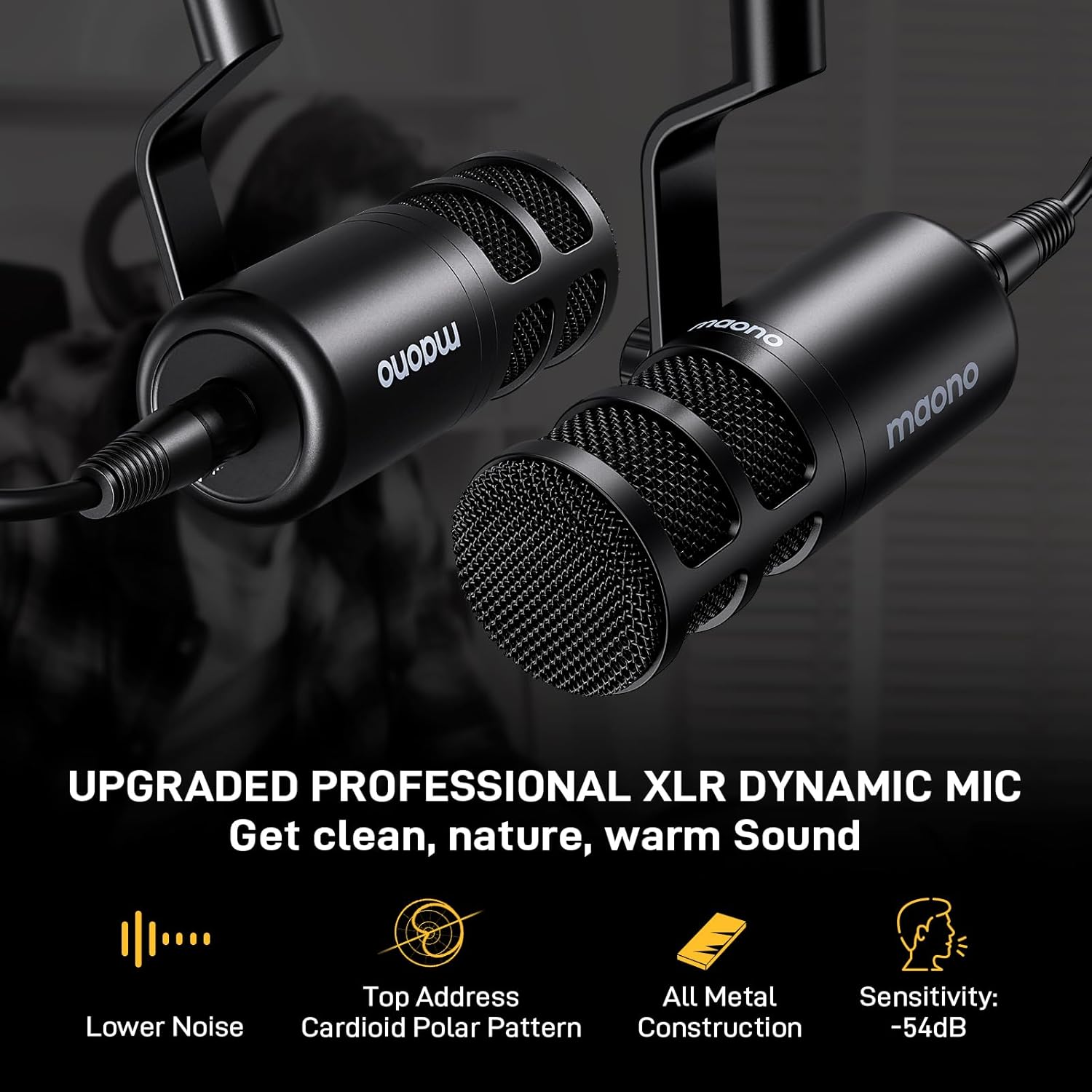
Image: Close-up of the MAONO PD100 Professional XLR Dynamic Microphone, emphasizing its low noise, top-address cardioid polar pattern, and all-metal construction.

Image: Diagram illustrating the 50mm Neodymium Magnet Driver of the MAONO MH700 Studio Headphones, highlighting its frequency response and sound stagе возможности.
4. Инструкции по настройке
4.1 Connecting the Audio Interface
- Подключение питания: Connect the audio interface to a power source using the provided USB-C cable. The device can also operate on its internal battery for up to 8 hours.
- Computer/Phone Connection: Use the USB-C cable to connect the audio interface to your computer, smartphone, or tablet. Ensure your device recognizes the MaonoCaster E2 Gen2 as an audio input/output device.
- Подключение микрофона: Connect the two XLR dynamic microphones to the XLR combo inputs on the audio interface using the provided XLR cables. If using condenser microphones, activate the 48V phantom power for each input as needed.
- Подключение наушников: Plug your studio headphones into the designated headphone jacks on the audio interface.
- Вспомогательные устройства: For background music or external audio, connect devices via Bluetooth or the 3.5mm AUX-IN port.

Image: The MaonoCaster E2 Gen2 demonstrating broad compatibility with various operating systems and devices, including Windows, Mac, PCs, laptops, and gaming consoles, as well as popular streaming platforms.
5. Инструкция по эксплуатации
5.1 Управление звуком
- Регуляторы усиления: Adjust the input sensitivity for each microphone to achieve optimal audio levels.
- EQ (Low, Mid, High): Fine-tune the tonal balance of your microphone audio. Adjust Low for bass, Mid for vocal presence, and High for clarity.
- Громкость музыки: Control the volume of background music or auxiliary inputs.
- Выходной объем: Adjust the overall output level to your streaming or recording device.
- Громкость наушников: Control the monitoring volume for your headphones.

Image: Close-up of the MaonoCaster E2 Gen2's control panel, highlighting the independent faders for music and microphone inputs, allowing precise volume adjustments.
5.2 Особенности
- Soundpads: Use the 8 customizable soundpad buttons to trigger pre-recorded audio effects, intros, or jingles. Each pad supports up to 20 seconds of audio.
- Снижение шума: Activate the 2-level intelligent noise reduction to minimize background distractions like fans or hums, ensuring clear vocals.
- Предустановки реверберации: Apply one of the 6 reverb presets to add depth and atmosphere to your voice.
- Pitch-Shifting: Modify your vocal pitch for creative effects or privacy.
- SingAlong Mode: Hear your vocals privately through headphones without sending them to the audience.
- Отключение звука одним нажатием: Instantly mute your microphone with a dedicated button.
- Мониторинг в реальном времени: The 'Monitor' button allows you to hear your own voice directly through headphones without latency.
- Функция обратной связи: Enable Loopback for seamless integration of all audio sources (microphone, music, sound effects) into a single stream on your computer.

Image: The MaonoCaster E2 Gen2 mixer displaying its 8 custom soundpads, which can be programmed with various audio effects like cheering, applause, or narration.

Image: A visual representation of the MaonoCaster E2 Gen2's 2-level intelligent noise reduction feature, showing how it cleans up audio from a 'Before' state to '1-Level' and '2-Level' reduced noise.
6. Техническое обслуживание
- Уборка: Use a soft, dry cloth to clean the surface of the audio interface, microphones, and headphones. Avoid using liquid cleaners or abrasive materials.
- Хранилище: Храните оборудование в прохладном, сухом месте, вдали от прямых солнечных лучей и экстремальных температур.
- Уход за кабелем: Handle cables carefully to prevent damage. Avoid sharp bends or excessive pulling.
- Уход батареи: For optimal battery life, avoid fully discharging the device frequently. Charge it regularly.
7. Поиск Неисправностей
- Нет звука на выходе:
- Check all cable connections (USB-C, XLR, headphones).
- Ensure volume knobs (Gain, Music, Output, Headphone) are not set to minimum.
- Verify the device is selected as the default audio input/output in your computer or streaming software settings.
- Confirm 48V phantom power is enabled for condenser microphones.
- Фоновый шум/гул:
- Activate the 'Noise Reduction' feature on the audio interface.
- Проверьте наличие земляных петель или помех от других электронных устройств.
- Adjust microphone gain to an appropriate level; too high can introduce noise.
- Soundpads Not Working:
- Ensure audio clips are properly loaded onto the soundpads.
- Check the 'Pad Vol' knob to ensure it's not set to minimum.
- Проблемы с подключением Bluetooth:
- Ensure Bluetooth is enabled on both the audio interface and your pairing device.
- Move devices closer to each other to improve signal strength.
- Попробуйте разорвать и заново соединить устройства.
8. Технические характеристики
| Особенность | Спецификация |
|---|---|
| Вес товара | 7.6 фунта |
| Размеры продукта | 9.64 x 6.18 x 2.16 дюйма |
| Номер модели товара | E2 Gen2+2 PD100+2 MH700 |
| Совместимые устройства | Наушники, Ноутбук, Микрофон, Персональный компьютер, Смартфон |
| Операционная система | Android, Windows, macOS |
| Источник питания | Питание от батареи |
| Томtage | 5 Вольт |
| Бренд | МАОНО |
| Технология связи | AUX, Bluetooth, USB |
| Количество каналов | 10 |
9. Гарантия и поддержка
MAONO products are designed for reliability and performance. For warranty information, technical support, or service inquiries, please refer to the official MAONO webили обратитесь в службу поддержки напрямую. Сохраните чек о покупке для предъявления гарантийных претензий.
Official MAONO Webсайт: www.maono.com


