1. Введение
This manual provides detailed instructions for the operation and maintenance of your HIFI WALKER H2 Touch 64GB Hi Res MP3 Player. Please read this manual thoroughly before using the device to ensure proper functionality and to maximize your audio experience.
2. Особенности продукта
- Hi-Res Lossless Audio Performance: Equipped with an ESS9219Q DAC chip, supporting FLAC, APE, WAV, ALAC, AIFF, and native DSD64/128 up to 32-bit/384 kHz.
- Bluetooth 5.2: Bi-directional (TX/RX) with aptX-HD and LDAC support for high-fidelity wireless audio.
- Двойной интерфейс управления: 2.4-inch full-touch 480x360 display combined with six physical buttons for intuitive navigation.
- Premium Build & Outputs: CNC-machined aluminum alloy body with 3.5 mm headphone out and line-out ports.
- Универсальные возможности подключения: Functions as a USB DAC, offers SPDIF output via Type-C port.
- Расширяемое хранилище: Includes a pre-inserted 64 GB micro SD card, expandable up to 512 GB via micro SD or USB OTG.
- Высококачественная запись: Digital stereo MIC for 48 kHz high-fidelity recording.
- Длительный срок службы батареи: 1500 mAh lithium battery provides up to 10 hours of playback.
- Дополнительные функции: E-book reading, background music playback, multiple EQ presets.
3. Что в коробке
- HIFI WALKER H2 Touch MP3 Player
- Зарядный кабель
- Карта памяти Micro SD на 64 ГБ (предварительно вставлена)
- Руководство пользователя
4. Продукт закончилсяview
4.1 Схема устройства
The HIFI WALKER H2 Touch features a compact design with a 2.4-inch display and strategically placed physical controls.
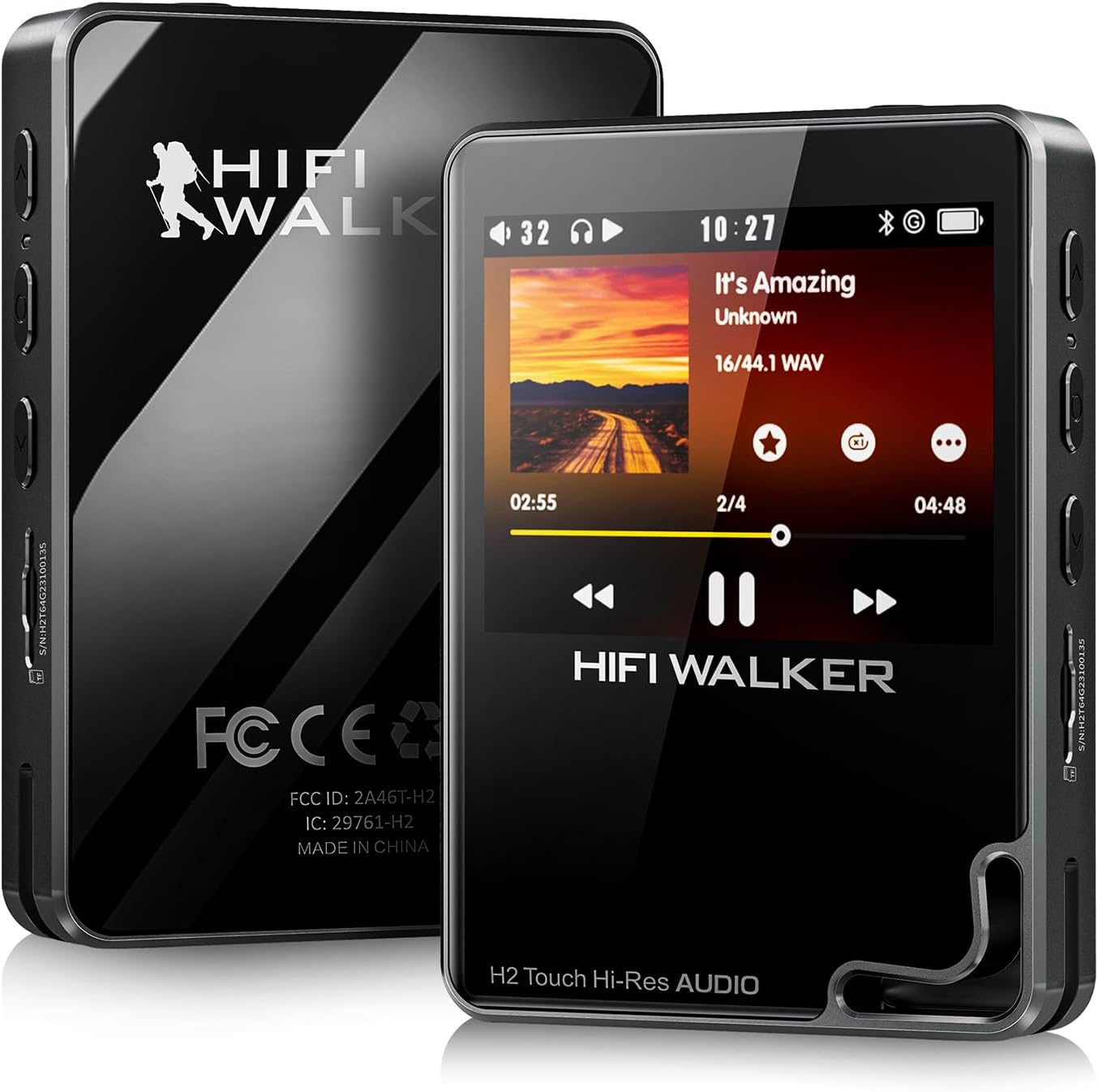
Рисунок 1: Вид спереди и сзади view of the HIFI WALKER H2 Touch MP3 Player.
4.2 Физические кнопки и порты
The device combines a touch screen with tactile buttons for ease of use.

Figure 2: Close-up of the H2 Touch screen and physical control buttons.
- Кнопка питания: Located on the top edge. Press and hold to power on/off.
- Кнопки громкости: Located on the side, marked '+' and '-'.
- Слот для карты Micro SD: Located on the side, for memory expansion.
- Выход для наушников 3.5 мм: Standard audio output port.
- Выходной линейный порт: Для подключения к внешнему ampусилители или автомобильные аудиосистемы.
- Порт USB Type-C: Для зарядки, передачи данных и вывода звука через USB ЦАП/SPDIF.
- Кнопки навигации: Play/Pause, Previous/Rewind, Next/Fast-forward, Back, and Menu buttons are located on the front panel.

Рисунок 3: Подробная информация view of the device's ports.
5. Настройка
5.1 Первоначальная зарядка
Before first use, fully charge the device using the provided USB Type-C cable connected to a computer or a compatible USB power adapter. A full charge typically takes about 3 hours.
5.2 Вставка/расширение хранилища
Your device comes with a 64GB micro SD card pre-inserted. To expand storage, power off the device, gently insert a micro SD card (up to 512GB) into the designated slot until it clicks. The device also supports USB OTG for additional storage.
5.3 Передача музыки
Connect the H2 Touch to your computer using the USB Type-C cable. The device will appear as a removable drive. Simply drag and drop your music files into the device's storage or the inserted micro SD card. The player supports various formats including FLAC, APE, WAV, ALAC, AIFF, DSD64/128, and MP3.
Video 1: Demonstrates connecting the H2 Touch to a computer and transferring music files.
6. Инструкция по эксплуатации
6.1 Включение/выключение питания
Press and hold the Power button on the top edge for a few seconds to turn the device on or off.
6.2 Базовая навигация
Navigate the menu using the 2.4-inch touch screen or the physical buttons on the front panel. The scroll wheel allows for quick browsing through lists, while the Play/Pause, Next/Fast-forward, Previous/Rewind, Back, and Menu buttons provide direct control.
6.3 Воспроизведение музыки
From the main menu, select 'Music' to browse your library by song, artist, album, or genre. Select a track to begin playback. Use the physical buttons or on-screen controls to play, pause, skip tracks, or adjust volume.
6.4 Bluetooth-соединение
Чтобы подключиться к наушникам или колонкам Bluetooth:
- Go to 'System Settings' from the main menu.
- Выберите «Настройки Bluetooth».
- Ensure Bluetooth is 'On'.
- Select 'Bluetooth Scan' to find available devices.
- Выберите нужное устройство из списка для сопряжения.
The H2 Touch supports bi-directional Bluetooth 5.2, allowing it to transmit audio to headphones/speakers or receive audio from another device (e.g., a smartphone) to act as a Bluetooth DAC.
Video 2: Demonstrates Bluetooth pairing and UI navigation on the H2 Touch.
6.5 Режим USB-ЦАП
Connect the H2 Touch to a computer or compatible smartphone via the USB Type-C cable. In the device's settings, select 'USB Mode' and choose 'DAC'. This allows the player to function as an external sound card, enhancing the audio quality of your connected device.
6.6 Настройки эквалайзера
Customize your sound experience by accessing the 'Equalizer' settings. Choose from various presets (Rock, Jazz, Classical, Pop, etc.) or create a custom EQ profile в соответствии с вашими предпочтениями.

Figure 4: Custom Equalizer modes for personalized audio.
6.7 Функция записи
The H2 Touch features a digital stereo MIC for high-fidelity recording. Access the 'Record' function from the main menu to start, pause, and save recordings.
7. Технические характеристики
| Название модели | H2 Touch |
| Бренд | HIFI-ХОДОК |
| Емкость памяти | 64 ГБ (с возможностью расширения до 512 ГБ) |
| Размер экрана | 2.4 дюйма |
| Технология связи | Bluetooth 5.2 (bi-directional) |
| Специальная характеристика | Hi-Res Audio, USB DAC, SPDIF Output, Recording |
| Чип ЦАП | ESS9219Q |
| Поддерживаемые аудиоформаты | FLAC, APE, WAV, ALAC, AIFF, native DSD64/128, MP3 |
| Аккумулятор | 1500 mAh Lithium Polymer (up to 10 hours playback) |
| Вес товара | 10.5 унции |
| Размеры | 5.91 x 3.78 x 2.24 дюйма |
8. Поиск Неисправностей
- Устройство не включается: Убедитесь, что устройство полностью заряжено. Если батарея полностью разряжена, может потребоваться несколько минут зарядки, прежде чем устройство включится.
- Нет звука: Check headphone connection, volume level, and ensure the correct output mode (headphone out/line-out) is selected. Verify Bluetooth connection if using wireless audio.
- Музыка fileне распознано: Гарантировать files are in a supported format and correctly transferred to the device's internal storage or micro SD card. Try updating the music library from the settings.
- Проблемы с подключением Bluetooth: Ensure the H2 Touch and the target Bluetooth device are in pairing mode and within range. Try restarting both devices.
- Устройство не отвечает: Press and hold the power button for 10-15 seconds to force a restart. If issues persist, consider performing a factory reset (note: this will erase all user data).
9. Техническое обслуживание
- Держите устройство в сухом месте и вдали от экстремальных температур.
- Протирайте экран и корпус мягкой сухой тканью. Избегайте использования едких химикатов.
- Не роняйте устройство и не подвергайте его сильным ударам.
- Регулярно создавайте резервные копии своей музыки files, чтобы предотвратить потерю данных.
10. Гарантия и поддержка
For warranty information and technical support, please refer to the official HIFI WALKER webили обратитесь в службу поддержки напрямую. Сохраните чек о покупке для предъявления гарантийных претензий.