1. Введение
This manual provides essential instructions for the proper setup, operation, and maintenance of your KYOCERA DuraXV Extreme+ E4811 ultra-rugged flip phone. Designed for durability, this device features IP68 dust and waterproof rating, MIL-STD-810G protection, 4G LTE connectivity, and a 5MP camera. Please read this manual thoroughly before using your device to ensure optimal performance and longevity.
2. Содержимое упаковки
Убедитесь, что ваш пакет содержит следующие предметы:
- KYOCERA DuraXV Extreme+ E4811 Handset
- Адаптер питания
- USB-кабель
- Аккумулятор (предустановленный или отдельный)
3. Компоновка устройства
Familiarize yourself with the physical components of your DuraXV Extreme+ E4811.
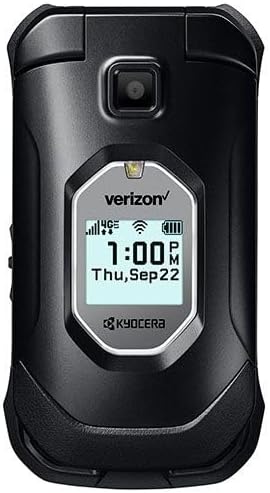
Рисунок 3.1: Передний view of the KYOCERA DuraXV Extreme+ E4811 in its closed position, displaying the external screen with time and network status.
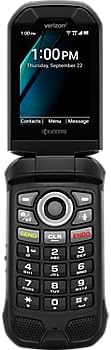
Рисунок 3.2: Передний view of the KYOCERA DuraXV Extreme+ E4811 in its open position, revealing the main display and the physical keypad with navigation buttons.

Рисунок 3.3: Назад view of the KYOCERA DuraXV Extreme+ E4811 in its open position, showing the rear casing and charging contacts.
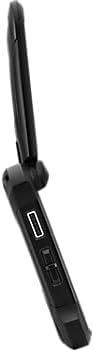
Рисунок 3.4: Сторона view of the KYOCERA DuraXV Extreme+ E4811, highlighting the USB charging port and other side buttons.
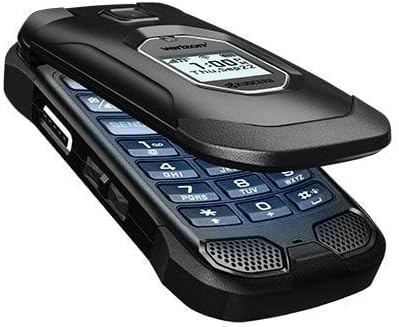
Рисунок 3.5: Угловой view of the KYOCERA DuraXV Extreme+ E4811 in its open state, providing a perspective of both the display and keypad.
4. Настройка
4.1 Установка и зарядка аккумулятора
- If the battery is not pre-installed, remove the back cover of the phone.
- Align the battery (1770 mAh) contacts with the phone's terminals and gently press it into place.
- Replace the back cover, ensuring it is securely latched to maintain water and dust resistance.
- Подключите USB-кабель к порту зарядки телефона и к адаптеру питания. Вставьте адаптер в розетку.
- Allow the phone to charge fully before initial use. The charging indicator will show progress.
4.2. Установка SIM-карты
Your DuraXV Extreme+ E4811 requires a Nano-SIM card for cellular service.
- Выключите телефон и снимите заднюю крышку.
- Найдите слот для SIM-карты.
- Insert the Nano-SIM card with the gold contacts facing down and the notched corner aligned with the slot. Push until it clicks into place.
- Заменить заднюю крышку.
4.3. Включение и выключение
- Для включения: Нажмите и удерживайте кнопку питания/завершения вызова, пока экран не загорится.
- Чтобы выключить: Press and hold the Power/End Call button, then select 'Power off' from the options on the screen.
5. Инструкция по эксплуатации
5.1. Основная навигация
Use the directional pad and center select button to navigate menus and select options. The 'Send' button initiates calls, and the 'End' button terminates calls or returns to the home screen.
5.2. Совершение и прием звонков
- Сделать звонок: Enter the phone number using the keypad and press the 'Send' button.
- Ответить на звонок: When the phone rings, press the 'Send' button.
- Чтобы завершить вызов: Press the 'End' button.
5.3. Отправка и получение сообщений
- Перейдите в приложение «Сообщения» из главного меню.
- Select 'New Message' to compose a text message. Enter the recipient's number and your message.
- Press the 'Send' option to transmit the message.
- Received messages will appear as notifications on the screen and can be accessed through the 'Messages' application.
5.4. Использование камеры
Your phone is equipped with a 5MP camera.
- Open the 'Camera' application from the main menu.
- Оформите объект съемки, используя дисплей.
- Press the center select button or a dedicated camera button (if available) to capture a photo.
5.5. Connectivity (Bluetooth, Wi-Fi, 4G LTE)
- Bluetooth: Access Bluetooth settings from the main menu to pair with compatible devices like headsets or car kits.
- Wi-Fi: Connect to available Wi-Fi networks via the settings menu to access the internet without using cellular data.
- 4G LTE: The phone automatically connects to the 4G LTE network for high-speed data and calls, provided a valid SIM card and service plan are active.
6. Техническое обслуживание
- Уборка: Используйте мягкий, damp Для протирки корпуса телефона используйте специальную ткань. Избегайте агрессивных химикатов и абразивных материалов.
- Водо- и пыленепроницаемость: The phone is IP68 rated. Ensure all port covers are securely closed to maintain water and dust resistance. Do not expose the phone to saltwater or other liquids. If exposed to water, rinse with fresh water and dry thoroughly.
- Уход батареи: Avoid extreme temperatures. Do not puncture or disassemble the battery. Use only approved chargers.
- Охрана окружающей среды: The phone is MIL-STD-810G compliant, offering protection against drops, shock, vibration, and extreme weather conditions. However, avoid unnecessary harsh treatment.
7. Поиск Неисправностей
If you encounter issues with your phone, refer to the following common solutions:
- Телефон не включается: Ensure the battery is charged. Connect the phone to the charger and attempt to power on after a few minutes.
- Нет сигнала сети: Check that the SIM card is correctly inserted. Move to an area with better network coverage. Contact your service provider if the issue persists.
- Невозможно совершать/принимать звонки: Verify that you have active cellular service. Check call barring settings. Ensure the phone is not in Airplane Mode.
- Screen is Unresponsive: If the screen is frozen, try performing a soft reset by removing and reinserting the battery (if accessible) or holding the Power button for an extended period.
- Плохое качество звука: Check the volume settings. Ensure the speaker or earpiece is not obstructed.
8. Технические характеристики
| Особенность | Спецификация |
|---|---|
| Номер модели | Е4811 |
| Операционная система | Андроид 11.0 |
| Модель ЦП | MediaTek Helio |
| Скорость ЦП | 2 ГГц |
| БАРАН | 2 ГБ |
| Внутреннее хранилище | 16 ГБ |
| Разрешение дисплея | 480 х 800 |
| Задняя камера | 5 МП |
| Емкость аккумулятора | 1770 мАч |
| Связность | 4G LTE, Wi-Fi, Bluetooth |
| Рейтинги долговечности | IP68 Dust & Waterproof, MIL-STD-810G |
| Форм-фактор | Подбросить |
| Аудиоразъем | 3.5 мм |
| Вес товара | 8 унции |
9. Гарантия и поддержка
Your KYOCERA DuraXV Extreme+ E4811 is covered by a manufacturer's warranty. For specific warranty terms and conditions, please refer to the warranty card included with your product or visit the official KYOCERA website. For technical support, product registration, or further assistance, please visit the KYOCERA support page or contact their customer service directly.
Онлайн поддержка: www.kyoceramobile.com/support/


