Введение
This manual provides detailed instructions for the installation, operation, and maintenance of your Thermalright Stream Vision 360 Black CPU Liquid Cooler. Please read this manual thoroughly before installation and use to ensure proper function and longevity of the product.

Image: Thermalright Stream Vision 360 Black CPU Liquid Cooler installed in a PC case, highlighting the LCD screen and radiator.
Информация по безопасности
Always follow these safety guidelines to prevent damage to the product or injury:
- Перед установкой убедитесь, что ваш компьютер выключен и отсоединен от розетки.
- Обращайтесь с компонентами осторожно, чтобы не повредить их.
- Do not attempt to disassemble the cooler's pump or radiator.
- Хранить в недоступном для детей месте.
- Refer to the installation video or manual for specific steps.
Содержимое упаковки
Убедитесь, что в упаковке присутствуют все компоненты:
- Thermalright Stream Vision 360 Black CPU Liquid Cooler (Radiator with pre-installed fans, pump/waterblock with LCD screen)
- Mounting fasteners for AMD (AM4/AM5) and Intel (LGA1150/1151/1155/1156/1200/2011/2066/1700/1851) platforms
- SS2 all-metal buckle
- Water guide clip
- USB-C to USB 2.0 connection cable (for LCD screen)
- Термическая паста

Image: Main components of the liquid cooler, showing the radiator, fans, and the waterblock with its detachable LCD module.
Настройка и установка
The Thermalright Stream Vision 360 Black CPU Liquid Cooler is designed for straightforward installation. Ensure you have the correct mounting hardware for your CPU socket type (AMD AM4/AM5 or Intel LGA1150/1151/1155/1156/1200/2011/2066/1700/1851).
Общие шаги установки:
- Подготовьте процессор: Clean the CPU surface of any old thermal paste. Apply a thin, even layer of new thermal paste to the center of the CPU.
- Установите радиатор и вентиляторы: Mount the radiator with its pre-installed fans to an available fan mounting location in your PC case (typically top or front). Ensure airflow direction is optimal for your case.
- Установите монтажный кронштейн: Attach the appropriate mounting bracket (Intel or AMD) to the waterblock. The SS2 all-metal buckle provides secure compatibility.
- Гора Уотерблок: Carefully place the waterblock onto the CPU, aligning the mounting holes. Secure it with the provided fasteners. For AMD platforms, use the original motherboard backplate.
- Соединительные кабели:
- Connect the pump's 4-PIN PWM cable to the CPU_FAN or AIO_PUMP header on your motherboard.
- Connect the fan cables to appropriate fan headers on your motherboard or a fan controller.
- Connect the LCD screen via the USB-C to USB 2.0 cable to an available USB 2.0 header on your motherboard.
- Manage Tubing: Use the included water guide clips to route the water tubes neatly and prevent them from interfering with other components or fans.

Image: The magnetic LCD display module detaching from the waterblock, illustrating easy installation.
Software Installation (TRCC):
To customize the LCD screen and monitor system parameters, download and install the TRCC software from the official Thermalright website. The software allows for custom themes, static/dynamic picture switching, and video playback on the 3.5-inch IPS LCD screen.
Видеоинструкция по установке:
For a visual guide, refer to the official installation video. This video demonstrates the process for various CPU platforms.
Видео: Продукт законченview and installation guide for the Thermalright Stream Vision 360 Black CPU Liquid Cooler.
Инструкция по эксплуатации
Настройка ЖК-экрана:
The 3.5-inch IPS LCD screen offers a 640x480 resolution for clear display. Use the TRCC software to:
- Display real-time system monitoring data (CPU/GPU temperature, clock frequencies, usage).
- Switch between various static and dynamic pictures.
- Upload and play custom GIFs and videos.
- Apply custom themes.

Image: The LCD screen showcasing various live system monitoring displays and customizable visual themes.
Active Motherboard Cooling:
The magnetic cold head pump features an integrated 60mm fan. This fan provides direct airflow to the motherboard's core power supply module (VRM) and memory, contributing to lower component temperatures and stable CPU power delivery.
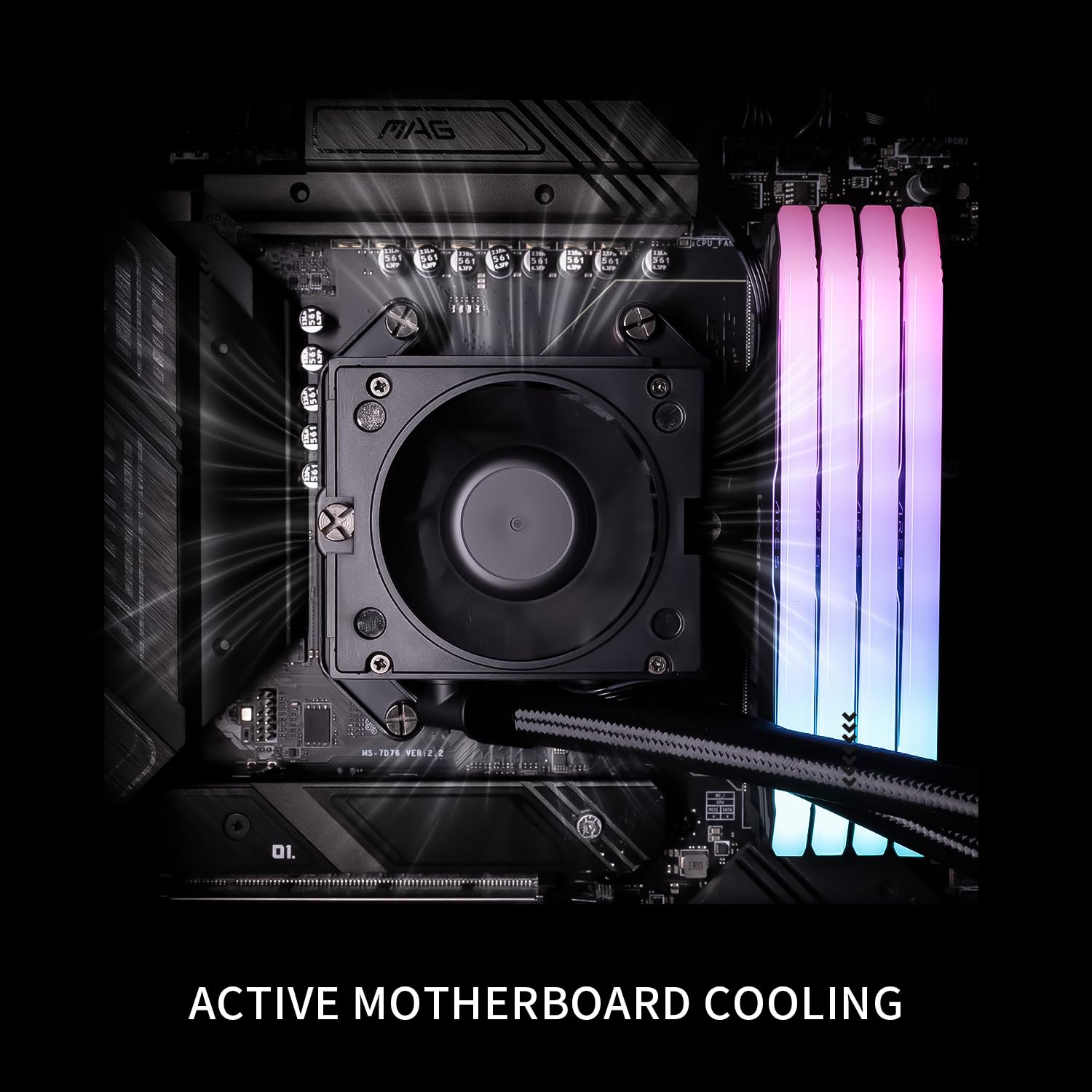
Image: The waterblock's integrated fan actively cooling the motherboard's voltage regulator modules (VRM) and RAM.
Обслуживание
- Очистка от пыли: Периодически очищайте ребра радиатора и лопасти вентилятора сжатым воздухом, чтобы предотвратить скопление пыли, которое может ухудшить эффективность охлаждения.
- Управление кабелями: Убедитесь, что все кабели надежно подключены и не препятствуют циркуляции воздуха.
- Обновления программного обеспечения: Keep the TRCC software updated to access new features and performance improvements.
- Liquid Level Check: This is a closed-loop system and does not require regular liquid refills. However, monitor for any signs of leaks.
Поиск неисправностей
| Проблема | Возможная причина | Решение |
|---|---|---|
| Высокие температуры процессора |
|
|
| ЖК-экран не отображается |
|
|
| Необычный шум от охладителя |
|
|
Технические характеристики
| Компонент | Спецификация |
|---|---|
| Модель | Stream Vision 360 Black |
| Размеры радиатора | 403мм х 120мм х 52мм |
| Waterblock Dimensions | 69mm x 76mm x 92mm (cold head) |
| Скорость насоса | 6400 об/мин ±10% |
| Объем насосаtage | 12 В постоянного тока |
| Разъем насоса | 4-контактный ШИМ |
| Модель вентилятора | TL-H12-X28-R7 |
| Размеры вентилятора | 120мм х 120мм х 28мм |
| Скорость вентилятора | 2400 об/мин ±10% |
| Давление воздуха вентилятора | 2.78 MM H2O |
| Объем воздушного потока вентилятора | 95.4 куб. футов в минуту |
| Рабочий шум | ≤31.4 дБА |
| Тип подшипника вентилятора | Подшипник S-FDB V2 |
| Размер ЖК-экрана | 3.5 дюймов |
| LCD Разрешение | 640x480 IPS |
| Совместимость | AMD: AM4/AM5, Intel: LGA1150/1151/1155/1156/1200/2011/2066/1700/1851 |
| Материал | Алюминий |
| Вес товара | 6.74 фунта |

Image: Compatibility information for Intel and AMD platforms, alongside details of the radiator's internal water channels and polymer-sleeved tubes.

Image: Specifications and features of the TL-H12-X28-R7 fan, including its S-FDB V2 bearing and static pressure optimization.
Гарантия и поддержка
For warranty information, technical support, or further assistance, please visit the official Thermalright webили обратитесь в службу поддержки клиентов. Сохраните чек в качестве подтверждения покупки.
Официально Webсайт: www.thermalright.com


