1. Введение
Welcome to the world of Tonies! This instruction manual provides essential information for setting up, operating, and maintaining your Tonies Toniebox 2 Audio Player Starter Set. Designed for independent play, the Toniebox offers screen-free audio entertainment for children aged 1 and up.

Image: The Tonies Toniebox 2 in Cloud Pink, accompanied by the Playtime Puppy Tonie.
2. Настройка
2.1 What's Included in the Starter Set
- 1x Toniebox 2 Speaker Unit (Cloud Pink)
- 1x 8.6” (22cm) USB-C Charging Cable
- 1x Playtime Puppy Tonie
Note: Power Adapter, longer charger cable, and additional Tonies are sold separately. Wi-Fi is needed for initial setup. The included USB-C Charging Cable is 8.6" to meet child safety standards for little listeners aged 1+.

Image: Visual representation of the Toniebox 2 Starter Set components.
2.2 Начальная настройка
- Charge the Toniebox: Connect the Toniebox to a power source using the provided USB-C charging cable. Ensure it is fully charged before first use.
- Подключитесь к Wi-Fi: The Toniebox requires a Wi-Fi connection for its initial setup and to download content for new Tonies. Follow the instructions in the Tonies app or on the Tonies website to connect your device.
- Place a Tonie: Once connected, place the Playtime Puppy Tonie on top of the Toniebox. The content will automatically download and be ready for playback.

Image: The short USB-C charging cable, designed for child safety.
3. Инструкция по эксплуатации
3.1 Базовое воспроизведение
- Начать воспроизведение: Place any Tonie audio character on top of the Toniebox. Playback begins automatically.
- Отрегулируйте громкость: Press the small "ears" on top of the Toniebox. Pressing the larger ear increases volume, and the smaller ear decreases it.
- Change Tracks: Tap the sides of the Toniebox to skip forward or backward through tracks.
- Пауза / Возобновить: Remove the Tonie from the box to pause. Place it back on to resume.

Image: Simple steps for independent play with the Toniebox 2.
3.2 Sleep Timer and Sunrise Alarm
The Toniebox 2 includes smart bedtime and wake-up features. These can be configured via the Tonies app to help establish sleep routines.
- Sleep Timer with Light: Set a duration for the Toniebox to play content and emit a soft light, gradually fading as the child falls asleep.
- Будильник на рассвете: Program the Toniebox to gently wake your child with light and sound at a set time.
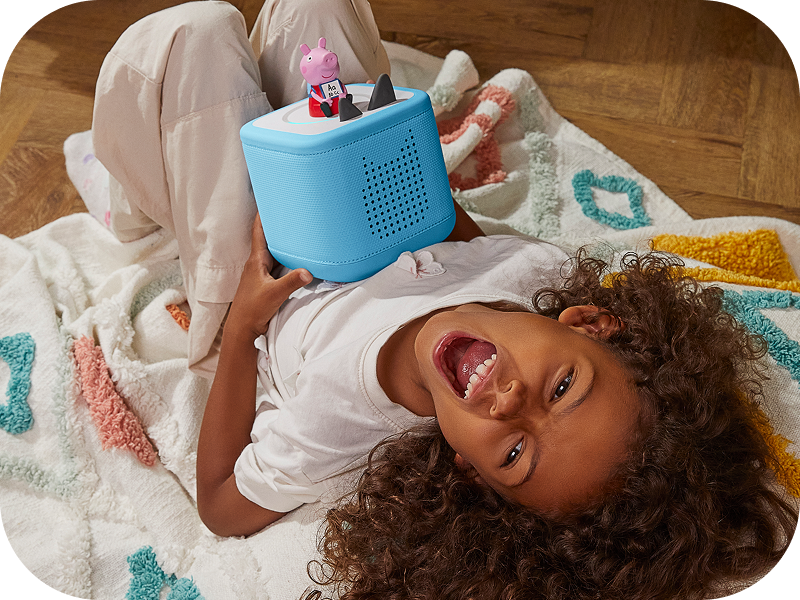
Image: A child sleeping peacefully next to a Toniebox 2, highlighting its sleep timer function.
4.Основные характеристики
- Самостоятельная игра: Kid-friendly, intuitive controls allow children to explore stories, songs, and games on their own.
- Прочность: Built to last for ages 1-9+, supporting a wide range of Tonies and Tonieplay games.
- Развлечения без экрана: Provides a safe, ad-free experience without screens, microphones, or cameras.
- Tonieplay: Supports interactive games, adventures, challenges, and quizzes (Tonieplay controller sold separately).
- Обширная библиотека контента: Access hundreds of Tonies with new releases monthly, covering diverse stories, songs, and educational content.
- Родительский контроль: Monitor usage and manage settings via the Tonies app.

Изображение: Оверview of the main features of the Toniebox 2.
5. Техническое обслуживание
- Уборка: Wipe the Toniebox with a soft, dry cloth. Avoid using harsh chemicals or abrasive materials.
- Хранилище: Store the Toniebox and Tonies in a cool, dry place away from direct sunlight and extreme temperatures.
- Уход батареи: Для оптимального срока службы аккумулятора избегайте его частой полной разрядки. Регулярно заряжайте его.
6. Поиск Неисправностей
6.1 Общие проблемы и решения
| Проблема | Возможная причина | Решение |
|---|---|---|
| Toniebox not turning on | Низкий заряд батареи; кнопка питания нажата неправильно | Charge the Toniebox fully. Press and hold one of the ears for a few seconds to power on. |
| Tonie not playing content | Content not fully downloaded; Poor Wi-Fi connection | Ensure the Toniebox is connected to Wi-Fi and the Tonie is placed correctly. Allow time for content to download. Check Wi-Fi signal strength. |
| Проблемы со звуком (слишком тихий/высокий, искаженный звук). | Volume settings; Speaker obstruction | Adjust volume using the Toniebox ears. Ensure speakers are not covered. |
For further assistance, please refer to the official Tonies support webсайт или свяжитесь со службой поддержки клиентов.
7. Технические характеристики
| Особенность | Деталь |
|---|---|
| Название модели | Toniebox 2 |
| Бренд | Тони |
| Цвет | Cloud Pink |
| Номер модели товара | Toniebox 2 |
| СКП | 840147443373 |
| Размеры продукта | 5"Д x 5"Ш x 5"В |
| Вес товара | 2.6 фунта |
| Материал | Хлопок |
| Источник питания | Питание от аккумулятора (1 литий-ионный аккумулятор в комплекте) |
| Технология связи | Wi-Fi |
| Метод контроля | Трогать |
| Специальная характеристика | Shockproof, USB Port, Network Ready |
| Рекомендуемое использование | Indoor/Outdoor, Home entertainment for kids, Educational and interactive play, Bedtime and sleep routine support |
8. Гарантия и поддержка
The Toniebox 2 comes with a limited warranty. For detailed information regarding warranty coverage, terms, and conditions, please refer to the official Tonies webсайте или в гарантийном талоне, прилагаемом к вашему продукту.
For customer support, technical assistance, or to register your product, visit the official Tonies support portal or contact their customer service team directly. Contact information can typically be found on the Tonies webсайте или в упаковке продукта.
Интернет-ресурсы:


