1. Введение
The Nothing Ear (3) wireless earbuds are designed to provide a high-quality audio experience with advanced features for various activities. This manual provides essential information for setting up, operating, and maintaining your earbuds.
2. Что в коробке
- Nothing Ear (3) Earbuds
- Чехол для беспроводной зарядки
- Кабель USB-C-USB-C
- Eartips (XS / S / L)
- Руководство пользователя
- Информация о безопасности и гарантии

Image: All items included in the Nothing Ear (3) product packaging.
3. Настройка
3.1 Первоначальное сопряжение
- Ensure your Nothing Ear (3) earbuds are in the charging case and the case is charged.
- Open the charging case lid. The indicator light should begin to flash, indicating pairing mode.
- On your device (smartphone, tablet, laptop), go to Bluetooth settings and select "Nothing Ear (3)" from the list of available devices.
- Следуйте инструкциям на экране для завершения процесса сопряжения.
3.2 Nothing X App Installation
For full functionality and customization, download the Nothing X app from your device's app store. The app allows you to adjust EQ settings, manage Active Noise Cancellation, customize controls, and access other advanced features.

Image: The Nothing X App provides comprehensive control over your Ear (3) earbuds.
4. Инструкция по эксплуатации
4.1 Сенсорное управление
The Nothing Ear (3) features intuitive pinch controls on the earbud stems. These controls can be customized via the Nothing X app.
- Одиночный щипок: Воспроизведение/пауза аудио, ответ/завершение вызова.
- Двойной щипок: Skip forward, Decline incoming call.
- Тройной щипок: Пропустить назад.
- Pinch & Hold: Toggle Noise Control (ANC/Transparency/Off).
- Double Pinch & Hold: Volume down (customizable).
4.2 Активное шумоподавление (АНЧ) и режим прозрачности
The earbuds offer up to 45 dB of Smart Hybrid ANC to reduce ambient noise. Transparency Mode allows you to hear your surroundings without removing the earbuds.
- Переключение режимов: Use the Pinch & Hold gesture on either earbud to cycle through ANC, Transparency, and Off modes.
- Адаптивный АНК: The Nothing X app allows for adaptive ANC settings, adjusting noise cancellation levels based on your environment.

Image: Visualizing the noise control features of Nothing Ear (3).
4.3 Super Mic Feature
The charging case integrates a dual-microphone system, called Super Mic, designed to enhance voice clarity by targeting your voice and reducing background noise up to 95 dB during calls.
- Активация: Press and hold the 'TALK' button on the charging case. For optimal clarity in loud settings, hold the case within 5cm of your mouth.
- Quick Commands: Hold the 'TALK' button for quick commands.
- Extended Conversations: Double-tap the 'TALK' button to lock it for longer conversations.
Image: The Super Mic feature in use for clear communication.
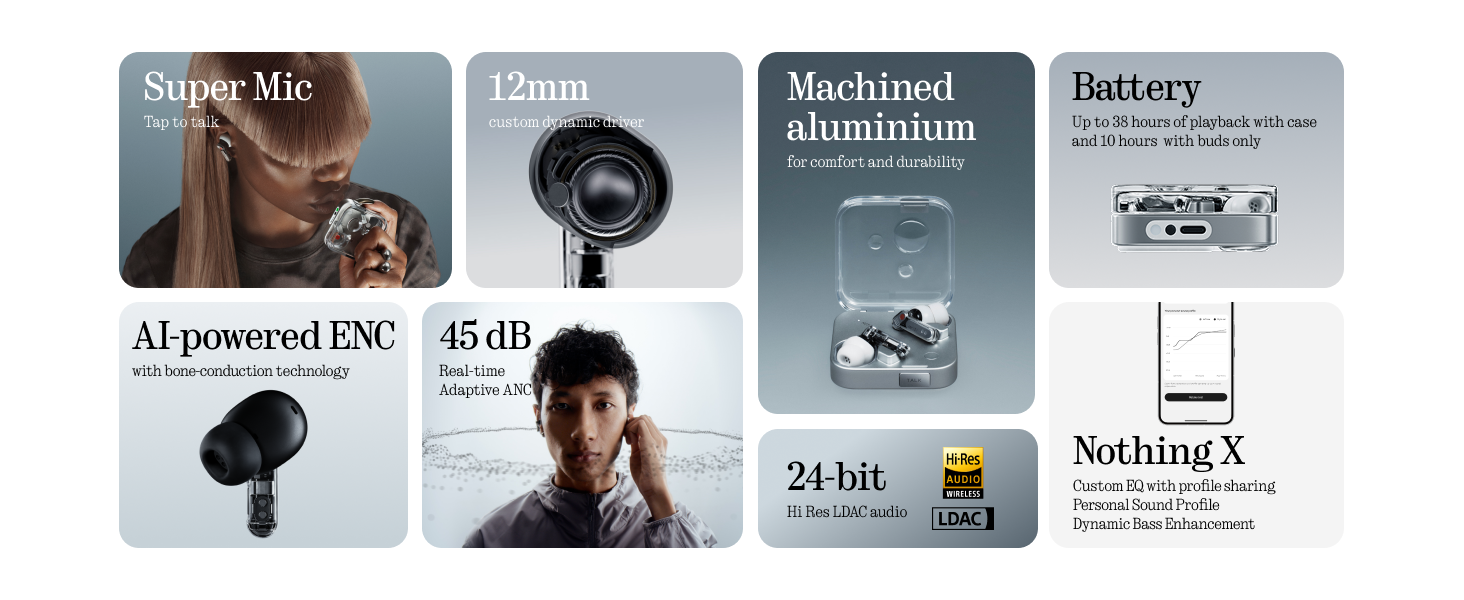
Image: The 'TALK' button on the charging case for Super Mic activation.
4.4 Пространственное аудио
Experience immersive sound with Spatial Audio. This feature can be toggled between 'Fixed' and 'Off' modes within the Nothing X app.
4.5 Low Lag Mode (Gaming)
Activate Low Lag Mode via the Nothing X app for optimized audio synchronization during gaming sessions on compatible devices.
4.6 Двойное соединение
The earbuds support Bluetooth 5.4 with Dual Connect, allowing seamless switching between two paired devices (e.g., phone and laptop).
5. Зарядка и аккумулятор
The Nothing Ear (3) provides up to 10 hours of continuous playback, with a total of 38 hours using the charging case. A quick 10-minute charge can provide an additional 10 hours of use.
- Проводная зарядка: Use the provided USB-C to USB-C cable to charge the case.
- Беспроводная зарядка: Зарядный чехол поддерживает беспроводную зарядку.

Image: Battery life and charging capabilities of Nothing Ear (3).
6. Техническое обслуживание и уход
- Водостойкость: The earbuds have an IP54 rating, making them water resistant and suitable for workouts and light rain. The charging case also has an IP54 rating.
- Уборка: Регулярно протирайте наушники и зарядный кейс мягкой сухой тканью. Следите за тем, чтобы влага не попадала в разъемы для зарядки или решетки динамиков.
- Ушные вкладыши: Remove and clean eartips periodically. Replace them if they show signs of wear or damage.
7. Поиск Неисправностей
- Нет звука: Убедитесь, что наушники заряжены, правильно сопряжены и громкость установлена на максимум как на наушниках, так и на вашем устройстве.
- Проблемы с сопряжением: Place earbuds back in the case, close the lid, then open it again to re-enter pairing mode. Forget the device on your phone's Bluetooth settings and try pairing again.
- АНК не работает: Check ANC settings in the Nothing X app. Ensure eartips provide a good seal.
- Плохое качество связи: Ensure Super Mic is activated correctly in noisy environments. Check earbud microphone grilles for obstructions.
- Проблемы с приложением: Ensure the Nothing X app is updated to the latest version. Restart the app or your device if problems persist.
8. Технические характеристики
| Название модели | Nothing Ear (3) |
| Номер модели товара | Б173 |
| Контроль шума | Гибридное активное шумоподавление (до 45 дБ) |
| Технология связи | Bluetooth 5.4, беспроводная связь |
| Размер аудиодрайвера | 12-миллиметровый динамический драйвер |
| Уровень водонепроницаемости | IP54 (Earbuds & Case) |
| Срок службы батареи (наушники) | До 10 часов |
| Общее время работы от аккумулятора (с чехлом) | До 38 часов |
| Быстрая зарядка | 10 минут зарядки обеспечивают 10 часов воспроизведения. |
| Беспроводная зарядка | Поддерживается |
| Микрофоны | 6 HD Microphones (earbuds), Dual-Microphone System (case for Super Mic) |
| Материал | Алюминий, Пластик |
| Вес товара | 71.4 Grams (Case) |
9. Официальное видео о продукте
Видео: Официальное лицоview of the Nothing Ear (3) Wireless Earbuds, highlighting key features like 45dB Hybrid ANC.
10. Гарантия и поддержка
For warranty information and customer support, please refer to the 'Safety and Warranty Information' document included in your product packaging or visit the official Nothing webсайт.


