Введение
This manual provides comprehensive instructions for the setup, operation, and maintenance of your Trevi PJ 3030 Digital Projection Clock. Please read this manual carefully before using the device to ensure proper function and longevity.
Продукт болееview
The Trevi PJ 3030 is a versatile digital clock designed to display time, date, and temperature, with the added feature of time projection. It includes a backlit display for clear readability and a programmable alarm function.
Компоненты
- Цифровой дисплей
- Проекционная линза
- Control Buttons (AL, UP, DOWN, SET, MODE)
- Отсек для батареи
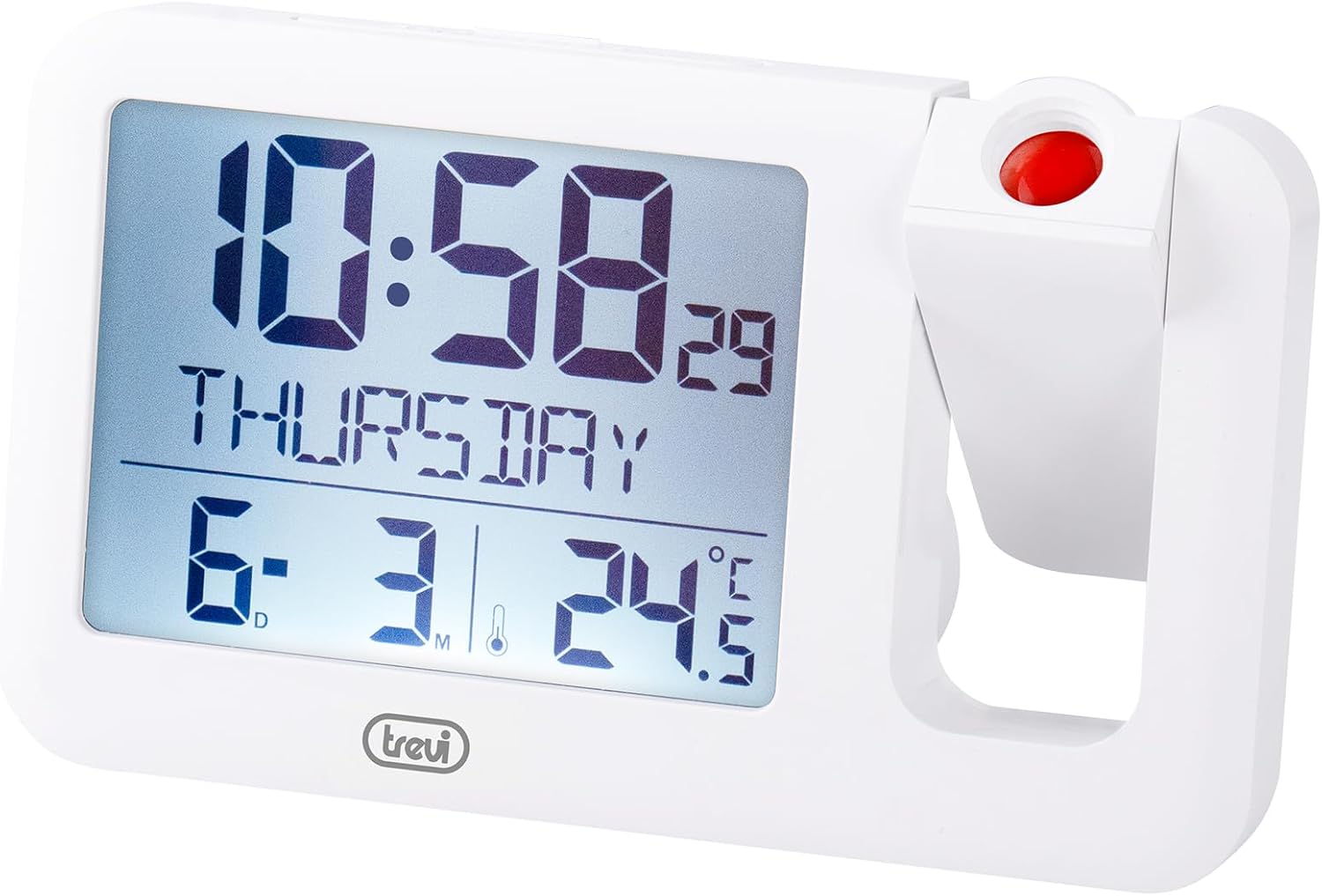
Рисунок 1: Передний view of the Trevi PJ 3030 Digital Projection Clock. The image shows the main digital display on the left, indicating time, day, date, and temperature. On the right, the adjustable projection lens is visible with a red button on top.
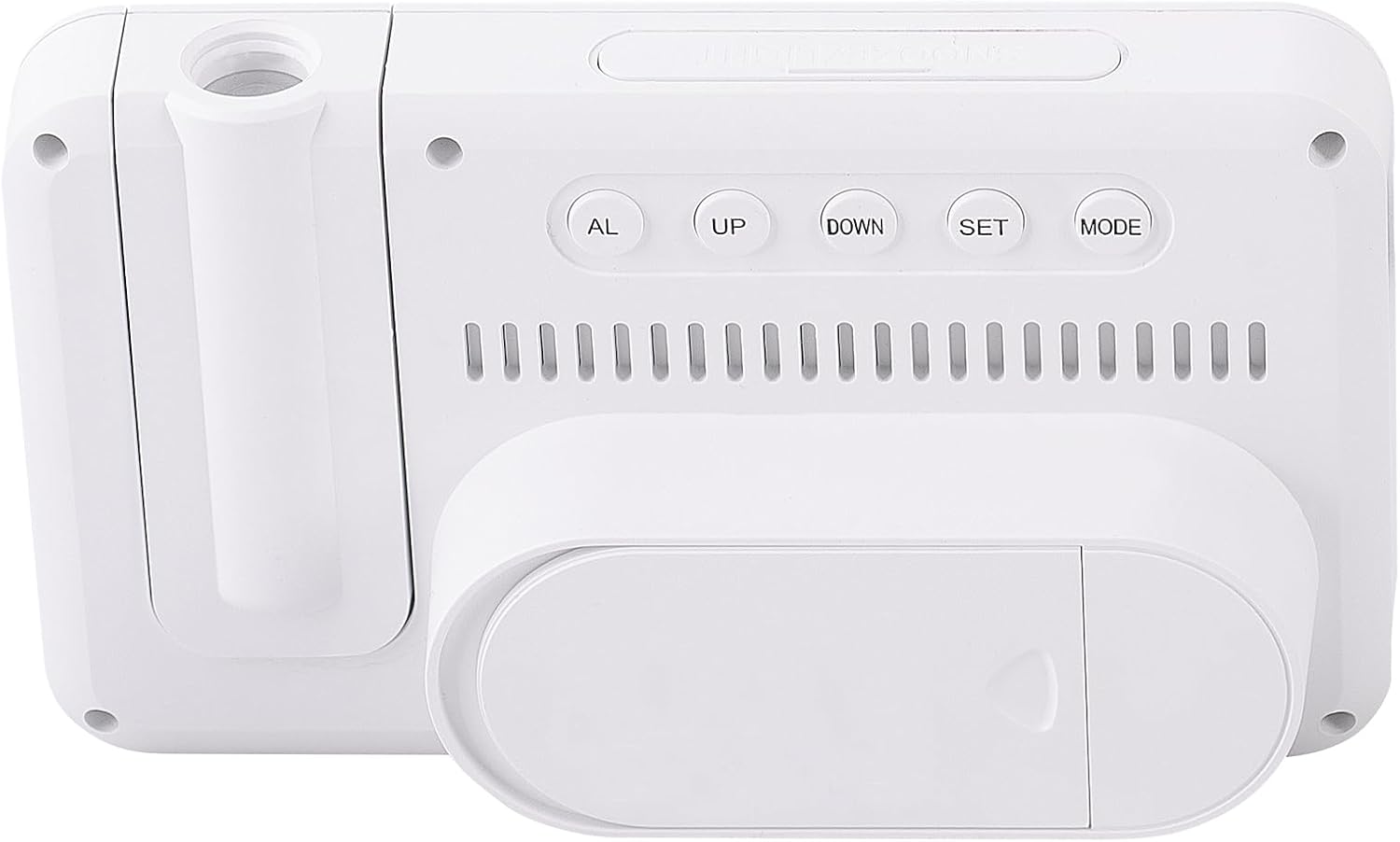
Рисунок 2: Назад view of the Trevi PJ 3030 Digital Projection Clock. This view highlights the control buttons: AL, UP, DOWN, SET, and MODE, arranged horizontally. Below the buttons, ventilation slots are visible, and at the bottom, the battery compartment cover is shown.
Настраивать
Установка аккумулятора
- Найдите отсек для батареи на задней панели устройства (см. рисунок 2).
- Откройте крышку батарейного отсека.
- Вставьте 3 батарейки AAA (не входят в комплект) в соответствии с полярностью (+/-) внутри отсека.
- Плотно закройте крышку батарейного отсека.
Примечание: The device requires 3 AAA batteries for operation. Batteries are not included with the product.
Инструкция по эксплуатации
Установка времени и даты
- Нажмите РЕЖИМ button repeatedly until the time display starts flashing.
- Используйте UP or ВНИЗ кнопки для настройки часов.
- Нажимать НАБОР to confirm the hour and move to minute adjustment.
- Используйте UP or ВНИЗ кнопки для настройки минут.
- Нажимать НАБОР to confirm the minutes and move to year adjustment.
- Continue this process, using UP/ВНИЗ отрегулировать и НАБОР to confirm, for setting the year, month, and day.
- После завершения всех настроек нажмите РЕЖИМ для выхода из режима настройки.
Установка будильника
- Нажмите AL Кнопка для входа в режим настройки будильника. Время будильника будет мигать.
- Используйте UP or ВНИЗ кнопки для настройки часа будильника.
- Нажимать НАБОР to confirm the alarm hour and move to minute adjustment.
- Используйте UP or ВНИЗ кнопки для настройки минут будильника.
- Нажимать НАБОР to confirm the alarm minutes.
- Нажимать AL again to activate or deactivate the alarm. An alarm icon will appear on the display when activated.
Использование функции проецирования
The Trevi PJ 3030 can project the time onto a ceiling or wall.
- Locate the projection lens on the right side of the clock (refer to Figure 1).
- Press the red button located on top of the projection lens to activate the projection.
- Adjust the angle of the projection lens manually to direct the time display to your desired surface.
- The projection will remain active for a short period and then turn off automatically to conserve battery power.
Changing Temperature Unit (°C / °F)
The clock displays temperature in Celsius (°C) or Fahrenheit (°F).
- В обычном режиме отображения времени нажмите кнопку ВНИЗ button to toggle between Celsius and Fahrenheit.
Обслуживание
- Clean the clock's surface with a soft, dry cloth. Do not use abrasive cleaners or solvents.
- Храните устройство вдали от прямых солнечных лучей, экстремальных температур и высокой влажности.
- Если часы не будут использоваться в течение длительного времени, извлеките батарейки, чтобы предотвратить их протечку.
Поиск неисправностей
| Проблема | Возможная причина | Решение |
|---|---|---|
| Дисплей пустой или тусклый. | Разряженные или разряженные батареи. | Замените батарейки типа AAA на новые. Соблюдайте полярность. |
| Projection is not visible or dim. | Projection feature not activated; insufficient ambient darkness; projection lens obstructed. | Press the red projection button. Ensure the room is dark enough. Clean the projection lens if necessary. |
| Сигнализация не срабатывает. | Alarm not activated; incorrect alarm time set. | Ensure the alarm icon is visible on the display. Re-check alarm time settings. |
| Отображается неверное время/дата. | Time/date not set correctly after battery change or initial setup. | Follow the "Setting Time and Date" instructions to reset. |
Технические характеристики
- Модель: Trevi PJ 3030
- Тип дисплея: Цифровой, с подсветкой
- Функции: Time, Date, Day, Temperature (°C/°F), Alarm, Projection
- Источник питания: Батареи 3 x AAA (не входят в комплект)
- Размеры: 14.9 см (ширина) x 9 см (высота)
- Масса: 0.2 Килограмма
- Материал: Пластик
- Внутреннее / наружное использование: В помещении
Гарантия и поддержка
For warranty information and customer support, please refer to the documentation provided with your purchase or visit the official Trevi webСохраните чек о покупке для предъявления гарантийных претензий.


