1. Введение
This manual provides detailed instructions for the safe and effective use of your iBstone Nova Hearing Aids. Please read this manual thoroughly before using your device and retain it for future reference.
The iBstone Nova Hearing Aids are designed to provide clear sound with advanced noise-cancelling technology, offering a comfortable listening experience for individuals with mild to severe hearing loss.

Image: iBstone Nova Hearing Aids (blue and red) with their charging case and packaging. This image illustrates the complete product package.
2. Что включено
Your iBstone Nova Hearing Aids package contains the following items:

Image: A visual representation of all items included in the iBstone Nova Hearing Aids package, arranged neatly.
- Зарядный футляр
- iBstone Nova Hearing Aids (Left and Right)
- Anti-lost Strap
- Щетка для чистки
- Wax Guard Filters
- USB-кабель для зарядки
- Руководство пользователя (этот документ)
- Assorted Silicone Ear Domes
- Dry Tablets (for moisture-proof compartment)
3. Настройка и первое использование
3.1 Зарядка устройства
Before initial use, fully charge the hearing aids and the charging case.
- Place the hearing aids into their respective slots in the charging case. Ensure the blue aid is in the 'L' slot and the red aid is in the 'R' slot.
- Подключите USB-кабель для зарядки к зарядному футляру и источнику питания.
- The charging case features a clear remaining battery display. Lights will indicate charging status. A full charge is indicated when all lights are off.
- A full charge takes approximately 1.5 hours and provides up to 80 hours of use with the charging case.

Image: Illustration of the charging case with hearing aids, showing charging indicators and battery duration information. It highlights the 1.5-hour fast charge for 80 hours of use.
3.2 Selecting and Attaching Ear Domes
Properly fitted ear domes are crucial for comfort and optimal sound quality, preventing feedback (whistling).
- Choose the ear dome size that feels most comfortable and creates a good seal in your ear canal. The package includes various sizes and styles.
- Gently attach the selected ear dome to the hearing aid.
3.3 Ношение слуховых аппаратов
The iBstone Nova hearing aids are designed for a slim, in-ear fit.
- Identify the Left (L) and Right (R) hearing aids. They are typically color-coded (blue for left, red for right) and marked.
- Gently insert the hearing aid into your ear canal, ensuring the upward direction marking is correctly oriented.
- Adjust the hearing aid until it feels secure and comfortable.

Image: A step-by-step guide illustrating how to choose ear domes, place the hearing aid in the ear canal, adjust for comfort, and use the function button. It shows a person comfortably wearing the device.
4. Инструкция по эксплуатации
4.1 Включение/выключение питания
- Автоматическое включение/выключение: Слуховые аппараты автоматически включаются при извлечении из зарядного футляра и выключаются при помещении обратно в футляр.
4.2 Adjusting Volume and Modes
The iBstone Nova features a single function button for all adjustments.
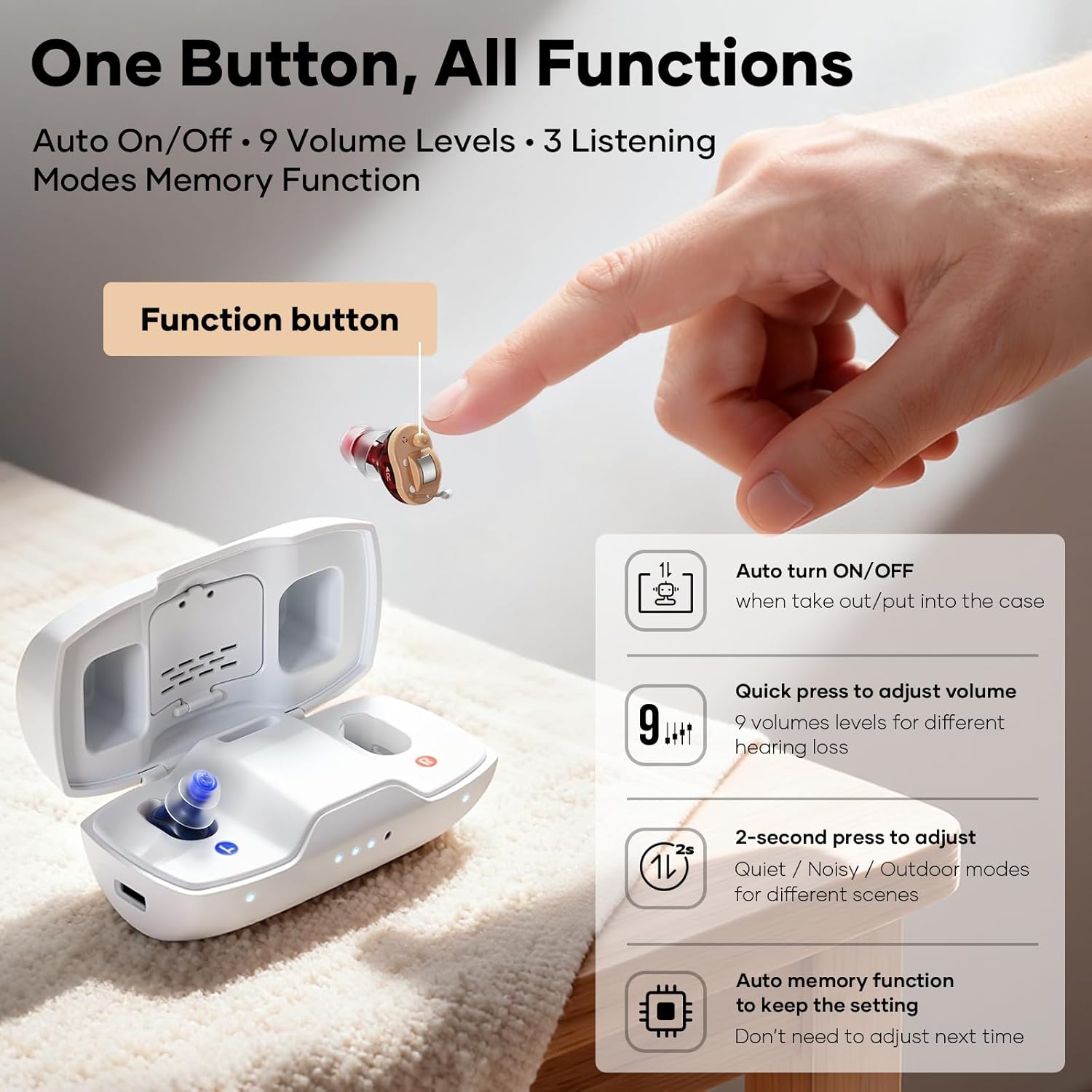
Image: Diagram illustrating the single function button on the hearing aid and its various operations: auto on/off, quick press for volume adjustment, 2-second press for mode adjustment, and auto memory function.
- Регулировка громкости: A quick press of the function button cycles through 9 volume levels. Select the level that provides optimal clarity without discomfort.
- Выбор режима: Press and hold the function button for 2 seconds to switch between the 3 hearing modes:
- Тихий режим: Optimized for calm environments.
- Noisy Mode: Enhances speech in environments with background noise.
- Режим «На открытом воздухе»: Designed for open-air settings, reducing wind noise.
- Функция памяти: The device remembers your last used volume and mode settings.
5. Техническое обслуживание
Regular maintenance ensures the longevity and optimal performance of your iBstone Nova Hearing Aids.
5.1 Ежедневная уборка
- After each use, gently wipe the hearing aids with a soft, dry cloth.
- Use the provided cleaning brush to remove any earwax or debris from the ear domes and sound outlets.
- Не используйте воду или чистящие средства непосредственно на слуховых аппаратах.
5.2 Wax Guard Filters
Periodically check and replace the wax guard filters as needed to prevent earwax from entering the hearing aid and affecting sound quality.
- Refer to the specific instructions included with your wax guard filters for replacement procedures.
5.3 Moisture Control
The charging case includes a built-in moisture-proof compartment to help keep your hearing aids dry.
- Place the provided dry tablets into this compartment.
- Store your hearing aids in the charging case with the dry tablets when not in use to extend their lifespan.

Изображение: коллажasing the anti-lost strap, the built-in dehumidifying capsule in the charging case, the portability of the charging case, and the variety of ear domes for a custom fit.
6. Поиск Неисправностей
If you encounter any issues with your iBstone Nova Hearing Aids, please refer to the following common solutions:
| Проблема | Возможная причина | Решение |
|---|---|---|
| Нет звука или слабый звук |
|
|
| Свист или обратная связь |
|
|
| Hearing Aid Not Charging |
|
|
Если проблема не устранена, обратитесь в службу поддержки клиентов.
7. Технические характеристики
- Номер модели: Новая звезда
- Производитель: iBstone
- Тип батареи: Rechargeable (1 A battery included per aid)
- Время зарядки: Примерно 1.5 часа
- Время использования: До 80 часов работы с зарядным кейсом
- Режимы слуха: Quiet, Noisy, Outdoor (3 modes)
- Уровни громкости: 9 уровня
- Снижение шума: Up to 26dB AI Noise Reduction
- Размеры упаковки: 6.1 x 3.9 x 1.8 дюйма
- Вес товара: 8.4 унции
8. Гарантия и поддержка
iBstone stands behind its products and is committed to user satisfaction.
- Служба поддержки клиентов: U.S.-based customer phone support is available to assist with any after-sales problems.
- Информация о гарантии: Please refer to the product packaging or contact iBstone customer service for specific warranty details.
- Контакт: For support, please refer to the contact information provided on the iBstone official webсайта или упаковки продукта.

Image: A group of professionals in lab coats, representing the iBstone support team, emphasizing lifetime support and customer service.