1. Введение
This manual provides detailed instructions for the setup, operation, and maintenance of your MOBAPAD Huben2 Wireless Switch Controller Pro. Please read this manual thoroughly before using the product to ensure optimal performance and longevity.
2. Информация по технике безопасности
- Держите контроллер подальше от воды и других жидкостей.
- Не подвергайте контроллер воздействию экстремальных температур.
- Не допускайте падений контроллера и не подвергайте его сильным ударам.
- Do not attempt to disassemble or repair the controller yourself. Contact customer support for assistance.
- Для зарядки используйте только прилагаемый зарядный кабель или сертифицированный кабель USB-C.
3. Содержимое упаковки
Проверьте наличие всех предметов в посылке:
- MOBAPAD Huben2 Wireless Controller Pro
- Зарядный кабель USB-C
- Wireless Dongle (2.4G)
- PU Travel Case
- Replaceable D-pad (Cross/Circle)
- Руководство по эксплуатации (данный документ)
4. Схема контроллера
Familiarize yourself with the buttons and features of your Huben2 controller.

Рисунок 4.1: Передняя часть view of the MOBAPAD Huben2 Wireless Controller Pro. Shows the joysticks, face buttons (A, B, X, Y), D-pad, and central function buttons.
- Левый/правый аналоговые джойстики: Capacitive joysticks with 4,096-step precision.
- Кнопки A/B/X/Y: Omron mechanical face buttons.
- Д-панель: Replaceable cross or circle D-pad.
- L1/R1 (кнопки на плечах): Стандартные плечевые пуговицы.
- L2/R2 (триггеры): Dual-mode triggers (Hall Effect and Microswitch).
- Кнопки M1/M2/M3/M4: Four programmable back buttons.
- Домашняя кнопка: Powers on/off and returns to system home screen.
- Кнопка скриншота: Делает скриншоты.
- Кнопки «Плюс»/«Минус»: Standard system menu buttons.
- Кнопка Турбо: Включает/выключает турбо-функцию.
- Порт USB-C: Для зарядки и проводного подключения.

Рисунок 4.2: Сзади view showing the four programmable M1, M2, M3, M4 back buttons.
5. Настройка
5.1 Зарядка контроллера
Before first use, fully charge the controller. Connect the provided USB-C cable to the controller's USB-C port and the other end to a USB power source (e.g., console, PC, or USB wall adapter). The charging indicator will show the charging status.
- A full charge provides approximately 15 hours of gameplay.

Figure 5.1: The controller features a 1000mAh battery for extended gameplay.
5.2 Режимы подключения
The Huben2 controller supports three connection methods:

Figure 5.2: The controller supports 2.4G wireless, Bluetooth, and wired connections across various platforms.
- Беспроводная связь 2.4 ГГц (через модем):
- Compatible with Windows PC, Steam, and Android TV.
- Вставьте беспроводной адаптер 2.4 ГГц в USB-порт вашего устройства.
- Включите контроллер. Он должен автоматически подключиться к адаптеру.
- Беспроводная связь Bluetooth:
- Compatible with Nintendo Switch, Nintendo Switch 2, Android, and iOS devices.
- На вашем устройстве перейдите в настройки Bluetooth и включите Bluetooth.
- На контроллере нажмите и удерживайте кнопку сопряжения Bluetooth (точное расположение см. на схеме контроллера), пока индикаторные лампочки не начнут быстро мигать.
- Select "MOBAPAD Huben2" from the list of available devices on your system to pair.
- For Nintendo Switch, the controller can wake the console from sleep mode after initial pairing and firmware update via the Mobapad app.
- Проводное подключение:
- Compatible with Windows PC and Android TV.
- Connect the controller to your device using the USB-C cable. The controller will be recognized automatically.
6. Инструкция по эксплуатации
6.1 Включение/выключение питания
- Включение питания: Нажмите кнопку «Домой».
- Выключение: Press and hold the Home button for 3-5 seconds. The controller will also power off automatically after a period of inactivity.
6.2 Режимы двойного триггера
The L2 and R2 triggers feature dual modes for different gaming experiences:

Figure 6.1: Visual representation of the 2mm Microswitch Trigger and 10mm Hall Linear Trigger modes.
- Microswitch Trigger (2mm): Provides a short, tactile click for rapid input, ideal for FPS games.
- Hall Effect Linear Trigger (10mm): Offers analog input with a longer travel distance, suitable for racing or simulation games.
- Режимы переключения: Use the physical switches located near the L2/R2 triggers to toggle between modes.
6.3 Customizable Features (Back Buttons, Macros, App Support)
The Huben2 controller offers extensive customization options:
- Programmable Back Buttons (M1-M4): Assign single button presses or complex macros to the four back buttons using the dedicated Mobapad PC/mobile application.
- Rapid-Fire Turbo Mode: Activate turbo functionality for any button. Refer to the Mobapad app or controller manual for specific button combinations to enable/disable.
- Mobapad App: Download the official Mobapad application for Windows or mobile devices to:
- Adjust joystick dead zones and response curves.
- Настройте интенсивность вибрации.
- Создание и управление макросами.
- Обновите прошивку контроллера.
6.4 HD Rumble and ALPS Linear Motors
The controller features dual ALPS linear motors for precise HD Rumble feedback, reacting to in-game sound and motion with 0ms startup time.
6.5 6-Axis Motion Control
The integrated 6-axis motion sensor provides precise motion control for compatible games.

Figure 6.2: The controller's internal 6-axis sensing motors enable precise motion control.
6.6 Replaceable D-pad and Faceplate
The controller allows for customization of the D-pad and faceplate.
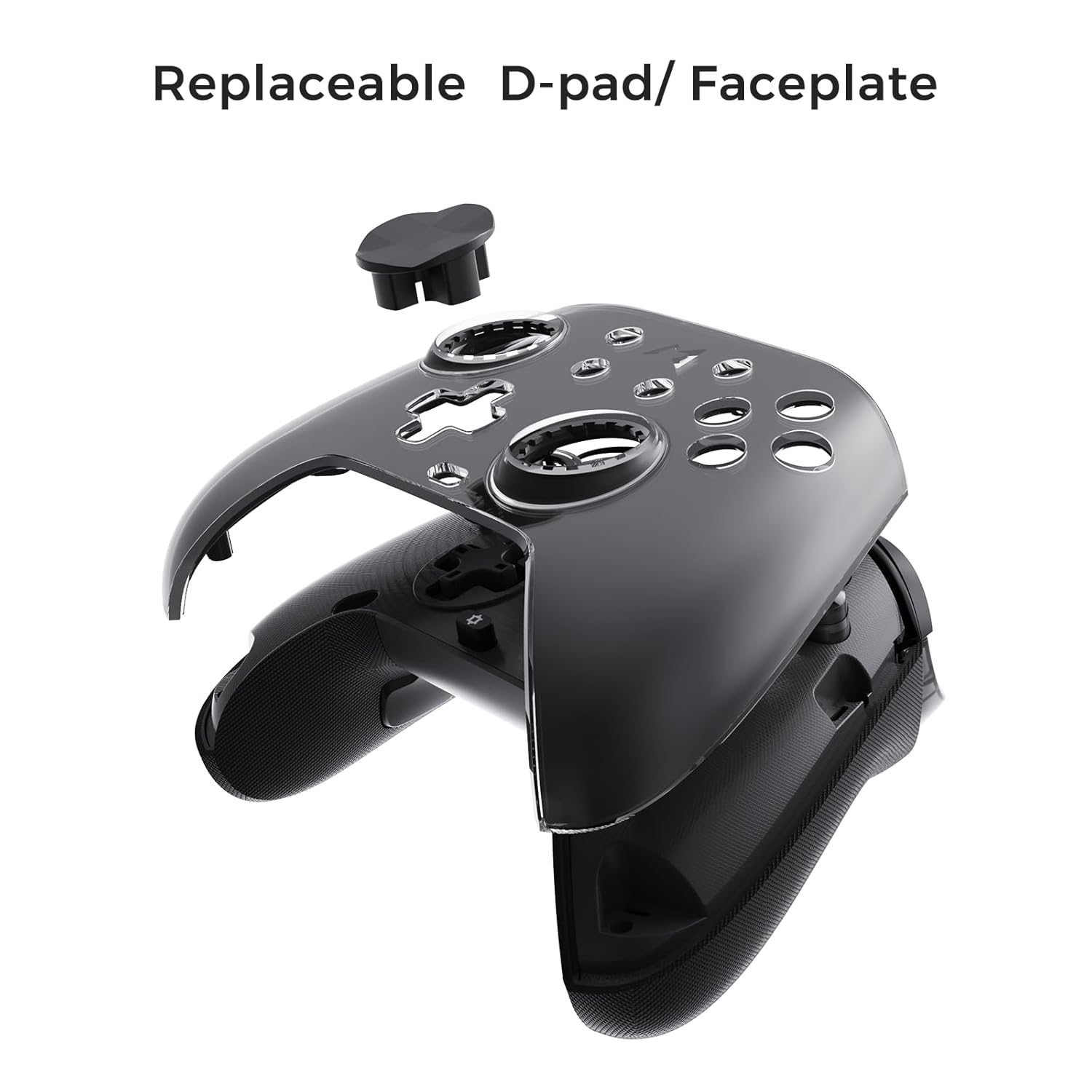
Figure 6.3: The D-pad and faceplate can be replaced for customization or preference.
- To replace the D-pad, gently remove the magnetic faceplate and then lift out the D-pad. Insert the desired D-pad (cross or circle) and reattach the faceplate.
7. Техническое обслуживание
- Уборка: Для очистки контроллера используйте мягкую сухую ткань. Для удаления стойких загрязнений слегка протрите поверхность.ampСмочите ткань водой. Не используйте едкие химикаты или абразивные чистящие средства.
- Хранилище: Store the controller in a cool, dry place, away from direct sunlight and extreme temperatures. When not in use for extended periods, store it in the provided PU travel case.
- Уход батареи: Чтобы продлить срок службы батареи, избегайте частой полной разрядки контроллера. Регулярно заряжайте его, даже если он не используется постоянно.
8. Поиск Неисправностей
| Проблема | Возможная причина | Решение |
|---|---|---|
| Контроллер не включается. | Низкий заряд батареи. | Заряжайте контроллер не менее 30 минут. |
| Контроллер не подключается по беспроводной сети. | Not in pairing mode; out of range; interference; incorrect mode selected. | Ensure controller is in pairing mode. Move closer to the device. Check for other wireless devices causing interference. Verify correct connection mode (2.4G or Bluetooth). |
| Input lag or dropped connections. | Wireless interference; low battery; outdated firmware. | Reduce distance to device. Charge controller. Update firmware via Mobapad app. Try wired connection. |
| Кнопки и джойстики не реагируют. | Software glitch; physical obstruction; calibration issue. | Restart the controller and the connected device. Check for physical debris. Calibrate joysticks via Mobapad app. |
| Функция HD Rumble не работает. | Feature disabled in game/system settings; low battery. | Ensure rumble is enabled in game and system settings. Charge controller. |
If you encounter issues not listed here, please refer to the official MOBAPAD support webсайт или свяжитесь со службой поддержки клиентов.
9. Технические характеристики
| Особенность | Деталь |
|---|---|
| Номер модели | Mobapad Huben2 H6 |
| Связность | 2.4G Беспроводная связь, Bluetooth, проводная связь (USB-C) |
| Совместимость | Nintendo Switch, Nintendo Switch 2, Windows, Steam, Android, iOS |
| Джойстики | Capacitive, 4,096-step precision, 1000Hz polling rate |
| Триггеры | Dual Mode: 2mm Omron Microswitch, 10mm Hall Effect Linear |
| Кнопки | Omron Mechanical Face Buttons, Programmable Back Buttons (M1-M4) |
| Вибрация | Два линейных двигателя ALPS (HD Rumble) |
| Управление движением | 6-осевой гироскоп |
| Емкость аккумулятора | 1000 мАч литий-ионный |
| Срок службы батареи | До 15 часов (приблизительно) |
| Размеры | 6.3 x 4.13 x 2.76 дюйма |
| Масса | 1.87 фунта |
10. Гарантия и поддержка
MOBAPAD products are designed and manufactured to the highest quality standards. For warranty information, technical support, or customer service inquiries, please visit the official MOBAPAD website or contact their authorized support channels. Please retain your proof of purchase for warranty claims.
Webсайт: Visit the MOBAPAD Store on Amazon


