1. Введение
This manual provides comprehensive instructions for the safe and effective use of the AMPBANK H128 Handheld Thermal Camera. The H128 is designed for precise temperature measurement and thermal imaging, suitable for various applications including electrical inspections, HVAC diagnostics, building energy audits, and automotive maintenance. Please read this manual thoroughly before operating the device and retain it for future reference.

Рисунок 1.1: AMPBANK H128 Handheld Thermal Camera, showcasing его эргономичный дизайн и встроенный дисплей.
2. Информация по технике безопасности
Во избежание травм и повреждения устройства всегда соблюдайте следующие меры предосторожности.
- Do not point the camera directly at extremely high-intensity energy sources, such as the sun or lasers, as this may damage the infrared detector.
- Avoid dropping the device or subjecting it to severe impact, despite its robust design.
- Do not immerse the device in water or other liquids. While it has an IP65 rating for dust and water jet protection, it is not designed for submersion.
- Use only the specified charging cable (USB-C) and power adapter to charge the device.
- Не пытайтесь разбирать или модифицировать камеру. Ремонт должен выполняться только авторизованным сервисным персоналом.
- Keep the lens clean and free from dust and debris. Use a soft, lint-free cloth for cleaning.
- Operate the device within the specified environmental conditions (temperature and humidity).
3. Продукт закончилсяview
3.1. Компоненты
The AMPBANK H128 thermal camera includes the following main components:
- Инфракрасный объектив: Улавливает тепловое излучение.
- Экран дисплея: Отображает тепловые изображения, показания температуры и пункты меню.
- Кнопки управления: For navigation and selection (OK, Up, Down, Return/Power).
- Триггерная кнопка: Для получения изображений.
- Порт USB-C: Для зарядки и передачи данных.
- Штатив Standard 1/4-inch thread for stable positioning.
3.2.Основные характеристики
The H128 thermal camera offers a range of advanced features for efficient and accurate thermal inspections:
- Enhanced Clarity with TISR Resolution: The camera utilizes TISR (Thermal Image Super Resolution) technology to achieve an effective display resolution of 240x240 pixels from a 128x128 infrared sensor, providing clearer thermal images.
- Увеличенное время автономной работы до 24 часов: Equipped with a built-in 2900mAh rechargeable battery, the H128 provides up to 24 hours of continuous operation, minimizing downtime during extended inspections.
- Precise Temperature Measurement: The device offers high accuracy with a temperature resolution of 0.1°C and readings within ±3%, covering a wide temperature range from -4°F to 842°F (-20°C to 450°C). Users can adjust emissivity for various materials to improve accuracy.
- Temperature Alarm for Anomaly Detection: A built-in alarm system quickly identifies abnormal heat sources, automatically tracking and displaying maximum, minimum, and center temperatures on the screen.
- Durable and Robust Design: The H128 is built to withstand demanding environments, featuring a 6.56-foot (2-meter) drop protection and an IP65 ingress protection rating against dust and water jets.
- Высокая частота кадров: A 25Hz frame rate ensures smooth, real-time thermal imagery, crucial for dynamic inspections.
- Multiple Thermal Palettes: Choose from 5 different color palettes (Iron Red, Black Hot, Rainbow, White Hot, Red Hot) to best visualize temperature differences for specific applications.

Figure 3.1: Comparison of thermal image clarity with and without TISR technology, demonstrating the enhanced 240x240 resolution.

Figure 3.2: Illustration of the H128's long-lasting 24-hour battery life and Type-C charging port.

Figure 3.3: The H128 in use, demonstrating its capability for accurate temperature measurement in an electrical panel.

Figure 3.4: The H128 display highlighting hot, center, and cold spots with an integrated high/low temperature alarm.
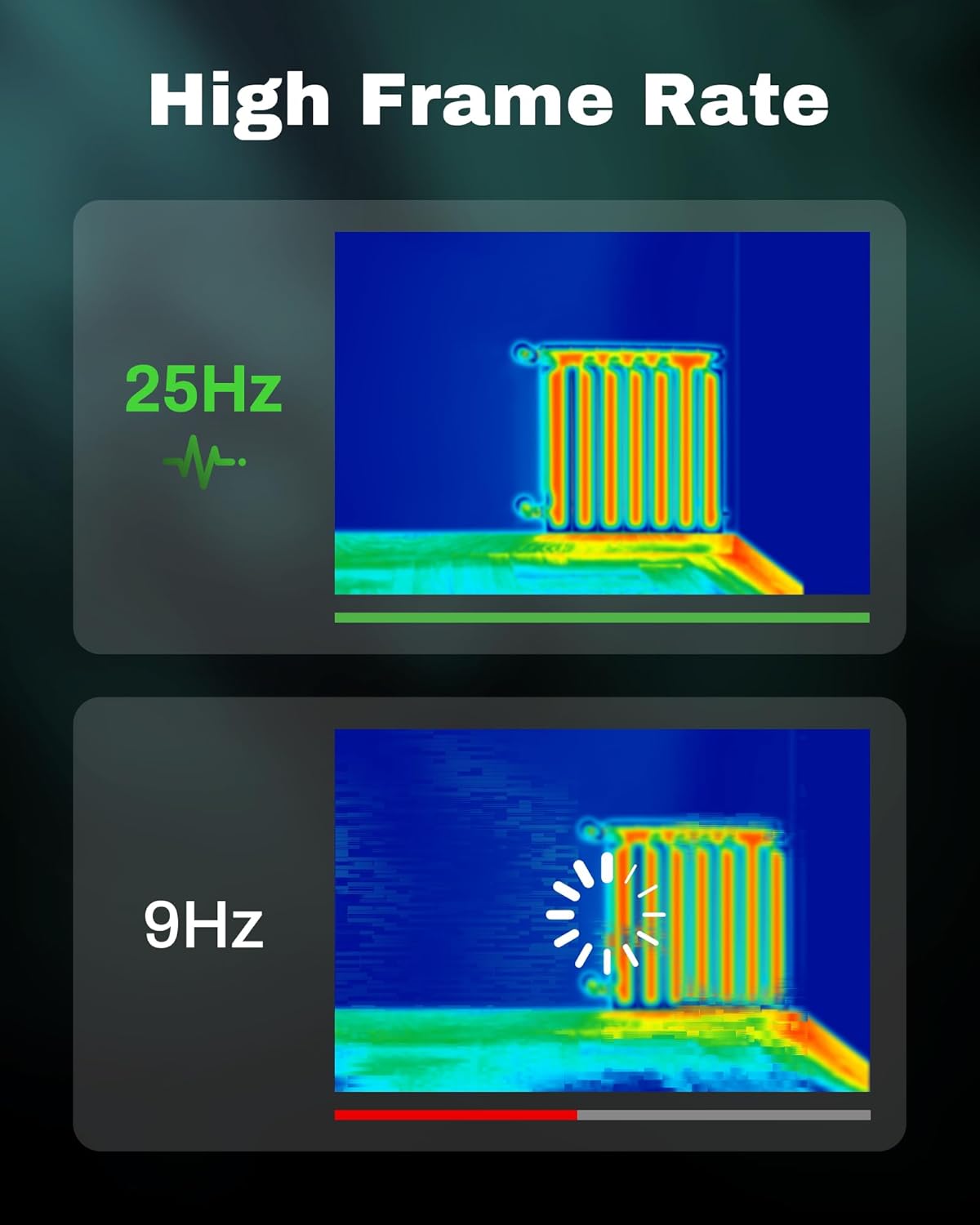
Figure 3.5: Visual comparison of thermal image fluidity at 25Hz versus 9Hz frame rates.

Figure 3.6: Display of the five available thermal color palettes for varied visualization of heat signatures.
4. Настройка
4.1. Распаковка
Аккуратно извлеките все предметы из упаковки. В коробке должно быть:
- AMPBANK H128 Thermal Imaging Camera
- Кабель USB-C
Inspect the camera for any signs of damage. If any components are missing or damaged, contact customer support immediately.
4.2. Зарядка аккумулятора
Before first use, fully charge the camera's built-in battery.
- Connect the supplied USB-C cable to the USB-C port on the top of the camera.
- Подключите другой конец кабеля USB-C к совместимому USB-адаптеру питания (не входит в комплект) или к USB-порту компьютера.
- The charging indicator on the screen will show the charging status. A full charge typically takes several hours.
- После полной зарядки отсоедините кабель.
4.3. Первое включение и основные настройки
- Включение питания: Press and hold the power button (often integrated with the Return button) for approximately 8 seconds until the screen illuminates.
- Выбор языка: Upon first power-on, you may be prompted to select your preferred language. Use the Up/Down buttons to navigate and the OK button to confirm.
- Дата и время: Установите правильную дату и время для точного времениamping of captured images. Navigate to the settings menu using the OK button, then find the Date/Time option.
5. Операция
5.1. Основные операции
- Включение/выключение питания: Press and hold the power button for 8 seconds to turn on. Press and release the power button to turn off or enter sleep mode.
- Навигация по меню: Используйте OK button to enter the menu. Use the Up и Вниз arrow buttons to scroll through options. Press OK to select an option. Press the Возвращаться button to exit a menu or go back.
- Захват изображений: Aim the camera at the target. Press the trigger button (located on the handle) to capture a thermal image. Images are saved internally.
5.2. Measurement Modes and Settings
- Temperature Spot Measurement: The H128 automatically displays the maximum, minimum, and center temperatures on the screen.
- Регулировка излучательной способности: For accurate temperature readings, adjust the emissivity setting based on the material being inspected. Access this setting through the menu. Common emissivity values can be found in reference tables.
- Настройка расстояния: Inputting the approximate distance to the target can further refine temperature accuracy.
- Термоподдоны: Change the color scheme of the thermal image to highlight temperature differences more effectively. Navigate to the palette settings in the menu and choose from Iron Red, Black Hot, Rainbow, White Hot, or Red Hot.
5.3. Управление данными
The H128 can store over 8000 images internally. To transfer images to a computer:
- Подключите камеру к компьютеру с помощью прилагаемого кабеля USB-C.
- Камера будет отображаться как съемное запоминающее устройство.
- Browse to the image folder and copy the desired fileна ваш компьютер.

Figure 5.1: Connecting the H128 thermal camera to a laptop via USB-C for image transfer.
6. Техническое обслуживание
6.1. Уборка
- Корпус камеры: Протрите корпус камеры мягкой тряпкой.amp Ткань. Не используйте абразивные чистящие средства или растворители.
- Инфракрасный объектив: The infrared lens is a delicate optical component. Use a lens cleaning cloth or a soft, lint-free cloth specifically designed for optics. Gently wipe the lens to remove dust or smudges. Do not apply excessive pressure or use harsh chemicals.
6.2. Хранение
When not in use, store the H128 in a cool, dry place, away from direct sunlight and extreme temperatures. Ensure the battery is partially charged (around 50%) before long-term storage to preserve battery health.
6.3. Уход за аккумулятором
Чтобы продлить срок службы батареи:
- Избегайте частой полной разрядки аккумулятора.
- Не оставляйте аккумулятор полностью заряженным в течение длительного времени.
- Заряжайте аккумулятор при комнатной температуре.
7. Поиск Неисправностей
| Проблема | Возможная причина | Решение |
|---|---|---|
| Камера не включается. | Батарея разряжена. | Зарядите аккумулятор с помощью кабеля USB-C. |
| Изображение размытое или нечеткое. | Lens is dirty. / Incorrect focus (if applicable). | Clean the infrared lens with a soft, lint-free cloth. The H128 has fixed focus, ensure you are within the optimal measurement distance. |
| Показания температуры кажутся неточными. | Incorrect emissivity setting. / Distance to target is too far. | Adjust the emissivity setting in the menu to match the material being measured. Ensure you are within the recommended measurement distance. |
| Не удаётся передать изображения на компьютер. | Loose USB-C connection. / Driver issue. | Ensure the USB-C cable is securely connected to both the camera and the computer. Try a different USB port or cable. Restart both devices. |
| Срок службы батареи меньше ожидаемого. | Frequent use of high-brightness settings. / Battery degradation over time. | Reduce screen brightness if possible. Ensure proper charging and storage practices. If battery life significantly degrades, contact support. |
Если проблема сохраняется после применения этих решений, пожалуйста, свяжитесь с нами. AMPBANK customer support.
8. Технические характеристики
| Параметр | Ценить |
|---|---|
| Модель | H128 |
| Инфракрасное разрешение | 128x128 пикселей |
| TISR Display Resolution | 240x240 пикселей |
| Диапазон температур | от -4°F до 842°F (от -20°C до 450°C) |
| Точность | ±3% or ±3°C (whichever is greater) |
| Температурная чувствительность (NETD) | 40мк |
| Частота кадров | 25 Гц |
| Тип батареи | Built-in Rechargeable Lithium Ion (2900mAh) |
| Срок службы батареи | До 24 часов непрерывного использования |
| Порт зарядки | USB-C |
| Защита от падения | 6.56 футов (2 метров) |
| Рейтинг IP | IP65 |
| Емкость хранилища | 8000+ images |
| Размеры | 9.33 x 4.76 x 3.86 дюйма (приблизительно) |
| Масса | 1.06 фунта (приблизительно) |
9. Гарантия и поддержка
Подробную информацию о гарантии см. в гарантийном талоне, прилагаемом к изделию, или на официальном сайте. AMPБАНК webСайт. Условия гарантии могут различаться в зависимости от региона и продукта.
If you require technical assistance, have questions about your product, or need to initiate a warranty claim, please contact AMPBANK customer support through their official channels:
- Производитель: AMPБАНК
- Интернет-магазин: Посетите AMPBANK Store on Amazon
- Пожалуйста, обратитесь к официальному AMPБАНК website or product packaging for the most current contact information (email, phone, service centers).


