1. Введение
Welcome to the SteelSeries Arctis GameBuds ANC Wireless Gaming Earbuds. This manual provides essential information for setting up, operating, maintaining, and troubleshooting your new gaming earbuds. Please read these instructions carefully before use to ensure optimal performance and longevity of your device.
2. Продукт закончилсяview
The SteelSeries Arctis GameBuds ANC are designed for a versatile gaming experience across multiple platforms, offering active noise cancellation, dual wireless connectivity, and a comfortable fit.
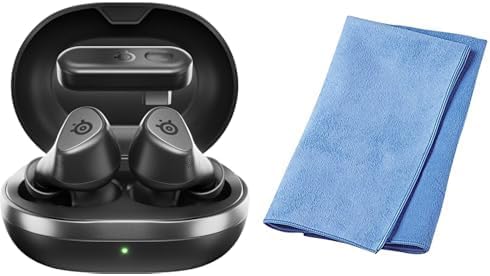
Image: The SteelSeries Arctis GameBuds ANC Wireless Gaming Earbuds are shown inside their open charging case, with a green indicator light visible. A folded blue cleaning cloth is positioned next to the case.
Содержимое упаковки:
- SteelSeries Arctis GameBuds ANC Wireless Gaming Earbuds
- Зарядный футляр
- Зарядный кабель USB-C
- Беспроводной адаптер (USB-C)
- Sanwa Cleaning Cloth
- Краткое руководство пользователя
3. Настройка
3.1 Первоначальная зарядка
- Поместите наушники в зарядный футляр.
- Connect the charging case to a power source using the provided USB-C cable, or place it on a Qi-compatible wireless charging pad.
- The LED indicator on the case will show charging status. A full charge provides up to 40 hours of battery life (including case charges). Rapid charging is supported.
3.2 Connecting via 2.4GHz Wireless (Low Latency)
- Insert the USB-C wireless dongle into your PC, PlayStation (PS5/PS4), or Nintendo Switch.
- Ensure the earbuds are charged and removed from the case. They should automatically connect to the dongle.
- Confirm the connection through your device's audio settings.
3.3 Подключение через Bluetooth 5.3
- Извлеките наушники из зарядного футляра.
- Activate Bluetooth pairing mode on the earbuds (refer to the Quick Start Guide for specific button presses).
- On your smartphone or other Bluetooth-enabled device, search for "Arctis GameBuds" in the Bluetooth settings and select to pair.
3.4 Software Installation (SteelSeries GG)
For advanced customization, including EQ settings and firmware updates, download and install the SteelSeries GG software on your PC. This software allows access to over 100 EQ presets and personalized audio profiles.
4. Инструкция по эксплуатации
4.1 Включение/выключение питания
- Включение питания: Достаньте наушники из зарядного футляра. Они автоматически включатся.
- Выключение: Поместите наушники обратно в зарядный футляр. Они автоматически выключатся и начнут заряжаться.
4.2 Активное шумоподавление (ANC)
The earbuds feature Active Noise Cancellation to minimize ambient distractions. Control ANC through the touch controls on the earbuds or via the SteelSeries GG software.
4.3 Управление звуком
The earbuds are equipped with intuitive touch controls for managing audio playback and calls:
- Воспроизведение/Пауза: Нажмите один раз на любой наушник.
- Следующий трек: Дважды нажмите на правый наушник.
- Предыдущий трек: Трижды нажмите на левый наушник.
- Увеличение/уменьшение громкости: Specific gestures or button presses may be customizable via SteelSeries GG.
4.4 Использование микрофона
The integrated microphones allow for clear communication during gaming or calls. Ensure the earbuds are properly seated for optimal microphone performance.
5. Техническое обслуживание
5.1 Очистка
Regularly clean your earbuds and charging case to maintain hygiene and performance. Use the provided Sanwa cleaning cloth or a soft, dry, lint-free cloth. Avoid using abrasive materials or harsh chemicals.
5.2 Хранение
Когда наушники не используются, храните их в зарядном футляре, чтобы защитить от пыли и повреждений, а также обеспечить поддержание заряда.
5.3 Защита от воды и пыли
The earbuds are rated IP55 for dust and water resistance, meaning they are protected against limited dust ingress and low-pressure water jets from any direction. This rating does not imply full waterproofing; avoid submerging the earbuds in water.
6. Поиск Неисправностей
6.1 Проблемы с подключением
- No Connection (2.4GHz): Ensure the wireless dongle is securely plugged into your device. For optimal performance, place the dongle in a USB port close to your line of sight, potentially using a USB-C extension cable if interference occurs.
- Ошибка сопряжения Bluetooth: Ensure the earbuds are in pairing mode and your device's Bluetooth is enabled. Try unpairing and re-pairing the earbuds.
- Периодические отключения: Check for potential interference from other wireless devices. Ensure the earbuds are fully charged.
6.2 Проблемы с качеством звука
- Low Volume/Poor Sound: Adjust EQ settings via the SteelSeries GG software. Ensure the earbuds are properly seated in your ears.
- ANC White Noise: Some users may experience a subtle white noise with ANC enabled. This is often normal for ANC technology. If it is excessive, ensure a proper earbud fit.
6.3 Аккумулятор и зарядка
- Наушники не заряжаются: Ensure the charging contacts on both the earbuds and the case are clean and free of debris. Verify the charging cable is functional and the power source is active.
- Автоматический спящий режим: If earbuds enter sleep mode unexpectedly during low volume playback, adjust the auto-sleep settings in the SteelSeries GG software.
6.4 Проблемы с обновлением программного обеспечения
- Ошибка обновления прошивки: Ensure a stable internet connection and that the earbuds are connected to your PC via the dongle or Bluetooth during the update process. Note that some operating systems, such as certain versions of macOS, may have compatibility issues with the SteelSeries GG update utility.
7. Технические характеристики
| Бренд | SteelSeries |
| Модель | Arctis GameBuds ANC (61680) |
| Связность | 2.4GHz Wireless (via USB-C dongle), Bluetooth 5.3 |
| Совместимость | PC, PlayStation 5, PlayStation 4, Nintendo Switch, Smartphones |
| Срок службы батареи | До 40 часов (с зарядным чехлом) |
| Зарядка | USB-C, Qi Wireless Charging, Rapid Charging |
| Прочность | Защита от пыли и воды IP55 |
| Аудио особенности | Active Noise Cancellation (ANC), Hi-Fi Audio, 100+ EQ Settings via SteelSeries GG |
| Цвет | Черный |
8. Информация о гарантии
SteelSeries products are covered by a manufacturer's warranty. For detailed information regarding warranty terms, conditions, and duration, please refer to the warranty card included with your product or visit the official SteelSeries webСохраните чек о покупке для предъявления гарантийных претензий.
9 Поддержка
For further assistance, technical support, or to access the latest drivers and firmware updates, please visit the official SteelSeries support webсайт:
На странице поддержки вы также найдете ответы на часто задаваемые вопросы и форумы сообщества.


