Введение
This manual provides detailed instructions for the installation, operation, and maintenance of your OBDPEAK D80 4-Channel 4K Rear View Зеркальная камера. Перед использованием устройства внимательно ознакомьтесь с данным руководством, чтобы обеспечить его правильную работу и безопасность.
Что в коробке?
Убедитесь, что в упаковке присутствуют все компоненты:
- Заднийview Mirror with 3 cameras (Main Unit)
- Rear camera with 6M Cable
- 64G TF-карта
- Зарядное устройство прикуривателя
- 24-Hour Parking Monitoring Hardware Kit
- Руководство пользователя
- Rubber Strips (for mounting)

Image: Package contents for the OBDPEAK D80 dash cam system.
Характеристики продукта
1. 11" Touchscreen Display & 4K Front Camera
The device features an 11-inch full touchscreen display for intuitive control and a 4K (2160p) front camera for high-resolution video recording. The large display enhances visibility, reducing blind spots compared to standard rearview зеркала.
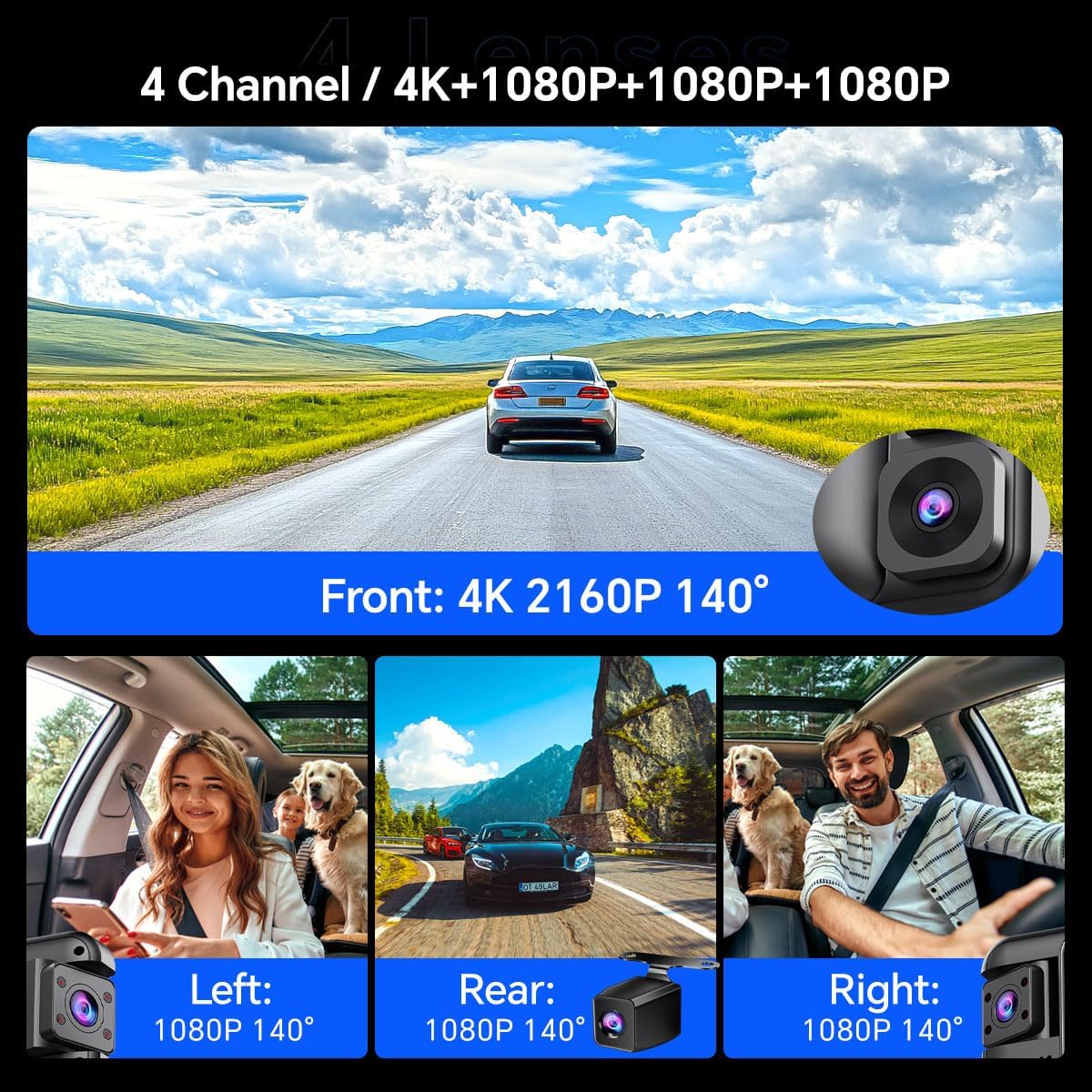
Image: The 11-inch touchscreen display of the D80 mirror camera.
2. 4-Channel Comprehensive Coverage
Equipped with four cameras (Front 4K, Rear 1080P, Left 1080P, Right 1080P), the system provides a complete 360-degree recording of your vehicle's surroundings. This ensures comprehensive evidence capture for various incidents.

Image: Visual representation of the 4-channel camera system providing 360-degree coverage.
3. Smart ADAS (Advanced Driver Assistance System)
The integrated ADAS technology provides voice alerts for critical driving situations, including front vehicle start, lane departure, forward collision, and pedestrian collision warnings. This system assists in maintaining driver awareness and safety.

Изображение: Бывшийamples of ADAS warnings for various road hazards.
4. BSD (Blind Spot Detection) Algorithm
The BSD system monitors blind spots not visible in standard mirrors. It detects vehicles in these areas and provides alerts to the driver, aiding in safer lane changes and preventing potential collisions.

Image: Illustration of the Blind Spot Detection system in action.
5. Rotating + Infrared Car Interior Lenses
The two internal cameras are equipped with infrared functionality, ensuring clear recording even in low-light conditions inside the vehicle. These lenses are rotatable, allowing adjustment to different angles or away from the interior for privacy.

Image: Detail of the rotatable interior cameras with infrared capability.
6. 64GB Memory Card Included
A 64GB memory card is included, providing ample storage for recordings and eliminating the need for a separate purchase. The dash cam supports memory cards up to 256GB.
7. Круглосуточный мониторинг парковки
With the included hardware kit, the D80 offers 24-hour parking monitoring. This feature utilizes all four cameras to provide continuous surveillance of your vehicle, even when parked, with ultra-low power consumption.

Изображение: Оверview функции круглосуточного мониторинга парковки.
8. Несколько режимов отображения
The touchscreen supports various display modes, including single-screen, three-screen (1:1:1), and four-screen (1:1:1:1) views, allowing you to customize your monitoring preference.

Изображение: Бывшийamples of multiple camera display modes on the mirror screen.
9. Система помощи при работе с камерой заднего вида
When reversing, the system automatically displays the high-definition rear camera feed on the IPS screen with guidelines, assisting in safe parking and maneuvering.

Image: Full-screen reversing display with parking assist lines.
10. Циклическая запись
The device supports automatic seamless loop recording, which overwrites the oldest unlocked footage when the memory card is full. This ensures continuous recording without manual intervention.

Image: Explanation of loop recording process.
11. G-Sensor
Встроенный G-сенсор автоматически обнаруживает внезапные удары или столкновения. При обнаружении он блокирует текущее видеоизображение.tage to prevent it from being overwritten by loop recording, preserving critical evidence.

Image: G-Sensor function locking video during an incident.
12. Super Night Vision (HDR Display)
The D80 features Super Night Vision with HDR (High Dynamic Range) display technology, providing enhanced clarity and detail in low-light conditions, improving visibility during nighttime driving and parking monitoring.

Image: Comparison of normal night vision and Super Night Vision with HDR.
13. In-App Video Download & Real-time Viewing (Wi-Fi)
The device supports both iOS and Android systems, allowing users to view and download videos in real-time via the dash cam's built-in Wi-Fi. Emergency videos are automatically locked to prevent overwriting.

Image: In-app video management via Wi-Fi.
Настройка и установка
Proper installation is crucial for optimal performance. It is recommended to have this device professionally installed if you are unfamiliar with vehicle electrical systems.
1. Main Unit Installation (Rearview Зеркало)
- Secure the main unit over your existing rearview Используйте прилагаемые резиновые ремни для крепления зеркала. Убедитесь, что оно надежно закреплено и не загораживает обзор. view.
- Adjust the angle of the main unit's front camera to capture the road ahead clearly.

Image: Main unit dimensions and mounting overview.
2. Установка задней камеры
- Mount the rear camera at the back of your vehicle, typically above the license plate or inside the rear window. Ensure a clear, unobstructed view.
- Route the 6-meter rear camera cable to the main unit, tucking it neatly along the vehicle's interior trim.
- Подключите кабель задней камеры к соответствующему порту на основном блоке.
3. Подключение питания
- Connect the cigarette lighter charger to the main unit's power input.
- Plug the charger into your vehicle's 12V cigarette lighter socket.
- For 24-hour parking monitoring, install the provided hardware kit by connecting it directly to your vehicle's fuse box. Refer to the hardware kit's specific instructions for detailed wiring.
4. Установка карты памяти
- Insert the provided 64GB TF card into the memory card slot on the main unit. Ensure it is inserted correctly until it clicks into place.
- Format the memory card through the device's settings menu before first use to ensure compatibility and optimal performance.
Инструкция по эксплуатации
1. Включение/выключение питания
- Устройство автоматически включится и начнет запись при включении зажигания вашего автомобиля.
- При выключении зажигания устройство автоматически выключится.
- Для включения/выключения вручную нажмите и удерживайте кнопку питания, расположенную сбоку устройства.
2. Управление с помощью сенсорного экрана
- Tap the screen to access menus and settings.
- Swipe left/right on the screen to switch between different camera views (front, rear, left, right, or combined viewс).
- Swipe up/down to adjust brightness or switch between display modes.
3 Режимы записи
- Driving Recording: Непрерывная циклическая запись начинается автоматически при включении устройства.
- Мониторинг парковки: Activates when the vehicle is parked and ignition is off (requires hardware kit installation). Records events like impacts or motion detection.
- Аварийная запись (G-сенсор): Автоматически блокирует видео files upon detecting a collision or sudden movement, preventing them from being overwritten.
4. ADAS and BSD Functions
- ADAS and BSD systems are enabled by default. Voice alerts will be provided for detected hazards.
- These functions can be configured or disabled in the system settings if desired.
5. Подключение по Wi-Fi и к приложениям
- Download the dedicated mobile application (search for "OBDPEAK" or refer to the manual for app name) from your device's app store.
- Enable Wi-Fi on the dash cam via the settings menu.
- Подключите свой смартфон к сети Wi-Fi видеорегистратора (SSID и пароль обычно отображаются на экране видеорегистратора).
- Используйте приложение, чтобы view жить фуtagе, воспроизведение записанных видео, загрузка fileна свой телефон и измените настройки.
Обслуживание
- Уборка: Для очистки экрана и объективов камеры используйте мягкую сухую ткань. Избегайте абразивных чистящих средств или растворителей.
- Карта памяти: Regularly format the memory card (at least once a month) to maintain optimal performance and prevent data corruption. Back up important files перед форматированием.
- Обновления прошивки: Проверьте производителя webПериодически проверяйте наличие обновлений прошивки на сайте. Обновления могут улучшить производительность и добавить новые функции.
- Температура: Avoid exposing the device to extreme temperatures for extended periods, as this can affect battery life and component longevity.
Поиск неисправностей
| Проблема | Возможное решение |
|---|---|
| Устройство не включается. |
|
| Запись останавливается или зависает. |
|
| Плохое качество видео. |
|
| ADAS/BSD alerts are not working. |
|
| Проблемы с подключением к Wi-Fi. |
|
Технические характеристики
- Название модели: Д80
- Бренд: ОБДПИК
- Разрешение фронтальной камеры: 4K (2160p)
- Разрешение задней камеры: 1080p
- Разрешение камеры в салоне: 1080p (Left & Right)
- Отображать: 11-дюймовый сенсорный экран
- Поле View: Front 170 Degrees, Other cameras 140 Degrees
- Особые характеристики: ADAS, BSD, 360 Degree Coverage, Automatic Incident Detection, Blind Spot Detection, Built-In Display, Parking Monitor, Super Night Vision, Loop Recording, G-Sensor, Wi-Fi
- Хранилище: Поддерживает карты памяти TF объемом до 256 ГБ (в комплекте 64 ГБ).
- Связь: USB, беспроводная связь (Wi-Fi)
- Источник питания: 1 Lithium Ion battery (included), Car Charger (12V)
- Размеры продукта: 0.8 x 12.28 x 2.9 дюйма
- Вес товара: 2.97 фунта
Гарантия и поддержка
For warranty information and technical support, please refer to the contact details provided in the packaging or visit the official OBDPEAK webсайт. Сохраните чек о покупке на случай гарантийных претензий.