1. Продукт закончилсяview
The Cudy AC1200 Outdoor Wireless Access Point (AP1200 Outdoor) is designed to provide reliable and high-speed Wi-Fi connectivity in outdoor environments. It supports the latest 802.11ac Wave 2 technology, offering dual-band Wi-Fi speeds up to 867 Mbps on 5 GHz and 300 Mbps on 2.4 GHz. Key features include MU-MIMO, Beamforming, IP65 waterproof rating, 4KV lightning protection, and flexible Power over Ethernet (PoE) options.

Figure 1: Cudy AP1200 Outdoor Wireless Access Point Overview
2. Содержимое упаковки
Убедитесь, что ваша посылка содержит все перечисленные ниже предметы:
- AP1200 Outdoor Wireless Access Point
- Адаптер питания
- Съемные антенны (2 шт.)
- Шнур питания
- Монтажный комплект
- Ethernet-кабель
- Руководство по установке (настоящее руководство)
3. Аппаратное обеспечение большеview
3.1 Внешность
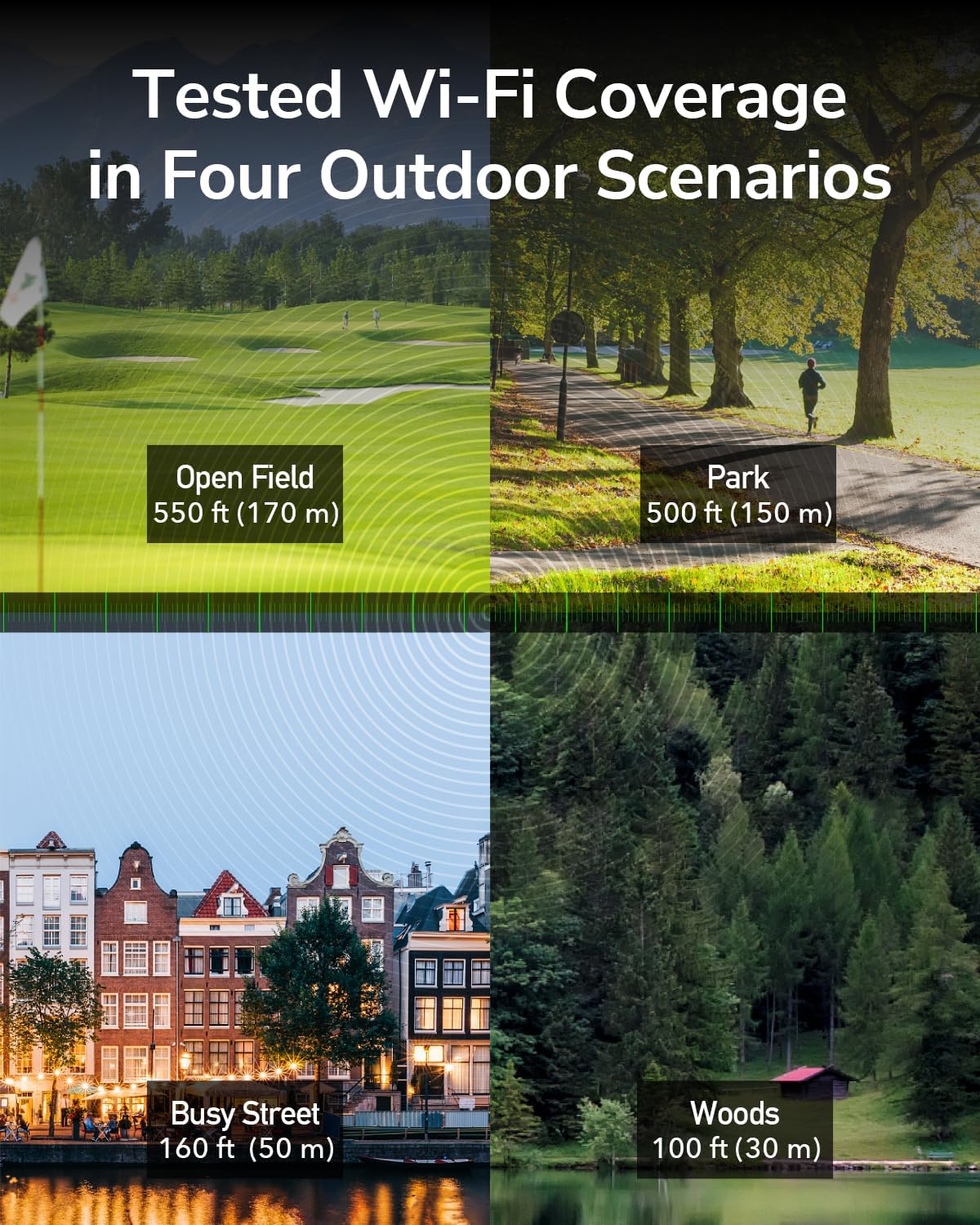
Figure 2: Cudy AP1200 Outdoor Access Point
3.2 светодиодных индикатора
The device features several LED indicators to show its status:
- Светодиод питания: Указывает состояние питания.
- Индикатор локальной сети: Indicates Ethernet connection status.
- Светодиодный дисплей Wi-Fi 2.4 ГГц: Указывает на активность беспроводной сети в диапазоне 2.4 ГГц.
- Светодиодный дисплей Wi-Fi 5 ГГц: Указывает на активность беспроводной сети в диапазоне 5 ГГц.
3.3 Порты и кнопки
The device includes the following ports and buttons:
- RJ45 Port (PoE-IN): Used for both data and power input via Power over Ethernet.
- Кнопка сброса: Используется для восстановления заводских настроек по умолчанию.
- Антенные разъемы: Two RP-SMA connectors for detachable antennas.

Figure 3: RJ45 Port with PoE-IN
4. Настройка и установка
4.1 Крепление антенн
Carefully screw the two detachable 5dBi antennas onto the RP-SMA connectors on the device. Ensure they are securely fastened but do not overtighten.

Figure 4: Antennas Attached to AP1200 Outdoor
4.2 Подключение по технологии Power over Ethernet (PoE)
The AP1200 Outdoor supports 802.3at/af PoE or 24~50V passive power supply. Use the included PoE adapter to power the device and connect it to your network.
- Connect one end of an Ethernet cable to the LAN port of your router or network switch.
- Connect the other end of this Ethernet cable to the 'LAN' port on the PoE adapter.
- Connect one end of the included Ethernet cable to the 'PoE' port on the PoE adapter.
- Open the protective cover on the AP1200 Outdoor and connect the other end of the Ethernet cable from the PoE adapter to the RJ45 (PoE-IN) port on the AP.
- Plug the PoE adapter into a power outlet. The device will power on, and the Power LED will illuminate.
4.3 Варианты монтажа
The AP1200 Outdoor can be mounted on a pole or a wall using the provided mounting kit. Choose a location that offers optimal Wi-Fi coverage and is protected from direct impact.
- Установка на столб: Use the straps and brackets to secure the device to a pole.
- Настенный монтаж: Use screws and anchors to attach the device to a wall.

Figure 5: Mounting Options (Wall and Pole)
5. Режимы работы
The Cudy AP1200 Outdoor supports multiple operating modes to suit various network requirements:
- Режим точки доступа (AP): Connects to a wired network and transforms it into a wireless network, allowing multiple Wi-Fi devices to connect.
- Режим расширителя: Расширяет зону покрытия существующей беспроводной сети.
- Режим маршрутизатора: Выполняет функции основного маршрутизатора, обеспечивая доступ в Интернет для подключенных устройств.
- Режим WISP: Connects wirelessly to an Internet Service Provider (ISP) network and shares the connection with local devices.
- Режим сетчатого маршрутизатора: Creates a seamless mesh Wi-Fi network with other compatible devices.

Режим точки доступа

Режим маршрутизатора

Режим повторителя

Режим WISP
6 Конфигурация
To configure the AP1200 Outdoor, connect a computer to the device via Ethernet or Wi-Fi. Access the webинтерфейс управления на основе web браузер.
- Ensure your computer is connected to the AP1200 Outdoor (either directly via Ethernet or to its default Wi-Fi network).
- Откройте web браузер и введите IP-адрес по умолчанию (обычно
192.168.10.1or refer to the Quick Installation Guide) in the address bar. - Введите имя пользователя и пароль по умолчанию (обычно)
adminдля обоих). - Follow the on-screen wizard to set up your desired operating mode, Wi-Fi name (SSID), and password.
- Сохраните настройки и перезагрузите устройство, если появится соответствующее сообщение.
7. Техническое обслуживание
7.1 обновлений прошивки
Regularly check for and install firmware updates to ensure optimal performance, security, and access to new features. Visit the Cudy official website for the latest firmware for your AP1200 Outdoor model.
7.2 Очистка
As an outdoor device with an IP65 rating, the AP1200 Outdoor is protected against dust and water. However, periodic cleaning can help maintain its appearance and prevent excessive buildup. Use a soft, damp Ткань для протирки внешней поверхности. Не используйте едкие химикаты или абразивные чистящие средства.
7.3 Экологические соображения
The device is designed to operate in a wide range of outdoor temperatures (-40°C to 65°C). Ensure proper ventilation and avoid placing it in direct sunlight for prolonged periods if possible, to maximize lifespan.

Figure 6: Weather-Proof Design
8. Поиск Неисправностей
If you encounter issues with your AP1200 Outdoor, refer to the following common troubleshooting steps:
- Нет питания: Ensure the PoE adapter is correctly plugged into a power outlet and the Ethernet cable is securely connected to the AP's PoE-IN port. Check the power LED.
- Нет доступа в Интернет: Verify that your main router has internet access. Check the Ethernet cable connections between the router, PoE adapter, and AP. Ensure the AP is configured in the correct operating mode.
- Слабый сигнал Wi-Fi: Adjust the antenna orientation. Relocate the AP to a more central position or higher elevation. Check for physical obstructions.
- Невозможно получить доступ Web Страница управления: Ensure your device is connected to the AP's network. Verify the IP address entered in the browser is correct. Try clearing your browser's cache or using a different browser.
- Сброс к заводским настройкам: If problems persist, you may need to perform a factory reset. With the device powered on, use a paperclip to press and hold the Reset button for approximately 5-10 seconds until the LEDs flash. The device will restart with factory default settings.
9. Технические характеристики
| Особенность | Описание |
|---|---|
| Название модели | AP1200 Наружный |
| Размеры продукта | 9.45 x 3.94 x 2.11 дюйма |
| Вес товара | 14.6 унции |
| Беспроводной стандарт | 802.11ac Волна 2 |
| Класс диапазона частот | Двухдиапазонный (2.4 ГГц и 5 ГГц) |
| Wi-Fi Speed (5 GHz) | До 867 Мбит/с |
| Wi-Fi Speed (2.4 GHz) | До 300 Мбит/с |
| Антенны | 2 external 5dBi detachable antennas |
| Порты | 1x RJ45 (PoE-IN) |
| Источник питания | 802.3at/af PoE or 24~50V Passive PoE (adapter included) |
| Защита от непогоды | IP65 rated waterproof housing, 4KV lightning protection |
| Рабочая температура | -40°С до 65°С |
| Совместимые устройства | Персональный компьютер, камера видеонаблюдения, смарт-телевизор, смартфон, планшет |
10. Информация о гарантии
Cudy products are backed by a limited warranty. For detailed warranty terms and conditions, please refer to the warranty card included with your product or visit the official Cudy webСохраните чек о покупке в качестве подтверждения покупки для предъявления гарантийных претензий.
11. Техническая поддержка
If you require further assistance or have questions not covered in this manual, please contact Cudy Technical Support. You can find contact information, FAQs, and additional resources on the official Cudy webсайт:
- Webсайт: www.cudy.com
- Электронная почта: Обратитесь к webСайт с адресами электронной почты службы поддержки.


