Важные инструкции по технике безопасности
Перед использованием данного изделия внимательно ознакомьтесь со всеми инструкциями по технике безопасности и усвойте их. Сохраните данное руководство для дальнейшего использования.
- Вентиляция: Обеспечьте надлежащую вентиляцию. Не закрывайте вентиляционные отверстия.
- Вода и влага: Не подвергайте прибор воздействию дождя или влаги. Не ставьте на него предметы, наполненные жидкостью, например, вазы.
- Источники тепла: Не устанавливайте вблизи источников тепла, таких как радиаторы, обогреватели, печи или другие приборы (включая amp(жирообразующие вещества), которые вырабатывают тепло.
- Источники питания: Use only power supplies specified by the manufacturer. Ensure the power cord is protected from being walked on or pinched.
- Уборка: Чистить только сухой тканью.
- Обслуживание: Не пытайтесь ремонтировать этот продукт самостоятельно. Поручите все обслуживание квалифицированному обслуживающему персоналу.
Содержимое упаковки
Убедитесь, что все перечисленные ниже предметы включены в ваш пакет:
- Kuephom CD-X2A Boombox
- Шнур питания переменного тока
- Руководство пользователя (данный документ)
- Дистанционное управление
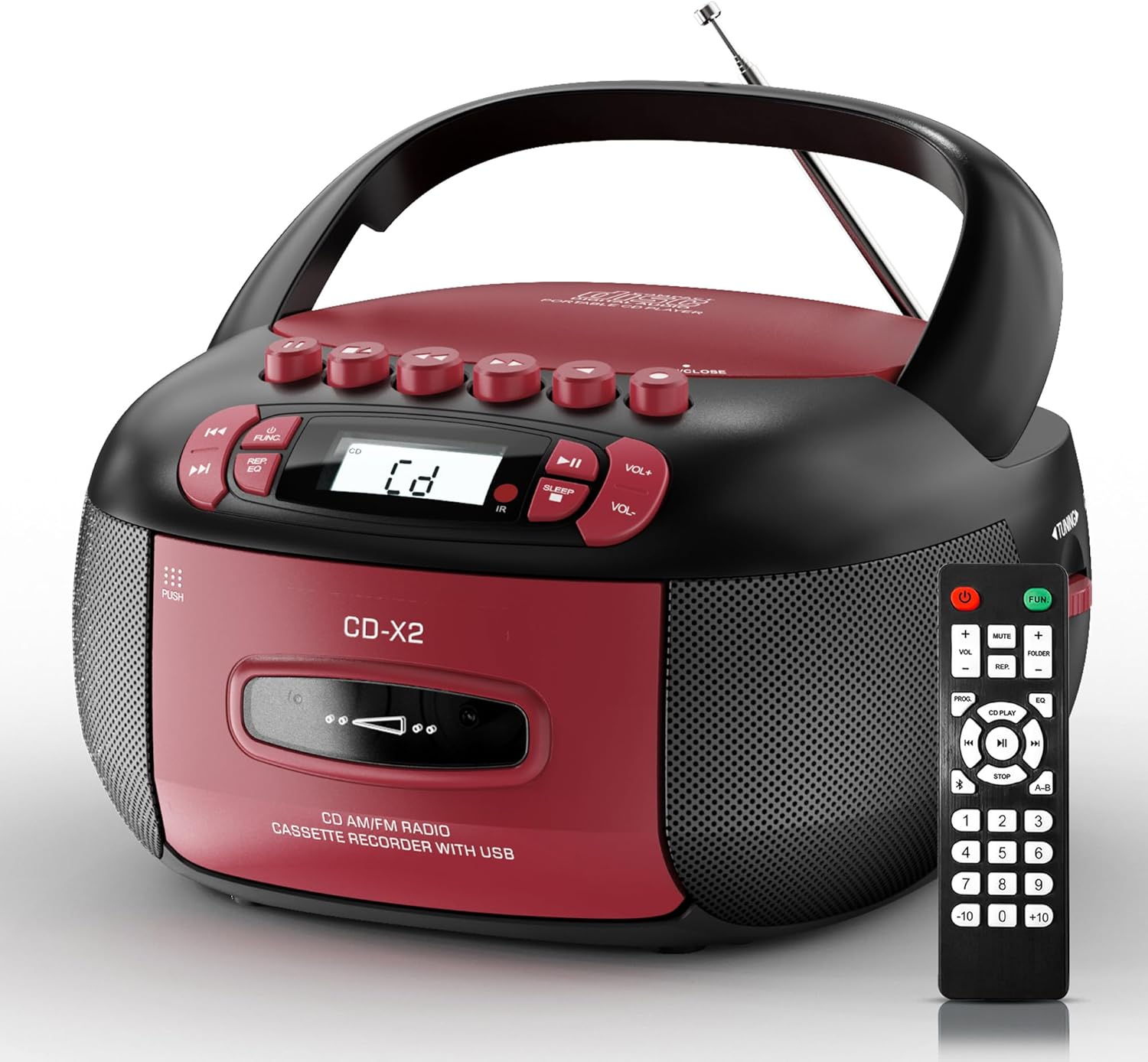
Image: The Kuephom CD-X2A Boombox with its included remote control, showcasing its compact design and red/black color scheme.
Продукт болееview
Familiarize yourself with the various components and controls of your Kuephom CD-X2A Boombox.
Элементы управления на передней панели
- Кнопка питания/функции: Press and hold to power on/off. Press to cycle through modes (CD, USB, Bluetooth, Radio, AUX, Tape).
- Кнопки регулировки громкости +/-: Отрегулируйте громкость воспроизведения.
- Кнопка воспроизведения/паузы: Start or pause playback for CD, USB, Bluetooth, or Tape.
- Кнопка остановки: Остановите воспроизведение.
- Кнопки «Пропустить»/«Поиск»: Navigate between tracks on CD/USB or fast forward/rewind on tape.
- Кнопка эквалайзера: Выберите предустановки эквалайзера.
- Кнопка таймера сна: Установите таймер сна.
Боковая панель управления
- Ручка настройки: Manually tune AM/FM radio stations.
- Порт для наушников: Подключите наушники для индивидуального прослушивания.
- Порт AUX-входа: Подключите внешние аудиоустройства.
- USB-порт: Insert USB drives for MP3/WMA playback.
Особенности верхней панели
- Отделение для компакт-дисков: Top-loading compartment for CDs.
- Кассетный отсек: Front-loading compartment for cassette tapes.
- Телескопическая антенна: Расширьте диапазон для улучшения приема радиосигнала.

Image: The boombox highlighting its multiple functions including CD/MP3, Bluetooth, Type I/II tape, USB, FM/AM Radios, Sleep timer, Remote, Phone jack, AUX, and Tape recording.

Изображение: Крупный план views of the boombox's phone jack, top-loading CD player, telescopic antenna, and tape play/record buttons.
Настраивать
Питание бумбокса
Мощность переменного тока
- Connect the supplied AC power cord to the AC IN jack on the back of the boombox.
- Plug the other end of the power cord into a standard AC wall outlet (120V~60Hz).
Мощность аккумулятора
- Open the battery compartment cover located on the bottom of the boombox.
- Insert 6 x 'C' size batteries (not included), ensuring correct polarity (+/-).
- Плотно закройте крышку батарейного отсека.
- When operating on battery power, disconnect the AC power cord.

Image: The boombox demonstrating both AC power connection and the use of 6 C-size batteries for portable operation.
Дистанционное управление
- Insert 2 x 'AAA' batteries (not included) into the remote control, observing polarity.
- Point the remote control towards the boombox's IR sensor for optimal operation.

Image: An individual comfortably operating the boombox using the remote control from a distance.
Инструкция по эксплуатации
Общая операция
- Включение/выключение питания: Press and hold the Power/Function button to turn the unit on or off.
- Выбор функции: Press the Power/Function button repeatedly to switch between CD, USB, Bluetooth, Radio (AM/FM), AUX, and Tape modes.
Воспроизведение компакт-дисков
- Откройте крышку отсека для компакт-дисков.
- Place a CD (CD, CD-R, MP3, WMA compatible) onto the spindle with the label side facing up.
- Закройте крышку отсека для компакт-дисков.
- Press the Power/Function button to select 'CD' mode.
- Нажмите кнопку «Воспроизведение/Пауза», чтобы начать воспроизведение.
- Use the Skip/Search buttons to navigate tracks.
- Press the Repeat button to repeat a single track, folder, or all tracks.
- Press the Program button to program a custom playback sequence.

Image: The boombox's display showing 'CD' mode, with icons indicating compatibility with CD, CD-R, CD-RW, WMA, and MP3 formats, along with single cycle, repeat folder, repeat all, random play, and play in order options.
Воспроизведение и запись на кассеты
- Press the 'OPEN/CLOSE' button on the cassette compartment to open it.
- Вставьте кассету.
- Закройте кассетный отсек.
- Press the Power/Function button to select 'TAPE' mode.
- Нажмите кнопку «Воспроизвести», чтобы начать воспроизведение.
- Use the Fast Forward/Rewind buttons to navigate the tape.
- Запись: In TAPE mode, select the desired source (CD, Bluetooth, USB, or AM/FM radio). Press the Record button to begin recording onto the cassette. The unit features an auto-stop function when the tape reaches its end.

Image: A hand inserting a cassette tape into the boombox's front-loading compartment, with controls for tape operation visible.
AM/FM-радио
- Press the Power/Function button to select 'RADIO' mode. Press again to switch between AM and FM bands.
- Extend the telescopic antenna for better FM reception. For AM, rotate the unit for best reception.
- Use the Tuning knob on the side to manually tune to your desired station. The frequency will be displayed on the screen.

Image: A man relaxing on a couch with the boombox, which displays various FM/AM radio frequencies, indicating good reception.
Bluetooth-подключение
- Press the Power/Function button to select 'BT' (Bluetooth) mode. The display will show 'BT' and flash, indicating it's in pairing mode.
- On your mobile device, enable Bluetooth and search for 'CD-X2A'.
- Select 'CD-X2A' to pair. Once paired, the 'BT' indicator will stop flashing.
- You can now stream audio wirelessly from your device to the boombox.

Image: A woman in a living room wirelessly streaming audio from her smartphone to the boombox via Bluetooth 5.1, indicating a stable connection.
Воспроизведение с USB-носителя
- Insert a USB flash drive into the USB port on the side of the boombox.
- Press the Power/Function button to select 'USB' mode.
- The boombox will automatically detect and play compatible MP3/WMA files.
- Use the Play/Pause, Stop, and Skip/Search buttons to control playback.
Вход AUX
- Connect an external audio device (e.g., smartphone, MP3 player) to the AUX-in port using a 3.5mm audio cable (not included).
- Press the Power/Function button to select 'AUX' mode.
- Управляйте воспроизведением непосредственно с подключенного внешнего устройства.
Таймер сна
- While the unit is playing, press the Sleep Timer button.
- Repeatedly press the button to cycle through available sleep timer durations (e.g., 15, 30, 60, 90 minutes).
- Устройство автоматически выключится по истечении выбранного времени.

Image: A man sleeping in bed with the boombox on his nightstand, illustrating the sleep timer feature which allows the device to turn off automatically.
Обслуживание
- Уборка: Use a soft, dry cloth to clean the exterior of the boombox. Do not use abrasive cleaners or solvents.
- Уход за компакт-диском: Берите компакт-диски за края. Загрязненные компакт-диски очищайте мягкой безворсовой тканью, протирая от центра к краям.
- Уход за кассетой: Keep cassette tapes away from direct sunlight and heat. Periodically clean the tape heads with a specialized cassette head cleaner.
- Хранилище: При длительном неиспользовании отсоедините шнур питания и извлеките батарейки. Храните устройство в прохладном, сухом месте.
Поиск неисправностей
Если у вас возникли проблемы, обратитесь к таблице ниже, где приведены распространенные проблемы и решения.
| Проблема | Возможная причина | Решение |
|---|---|---|
| Нет электричества | Сетевой шнур не подключен; батареи разряжены или неправильно вставлены. | Check AC connection; Replace or correctly insert batteries. |
| Нет звука | Volume too low; Incorrect function mode selected; Headphones connected. | Увеличьте громкость; выберите нужный режим; отсоедините наушники. |
| CD-диск заедает или не воспроизводится | CD dirty or scratched; CD inserted incorrectly; Incompatible CD format. | Clean or replace CD; Insert CD correctly; Ensure CD is compatible (CD, CD-R, MP3, WMA). |
| Помехи на радио/плохой прием | Антенна не выдвинута/не расположена должным образом; слабый сигнал. | Extend and adjust telescopic antenna; Try repositioning the unit. |
| Bluetooth не сопряжен | Boombox not in pairing mode; Device Bluetooth off; Device too far. | Ensure boombox is in 'BT' mode and flashing; Enable Bluetooth on device; Move device closer. |
| Кассета не воспроизводится/не записывается | Tape inserted incorrectly; Tape heads dirty; Auto-stop engaged. | Insert tape correctly; Clean tape heads; Check tape end. |
Технические характеристики
| Особенность | Деталь |
|---|---|
| Номер модели | CD-X2A |
| Размеры продукта (Д x Ш x В) | 8.39 x 4.8 x 8.54 дюйма |
| Вес товара | 3.45 фунта |
| Источник питания | AC 120V~60Hz or 6 x 'C' size batteries |
| Технология связи | Вспомогательный, Bluetooth, USB |
| Тип динамика | Stereo (2W+2W output) |
| Поддерживаемые форматы дисков | CD, CD-R, MP3, WMA |
| Supported Tape Types | Type I/II Cassette |
| Радиодиапазоны | АМ/ФМ |
| Особые возможности | Tape Recording, Sleep Timer, Earphone Jack, Remote Control |
Гарантия и поддержка
Kuephom products are designed for reliability and performance. This product comes with a standard manufacturer's warranty against defects in materials and workmanship under normal use.
For warranty claims, technical assistance, or any questions regarding your Kuephom CD-X2A Boombox, please contact Kuephom customer support. Refer to the contact information provided with your purchase documentation or visit the official Kuephom webсайт для получения подробной информации о поддержке.
We are committed to providing lifetime service support and 7/24 customer assistance for our products.


