1. Введение
The TECKNET WiFi Water Leak Detector is designed to provide early warning of water leaks and drips in your home or office. This smart sensor connects directly to your 2.4GHz WiFi network, sending instant notifications to your smartphone via the Tuya Smart App and activating a local 120dB audible alarm. Its advanced 6-point sensing technology helps protect your property from potential water damage.
2. Информация по технике безопасности
- Не подвергайте устройство воздействию экстремальных температур или прямых солнечных лучей.
- Держите устройство вдали от сильных магнитных полей.
- Используйте только указанные батарейки типа AAA. Не смешивайте старые и новые батарейки, а также батарейки разных типов.
- Утилизируйте батареи в соответствии с местным законодательством.
- Не пытайтесь разбирать или ремонтировать устройство самостоятельно. Обратитесь в службу поддержки клиентов за помощью.
- Ensure the device is placed on a flat, stable surface where water leaks are most likely to occur.
3. Содержимое упаковки
- 1 x TECKNET WiFi Water Leak Detector (Model TK-WA161)
- 2 батареек типа ААА
- 1 x Руководство пользователя (этот документ)
4. Продукт закончилсяview
The TECKNET WiFi Water Leak Detector features a compact design with advanced sensing capabilities. It includes:
- 6-Point Precision Detection: Equipped with 2 top and 4 bottom probes for comprehensive water detection.
- 120dB Adjustable Siren: A loud local alarm with adjustable volume levels.
- Подключение к Wi-Fi: Direct connection to 2.4GHz home WiFi, no hub required.
- Уведомления приложения: Instant alerts to your smartphone via the Tuya Smart App.
- Длительный срок службы батареи: Up to 2 years on 2 AAA batteries with low battery alerts.
- Сертификация IP67: Designed to withstand water exposure without damage.

Image: The TECKNET Water Leak Detector positioned to detect both dripping and leaking water, highlighting its dual detection capabilities.

Image: The TECKNET Water Leak Detector shown submerged in water, illustrating its IP67 water resistance rating, ensuring no damage after water exposure.
5. Инструкции по настройке
5.1. Установка аккумулятора
- Найдите батарейный отсек на задней панели устройства.
- Use a small tool (like a flathead screwdriver or the provided tool if any) to gently pry open the battery cover.
- Вставьте две батарейки типа ААА, соблюдая правильную полярность (+/-).
- Плотно закройте крышку батарейного отсека до щелчка.

Image: A visual guide demonstrating the four steps for battery installation: inserting a tool to open, rotating to unlock, inserting AAA batteries, and closing the cover.
5.2. Загрузка приложения и сопряжение устройства
- Загрузите приложение "Tuya Smart" из Apple App Store или Google Play Store.
- Зарегистрируйтесь или войдите в свою учетную запись Tuya Smart.
- Убедитесь, что ваш смартфон подключен к сети Wi-Fi 2.4 ГГц. Устройство не поддерживает Wi-Fi 5 ГГц.
- Open the app and tap the "+" icon to add a device.
- Select "Security & Video Surveillance" then "Water Leak Sensor (Wi-Fi)".
- Follow the in-app instructions for Bluetooth-assisted pairing. This typically involves pressing and holding the "TEST" button on the device until the indicator light flashes, then confirming in the app.
- Once successfully paired, you can name the device and assign it to a specific room in the app.
5.3. Размещение
Place the water leak detector in areas prone to water leaks or flooding. Common locations include:
- Under kitchen and bathroom sinks
- Behind washing machines and dishwashers
- Near water heaters and sump pumps
- In basements, utility rooms, and crawl spaces
- Near air conditioning units or refrigerators with water lines
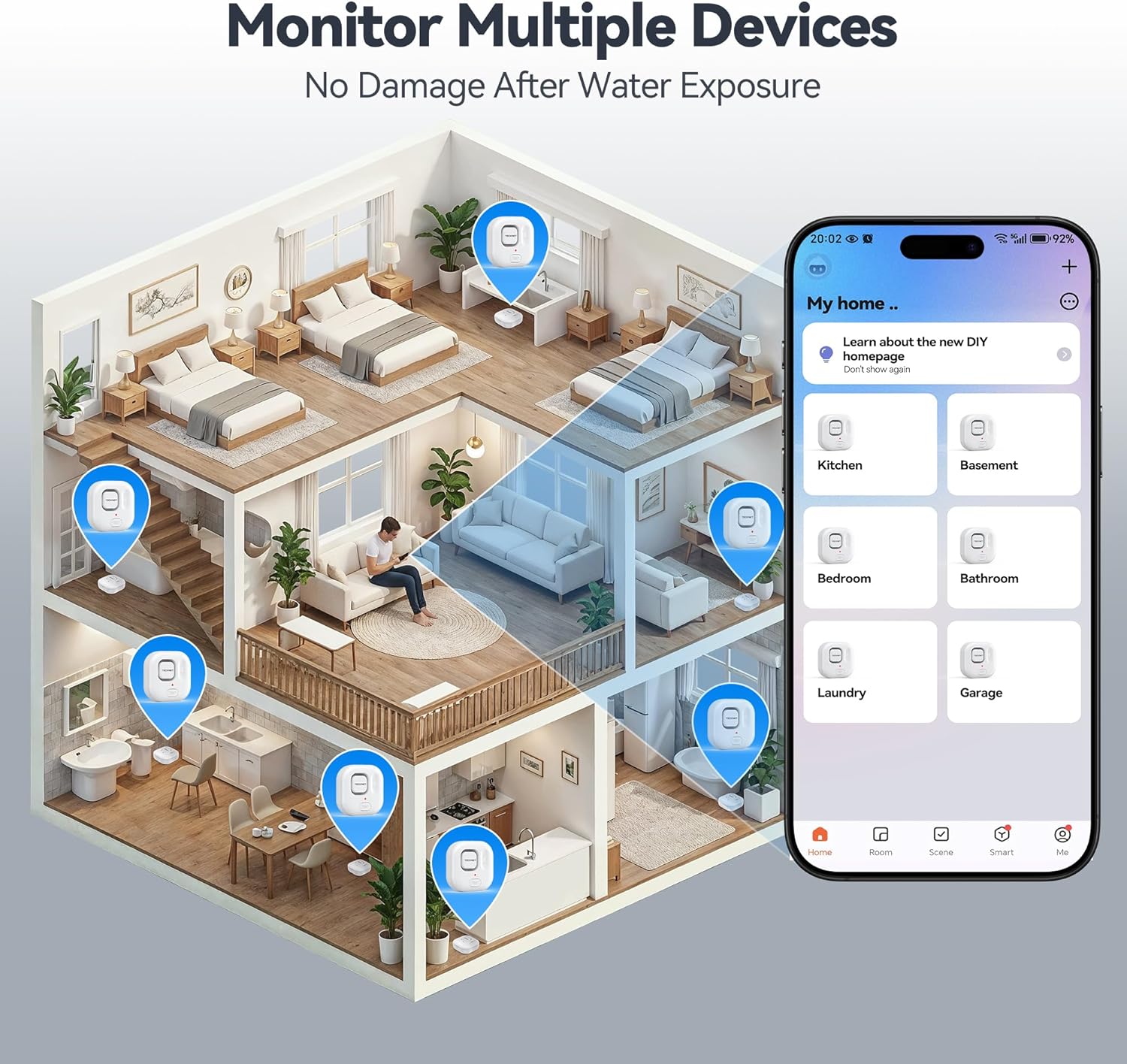
Image: An illustration depicting various locations within a house where TECKNET Water Leak Detectors can be strategically placed, such as kitchens, bathrooms, and basements, alongside the corresponding mobile app interface for monitoring.
6. Инструкция по эксплуатации
6.1. Обнаружение утечек и оповещения
When the sensor detects water, it will immediately:
- Trigger the built-in 120dB audible alarm.
- Send an instant push notification to your smartphone via the Tuya Smart App.
To silence the alarm, you can press the "TEST" button on the device or disable it through the Tuya Smart App.
6.2. Регулировка громкости будильника
The alarm volume can be adjusted to 0dB (silent), 40dB, 80dB, or 120dB. This can be done either through the Tuya Smart App settings for the device or by repeatedly pressing the "TEST" button on the device to cycle through the volume levels.
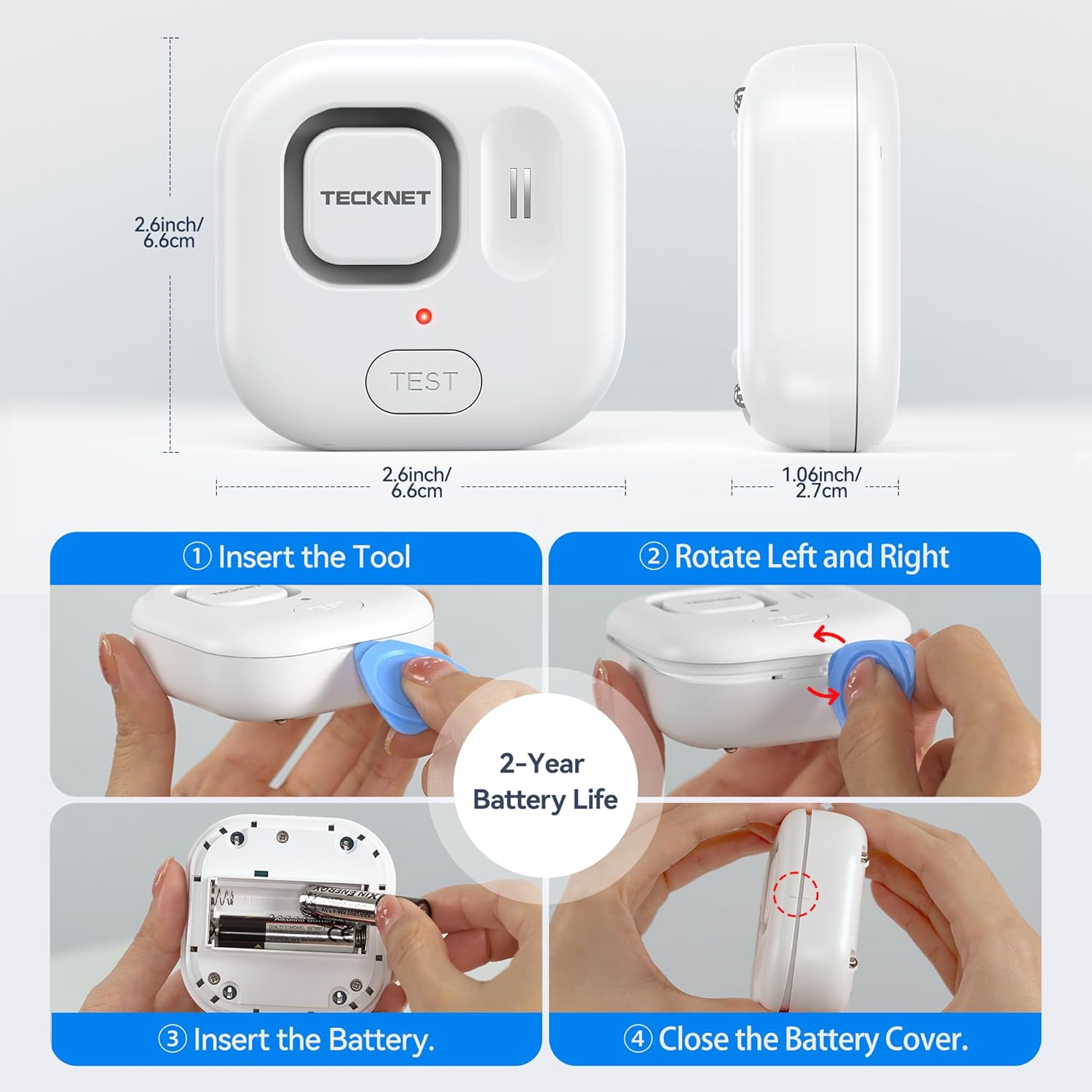
Image: A visual representation of the four adjustable alarm volume settings (0dB, 40dB, 80dB, 120dB) and how they might sound across different floors of a house.
6.3. Тестирование устройства
It is recommended to test the device periodically to ensure proper functionality. To test:
- Place the sensor on a damp cloth or a small amount of water, ensuring the bottom probes make contact.
- The alarm should sound, and you should receive a notification on your smartphone.
- Dry the sensor thoroughly after testing.
7. Техническое обслуживание
7.1. Замена батареи
The device is powered by two AAA batteries, offering up to 2 years of battery life. The Tuya Smart App will send a notification when the battery level is low. Replace batteries as described in Section 5.1.
7.2. Уборка
Wipe the device with a soft, dry cloth. Do not use abrasive cleaners or immerse the device in water (beyond its intended function for leak detection) as this may damage internal components.
8. Поиск Неисправностей
- Устройство не подключается к Wi-Fi:
- Убедитесь, что ваша сеть Wi-Fi имеет частоту 2.4 ГГц. Устройство не поддерживает сети с частотой 5 ГГц.
- Check if your WiFi password is correct.
- Поднесите устройство ближе к вашему Wi-Fi роутеру.
- Перезагрузите маршрутизатор и повторите попытку сопряжения.
- Нет уведомлений от приложения:
- Check your phone's notification settings for the Tuya Smart App.
- Ensure the device is connected to WiFi and has sufficient battery.
- Убедитесь, что ваш телефон подключен к интернету.
- Сигнализация не срабатывает:
- Проверьте уровень заряда батареи и замените ее, если он низкий.
- Ensure the alarm volume is not set to 0dB in the app or via the "TEST" button.
- Test the device with water to confirm sensor functionality.
- Ложные тревоги:
- Ensure the sensor probes are clean and dry.
- Relocate the device if it's in an area with high humidity or condensation that might trigger it.
9. Технические характеристики
| Номер модели | TK-WA161 |
| Связность | WiFi (2.4GHz only), Bluetooth (for setup) |
| Совместимость приложений | Tuya Smart (Android & iOS) |
| Громкость будильника | 120dB (adjustable: 0dB, 40dB, 80dB, 120dB) |
| Датчики | 6 probes (2 top, 4 bottom) |
| Источник питания | 2 батарейки типа ААА |
| Срок службы батареи | До 2 лет |
| Размеры | 1 x 1 x 1 cm (approx. 2.6 x 2.6 x 1.06 inches); 109 g |
| Защита от проникновения | Сертификат IP67 |
| Включенные компоненты | WiFi Water Alarm, 2 AAA Batteries |
10. Гарантия и поддержка
TECKNET provides a 36-month warranty for this product upon registration. If you encounter any issues or have questions regarding your TECKNET WiFi Water Leak Detector, please contact our professional customer service team. Refer to the TECKNET official webконтактную информацию см. на сайте или в документации о покупке.


