Введение
The FeiyuTech SCORP Mini 3 Pro Kit is a versatile 3-axis camera stabilizer designed for a wide range of devices, including mirrorless cameras, compact cameras, action cameras, and smartphones. It features advanced AI tracking, a detachable handle for flexible shooting, a 1.3-inch HD touchscreen for real-time monitoring, and a robust 2KG (4.4lb) payload capacity. This manual provides detailed instructions for setting up, operating, and maintaining your SCORP Mini 3 Pro Kit to ensure optimal performance.
Что в коробке?
The FeiyuTech SCORP Mini 3 Pro Kit includes the following components:
- Основной корпус (подвес)
- USB-C to charging cable
- Кабель управления камерой USB-C — Type-C
- USB-C to Lightning charging cable
- Длинный винт с накатанной головкой
- Адаптер GoPro
- Фиксированный винт камеры
- Винт держателя объектива
- Штатив
- Слайдер
- Фиксированная пластина
- Пылезащитный чехол
- Пластина быстрого отсоединения
- Шестигранный ключ
- Держатель линзы
- Smartphone holder with cooling fan
- Storage bag/Case
- Шарнирная рука
- Заполняющий свет
- Extension rod (Reach Pole C275)
Настраивать
1. Gimbal Overview and Initial Assembly
Familiarize yourself with the main body of the gimbal. The detachable handle can be removed for remote control or different grip configurations. The gimbal features a 1.3-inch HD touchscreen for settings and monitoring, a joystick for control, and a focus/zoom wheel.

2. Attaching the Camera/Device
The SCORP Mini 3 Pro supports mirrorless cameras, compact cameras, action cameras, and smartphones. Use the appropriate quick-release plate and adapter for your device. For smartphones, utilize the provided holder with the built-in cooling fan to prevent overheating during extended use.

3. Balancing the Camera
Proper balancing is crucial for optimal gimbal performance and to prevent motor strain. Follow these steps for each axis:
- Tilt Axis Balancing:
- Unlock the tilt axis motor lock.
- Point the camera lens straight up. Release your hands and observe the direction it tilts.
- If the lens drops forward, the lens front is too heavy. Unlock the tilt axis arm lock and shift the camera backward until it stays pointing straight up when released.
- If the lens drops backward, the camera body is too heavy. Unlock the tilt axis arm lock and shift the camera forward until it stays pointing straight up when released.
- Once balanced, lock the tilt axis motor lock.
- Roll Axis Balancing:
- Unlock the roll axis motor lock.
- Face the camera forward. Release and observe which way it leans.
- If the camera drops to the left, the left side is too heavy. Unlock the quick release plate lock and move the camera to the right until it stays balanced when you let go.
- If the camera drops to the right, the right side is too heavy. Unlock the quick release plate lock and move the camera to the left until it stays balanced when you let go.
- Once balanced, lock the quick release plate in place.
- Pan Axis Balancing:
- Unlock the pan axis motor lock.
- Rotate the pan axis to one side and tilt the stabilizer forward. Check how the camera rotates.
- If the camera rotates to the left, the left side is too heavy. Unlock the pan axis arm lock and move the arm to the right until it stays balanced when you let go.
- If the camera rotates to the right, the right side is too heavy. Unlock the pan axis arm lock and move the arm to the left until it stays balanced when you let go.
- Once balanced, lock the pan axis motor lock.
Инструкция по эксплуатации
1. Включение/выключение питания
To power on the gimbal, press and hold the power button until the screen illuminates. To power off, press and hold the power button again until the screen shuts down.
2. Режимы и элементы управления
The 1.3-inch HD touchscreen allows you to monitor shooting status and adjust parameters in real-time. Use the joystick for precise control over gimbal movement and the Magic Wheel for ultimate precision control over gimbal axis rotation and camera electronic zoom.

3. AI Tracking 4.0 and Gesture Control
The built-in AI Tracking 4.0 offers ultra-fast response and 360° unlimited follow. Use gesture control for hands-free operation:
- "OK" gesture: Запустить/остановить отслеживание.
- Double "L" gesture: Open/lock custom composition.
- Открытая ладонь: Снимать/записывать.
- Большие пальцы направлены в противоположные стороны: Stop Tracking.
- Жест «два больших пальца вверх»: Отключите управление жестами.

4. Связь
Wirelessly control your cameras via Bluetooth or use the included USB cables for instant compatibility with DSLR, mirrorless, and action cameras. The detachable handle can also function as a fully wireless remote for shutter, zoom, and tracking.
5. Vertical/Horizontal Switching
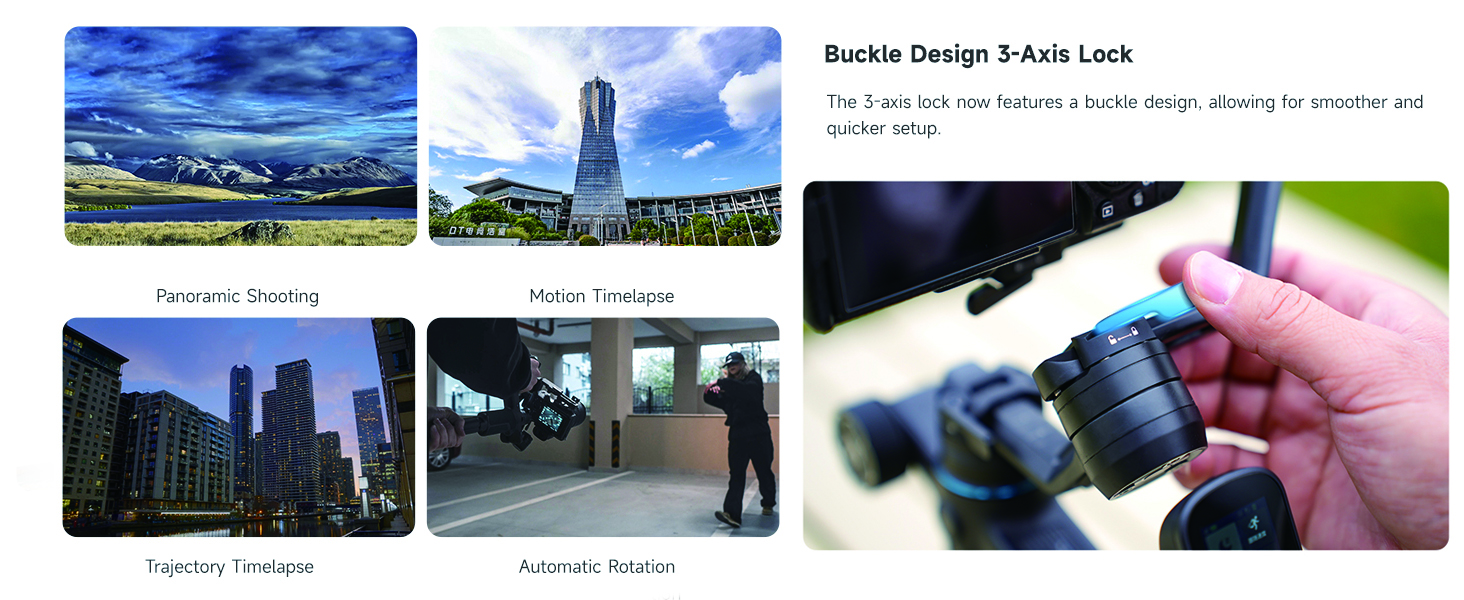
The 3-Axis Lever Lock system allows for rapid switching between portrait and landscape orientations without the need for rebalancing.

Обслуживание
- Уборка: Для очистки стабилизатора используйте мягкую сухую ткань. Избегайте использования агрессивных химикатов или абразивных материалов.
- Хранилище: Store the gimbal in its dedicated carrying case in a cool, dry place when not in use. Ensure all axes are locked to prevent damage.
- Зарядка аккумулятора: The gimbal features a 14-hour battery life and supports 3-hour fast charging via USB-C. Use the provided charging cable.
- Обновления прошивки: Регулярно проверяйте официальный сайт FeiyuTech. webДля обновления прошивки и обеспечения оптимальной производительности и доступа к новым функциям используйте сайт или приложение.
Поиск неисправностей
- Gimbal Vibration Detected: If the gimbal displays a "Gimbal vibration detected" message, ensure the camera is properly balanced on all three axes. Re-balance the camera if necessary.
- Перегрузка двигателя: If motors appear strained or the gimbal is not responding smoothly, check the camera's weight to ensure it is within the 2KG (4.4lb) payload limit. Re-balance the camera and perform motor auto-tuning via the touchscreen or app.
- Проблемы с подключением: Ensure Bluetooth is enabled on your camera/smartphone and the gimbal. For wired connections, verify the correct USB cable is used and securely connected.
- AI Tracking Malfunction: Ensure the AI vision sensor is clear and unobstructed. Check lighting conditions and ensure the subject has sufficient contrast for effective tracking.
Технические характеристики
| Особенность | Деталь |
|---|---|
| Размеры продукта | 7.87 x 6.69 x 11.81 inches (Folded: 20x17x30cm) |
| Вес товара | 4.4 фунта (2 килограмма) |
| Грузоподъемность | Up to 2KG (4.4lb) |
| Срок службы батареи | 14 hours (3-hour fast charging) |
| Отображать | 1.3-дюймовый сенсорный HD-экран |
| Отслеживание | Built-in AI Tracking 4.0 with Gesture Control |
| Совместимость | Mirrorless, Compact, Action Cameras, Smartphones |
| Цвет | Черный |

Гарантия и поддержка
Для получения информации о гарантии, технической поддержке или по вопросам сервисного обслуживания обращайтесь на официальный сайт FeiyuTech. webили обратитесь в службу поддержки напрямую. Сохраните чек о покупке для предъявления гарантийных претензий.
Официальный сайт FeiyuTech Webсайт: www.feiyu-tech.com


