1. Начало работы: Первоначальная настройка
This section guides you through the initial setup of your new Motorola moto g56 5G smartphone.
1.1. Распаковка и комплектация
Прежде чем начать, убедитесь, что в упаковке присутствуют все предметы:
- Motorola moto g56 5G Smartphone
- USB-кабель (для зарядки и передачи данных)
- Phone Case (protective cover)
- Инструмент для извлечения SIM-карты
Note: A wall charger is not included and must be purchased separately. The device supports TurboPower 30W charging.
1.2. Установка SIM-карты
- Найдите лоток для SIM-карты на боковой панели устройства.
- Вставьте инструмент для извлечения SIM-карты в небольшое отверстие на лотке и слегка нажмите, пока лоток не выдвинется.
- Вставьте карту(ы) Nano-SIM в лоток позолоченными контактами вниз. Убедитесь, что вы правильно сориентированы.
- If using a microSD card for expanded storage, place it in the designated slot on the SIM tray.
- Осторожно задвиньте лоток обратно в устройство до щелчка.
1.3. Включение и первоначальная зарядка
- To power on your device, press and hold the Power button (located on the side) until the Motorola logo appears.
- For the first use, it is recommended to fully charge the device. Connect the USB cable to the phone's charging port and to a compatible 30W TurboPower charger (sold separately).
- Следуйте инструкциям на экране, чтобы завершить первоначальную настройку, включая выбор языка, подключение к Wi-Fi, вход в учетную запись Google и параметры безопасности.
2. Operating Your Motorola moto g56 5G
This section covers the primary functions and features of your smartphone.
2.1. Дисплей и навигация
The moto g56 5G features a 6.72-inch FHD+ display with a 120Hz refresh rate for smooth visuals and a peak brightness of 1000 nits for clear visibility even in bright conditions.

Image: The Motorola moto g56 5G display, highlighting its FHD+ resolution, 120Hz refresh rate, 1000 nit brightness, and Dolby Atmos audio capabilities.
- Сенсорные жесты: Navigate the interface using standard Android gestures (swipe, tap, pinch-to-zoom).
- Частота обновления: The 120Hz refresh rate provides a fluid scrolling and viewing experience. This can often be adjusted in display settings to optimize battery life.
- Аудио: Enjoy immersive sound with stereo speakers and Dolby Atmos support.
2.2. Характеристики камеры
Capture detailed photos and videos with the advanced camera system.

Image: A visual representation of the Motorola moto g56 5G's camera capabilities, featuring a 50MP main sensor, ultrawide lens, and 32MP selfie camera, with people enjoying photography.
- Основная камера: 50MP sensor (Sony LYTIA) for high-resolution photos, even in challenging lighting conditions.
- Сверхширокий объектив: An 8MP ultrawide lens allows you to capture a broader perspective in your shots.
- Селфи-камера: A 32MP front camera ensures clear and detailed self-portraits.
- Anti-Flicker Sensor: This sensor helps reduce flickering when photographing screens or under certain artificial lighting. Access this feature in the camera settings.
2.3. Software and Performance
The moto g56 5G runs on Android 15, offering a clean and intuitive user experience. It is powered by the MediaTek Dimensity 7060 processor for smooth performance.

Изображение: Оверview of the Motorola moto g56 5G's performance, highlighting the MediaTek Dimensity 7060 5G processor, Android 15 operating system, and RAM expansion capabilities up to 24GB.
- Андроид 15: Enjoy the latest features and security updates from Android.
- Moto AI: Utilize intelligent features for organized content, notification summaries, and generative AI for wallpapers.
- Связь 5G: Experience fast data speeds with 5G network support.
- Хранилище: The device comes with 256GB of internal storage, expandable up to 2TB via a dedicated microSD card slot.
3. Техническое обслуживание и уход
Proper care ensures the longevity and optimal performance of your Motorola moto g56 5G.
3.1. Уход за аккумулятором
The 5200mAh battery provides extended usage. Follow these tips for optimal battery health:

Image: An illustration of the Motorola moto g56 5G's battery capabilities, including its 5100mAh capacity, TurboPower 30 fast charging, and an estimated 40 hours of usage on a single charge.
- Зарядка: Use a compatible TurboPower 30W charger for fast charging. Avoid using non-certified chargers.
- Battery Health 2.0: This feature optimizes battery health and performance over time.
- Избегайте экстремальных температур: Do not expose your device to very high or very low temperatures, as this can degrade battery life.
3.2. Durability and Cleaning
Your moto g56 5G is built to withstand daily use with its robust design.

Image: The Motorola moto g56 5G highlighting its advanced protection features, including IP68/IP69 water and dust resistance, MIL-STD-810H military-grade certification, and Corning Gorilla Glass 7i for scratch protection.
- Водо- и пыленепроницаемость: The device is rated IP68/IP69, offering superior protection against dust and water immersion up to 1.5 meters for 30 minutes, and resistance to high-pressure jets.
- Военный стандарт: MIL-STD-810H certified for resistance to drops, shocks, humidity, and extreme temperatures.
- Защита экрана: Corning Gorilla Glass 7i provides reliable scratch protection for the display.
- Уборка: Для очистки экрана и корпуса используйте мягкую безворсовую ткань. Для удаления стойких загрязнений слегка протрите поверхность.ampСмочите ткань водой. Избегайте использования агрессивных химикатов.
4. Устранение распространенных неполадок
В этом разделе приведены решения распространенных проблем, с которыми вы можете столкнуться.
- Устройство не включается: Убедитесь, что батарея заряжена. Подключите телефон к зарядному устройству как минимум на 15 минут, затем попробуйте включить его снова. Если он по-прежнему не включается, выполните принудительную перезагрузку, удерживая кнопку питания в течение 10-15 секунд.
- Низкая производительность: Close unused apps, clear cache, or restart the device. Check for system updates as they often include performance improvements.
- Батарея быстро разряжается: Reduce screen brightness, disable unnecessary features like Wi-Fi or Bluetooth when not in use, and identify power-hungry apps in battery settings.
- Проблемы с сетевым подключением: Check if your SIM card is properly inserted. Try toggling Airplane Mode on and off. If issues persist, contact your mobile carrier.
- Камера не работает: Restart the phone. Clear the camera app's cache and data in settings. Ensure no other app is using the camera in the background.
5. Технические характеристики
Detailed technical specifications for the Motorola moto g56 5G.
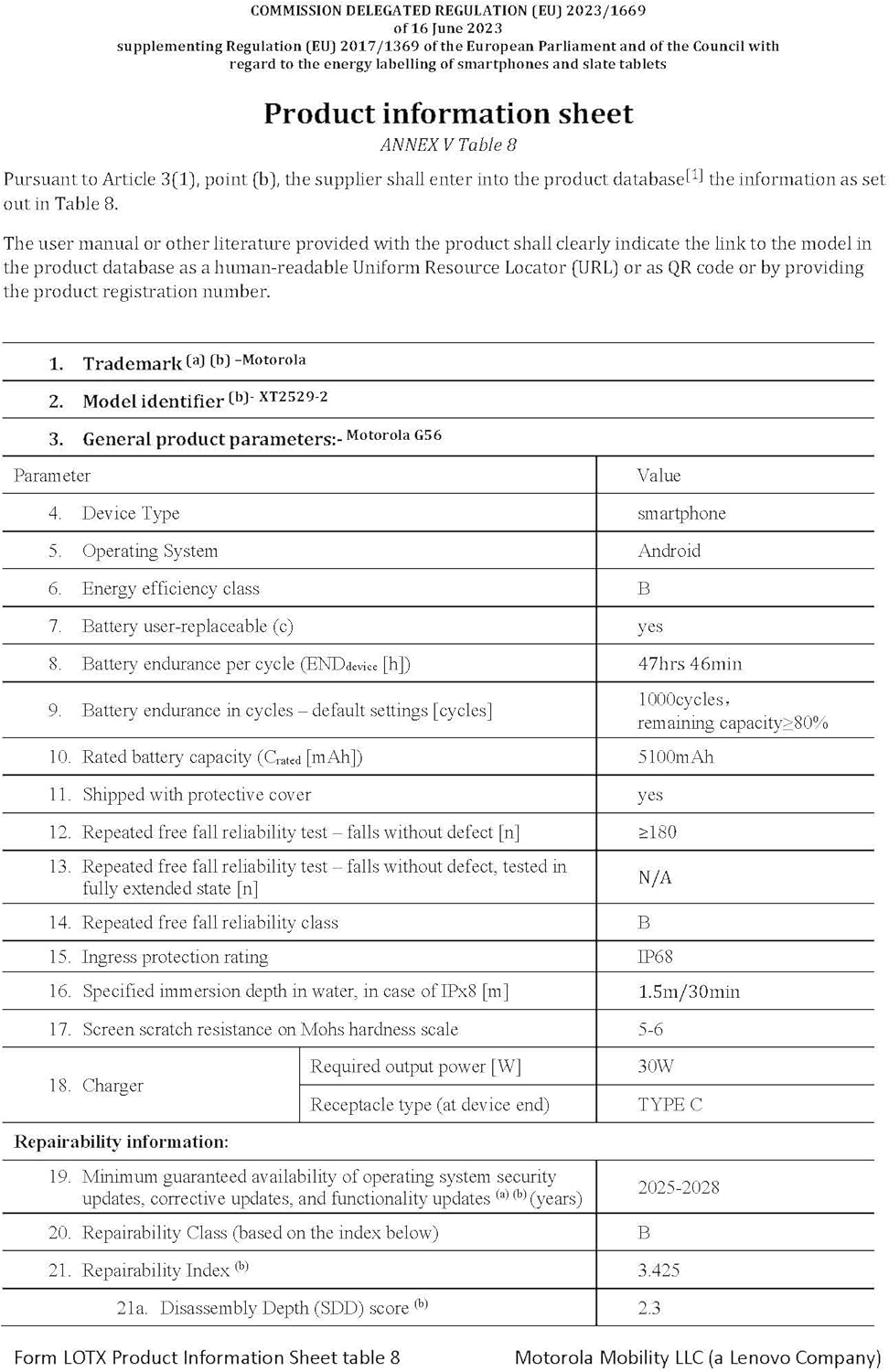
Image: The official product information sheet for the Motorola moto g56 5G, detailing its technical specifications, including battery life, IP rating, and repairability index.
| Особенность | Спецификация |
|---|---|
| Название модели | мото g56 5G |
| Операционная система | Андроид 15 |
| Модель ЦП | MediaTek Dimensity 7060 |
| Скорость ЦП | 2.6 ГГц |
| БАРАН | 8 GB (expandable up to 24 GB with RAM extension) |
| Внутреннее хранилище | 256 ГБ (расширяемая память до 2 ТБ с помощью карты microSD) |
| Размер дисплея | 6.72 дюйма |
| Разрешение дисплея | 1080 x 2400 (FHD+) |
| Частота обновления | 120 Гц |
| Основная камера | 50 MP (Sony LYTIA) |
| Сверхширокоугольная камера | 8 МП |
| Передняя камера | 32 МП |
| Емкость аккумулятора | 5200 mAh (Rated capacity 5100 mAh) |
| Зарядка | TurboPower 30W (charger not included) |
| Защита от воды/пыли | IP68/IP69 |
| Стандарт долговечности | Сертифицировано по стандарту MIL-STD-810H |
| Защита экрана | Corning Gorilla Glass 7i |
| Размеры | 16.57 х 0.83 х 7.63 см |
| Масса | 200 грамм |
6. Гарантия и поддержка
Motorola provides support and warranty for your device.
- Обновления программного обеспечения: Motorola guarantees a minimum of 3 years of operating system security updates, corrective updates, and functionality updates from the device's release date.
- Информация о гарантии: Refer to the warranty card included in your product packaging or visit the official Motorola support webПодробные условия гарантии, действующие в вашем регионе, можно найти на сайте.
- Служба поддержки клиентов: Для получения дополнительной помощи, технической поддержки или по вопросам обслуживания, пожалуйста, посетите официальный сайт поддержки Motorola. webили свяжитесь с их службой поддержки клиентов по телефону или электронной почте.


