Введение
This user manual provides comprehensive instructions for the setup, operation, maintenance, and troubleshooting of your Pisichen 21.5-Inch Touchscreen Monitor. Please read this manual thoroughly before using the product to ensure proper functionality and to prevent damage.
The Pisichen 21.5-inch touch monitor is designed to enhance your work efficiency and provide an interactive experience with its responsive 10-point capacitive touchscreen. It features a Full HD 1920x1080 resolution display, built-in speakers, and versatile connectivity options including HDMI, VGA, and USB for touch functionality.
Основные характеристики
- Sensitive 10-Point Capacitive Touchscreen: Offers seamless and responsive interaction, allowing direct engagement with content and simultaneous multi-finger input.
- Stunning FHD 1080P Display: A 21.5-inch Full HD (1920x1080) resolution screen with a 1000:1 contrast ratio, 250cd/㎡ brightness, 170° viewing angle, and 60Hz refresh rate for clear and smooth visuals. Includes low-blue-light and eye-care technology.
- Широкая совместимость устройств: Equipped with USB2.0 (for touch), HDMI, VGA, and DC ports for easy connection to PCs, laptops, PS3/4, and gaming consoles.
- Универсальные режимы отображения: Supports duplicate, extend, and second-screen modes to enhance productivity and workspace.
- Built-in Speakers and VESA Mounting: Integrated speakers provide audio, and the 75x75mm VESA mount allows for flexible installation options.
Содержимое упаковки
Перед началом установки убедитесь, что все необходимые компоненты находятся в комплекте.

The package includes the Pisichen 21.5-inch touchscreen monitor, a user manual, an HDMI cable, a USB cable, and a power adapter, ensuring it is ready for immediate use.
- Pisichen 21.5-Inch Touchscreen Monitor
- Адаптер питания
- HDMI-кабель
- USB Cable (for touch function)
- Руководство пользователя
Инструкции по установке
1. Подключение монитора
The monitor offers various connection options to suit your needs. Ensure all connections are secure before powering on the device.

Подробный view of the monitor's input/output ports, including HDMI, VGA, headphone, DC power, and USB 2.0 touch ports.
- Подключение питания: Connect the provided power adapter to the DC power port on the monitor and then plug it into a wall outlet.
- Видеоподключение (HDMI): Use the HDMI cable to connect the monitor's HDMI port to the HDMI output port on your computer, laptop, or gaming console.
- Видеоразъем (VGA): Alternatively, use a VGA cable to connect the monitor's VGA port to the VGA output port on your computer or laptop.
- Touch Function Connection: To enable the touch function, connect the included USB cable from the monitor's USB 2.0 touch port to an available USB port on your computer. This step is crucial for touch signal transmission.
- Аудиовыход (опционально): If you prefer external audio, you can connect headphones or external speakers to the headphone jack. The monitor also has built-in speakers.
2. Варианты монтажа
The Pisichen monitor supports both desktop placement and VESA wall mounting for flexible setup.
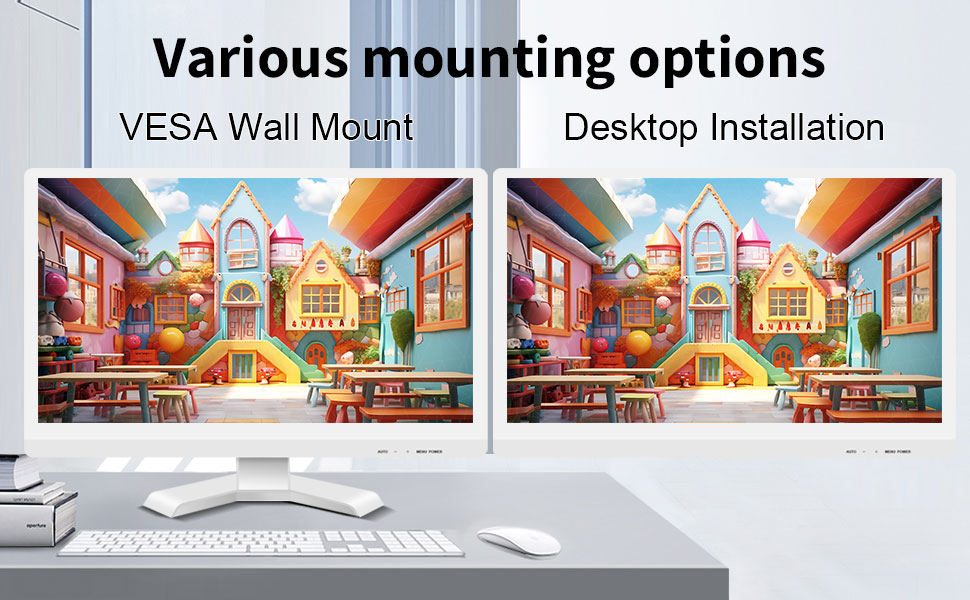
The monitor can be set up on a desktop stand or mounted on a wall using a VESA compatible bracket.
- Установка на рабочем столе: Attach the provided stand to the monitor base and place it on a stable, flat surface.
- Настенное крепление VESA: The monitor features a 75x75mm VESA mounting pattern. Use a compatible VESA bracket (not included) to mount the monitor on a wall or an adjustable arm. Ensure the mount can support the monitor's weight (9.88 pounds).

Задний view of the monitor highlighting the VESA 75x75mm mounting pattern and overall dimensions.
Инструкция по эксплуатации
1. Включение и выключение
Locate the power button on the monitor. Press it to turn the monitor on or off. The power indicator light will illuminate when the monitor is on.
2. Using the Touchscreen Function
Once the USB cable is connected to your computer, the 10-point capacitive touch function will be active. You can interact with the screen using your fingers or a passive capacitive stylus.

The monitor supports direct touch interaction for intuitive control.
- Одно касание: Эквивалентно щелчку мыши.
- Нажмите и удерживайте: Эквивалентно щелчку правой кнопкой мыши.
- Бремя: Move items by touching and dragging.
- Масштабирование сведением пальцев: Для увеличения или уменьшения масштаба содержимого используйте два пальца.
- Мультитач: The monitor supports up to 10 simultaneous touch points, enabling collaborative work or complex gestures.

The 10-point multi-touch feature allows for multiple users or complex interactions simultaneously.
Важное примечание: The touch functionality is disabled on Mac OS, iPad OS, and iOS. This monitor only supports passive capacitive styluses.
3. Режимы отображения
Монитор поддерживает различные режимы отображения при подключении к компьютеру:
- Дублированный режим: Displays the same content on both your primary screen and the Pisichen monitor.
- Расширенный режим: Расширяет рабочий стол на оба экрана, обеспечивая больше рабочего пространства.
- Режим «Только второй экран»: Displays content only on the Pisichen monitor, turning off your primary screen.
You can typically switch between these modes through your operating system's display settings (e.g., Windows Display Settings).
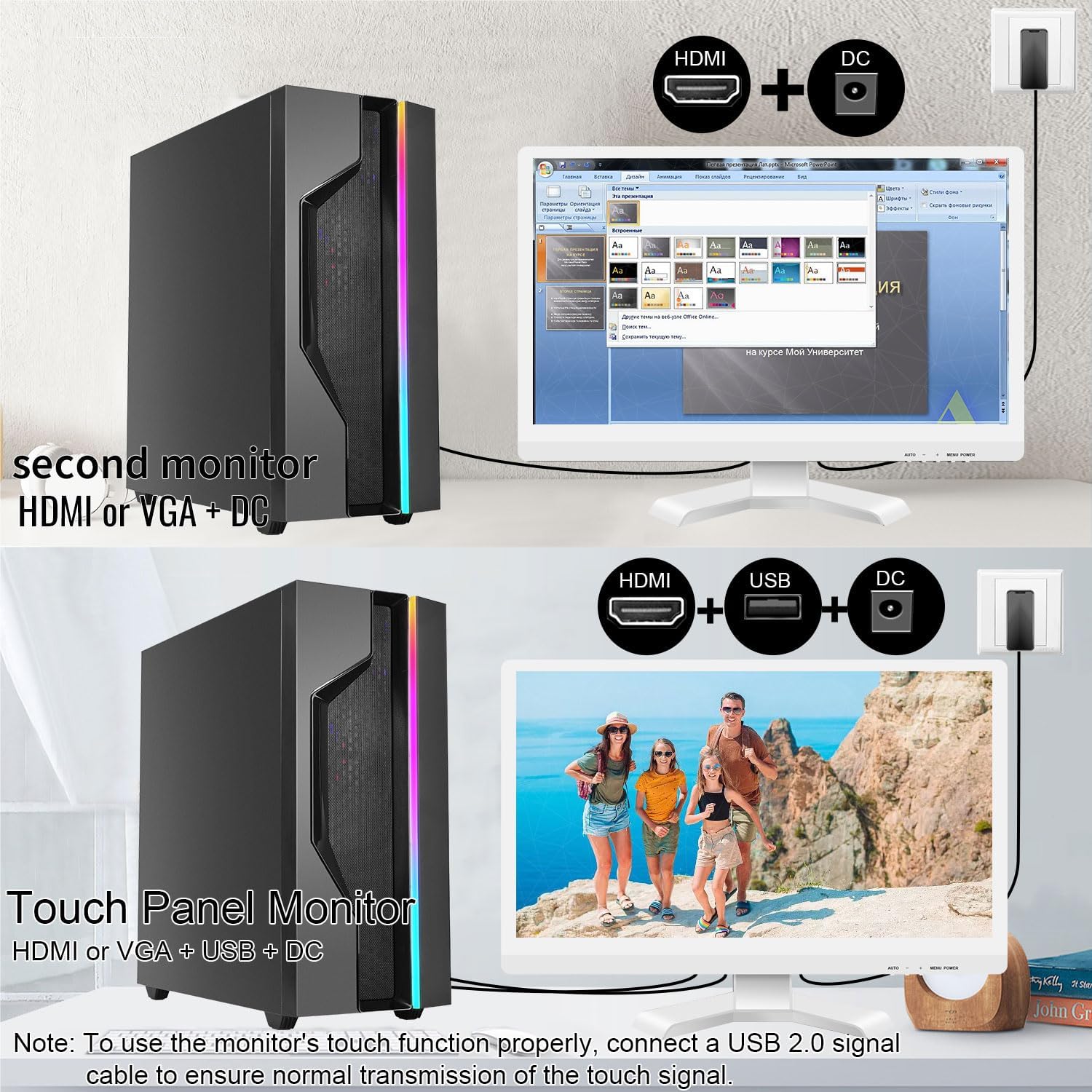
Illustrations of connecting the monitor as a secondary display or as a touch-enabled display.
4. Экранное меню (OSD)
The monitor features an OSD menu for adjusting display settings. Use the buttons located on the monitor's frame (usually on the bottom right) to navigate and select options.
- Кнопка меню: Открывает экранное меню.
- Кнопки вверх / вниз: Навигация по опциям меню.
- Кнопка «Ввод/Выбор»: Подтверждает выбор или входит в подменю.
- Кнопка выхода: Выход из текущего меню или экранного меню.
Common OSD settings include brightness, contrast, color temperature, input source selection, and aspect ratio.
Техническое обслуживание и уход
- Очистка экрана:
Always power off the monitor and unplug it before cleaning. Use a soft, lint-free cloth lightly dampened with water or a non-abrasive, monitor-specific cleaning solution. Do not spray liquid directly onto the screen. Avoid using alcohol, ammonia, or abrasive cleaners, as they can damage the screen surface.
- Очистка Casing:
Протрите монитор casing with a soft, dry cloth. If necessary, a slightly damp Можно использовать ткань, но убедитесь, что влага не попадает в вентиляционные отверстия или патрубки.
- Хранилище:
При длительном неиспользовании храните монитор в прохладном, сухом месте, вдали от прямых солнечных лучей и экстремальных температур. По возможности используйте оригинальную упаковку для защиты.
- Вентиляция:
Ensure the monitor's ventilation openings are not blocked. Proper airflow is essential to prevent overheating.
- Умение обращаться:
Обращайтесь с монитором осторожно. Не допускайте его падений и сильных ударов. Не ставьте на монитор тяжёлые предметы.
Поиск неисправностей
| Проблема | Возможная причина | Решение |
|---|---|---|
| Нет изображения на экране |
|
|
| Сенсорный экран не отвечает |
|
|
| Изображение размыто или искажено |
|
|
| Нет звука из встроенных динамиков |
|
|
Технические характеристики
| Номер модели | 21.5INTS-White-NEW |
| Размер экрана | 21.5 дюйма |
| Разрешение | 1920 x 1080 пикселей (FHD 1080p) |
| Соотношение сторон | 16:9 |
| Яркость | 250 Candela (cd/㎡) |
| Коэффициент контрастности | 1000:1 |
| Viewугол наклона | 170° |
| Частота обновления | 60 Гц |
| Сенсорная технология | 10-точечный емкостный сенсор |
| Входные порты | HDMI, VGA, USB 2.0 (for touch), DC Power |
| Аудио | Встроенные динамики, разъем для наушников |
| Совместимость с креплениями VESA | 75x75мм |
| Размеры продукта (Д x Ш x В) | 0.78 x 20.4 x 14.9 дюйма |
| Вес товара | 9.88 фунта |
| Производитель | Shenzhen Konowa Electronics Co., LTD |
| Страна происхождения | Китай |
Гарантия и поддержка
For warranty information and technical support, please refer to the official Pisichen webили свяжитесь напрямую со службой поддержки клиентов. Подробная информация обычно указывается на упаковке продукта или в официальных каналах поддержки производителя.
Вы можете посетить Pisichen Store on Amazon for more product information and potential support contacts.


