Введение
This manual provides detailed instructions for the safe and efficient operation of your Kuephom PM24 Portable CD Player with Speakers. Please read this manual thoroughly before using the device and retain it for future reference.
The Kuephom PM24 is a versatile audio device offering multiple playback options including CD, Bluetooth, FM Radio, USB, and TF card. It features built-in stereo speakers, a rechargeable battery for portability, and a remote control for convenient operation.

Image: The Kuephom PM24 Portable CD Player, showcasing its design with an open CD lid, remote control, and an indicator for its rechargeable battery.
Содержимое упаковки
Проверьте наличие всех предметов в упаковке:
- Kuephom PM24 Portable CD Player with Speakers x 1
- Зарядный кабель х 1
- Пульт дистанционного управления х 1
- Руководство пользователя х 1
Продукт болееview
The PM24 offers a range of features for diverse audio playback. Familiarize yourself with the device's components and capabilities.

Image: A visual representation of the PM24's key features, including CD/MP3 playback, Bluetooth connectivity, USB and TF card support, FM radio, audio input, headphone jack, remote control, rechargeable battery, and sleep timer.
Основные характеристики:
- Воспроизведение CD/MP3: Supports standard audio CDs and MP3 fileс дисков CD-R/RW.
- Bluetooth-подключение: Беспроводная потоковая передача аудио с совместимых устройств.
- USB & TF Card Support: Play MP3/WMA audio files directly from USB flash drives or TF cards (up to 32GB).
- FM-радио: Built-in FM tuner with retractable antenna and programmable presets.
- Вспомогательный вход: Подключите внешние источники звука с помощью аудиокабеля 3.5 мм.
- Порт для наушников: Для частного прослушивания.
- Дистанционное управление: Полнофункциональный пульт дистанционного управления для удобства использования.
- Аккумуляторная батарея: Обеспечивает портативное электропитание для длительного использования.
- Таймер сна: Устройство автоматически выключается через заданный промежуток времени.
- Стереодинамики: Integrated speakers for clear audio output.
Настраивать
1. Зарядка устройства
Before first use, fully charge the PM24. Connect the provided charging cable to the DC 5V input port on the device and the other end to a standard USB power adapter (not included) or a computer USB port.
- Во время зарядки будет гореть индикатор зарядки.
- Полная зарядка обычно занимает около 4 часов.
- The device provides approximately 5-8 hours of playback on a full charge, depending on volume and mode.

Image: Visual representation of the PM24's rechargeable nature, highlighting its play time and charge time.
2. Включение/выключение питания
Нажмите и удерживайте ВЛАСТЬ button on the device or remote control to turn the unit on or off.
3. Установка батареи пульта дистанционного управления.
The remote control requires 2 AAA batteries (not included). Open the battery compartment on the back of the remote and insert the batteries, observing the correct polarity (+/-).
Инструкция по эксплуатации
1. Использование пульта дистанционного управления
The remote control allows for convenient operation of all functions from a distance.

Image: A user interacting with the PM24 using the remote control, illustrating various functions accessible from the remote.
- Кнопка питания: Включает и выключает устройство.
- Кнопка режима: Switches between CD, Bluetooth, FM, USB, TF, and AUX modes.
- Кнопка воспроизведения/паузы: Запускает или приостанавливает воспроизведение.
- Кнопки предыдущего/следующего трека: Переход к предыдущему или следующему пути/станции.
- Кнопки регулировки громкости +/-: Регулирует уровень громкости.
- Repeat/Shuffle Button: Changes playback repeat modes (e.g., repeat one, repeat all, shuffle).
- Кнопка перехода в спящий режим: Activates and sets the sleep timer.
2. Воспроизведение компакт-диска
- Откройте крышку отсека для компакт-дисков.
- Carefully place a CD (audio CD or MP3 CD) onto the spindle with the label side facing up.
- Закройте крышку отсека для компакт-дисков.
- Нажмите РЕЖИМ нажимайте кнопку, пока не будет выбран режим "CD".
- Воспроизведение компакт-диска начнётся автоматически. Если этого не произойдёт, нажмите кнопку. ВОСПРОИЗВЕДЕНИЕ/ПАУЗА кнопка.

Image: Icons illustrating various CD playback options such as sequential play, random play, repeating a single track, repeating all tracks, and the play memory function.
3. Режим Bluetooth
- Нажмите РЕЖИМ button until "BT" (Bluetooth) mode is selected. The display will show "bt" and flash, indicating it's in pairing mode.
- На вашем устройстве с поддержкой Bluetooth (смартфоне, планшете и т. д.) включите Bluetooth и выполните поиск доступных устройств.
- Select "PM24" from the list of devices.
- Once paired, the "bt" indicator will stop flashing, and you can stream audio wirelessly to the PM24.

Image: A smartphone screen showing a successful Bluetooth connection to the PM24, with the player's display confirming 'bt' mode.
4. Режим FM-радио
- Для оптимального приема выдвиньте телескопическую антенну на задней панели устройства.
- Нажмите РЕЖИМ кнопку, пока не будет выбран режим «FM».
- Нажмите и удерживайте ВОСПРОИЗВЕДЕНИЕ/ПАУЗА button to initiate an automatic station scan. The radio will scan and save available stations.
- Используйте ПРЕДЫДУЩИЙ/СЛЕДУЮЩИЙ ТРЕК кнопки для навигации по сохраненным станциям.

Image: A user enjoying FM radio on the PM24, with visual cues indicating different radio frequencies.
5 Воспроизведение с USB/TF-карт
- Insert a USB flash drive into the USB port or a TF card into the TF card slot. Ensure the card is inserted correctly.
- Нажмите РЕЖИМ button until "USB" or "TF" mode is selected.
- The device will automatically detect and begin playing MP3/WMA audio fileс из вставленного хранилища.
- Используйте ПРЕДЫДУЩИЙ/СЛЕДУЮЩИЙ ТРЕК кнопки для навигации между files.

Изображение: Крупный план view of the USB and TF card slots on the PM24, indicating their function for playing media from external storage.
6. Вспомогательный вход (AUX)
- Connect one end of a 3.5mm audio cable (not included) to the AUX IN port on the PM24.
- Connect the other end to the headphone jack or audio output of an external audio device (e.g., smartphone, MP3 player).
- Нажмите РЕЖИМ кнопку, пока не будет выбран режим «AUX».
- Управляйте воспроизведением и громкостью с внешнего аудиоустройства.
7 Функция таймера сна
Таймер сна позволяет устройству автоматически выключаться через заданный промежуток времени.
- While the device is playing, press the СПАТЬ кнопку на пульте дистанционного управления.
- Несколько раз нажмите кнопку СПАТЬ button to cycle through available timer settings (e.g., 10, 20, 30, 60, 90 minutes).
- The selected time will be displayed. The device will automatically power off once the timer expires.

Image: A visual demonstration of the sleep timer function, showing the PM24 on a nightstand while a person sleeps.
8. Использование наушников
For private listening, connect 3.5mm headphones (not included) to the ДЖЕК ДЛЯ НАУШНИКОВ on the device. The built-in speakers will automatically mute when headphones are connected.
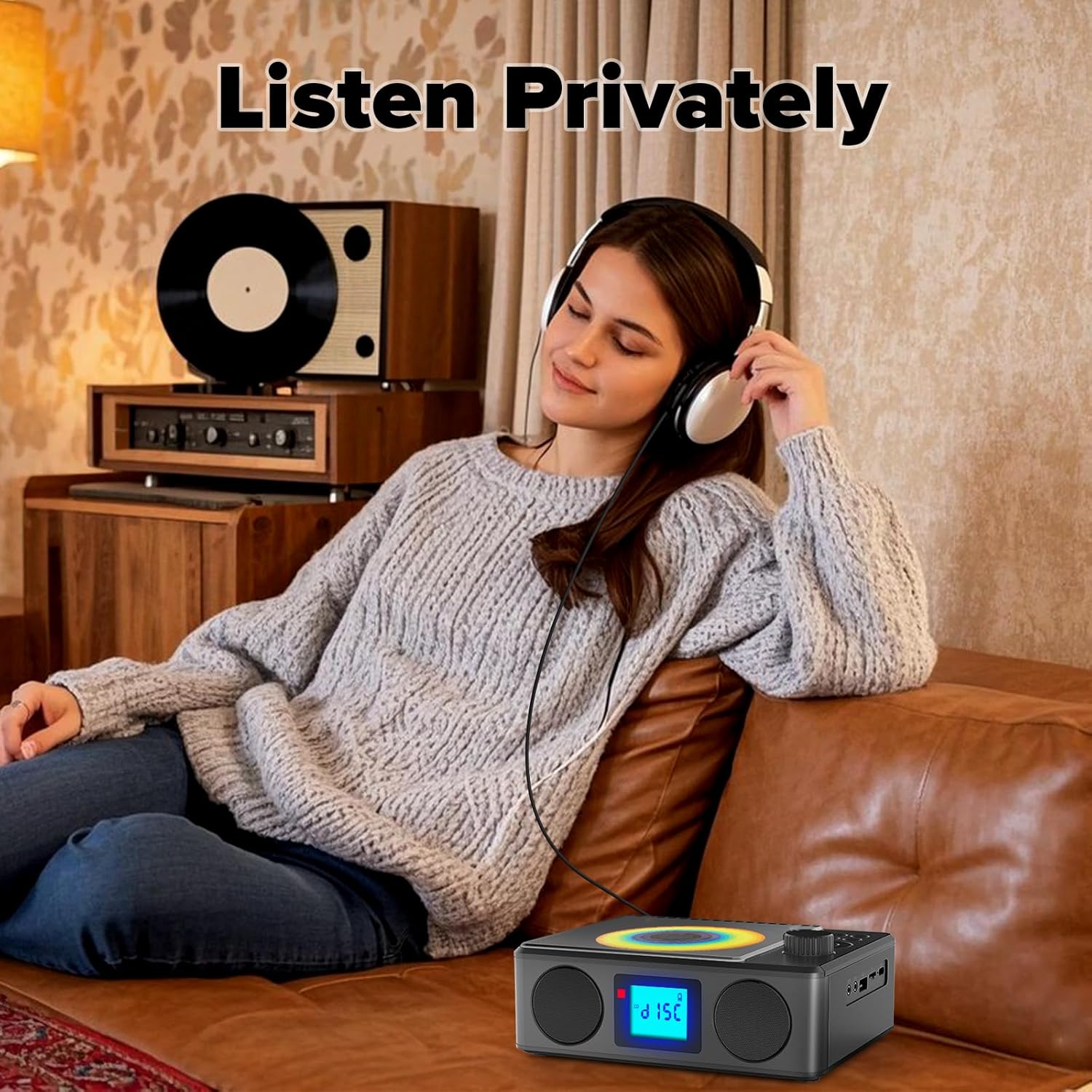
Image: A user enjoying private audio through headphones connected to the PM24.
Обслуживание
- Уборка: Для очистки внешней поверхности устройства используйте мягкую сухую ткань. Не используйте абразивные чистящие средства или растворители.
- Уход за компакт-диском: Берите компакт-диски за края. Загрязненные компакт-диски очищайте мягкой безворсовой тканью, протирая от центра к краям.
- Хранилище: Если устройство не используется в течение длительного времени, храните его в прохладном, сухом месте, вдали от прямых солнечных лучей и экстремальных температур.
- Аккумулятор: Чтобы продлить срок службы батареи, избегайте частой полной разрядки аккумулятора. Регулярно заряжайте устройство, даже если оно не используется.
Поиск неисправностей
| Проблема | Возможная причина | Решение |
|---|---|---|
| Устройство не включается. | Батарея разряжена. | Connect the charging cable and allow the device to charge. |
| Нет звука из динамиков. | Громкость слишком низкая или отключена. Наушники подключены. | Увеличьте громкость. Отключите наушники. |
| Компакт-диск пропускает или не воспроизводится. | CD-диск загрязнен, поцарапан или вставлен неправильно. | Clean the CD. Ensure it is placed correctly. Try another CD. |
| Сбой сопряжения по Bluetooth. | Device is too far, not in pairing mode, or already paired. | Ensure PM24 is in BT mode and flashing. Move devices closer. Disconnect from other devices. |
| Плохой прием FM-радио. | Антенна не выдвинута или зона слабого сигнала. | Fully extend the telescopic antenna. Reposition the device for better signal. |
| Пульт дистанционного управления не работает. | Batteries are depleted or inserted incorrectly. Obstruction between remote and device. | Replace batteries, check polarity. Remove obstructions. Ensure remote is pointed at the device. |
Технические характеристики
- Модель: PM24
- Бренд: Куэпхом
- Размеры продукта: 7.5 x 6.3 x 2.5 дюйма (19.05 x 16.00 x 6.35 см)
- Вес товара: 1.96 фунта (0.89 кг)
- Технологии подключения: Вспомогательный, Bluetooth, USB
- Цвет: Черный
- Тип динамика: Стерео
- Аккумуляторы: 1 нестандартная батарея (в комплекте)
- Время игры: 5-8 часов (прибл.)
- Время зарядки: 4 часов (приблизительно)
Гарантия и поддержка
Kuephom products are designed for reliability and performance. For warranty information or technical support, please refer to the contact details provided on the product packaging or visit the official Kuephom webсайт.
Пожалуйста, сохраните документ, подтверждающий покупку, для претензий по гарантии.


