1. Продукт закончилсяview
The JUSTONE A1 is an 11.3-inch portable touch screen designed to bring wireless CarPlay and Android Auto functionality to your vehicle. It features an in-Cell fully laminated display, 1920x720 resolution, and supports up to 60 frames per second for a smooth user experience. Control is available via the capacitive touchscreen or a wireless button knob. It also includes a BT Display Only Mode for audio streaming and offers multiple mounting options.
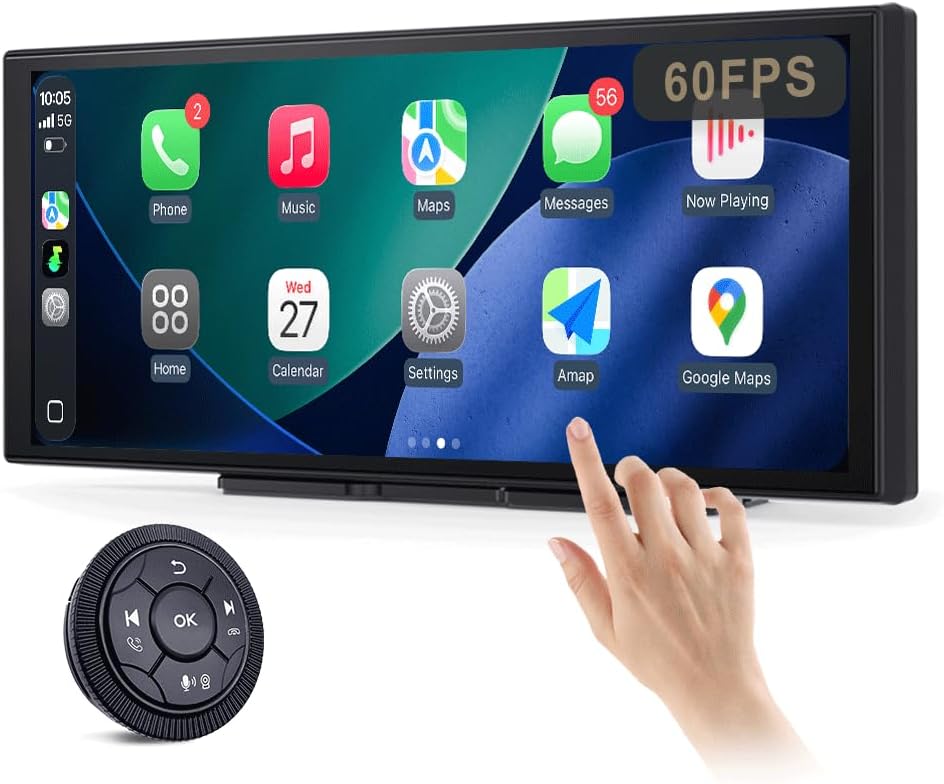
Figure 1: JUSTONE A1 Portable Touch Screen with CarPlay interface and wireless control knob.
2. Содержимое упаковки
Убедитесь, что все перечисленные ниже предметы входят в комплект. Если какие-либо предметы отсутствуют или повреждены, обратитесь в службу поддержки клиентов.

Figure 2: Included accessories for the JUSTONE A1.
- Screen Host
- 4 Clip Bracket
- Двусторонний скотч
- Кронштейн на присоске
- Control Button (Wireless Knob)
- Автомобильный адаптер питания
- Ball Shaped Bracket Converter
- TYPE-C Power Cable
- Аудиокабель AUX
- Base for Suction Cup
- Camera Input Cable (Camera optional)
- Руководство пользователя
3. Настройка
3.1 Варианты монтажа
The JUSTONE A1 offers two primary mounting methods to suit various vehicle dashboards. Ensure the screen is securely mounted and does not obstruct your view дороги.

Рисунок 3: Examples of suction cup and dashboard mounting.
- 4-Clip Vertical Base: Use this bracket to rest the bottom of the screen directly on your dashboard. Secure it with the provided double-sided tape for stability.
- 17mm Ball-Joint Extendable Arm Mount (Suction Cup Bracket): This option allows for more flexible positioning, typically on the windshield or a smooth dashboard surface. Ensure the suction cup is firmly attached.
Примечание: Always ensure the chosen mounting location complies with local traffic laws regarding windshield obstructions.
3.2 Подключение питания
- Connect the TYPE-C Power Cable to the screen host.
- Plug the Car Power Adapter into your vehicle's 12V power outlet (cigarette lighter socket).
- The screen will power on automatically when the vehicle's ignition is turned on.
3.3 Initial Wireless Connection (CarPlay/Android Auto)
- Убедитесь, что на вашем смартфоне включены Bluetooth и Wi-Fi.
- On the JUSTONE A1 screen, select either 'CarPlay' or 'Android Auto' from the main menu.
- Следуйте инструкциям на экране, чтобы выполнить сопряжение телефона через Bluetooth.
- Once Bluetooth is paired, the system will automatically establish a Wi-Fi connection for wireless CarPlay or Android Auto.
- The device is designed to auto-connect to your paired phone when you start your car after the initial setup.
4. Инструкция по эксплуатации
4.1 Функции дисплея

Figure 4: Display features including 11.3-inch size and in-cell full lamination.
- 11.3" In-Cell Full-Laminated Display: Provides a premium look and feel, appearing darker when off compared to standard lamination. The actual panel size is approximately 10.5" x 4.13".
- Разрешение 1920x720: Delivers clear and sharp visuals.
- Частота обновления 60 Гц: Ensures smoother performance, especially for CarPlay.
Методы управления 4.2
The device offers two ways to interact with its interface:

Figure 5: Touchscreen and wireless knob control options.
- Capacitive Touchscreen: Directly interact with the display by touching icons and swiping.
- Wireless Button Knob: For safer operation while driving, especially if the screen is difficult to reach. This knob allows navigation, volume control, and other functions without direct screen interaction.
4.3 Возможности подключения

Figure 6: Supported phone connectivity options.
- Беспроводной CarPlay: Access navigation, music, messages, and more from your iPhone.
- Беспроводной Android Auto: Access navigation, music, and communication features from your Android phone.
- AirPlay: Mirror content from your Apple devices.
- МираКаст: Mirror content from compatible Android devices.
4.4 Режимы вывода звука
The JUSTONE A1 supports multiple ways to output audio to your vehicle's sound system:
- BT Display Only Mode: When your phone is connected to the JUSTONE A1, audio streams directly from your phone to your vehicle's built-in Bluetooth audio system. This requires your vehicle to have its own Bluetooth audio input.
- Дополнительный выход: Connect the provided AUX Audio Cable from the JUSTONE A1 to your vehicle's AUX input port.
- FM-передатчик: The device can transmit audio via an FM frequency. Tune your car radio to the same frequency set on the JUSTONE A1.
4.5 Automatic Day/Night Mode

Figure 7: Automatic brightness adjustment for day and night conditions.
The built-in light sensor automatically detects ambient light conditions and switches between dark and light themes, adjusting screen brightness for optimal visibility and glare resistance during both day and night driving.
5. Техническое обслуживание
- Уборка: Для очистки экрана используйте мягкую ткань без ворса. Для удаления стойких пятен слегка протрите экран.ampСмочите ткань водой или безопасным для экранов чистящим средством. Избегайте использования агрессивных химикатов и абразивных материалов.
- Температура: Не подвергайте устройство длительному воздействию экстремальных температур (как высоких, так и низких).
- Хранилище: При длительном хранении устройства отключите его от питания и храните в прохладном, сухом месте.
- кабели: Regularly check power and audio cables for any signs of wear or damage. Replace if necessary.
6. Поиск Неисправностей
- Устройство не включается:
- Ensure the car power adapter is securely plugged into the vehicle's 12V outlet and the TYPE-C cable is firmly connected to the screen.
- Check if the vehicle's 12V outlet is receiving power (e.g., by testing with another device).
- Wireless CarPlay/Android Auto fails to connect:
- Verify Bluetooth and Wi-Fi are enabled on your smartphone.
- Ensure your phone is not connected to another CarPlay/Android Auto device.
- Попробуйте удалить устройство из настроек Bluetooth вашего телефона и выполнить сопряжение заново.
- Restart both your phone and the JUSTONE A1 device.
- Нет аудиовыхода:
- If using BT Display Only Mode, ensure your phone is connected to your car's native Bluetooth audio system.
- If using AUX, check that the AUX cable is properly connected to both the JUSTONE A1 and your car's AUX input, and your car's audio source is set to AUX.
- If using FM transmitter, ensure the frequency on the JUSTONE A1 matches your car radio's frequency and there is no strong interference on that frequency.
- Check the volume levels on both the JUSTONE A1 and your car's audio system.
- Экран не реагирует или завис:
- Disconnect the power cable from the JUSTONE A1 for 10 seconds, then reconnect it to perform a restart.
- Wireless control knob is not working:
- Ensure the knob's battery is not depleted. Replace if necessary.
- Re-pair the knob with the main unit if it has become disconnected.
7. Технические характеристики
| Особенность | Спецификация |
|---|---|
| Название модели | A1 |
| Бренд | JUSTONE |
| Размер дисплея | 11.3 Inches (10.5" x 4.13" actual panel) |
| Тип дисплея | In-Cell Full-Laminated Touch Screen |
| Разрешение | 1920x720 |
| Частота обновления | Up to 60Hz (for CarPlay) |
| Технология связи | Bluetooth, Wi-Fi (for Wireless CarPlay/Android Auto) |
| Режим аудиовыхода | BT Display Only, AUX, FM Transmitter |
| Интерфейс управления | Touchscreen, Wireless Button Knob |
| Тип крепления | Panel Mount (4-clip vertical base), Dashboard Mount (17mm ball-joint extendable arm) |
| Специальная характеристика | Portable, Auto Day/Night Mode (Light Sensor) |
| Вес товара | 14.8 унции (420 граммов) |
| Размеры упаковки | 12.01 x 5.51 x 3.98 дюйма |
8. Гарантия и поддержка
8.1 Информация о гарантии
The JUSTONE A1 portable touch screen comes with a гарантия производителя один год Гарантия действует с даты покупки. Данная гарантия распространяется на дефекты материалов и изготовления при нормальной эксплуатации. Она не распространяется на повреждения, вызванные неправильным использованием, несчастными случаями, несанкционированными модификациями или неправильной установкой.
Пожалуйста, сохраните документ, подтверждающий покупку, для претензий по гарантии.
8.2 Поддержка клиентов
For technical assistance, troubleshooting, or warranty inquiries, please contact JUSTONE customer support through the retailer's platform where the product was purchased or visit the official JUSTONE webсайт для контактной информации.
When contacting support, please have your product model (A1) and purchase details ready.