Продукт болееview
The MIKIBY AK980 is a versatile 98% layout mechanical keyboard designed for enhanced productivity and gaming. It features tri-mode connectivity (Bluetooth, 2.4G wireless, and USB-C wired), a smart TFT display, a multi-function knob, hot-swappable switches, and vibrant RGB backlighting. Its gasket-mounted design ensures a comfortable and quiet typing experience.

Image: The MIKIBY AK980 keyboard, showcasing its 98% layout, smart display, and knob. The keyboard features a grey and yellow keycap color scheme with RGB backlighting.
Что в коробке?
- AK980 keyboard
- Съемник Keycap
- USB-кабель
- Руководство пользователя
Настраивать
Режимы подключения
The AK980 keyboard supports three connection modes: Bluetooth (BT5.0), 2.4G wireless, and USB-C wired. A switch on the back of the keyboard allows you to select between MAC and WIN layouts, and between 2.4G, USB, and BT connection modes.

Image: The MIKIBY AK980 keyboard demonstrating its tri-mode connectivity options: Bluetooth, 2.4GHz Wireless, and Type-C wired. The image shows the keyboard connected to a desktop computer, a tablet, and a smartphone, highlighting its multi-device compatibility.
Беспроводное соединение 2.4G
- Locate the 2.4G USB dongle, typically stored in a slot on the keyboard.
- Подключите USB-модем 2.4G к свободному USB-порту вашего компьютера.
- Switch the keyboard's mode selector to "2.4G". The keyboard will automatically connect.

Изображение: Крупный план view of the MIKIBY AK980's metal knob and smart display. The image illustrates how to adjust volume (default), press down to enter the menu, rotate to select sections, and press to confirm selections.
Bluetooth-соединение
- Переключите селектор режима клавиатуры на «BT».
- На вашем устройстве (компьютере, планшете, смартфоне) включите Bluetooth и выполните поиск новых устройств.
- Select "AK980" from the list of available devices to pair.
- The smart display will indicate successful pairing.
Video: This video demonstrates the Bluetooth connection process for the MIKIBY AK980 wireless keyboard. It shows how to switch the keyboard to Bluetooth mode and pair it with a device, with the smart display confirming the successful connection.
Проводное соединение USB-C
- Подключите прилагаемый кабель USB-C к порту USB-C клавиатуры.
- Подключите другой конец кабеля USB-C к свободному USB-порту вашего компьютера.
- Switch the keyboard's mode selector to "USB". The keyboard will be recognized automatically.
Инструкция по эксплуатации
TFT Smart Display & Knob Functions
The 1.49-inch TFT smart display provides real-time information such as date, time, battery level, and connection mode. The multi-function knob allows for quick adjustments.

Image: A close-up of the MIKIBY AK980's metal knob and smart display. The image illustrates how to adjust volume (default), press down to enter the menu, rotate to select sections, and press to confirm selections.
- Adjust Volume (Default): Rotate the knob to increase or decrease the system volume.
- Войдите в меню: Press down on the knob to enter the smart display's menu.
- Меню навигации: Rotate the knob to scroll through menu options (Home, RGB Modes, RGB Colors, RGB Speed, Language Settings, GIF Image display).
- Выберите опцию: Press down on the knob to select a highlighted menu option.
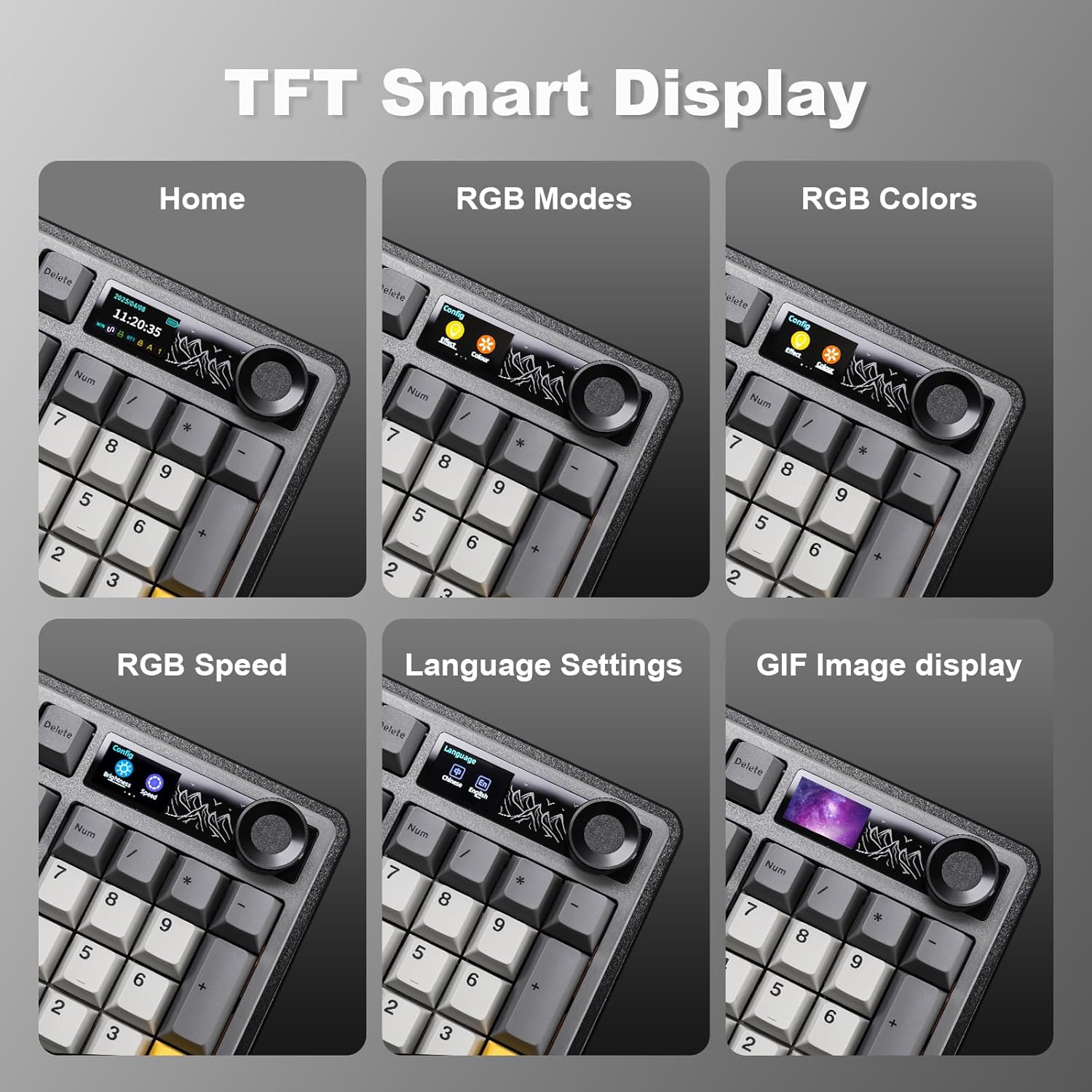
Image: Screenshots of the MIKIBY AK980's TFT Smart Display showing various menu options: Home screen with date/time/battery, RGB Modes, RGB Colors, RGB Speed, Language Settings, and GIF Image display.
RGB подсветка
The keyboard features 20 pre-programmed RGB lighting effects. You can also customize effects via the web водитель.
- Изменить световой эффект: Нажимать FN + \ (backslash)
- Отрегулируйте яркость: Нажимать FN + + (увеличение) или FN + - (снижаться)
- Change Direction Light: Нажимать FN + ← (left arrow) or FN + → (right arrow)
- Настройте цвет освещения: Нажимать FN + ↑ (стрелка вверх) или FN + ↓ (down arrow)
- Adjust Keyboard Light Speed: Нажимать FN + [ (увеличение) или FN + ] (снижаться)
- Включение/выключение подсветки: Нажимать FN + X

Image: The MIKIBY AK980 keyboard displaying various RGB lighting effects. The image also provides a guide to function key combinations for adjusting light effects, brightness, direction, color, and speed, as well as turning the backlight on/off.
Коммутаторы с возможностью горячей замены
The AK980 supports 3/5-pin hot-swappable mechanical switches, allowing for easy customization without soldering. Use the included keycap puller and switch puller to replace switches.

Image: A demonstration of the MIKIBY AK980's hot-swappable feature, showing a switch being removed with a switch puller. Insets highlight PBT keycaps, Murad switches, mounted stabilizers, and south-facing LEDs.
Срок службы батареи и зарядка
The keyboard is equipped with an 8000mAh battery. It offers up to 28 hours of use with RGB lighting on and up to 110 hours in sleeping mode (backlight off). Use the provided USB-C cable for charging.

Image: The MIKIBY AK980 keyboard highlighting its 8000mAh battery capacity. The image indicates 28 hours of endurance with RGB on and 110 hours in sleeping mode.
Обслуживание
- Уборка: Use a soft, dry cloth to wipe the keyboard surface. For deeper cleaning, remove keycaps using the keycap puller and use compressed air to clear debris.
- Уход батареи: To prolong battery life, avoid fully discharging the battery frequently. Charge the keyboard regularly.
- Хранилище: Храните клавиатуру в прохладном, сухом месте, вдали от прямых солнечных лучей и экстремальных температур.
Поиск неисправностей
| Проблема | Возможная причина | Решение |
|---|---|---|
| Клавиатура не отвечает | Low battery; Incorrect connection mode; Loose cable/dongle; Driver issue. | Charge the keyboard; Ensure correct mode (BT/2.4G/USB) is selected; Reconnect cable/dongle; Reinstall keyboard drivers on your computer. |
| Нестабильное соединение Bluetooth | Interference; Distance from device; Low keyboard battery. | Move closer to the device; Ensure no strong interference sources nearby; Charge the keyboard; Re-pair the Bluetooth connection. |
| RGB lights not working/customizing | Backlight turned off; Incorrect settings; Software issue. | Нажимать FN + X to toggle backlight; Use the knob menu or web driver to adjust settings; Ensure web driver is installed and updated. |
| Smart display not showing correct time/date | Time/date not synchronized. | Подключайтесь к web driver software to calibrate date and time. |
Технические характеристики
| Особенность | Деталь |
|---|---|
| Бренд | МИКИБИ |
| Модель | АК980 |
| Технология связи | Bluetooth (BT5.0), 2.4G Wireless, USB-C Wired |
| Описание клавиатуры | Механический |
| Количество ключей | 97 (98% планировки) |
| Колпачки | Колпачки клавиш из ПБТ |
| Переключатели | Hot-Swappable (3/5-pin support), Murad Switch (default) |
| Стиль монтажа | Прокладка установлена |
| Подсветка | RGB (20 pre-programmed effects, web driver customization) |
| Особые возможности | TFT Smart Display, Multi-function Knob, Ergonomic Design, 2-Level Feet |
| Емкость аккумулятора | 8000мАч |
| Срок службы батареи | Up to 28 hours (RGB on), Up to 110 hours (backlight off) |
| Вес товара | 3.19 фунта |
| Размеры упаковки | 17.99 x 7.76 x 2.32 дюйма |
| Совместимые устройства | Игровая консоль, ноутбук, ПК, смартфон, планшет |

Изображение: взорванный view of the MIKIBY AK980 keyboard, illustrating its 5 silencer layers and internal components for sound dampening and improved typing feel. Components include TFT Color Screen, Metal volume knob, PBT keycaps, Upper keyboard case, Mechanical Switches, Stabilizers, FR4 Positioning Plate, Gaskets, PO sound-absorbing pad, PCB Plate, IXPE switch pad, PET sound foam, PO base sound foam, Silicone pad, Battery, Bottom keyboard case, and Anti-slip silicone pads.
Гарантия и поддержка
For warranty information and technical support, please refer to the official MIKIBY webили обратитесь в службу поддержки напрямую. Сохраните чек о покупке для предъявления гарантийных претензий.
Official MIKIBY Store: MIKIBY Amazon Store


