1. Введение и окончаниеview
This manual provides detailed instructions for the installation, setup, and operation of your Veise VE017G-H Wi-Fi Smart Fingerprint Front Door Lock Set. This advanced lock offers multiple access methods and smart home integration for enhanced security and convenience.
Основные характеристики:
- Smart Wi-Fi Control: Remote lock/unlock, password management, real-time notifications, activity logs via the KK Home App.
- Бесключевой доступ 8-в-1: Access via Fingerprint, App, Password, Cards, Backup Key, User Authorization, Code Sharing, and Voice.
- Голосовое управление: Compatible with Amazon Alexa & Google Home for hands-free operation.
- Повышенная безопасность: ANSI Grade 3 and BHMA tested, IP55 weatherproof, built-in alarm, emergency power port, AES 128-bit encryption.
- Современный дизайн: Matte Black finish with a retro handle set.
- Простая установка: Designed for DIY installation with a screwdriver.
2. Что включено
The Veise VE017G-H package includes the following components:
- Fingerprint Smart Lock with 2 Handles (Exterior & Interior assembly)
- Veise G1 Gateway
- 2 клавиш
- 2 ИС-карты
- Винты
- Защелка
- Ударять
- Монтажная пластина
- Установка и руководство пользователя

3. Руководство по установке
3.1 Проверки перед установкой
Before beginning installation, verify your door's compatibility and dimensions:
- Толщина двери: 1-3/8" to 2" (35 to 50mm).
- Диаметр отверстия: 1-1/2" или 2-1/8" (38 мм или 54 мм).
- Дорнмас: 2-3/8" или 2-3/4" (60 мм или 70 мм).
- Минимальное расстояние между отверстиями: 5" (127 мм).
- Расстояние между отверстиями для ручки: 7-8/8" to 8-7/8" (200 to 225mm).
- Bore Diameter for Handle: 3/8" (10mm).
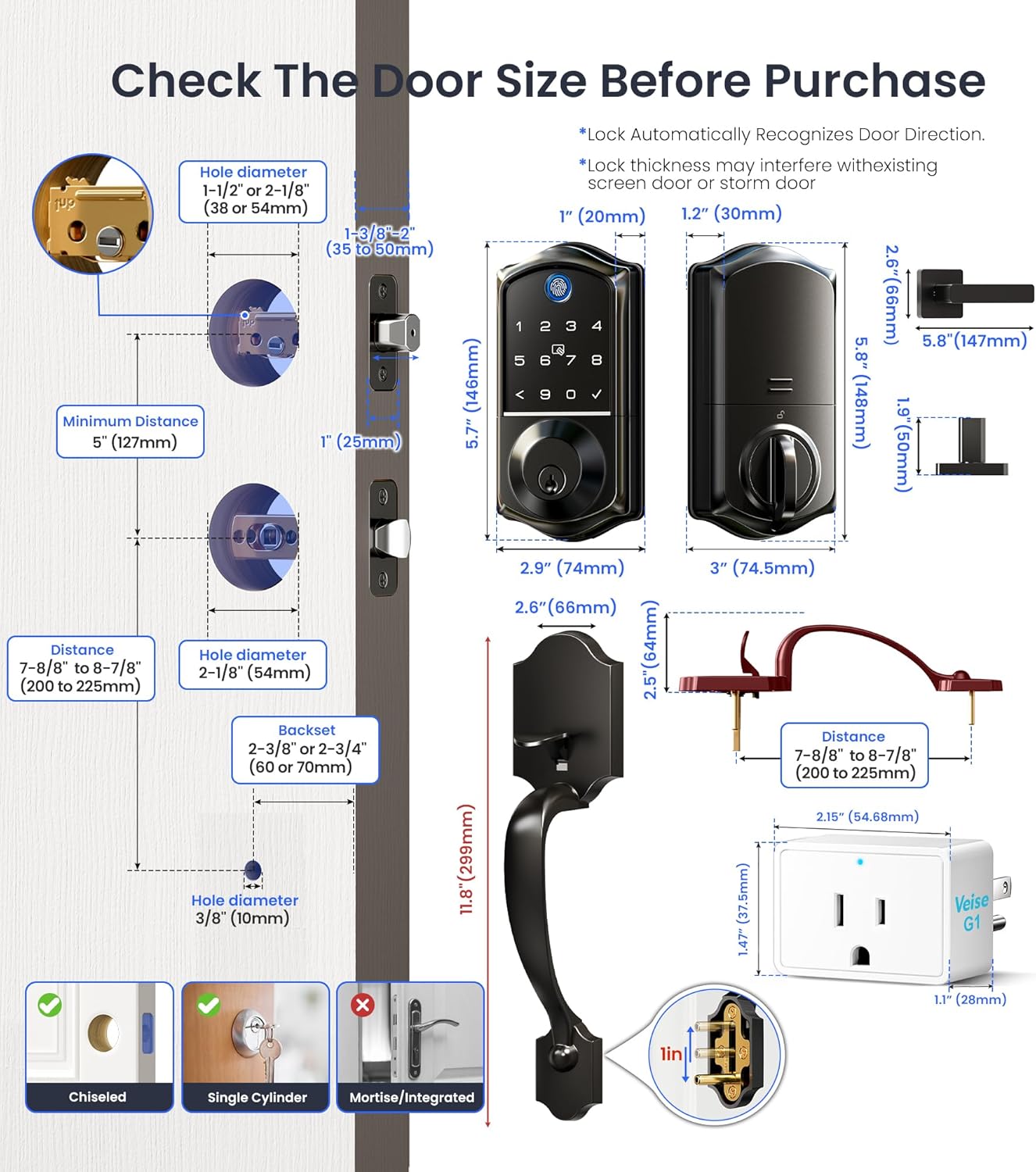
Ensure your door is chiseled for the latch and strike plates. This lock is designed for single cylinder deadbolts and is not compatible with mortise/integrated locks.

3.2 Пошаговая установка
It is strongly recommended to keep the door open or ajar during installation. Do not close the door before inserting the batteries. Do not insert the batteries until the lock is fully installed.
Video 1: Detailed guide on how to install the smart lock and handle sets.
- Установите защелку и защелку:
- Adjust the latch backset (60mm or 70mm) if necessary.
- Ensure the beveled edge of the latch bolt faces the direction the door swings shut.
- Secure the latch with screws.
- Установите ответную планку на дверную коробку.
- Установите внешнюю сборку:
- Проведите кабель под защелкой.
- Insert the torque blade through the slot in the latch, ensuring it's horizontal.
- Align the exterior assembly with the door holes and secure it.
- Установить внутреннюю сборку:
- Disassemble the battery cover.
- Insert the cable connector into the socket, pushing firmly until seated.
- Align the torque blade with the knob hole.
- Attach the interior assembly to the mounting plate and tighten the 3 screws.
- Insert 4 AA alkaline batteries (do not mix old and new batteries or different brands).
- Прикрепите крышку батарейного отсека.
- Install Handle Set:
- Ensure the handle set is compatible with your door's 3-hole spacing (7-8/8" to 8-7/8").
- Install the exterior handle, ensuring the handle button is not pressed during installation.
- Установите внутреннюю ручку.
- Do not exert excessive force on the handle or hang objects on it.
4. App Setup & Connectivity
4.1 KK Home App Setup
The KK Home App allows full control and management of your smart lock.
Video 2: Instructions on how to pair the lock to the KKHome App and G1 Gateway.
- Скачайте и зарегистрируйтесь: Download the KK Home App from your app store. Register and log in to your account.
- Включить разрешения: Turn on Bluetooth for iOS. For Android, turn on Location and Bluetooth, and grant location permission to the app. Keep your phone and lock within 2 meters during pairing.
- Добавить устройство: Click "Add device" in the app. Scan the QR code or manually enter the ESN located on the back of the interior assembly. Follow in-app instructions to complete pairing.
- Изменить мастер-код: After successful connection, tap on "Settings" then "Master code" to set a new 4-10 digit master PIN code.
4.2 G1 Gateway Pairing
The G1 Gateway enables Wi-Fi connectivity for your lock.
- Включение питания: Plug in the G1 Gateway. Keep it within 15 meters (49ft) of your home router.
- Отсканируйте QR-код: Open the KK Home App and scan the QR code on the G1 Gateway.
- Сбросить настройки шлюза: Find the RES button on the device, press and hold it for 5 seconds until the indicator starts to slowly flash.
- Wi-Fi-соединение: Set up Wi-Fi connection. The gateway only works with 2.4G Wi-Fi networks. Click "next" to complete.
- Добавить «умный замок»: Add the smart lock in the App. Ensure the G1 gateway has been added successfully first. Keep the G1 gateway within 10 meters of the door lock.
4.3 Интеграция голосового управления
Integrate your smart lock with Amazon Alexa or Google Home for convenient voice commands.
Video 3: Guide on how to connect your Veise smart lock to Alexa.
After successfully connecting your G1 gateway and smart lock to the KK Home App, follow the in-app instructions to link your KK Home account with Alexa or Google Assistant. You can then use voice commands like "Alexa, unlock the front door" or "Alexa, lock the front door."
5. Инструкция по эксплуатации
5.1 Множественные методы доступа
Your Veise smart lock offers various ways to unlock and lock your door:
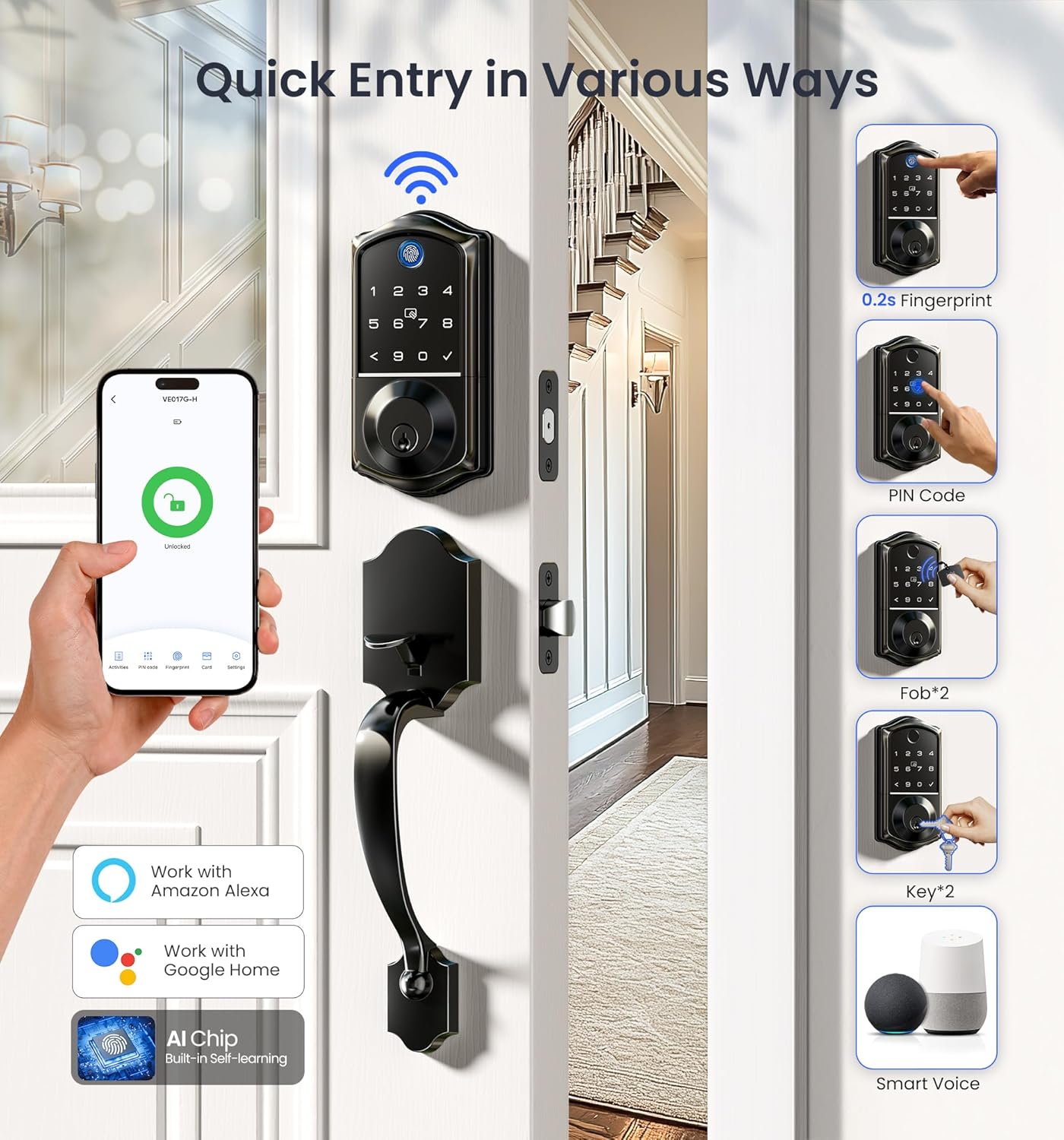
- отпечатков пальцев: Fast 0.2-second recognition.
- ПИН-код: Use the backlit keypad to enter your personalized code.
- Fob/IC Card: Для быстрого входа используйте предоставленные IC-карты.
- Резервный ключ: Traditional key access is always available.
- Приложение KK Home: Remote lock/unlock from anywhere.
- Голосовое управление: Use Alexa or Google Home commands.
5.2 Функция автоматической блокировки
The auto-lock feature automatically locks your door after a set period, providing peace of mind.

5.3 Удаленное управление
Manage your lock's access and monitor activity remotely through the KK Home App.

- Generate Passwords: Create permanent, one-time, duration, or recurring codes for various users.
- Управление пользователями: Add or remove users and assign specific access permissions.
- Уведомления в реальном времени: Receive instant alerts on your phone when the door is locked or unlocked.
- Журналы активности: View Подробная история всех событий, связанных с блокировкой и разблокировкой дверей.

5.4 Функции безопасности
The lock incorporates several features to enhance security:
- Пароль защиты от подглядывания: Enter random digits before or after your actual PIN to prevent others from guessing your code.
- Lockout Alarm: The lock will trigger an alarm and temporarily disable access after multiple incorrect entry attempts.
- Защита от атмосферных воздействий IP55: Разработан, чтобы выдерживать различные погодные условия.


5.5 Специальные режимы
- В гостях режим: Activates an alarm if the lock is unlocked mechanically or by thumb turn.
- Бесшумный режим: Disables sound prompts for quiet operation.
- Клавиатура с подсветкой: Keypad illuminates for easy visibility in low light conditions.

6. Техническое обслуживание
6.1. Замена батареи
The lock requires 4 AA alkaline batteries. Replace batteries when the low battery alarm is triggered.

6.2 Аварийное питание
In case of complete battery depletion, an emergency Type-C port is available for temporary power to unlock the door.
7. Поиск Неисправностей
If you encounter issues with your Veise smart lock, refer to the following common problems and solutions:
Video 4: Troubleshooting guide for the VE017G-H smart lock.
| Проблема | Решение |
|---|---|
| The latch bolt keeps going in and out. | Disassemble and reinstall the lock by following the installation tips:
|
| Can only be unlocked with a key; password, fingerprint, and mobile app unlocking are unavailable. | Press and hold the reset button with the reset tool for 5 seconds. The lock will resume normal operation after resetting. |
| Keeps showing stuck. Key/password/fingerprint/KK Home App can't be unlocked and locked. | Route the cable below the Latch and insert the Torque Blade horizontally into the Latch slot, ensuring both the blade and slot are level. |
| Connection failed during pairing or lock not found. | Perform a resetting on the lock. Test if the default master code (12345678) works to unlock. Make sure Bluetooth is turned on in your phone's settings and the lock is supplied with power. |
| Главный PIN-код не может быть изменен. | Обратитесь к Краткому руководству для сброса блокировки и перепрограммирования всех PIN-кодов. |
| Forgot Master PIN Code. | Perform a factory reset to clear all PIN Codes. Once reset, all PIN Codes will be deleted and the Master PIN Code will be reset to the default (12345678). |
| Автоблокировка не работает. | If the light continues to flash red and the voice announces "Low battery", replace the batteries with four new AA alkaline batteries. See Quick Setup to activate the auto-lock feature. |
| Fingerprint can't unlock. | Очистите датчик отпечатков пальцев и повторите попытку. |
| Установка блокировки завершилась неудачей. | Make sure the lock is installed correctly. Insert fresh batteries and make sure the cable is properly connected, not pinched. After installation, reset the lock to the factory default settings. |
| Клавиатура не отвечает. | Make sure batteries are inserted correctly. If the battery indicator flashes continuously, the batteries are low. Replace them with four new AA alkaline batteries. Make sure that the cable is properly connected and has not been damaged during installation. |
8. Технические характеристики
| Особенность | Деталь |
|---|---|
| Бренд | Вейзе |
| Название модели | VE017G-H |
| Тип замка | Биометрический, с засовом, с клавиатурой |
| Материал | Алюминий |
| Цвет | Матовый черный |
| Тип отделки | Матовый черный |
| Размеры товара Д x Ш x В | 12.83 x 9.29 x 3.74 дюйма |
| Вес товара | 5.37 фунта |
| Протокол подключения | Bluetooth, Wi-Fi 2.4 ГГц |
| Тип контроллера | APP, Amazon Alexa, Google Assistant, Hand Control |
| Требуются батареи | 4 батарейки типа АА (не входят в комплект) |
| Тип элемента батареи | Щелочной |
| Особые возможности | Auto-Lock, Back-Lit Keypad, Fingerprint, One-Touch Lock, Smart Lock with Retro Handle Set, Wi-Fi Remote Control, Remote Lock/Unlock, Remote Access Sharing, Real-time Notifications, Instant Access Log, Monitor Lock Status, Alexa and Google Voice Control, Remotely Generate/Modify/Delete Code, Voice Prompts in 3 Languages, US-Based Customer Support |
9. Гарантия и поддержка
Veise offers comprehensive support for your product:
- Гарантия: At least 1-year warranty.
- Онлайн-поддержка по телефону: Monday–Friday, 9 AM–5 PM PST.
- Помощь по электронной почте: 24/7 email support.
If you have any questions or require assistance, please contact us first!
- Бесплатный номер: +1 (855) 400-3853 (США)
- Электронная почта: support@iveise.com


