1. Введение
Welcome to the TABWEE T80 Tablet user manual. This guide provides comprehensive instructions to help you get the most out of your new Android 15 tablet. The T80 is designed for a seamless and powerful user experience, featuring advanced AI capabilities, a vibrant display, and robust performance for both work and entertainment.
Основные характеристики:
- Операционная система Android 15: Experience the latest features and security enhancements.
- Gemini AI 2.0: Enhanced AI for smarter interactions and controls.
- 10.5-дюймовый HD+ IPS-дисплей: Enjoy clear and vibrant visuals with a wide viewугол наклона.
- Высокая производительность: Equipped with a 2.0GHz CPU, 12GB RAM, and 64GB ROM (expandable up to 2TB via TF card).
- Долговечный аккумулятор: 6000mAh mega battery for extended use.
- Расширенные возможности подключения: Supports 5G WiFi and Bluetooth 5.0.
- 5MP Google Lens Camera: For clear photos and smart scene recognition.

Figure 1.1: The TABWEE T80 Tablet, showcasing его элегантный дизайн и дисплей.
2. Настройка
2.1 Распаковка и первоначальная оплата
Carefully remove your TABWEE T80 Tablet from its packaging. Before first use, it is recommended to fully charge the device using the provided USB-C cable and power adapter. The charging port is located on the side of the tablet.
2.2 Включение и начальная настройка
- Press and hold the Power button (located on the side) until the TABWEE logo appears on the screen.
- Следуйте инструкциям на экране, чтобы выбрать язык, подключиться к сети Wi-Fi и настроить учетную запись Google.
- Review и примите условия, чтобы завершить процесс настройки.

Рисунок 2.1: Оверview of the TABWEE T80's core specifications and features.
3. Эксплуатация планшета
3.1 Возможности Android 15
Your TABWEE T80 runs on the latest Android 15, offering enhanced user experience, improved privacy, and smart features.
Split-Screen Combo
The split-screen feature allows you to run two applications simultaneously, enhancing multitasking and productivity. You can easily save app pairs for quick access.
Video 3.1: Demonstrates how to use the split-screen feature to run two applications concurrently on the TABWEE T80 tablet.
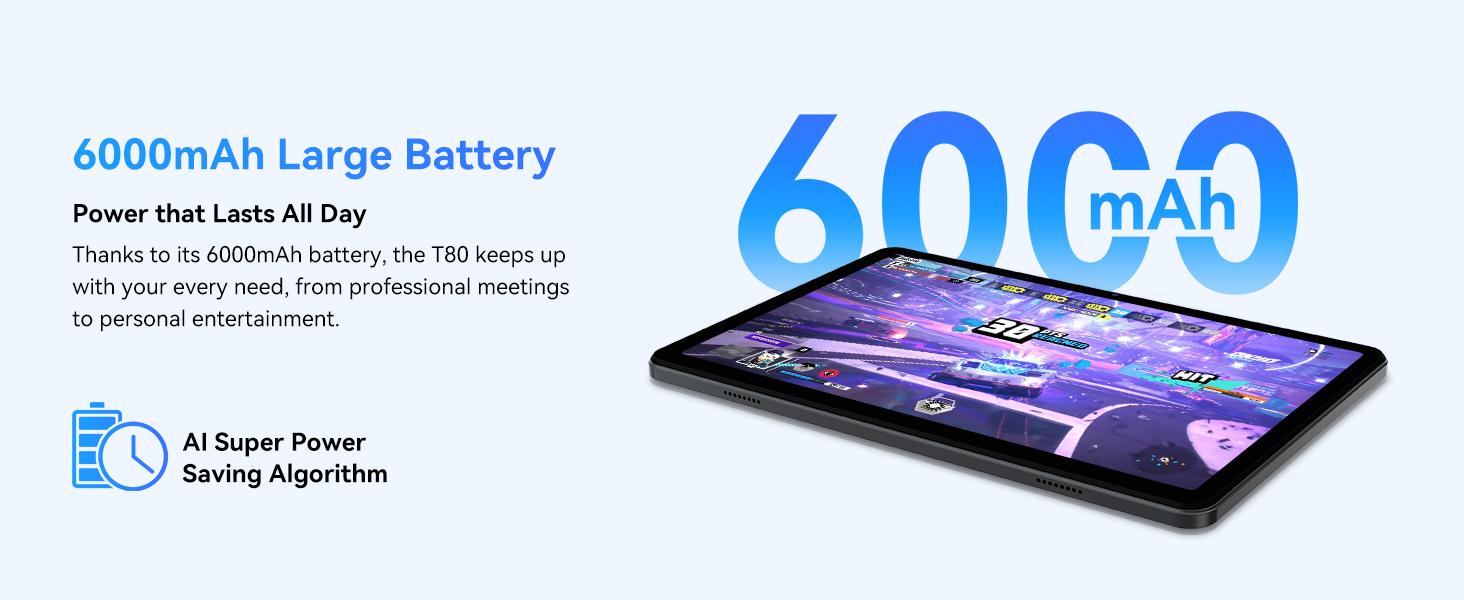
Figure 3.1: Visual representation of the split-screen functionality, allowing for efficient multitasking.
Desktop Customization and Widgets
Personalize your home screen by dragging and grouping apps freely. You can also add various widgets, such as the calendar, to quickly access information and tasks.
Video 3.2: Illustrates how to customize your desktop layout and add widgets for quick access to information.
Контроль конфиденциальности
Android 15 offers enhanced privacy controls, allowing you to manage app permissions and secure your data. You can block app access to sensitive information like location.
Video 3.3: Shows how to manage privacy settings and control app access to your data on the TABWEE T80.
Parental Controls with Gemini AI
Utilize Gemini AI parental controls to manage screen time, automatically lock games during homework, and ensure a safe digital environment for children.
Figure 3.2: The Digital Wellbeing interface, demonstrating options for managing screen time and parental controls.
3.2 Дисплей и визуальные эффекты
The 10.5-inch HD+ IPS display provides a clear and immersive viewing experience with a 1280x800 resolution and 84.9% screen-to-body ratio. It's ideal for watching videos, browsing, and reading.

Figure 3.3: Details of the tablet's display, highlighting its resolution and IPS full view возможности.
3.3 Производительность и хранение
Powered by a 2.0GHz Unisoc T310 CPU and 12GB RAM (expandable via software memory extension), the T80 ensures smooth multitasking and responsive performance. With 64GB of internal storage and support for up to 2TB TF cards, you have ampле пространство для всех ваших files, приложения и медиа.

Figure 3.4: Illustration of the tablet's processing power and memory, enabling seamless multitasking and productivity.
3.4 Срок службы батареи
The 6000mAh mega battery provides extended usage, offering up to 8 hours of video streaming, 6 hours of gaming, or 30 hours of music playback. Smart power-saving modes further optimize battery longevity.

Figure 3.5: Depiction of the tablet's large 6000mAh battery and its USB-C charging port.
3.5 Функции камеры
The T80 features a 5MP Google Lens enabled camera. This allows for scene recognition, night mode optimization, and useful functions like text translation and object identification.

Рисунок 3.6: Оверview of the tablet's camera and its integration with Google Lens for smart functions.
4. Техническое обслуживание
To ensure the longevity and optimal performance of your TABWEE T80 Tablet, follow these maintenance guidelines:
- Уборка: Для чистки экрана и корпуса используйте мягкую ткань без ворса. Избегайте использования абразивных материалов и едких химикатов.
- Обновления программного обеспечения: Регулярно проверяйте и устанавливайте обновления системы, чтобы воспользоваться новейшими функциями, исправлениями безопасности и улучшениями производительности.
- Уход батареи: Избегайте экстремальных температур. Не допускайте частой полной разрядки аккумулятора. При длительном хранении зарядите аккумулятор примерно до 50%.
- Управление хранилищем: Периодически очищайте ненужное fileи приложения для освобождения места в памяти и поддержания бесперебойной работы.
- Защита: Рассмотрите возможность использования защитного чехла и защитной пленки для экрана, чтобы защитить устройство от падений и царапин.
5. Поиск Неисправностей
В этом разделе рассматриваются распространенные проблемы, с которыми вы можете столкнуться при использовании планшета TABWEE T80.
5.1 Устройство не включается
- Проверьте аккумулятор: Убедитесь, что планшет достаточно заряжен. Подключите его к зарядному устройству и подождите несколько минут, прежде чем снова попытаться включить.
- Жесткий сброс: Press and hold the Power button for about 10-15 seconds until the device restarts.
5.2 Проблемы с подключением Wi-Fi
- Включить/выключить Wi-Fi: В настройках выключите, а затем снова включите Wi-Fi.
- Перезагрузите маршрутизатор: Выключите и снова включите Wi-Fi-роутер.
- Забудьте о сети: Зайдите в настройки Wi-Fi, удалите проблемную сеть из списка, а затем подключитесь заново.
5.3 Низкая производительность
- Закрыть фоновые приложения: Закройте неиспользуемые приложения, работающие в фоновом режиме.
- Очистить кэш: Regularly clear app caches in Settings > Apps.
- Освободить хранилище: Удалить ненужное fileили удалить редко используемые приложения.
- Перезагрузите устройство: A simple restart can often resolve temporary slowdowns.
5.4 Приложения зависают или не отвечают
- Принудительная остановка приложения: Go to Settings > Apps, select the problematic app, and choose 'Force Stop'.
- Clear App Data/Cache: In the same app settings, try clearing its cache or data (note: clearing data will reset the app to its default state).
- Переустановить приложение: Удалите, а затем переустановите приложение из магазина Google Play.
6. Технические характеристики
Подробные технические характеристики планшета TABWEE T80:
| Особенность | Спецификация |
|---|---|
| Бренд | ТАБВИ |
| Название модели | Т80 |
| Операционная система | Андроид 15 |
| Размер экрана | 10.5 дюйма |
| Разрешение экрана | 1280 x 800 пикселей |
| Процессор | 2.0 GHz Unisoc T310 |
| Память (ОЗУ) | 12 ГБ |
| Память (ПЗУ) | 64 ГБ |
| Расширяемое хранилище | Карта памяти TF до 2 ТБ |
| Задний WebРазрешение камеры | 5 МП |
| Тип беспроводной связи | 802.11n, 802.11b, 802.11a, 802.11ac, 802.11g (5G WiFi) |
| Bluetooth | Блютус 5.0 |
| Емкость аккумулятора | 6000мАч |
| Средний срок службы батареи | 550 часов (в режиме ожидания) |
| Вес товара | 1.1 фунта (приблизительно 523 граммов) |
| Размеры продукта | 9.5 x 6.4 x 0.3 дюйма |
| Цвет | Серый |
7. Гарантия и поддержка
TABWEE is committed to quality and customer satisfaction. Your T80 Tablet comes with comprehensive support to ensure a worry-free experience.
7.1 Информация о гарантии
The TABWEE T80 Tablet is backed by a Гарантия 2 год. This warranty covers manufacturing defects and ensures free repair service for eligible issues. Please retain your proof of purchase for warranty claims.
7.2 Поддержка клиентов
For any questions, technical assistance, or warranty claims, please contact our dedicated support team:
- 24/7 Online Call Support: Доступен для оказания немедленной помощи.
- Пожизненная техническая поддержка: Expert help whenever you need it.
- Hassle-Free Service: Assistance available through the TABWEE Official Flagship Store.
We are dedicated to providing prompt and effective solutions to all your inquiries.

Figure 7.1: Our dedicated customer support team is ready to assist you.


