1. Продукт закончилсяview
The TABWEE T20 is a versatile 10-inch Android tablet designed for both productivity and entertainment. It features a high-resolution Incell display, a powerful Octa-Core processor, and ample memory and storage, making it suitable for a wide range of applications from content creation to multimedia consumption.
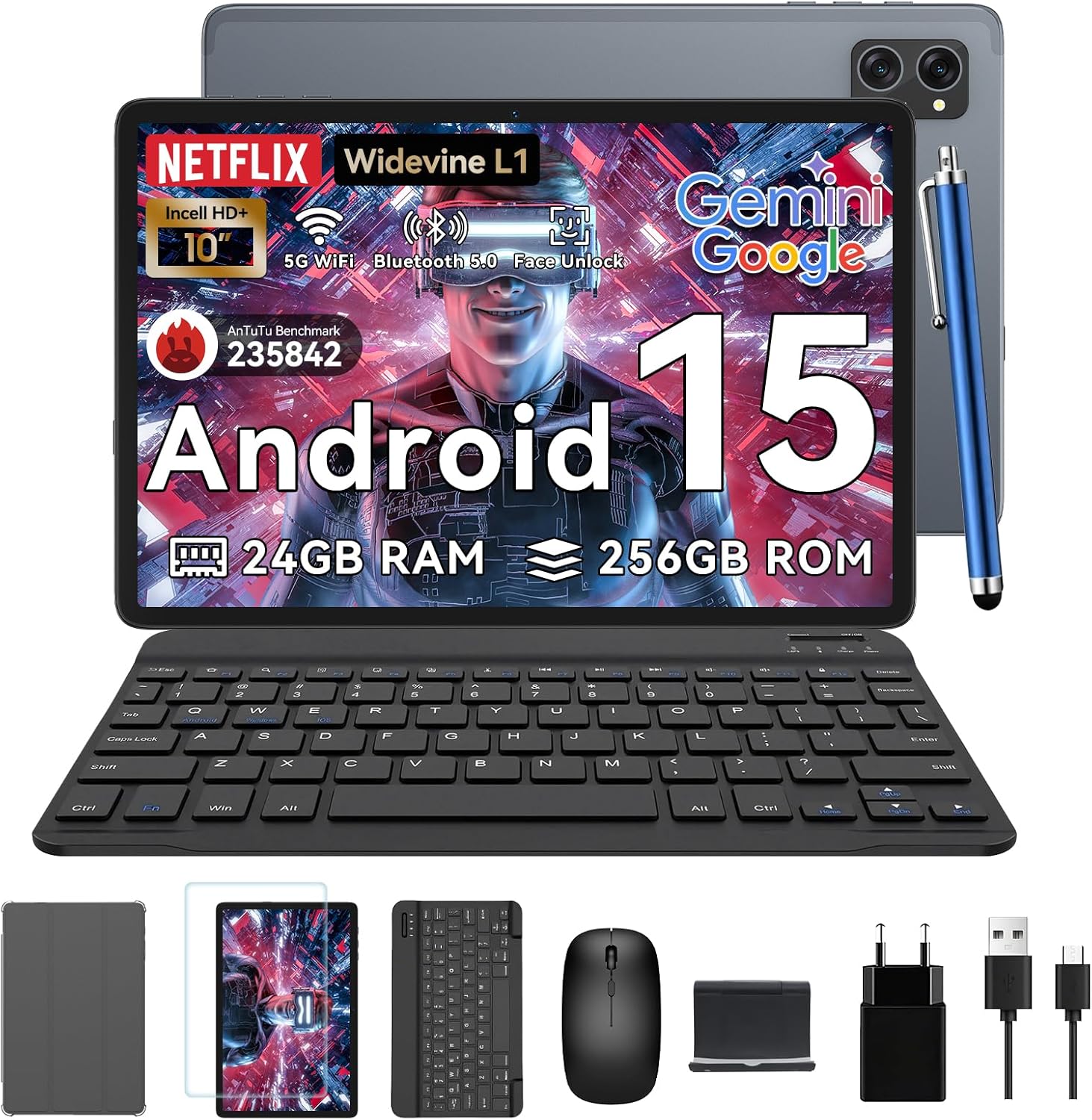
Figure 1.1: TABWEE T20 Tablet and its complete accessory package, including a Bluetooth keyboard, mouse, stylus, protective case, screen protector, charger, and USB cable.
Что в коробке?
Upon unboxing your TABWEE T20 Tablet, verify that all components are present:

Figure 1.2: Contents of the TABWEE T20 Tablet retail package.
- 1x TABWEE T20 Tablet
- 1x Bluetooth-клавиатура
- 1x Мышь
- 1x Stylus
- 1x Защитный чехол
- 1x Защитная пленка для экрана
- 1x Подставка для планшета
- 1x зарядное устройство
- 1x USB-кабель
2. Настройка и первоначальное использование
Зарядка планшета
Before first use, fully charge the tablet using the provided charger and USB cable. Connect the charger to a power outlet and the USB cable to the tablet's charging port. The charging indicator will illuminate.
Включение/выключение питания
- Для включения: Нажмите и удерживайте кнопку питания, пока на экране не появится логотип TABWEE.
- Чтобы выключить: Нажмите и удерживайте кнопку питания, пока не появится меню параметров питания. Выберите «Выключить» и подтвердите выбор.
- Начать заново: В меню параметров электропитания выберите «Перезагрузка» и подтвердите выбор.
Мастер первоначальной настройки
При первом включении планшет проведет вас через мастер первоначальной настройки. Следуйте инструкциям на экране, чтобы:
- Выберите язык.
- Подключитесь к сети Wi-Fi.
- Войдите в свою учетную запись Google или создайте новую.
- Настройте блокировку экрана (PIN-код, графический ключ, пароль или распознавание лица).
- Review и принять положения и условия.
Подключение аксессуаров
The TABWEE T20 comes with a Bluetooth keyboard and mouse for enhanced productivity.
- Bluetooth-клавиатура:
- Убедитесь, что клавиатура заряжена и включена.
- На планшете заходим в Настройки > Подключенные устройства > Bluetooth.
- Включите Bluetooth и нажмите «Сопряжение нового устройства».
- Select the keyboard from the list of available devices and follow pairing instructions.
- Bluetooth-мышь:
- Убедитесь, что мышь включена и находится в режиме сопряжения.
- На планшете заходим в Настройки > Подключенные устройства > Bluetooth.
- Tap "Pair new device" and select the mouse from the list.
- Стилус: The included stylus can be used directly on the screen for navigation, drawing, and note-taking. It features palm-rejection precision.
3. Эксплуатация планшета
Операционная система Android 15
The TABWEE T20 runs on Android 15, offering enhanced privacy controls, seamless cross-device collaboration, and improved multitasking capabilities.

Рисунок 3.1: Основные особенности операционной системы Android 15.
Gemini AI Integration
The tablet integrates Google Gemini AI, which intelligently optimizes tasks, from photo editing to document formatting, while prioritizing security with a dedicated encrypted privacy space.

Рисунок 3.2: Болееview возможностей искусственного интеллекта Gemini на планшете.
Display and Multimedia
The 10.1-inch Incell HD+ display (1280x800 resolution) provides vivid colors and crisp details. With Widevine L1 certification, you can enjoy 1080P streaming on platforms like Netflix, Disney+, and Hulu.

Figure 3.3: Display features and eye-friendly modes.
The tablet also features Dual Smart-K Box Speakers for an immersive audio experience.

Figure 3.4: Dual Smart-K Box Speakers for enhanced audio.
Характеристики камеры
Equipped with an 8MP rear camera and a 5MP front camera, the tablet supports Google Lens integration for smart scanning and object recognition. Face Unlock is also supported for convenient security.

Рисунок 3.5: Технические характеристики и особенности камеры.

Figure 3.6: Smart Google Lens functionalities.
Связность
The TABWEE T20 supports dual-band 5G WiFi and Bluetooth 5.0 for fast and stable connections.
- Wi-Fi: Connect to 2.4GHz or 5GHz networks for seamless streaming and quick downloads.
- Bluetooth 5.0: Pair with wireless earbuds, speakers, or other Bluetooth-enabled devices with 20% faster data transfer speed.
- Поддержка OTG: Allows for easy transfer of files to and from external storage devices.

Рисунок 3.7: Расширенные возможности подключения Bluetooth 5.0.

Figure 3.8: Lightning Fast WiFi 5 Technology.
4. Техническое обслуживание и уход
Proper maintenance ensures the longevity and optimal performance of your TABWEE T20 Tablet.
Управление аккумулятором
The 5000mAh battery provides extended usage times. To maximize battery life:
- Избегайте экстремальных температур.
- Используйте прилагаемое зарядное устройство.
- Enable smart power-saving modes in settings.
- Закройте неиспользуемые приложения, работающие в фоновом режиме.

Figure 4.1: 5000mAh Mega Battery performance metrics.
Очистка планшета
- Для очистки экрана и корпуса используйте мягкую безворсовую ткань.
- Для стойких пятен слегка разотритеampсмочите ткань водой или средством для чистки экранов.
- Избегайте использования едких химикатов и абразивных материалов.
Управление хранилищем и памятью
The tablet comes with 256GB of internal storage and supports up to 2TB TF card expansion. It also features 24GB RAM (8GB physical + 16GB virtual) for smooth multitasking.

Figure 4.2: Storage and RAM expansion capabilities.
To optimize performance and storage:
- Регулярно очищайте кэш и временные файлы. files.
- Удалите неиспользуемые приложения.
- Utilize the 2TB TF card slot for large files like 4K videos and design documents.
5. Поиск Неисправностей
This section addresses common issues you might encounter with your TABWEE T20 Tablet.
| Проблема | Возможная причина | Решение |
|---|
| Планшет не включается. | Низкий заряд батареи; сбой системы. | Заряжайте планшет не менее 30 минут. Если он по-прежнему не реагирует, нажмите и удерживайте кнопку питания в течение 10-15 секунд, чтобы принудительно перезагрузить его. |
| Проблемы с подключением к Wi-Fi. | Неверный пароль; проблемы с маршрутизатором; выход за пределы зоны действия. | Verify Wi-Fi password. Restart your router. Ensure tablet is within Wi-Fi range. Forget the network and reconnect. |
| Аксессуары Bluetooth не сопрягаются. | Accessory not in pairing mode; Bluetooth off on tablet. | Ensure accessory is in pairing mode. Turn Bluetooth off and on again on the tablet. Restart both devices. |
| Slow performance or app crashes. | Слишком много запущенных приложений; мало места в памяти; устаревшее программное обеспечение. | Close background apps. Clear app caches. Free up storage space. Check for system updates in Настройки > Система > Обновление системы. |
| Экран не реагирует. | Временный сбой программного обеспечения. | Для принудительной перезагрузки планшета удерживайте кнопку питания в течение 10-15 секунд. |
Если проблема сохраняется после применения этих решений, обратитесь в службу поддержки клиентов.
7. Гарантия и поддержка
TABWEE is committed to providing excellent customer service and support for your T20 Tablet.
Информация о гарантии
Your TABWEE T20 Tablet is covered by a Гарантия 2 год from the date of purchase. This warranty covers manufacturing defects and ensures risk-free ownership.
Поддержка клиентов
По любым вопросам технической поддержки, устранения неполадок или гарантийного обслуживания обращайтесь в нашу службу поддержки:
- Поддержка по электронной почте: serviceplus.linda@gmail.com
- Online Call Support: Available 24/7 for US/CA customers.
- Repair Support: 2-Year Repair Support is provided.

Figure 7.1: TABWEE Customer Support Services.
Please have your purchase details and tablet model number ready when contacting support to expedite the process.


