1. Введение
This manual provides comprehensive instructions for the installation, operation, maintenance, and troubleshooting of your NIVIAN Professional WiFi SuperHD Surveillance Camera Kit. This system is designed to provide reliable and efficient security monitoring for your home or business.
Please read this manual carefully before using the product to ensure proper setup and optimal performance. Keep this manual for future reference.
2. Продукт закончилсяview
The NIVIAN CCTV Kit is a professional 2K SuperHD WiFi surveillance system featuring 6 IP cameras and a 10-channel Network Video Recorder (NVR) with a pre-installed 1TB hard drive. Key features include:
- 2K SuperHD Image Resolution: Предоставляет четкие и подробные видеофрагменты.tage (3MP).
- Обнаружение человека ИИ: Intelligent motion detection to reduce false alarms.
- Двустороннее аудио: Встроенный микрофон и динамик для общения в реальном времени.
- Двойное ночное видение: Infrared mode for discreet monitoring and white LED mode for full-color night vision activated by motion.
- WiFi-6 Long Range Connectivity: Stable wireless connection up to 250 meters with repeater function.
- Всепогодные камеры со степенью защиты IP66: Прочный металлический casing suitable for outdoor use.
- Профессиональная запись: Continuous or event-based recording to the included 1TB hard drive.
- HDMI-выход: Connect to a monitor or TV for live viewинж.
- Приложение EseeCloud: Remote access and control from mobile devices.
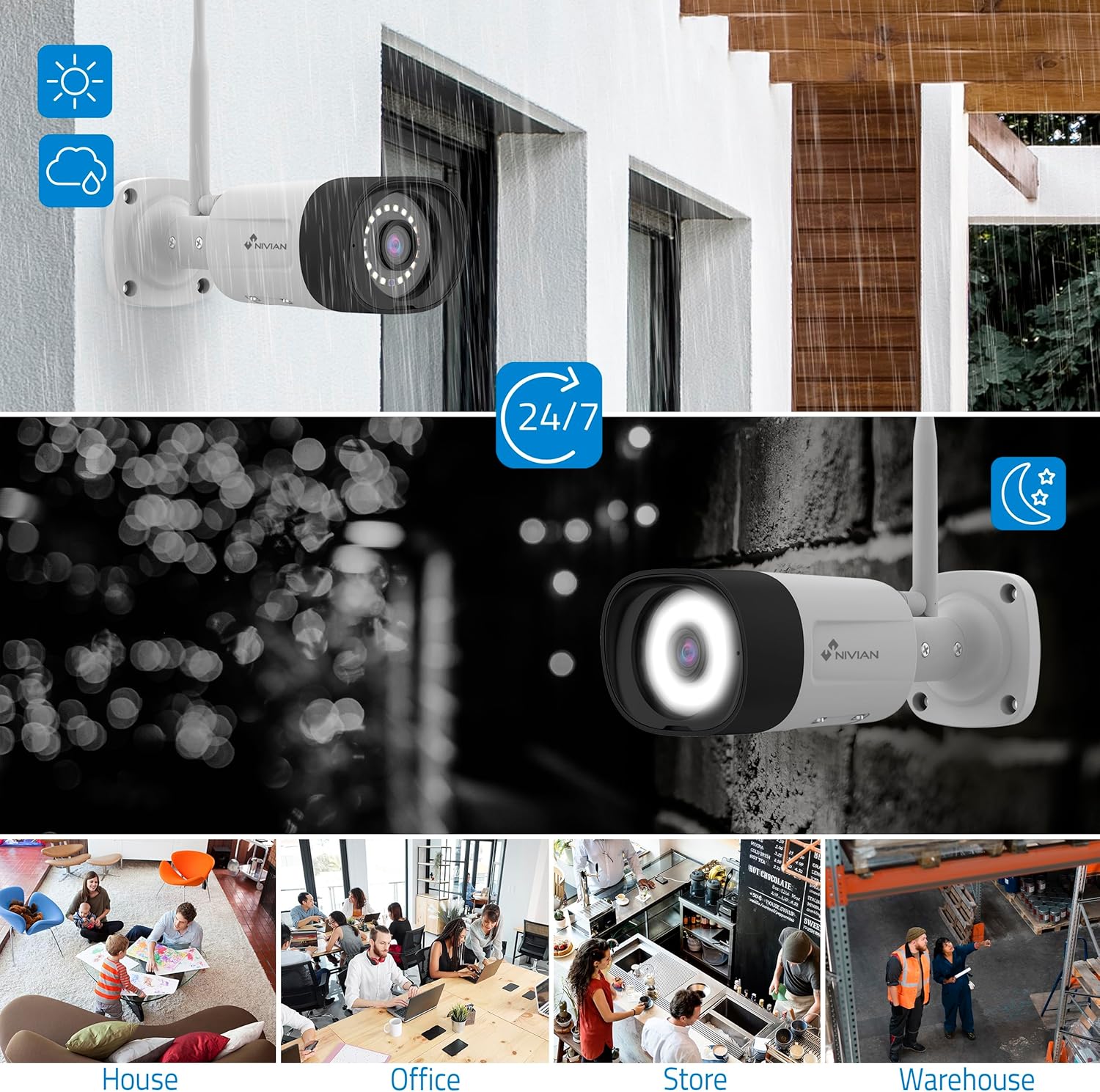
Image: NIVIAN CCTV Camera with day and night vision capabilities, showing weatherproof design and application in various environments like house, office, store, and warehouse.

Image: Comparison of 1080p Full HD video quality versus 2K Super HD video quality, demonstrating enhanced detail with 2K resolution.
3. Содержимое упаковки
Проверьте наличие всех предметов в посылке:
- 1x 10-Channel NVR (Network Video Recorder) with 1TB Hard Drive
- 6x NIVIAN 2K SuperHD WiFi IP Cameras
- Адаптеры питания для NVR и камер
- USB-мышь
- Ethernet-кабель
- Монтажные винты и заглушки
- Краткое руководство пользователя (подробные инструкции см. в этом руководстве)
4. Настройка
4.1. Установка сетевого видеорегистратора (NVR)
- Подключите видеорегистратор:
- Подключите сетевой видеорегистратор к розетке с помощью прилагаемого адаптера питания.
- Подключите сетевой видеорегистратор к монитору или телевизору через порт HDMI для локальной связи. viewинж.
- Подключите USB-мышь к USB-порту видеорегистратора.
- For internet access, connect the NVR to your router using the Ethernet cable.
- Включение питания: Turn on the NVR. Follow the on-screen prompts for initial setup, including language selection and network configuration.
4.2. Установка камеры
- Место установки: Выберите подходящие места для установки камер, убедившись, что они находятся в поле зрения камеры. view and are within range of the NVR's WiFi signal. The IP66 rating allows for outdoor installation.
- Питание камер: Подключите каждую камеру к розетке с помощью соответствующего адаптера питания.
- Сопряжение (автоматическое): The cameras are pre-paired with the NVR. Once powered on, they should automatically connect to the NVR's WiFi network. You will see the camera feeds appear on the connected monitor.
- Signal Repetition Function: If a camera is too far from the NVR, you can use another camera as a repeater to extend the WiFi range up to 250m. Refer to the NVR's on-screen menu for configuring this feature.

Image: Diagram illustrating various connection options for the NIVIAN CCTV system, including direct WiFi-6 connection to NVR, HDMI output to a monitor, and NVR connection to a router via LAN for remote access via Eseecloud app. Also shows signal repetition function.
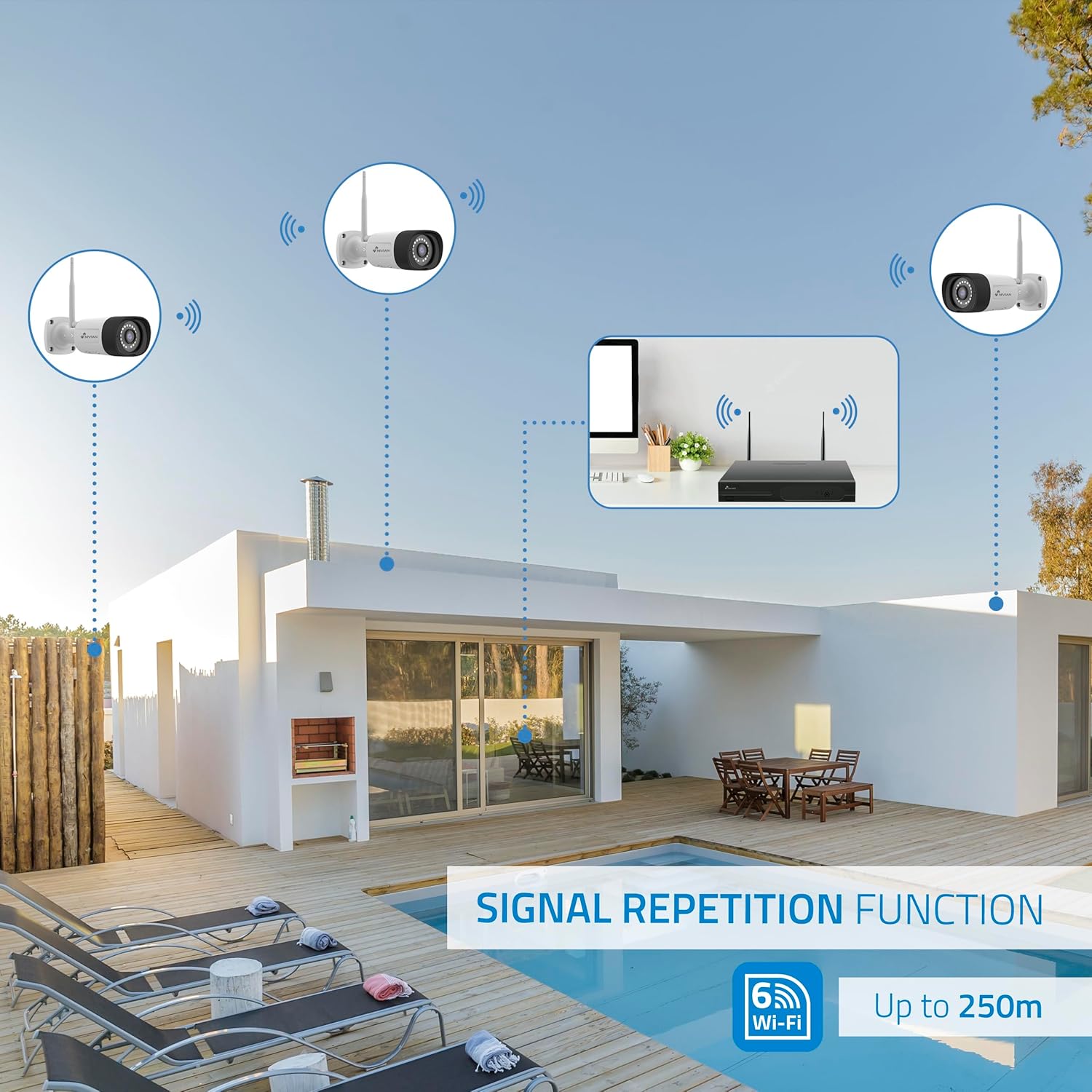
Image: Diagram showing the signal repetition function of the NIVIAN WiFi CCTV system, where cameras can extend the WiFi range up to 250 meters from the NVR.
4.3. Настройка приложения EseeCloud
- Скачать приложение: Download the "EseeCloud" app from your mobile device's app store (available for iOS, Android).
- Регистрация Аккаунта: Откройте приложение и зарегистрируйте новую учетную запись или войдите в систему, если она у вас уже есть.
- Добавить устройство: Follow the in-app instructions to add your NVR system. This typically involves scanning a QR code displayed on the NVR's monitor or entering the device ID manually.
- Удаленный Viewing: После добавления вы можете view Прямая трансляция, доступ к записям и удаленная настройка параметров.

Image: Smartphone screen displaying the EseeCloud app interface for managing the security system, showing live camera feeds and control options, with NIVIAN cameras and a laptop in the background.
5. Инструкция по эксплуатации
5.1. Жить View
Access live camera feeds through the NVR connected to a monitor or via the EseeCloud mobile app. The NVR interface allows you to switch between single-camera view и многокамерная сетка view.
5.2. Запись
- Непрерывная запись: The system is configured for continuous recording by default to the 1TB hard drive.
- Запись при обнаружении движения: Configure cameras to record only when motion is detected. This can be scheduled via the NVR settings or EseeCloud app.
- H.265+ Codec: The system uses H.265+ video compression to optimize storage space while maintaining video quality.
5.3. Воспроизведение
Доступ к записанному footage through the NVR's playback menu or the EseeCloud app. You can search recordings by date, time, and event type (e.g., motion detection).
5.4. Обнаружение человека с помощью ИИ
The cameras feature advanced AI human detection to differentiate human movement from other objects, significantly reducing false alarms. When human motion is detected, the system can trigger recordings, send notifications, and activate the white LED night vision for color footage.

Image: NIVIAN camera detecting a person at night, with the white LED light activated for color night vision, and a mobile notification indicating motion detection.
5.5. Двусторонняя аудиосвязь
Use the EseeCloud app to utilize the two-way audio feature. This allows you to listen to audio from the camera's location and speak through the camera's built-in speaker.
5.6 Режимы ночного видения
- Инфракрасный (ИК) режим: Provides black and white video in low-light conditions for discreet surveillance.
- Режим белого светодиода: When motion is detected in low light, the camera's white LEDs activate, providing full-color video and acting as a deterrent.
6. Техническое обслуживание
- Очистка камеры: Регулярно очищайте линзы камеры мягкой тряпкой.amp Используйте специальную ткань для обеспечения четкого изображения. Не используйте агрессивные химические вещества.
- Обновления прошивки: Check for firmware updates for the NVR and cameras through the EseeCloud app or NVR settings. Keep your system updated for optimal performance and security.
- Управление жестким диском: The 1TB hard drive will automatically overwrite the oldest recordings when full. If you need to preserve specific footage, back it up to an external device.
- Проверка блока питания: Убедитесь, что все адаптеры питания надежно подключены и не имеют повреждений.
7. Поиск Неисправностей
7.1. No Camera Feed
- Проверьте мощность: Ensure the camera is powered on and its adapter is working.
- Сигнал Wi-Fi: Verify the camera is within the NVR's WiFi range. Use the signal repetition function if necessary.
- Повторное сопряжение камеры: If issues persist, try re-pairing the camera with the NVR through the NVR's menu.
7.2. Плохое качество изображения
- Чистая линза: Очистите объектив камеры от грязи и пятен.
- Освещение: Для обеспечения оптимального качества изображения, особенно в ночное время, необходимо обеспечить достаточное освещение.
- Помехи WiFi: Reduce potential WiFi interference by moving the camera or NVR, or by using the signal repetition function.
7.3. Remote Access Issues (EseeCloud App)
- Интернет-соединение: Ensure both your NVR and mobile device have a stable internet connection.
- NVR Network Settings: Verify the NVR is correctly connected to your router and has internet access.
- Версия приложения: Ensure your EseeCloud app is updated to the latest version.
7.4. Hard Drive Full / Recording Issues
- Проверьте хранилище: Verify the hard drive status in the NVR settings.
- График записи: Убедитесь, что расписания записи настроены правильно.
- Состояние жесткого диска: If issues persist, the hard drive may need to be checked or replaced.
8. Технические характеристики
| Бренд | НИВИАН |
| Номер модели | NV-KIT830W-8CAM |
| Размеры продукта (Д x Ш x В) | 23 х 12 х 8 см; 6.2 кг |
| Технология связи | Беспроводная связь (WiFi-6) |
| Разрешение видеозаписи | 2К (3МП) |
| Количество каналов | 10 (NVR) |
| Количество камер | 6 |
| Емкость хранилища | 1 TB Hard Drive (included) |
| Характеристики камеры | IP Cameras SuperHD with PTZ, Night Vision, AI Human Detection, Two-Way Audio |
| Частота кадров | 15 кадра в секунду, 24 кадров в секунду, 30 кадров в секунду |
| Совместимые устройства | Television (via HDMI) |
| Питание Тип штепсельной вилки | Настенное крепление |
| Страна происхождения | Китай |
9. Гарантия и поддержка
NIVIAN offers technical support to all customers. If you have any questions, suggestions, or encounter any issues with your WiFi surveillance camera kit, please do not hesitate to contact us.
You can reach us through Amazon messages or via any official NIVIAN brand channel. Please refer to your purchase documentation for specific warranty terms and contact details.


