1. Введение
Thank you for choosing the ELISWEEN Wireless PC Gaming Controller. This controller is designed to provide a superior gaming experience across multiple platforms, including PC, Nintendo Switch, Android, and iOS devices. Featuring advanced Hall Effect joysticks, programmable back buttons, and customizable vibration, this manual will guide you through its setup, operation, and maintenance to ensure optimal performance.
2. Содержимое упаковки
- ELISWEEN Wireless PC Gaming Controller
- Зарядный кабель USB-C (1.5 м)
- USB-ключ на 2.4 ГГц
- Руководство пользователя
3. Продукт закончилсяview
Ознакомьтесь с компонентами контроллера:
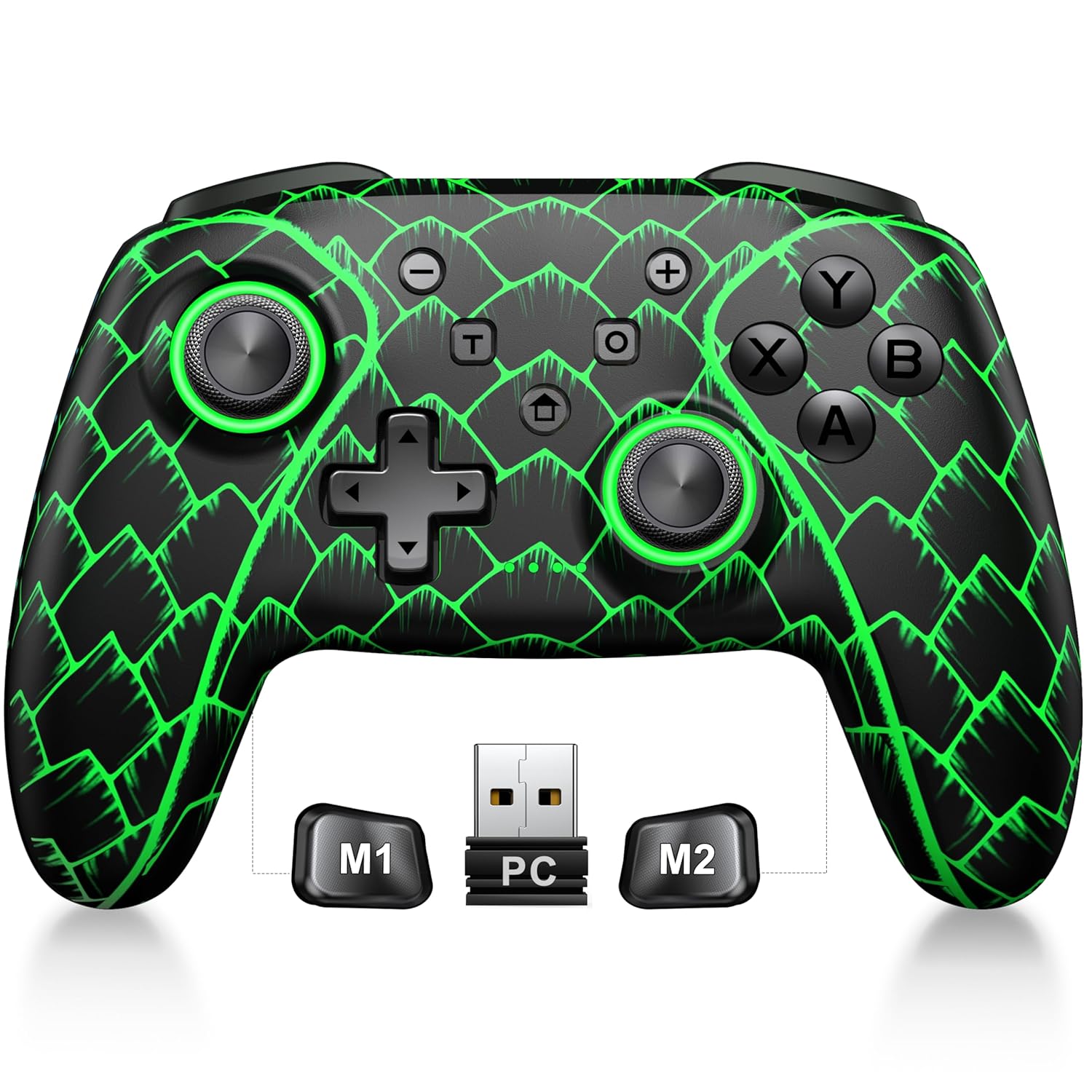
Figure 3.1: ELISWEEN Wireless PC Gaming Controller with its 2.4GHz USB dongle and highlighted M1/M2 programmable buttons.
- Левый/правый аналоговые джойстики: Hall Effect joysticks for precise movement.
- Крестовина: Направленный ввод.
- Кнопки действий (A/B/X/Y): Стандартные игровые кнопки ввода.
- Наплечные пуговицы (слева/справа): Кнопки сверху.
- Trigger Buttons (ZL/ZR): Hall Effect analog triggers.
- Кнопки M1/M2: Программируемые кнопки "Назад".
- Домашняя кнопка: Powers on/off and returns to system home screen.
- +/- Кнопки: System navigation/menu buttons.
- Кнопка скриншота: Делает скриншоты.
- Кнопка Турбо: Включает/выключает турбо-функцию.
- Порт USB-C: Для зарядки и проводного подключения.
4. Настройка и подключение
4.1 Зарядка контроллера
Before first use, fully charge the controller. Connect the USB-C cable to the controller's USB-C port and the other end to a USB power source (e.g., PC, USB wall adapter). The charging indicator will show status and turn off when fully charged. A full charge takes approximately 3 hours.
4.2 Connecting to PC (Wireless 2.4GHz)

Figure 4.1: Multi-platform compatibility of the ELISWEEN controller, including PC, Switch, Android, and iOS.
- Вставьте USB-адаптер 2.4 ГГц в свободный USB-порт вашего компьютера.
- Нажмите кнопку «Домой» на контроллере, чтобы включить его.
- The controller will automatically connect to the dongle. The indicator lights will stabilize once connected.
4.3 Connecting to PC (Wired USB-C)
- Connect the USB-C cable to the controller and the other end to your PC.
- The controller will be recognized as a plug-and-play device.
4.4 Подключение к Nintendo Switch
- На вашей Nintendo Switch перейдите в «Системные настройки» > «Контроллеры и датчики» > «Отключить контроллеры».
- Затем перейдите в раздел Контроллеры и датчики > Изменить захват/порядок.
- Press and hold the Home button on the ELISWEEN controller until the indicator lights begin to flash rapidly.
- Once paired, the indicator light(s) corresponding to the player number will remain solid.
4.5 Connecting to Android/iOS (Bluetooth)
- Убедитесь, что Bluetooth включен на вашем устройстве Android или iOS.
- On the controller, press and hold the X + Home buttons simultaneously until the indicator lights flash rapidly, indicating pairing mode.
- On your device, search for Bluetooth devices and select "STK-7040RG" (or similar) to pair.
- Once connected, the indicator light will stabilize. Supports iOS 13+ MFi titles.
5. Инструкция по эксплуатации
5.1 Джойстики на эффекте Холла
The controller features precision Hall Effect joysticks and triggers, designed to prevent stick drift and provide accurate, responsive control. These magnetic, contactless sensors ensure long-term durability and precision.

Рисунок 5.1: Внутренний view of Hall Effect joystick technology, highlighting its magnetic, contactless design for enhanced accuracy and durability.
Zero Deadzone Mode: For competitive gaming, activate a temporary 0 deadzone mode by holding the T кнопка + R3 (right stick click) or L3 (left stick click). A green light confirms activation. To revert to default calibration, press the same combo (blue light indicator). The controller automatically resets to factory default settings upon restart for consistent anti-drift performance.
5.2 Программируемые кнопки на задней панели (M1/M2)
The M1 and M2 back buttons can be programmed to map up to 21 different key combinations, allowing for quick execution of complex actions.

Figure 5.2: The M1 and M2 programmable back buttons, capable of mapping up to 21 different actions for enhanced control.
Refer to the Keylinker App (search "NC300") for detailed instructions on programming and customizing these buttons.
5.3 Функция Турбо
The controller supports Turbo fire functionality for 10 action buttons with adjustable speeds (5, 12, or 20 presses per second).
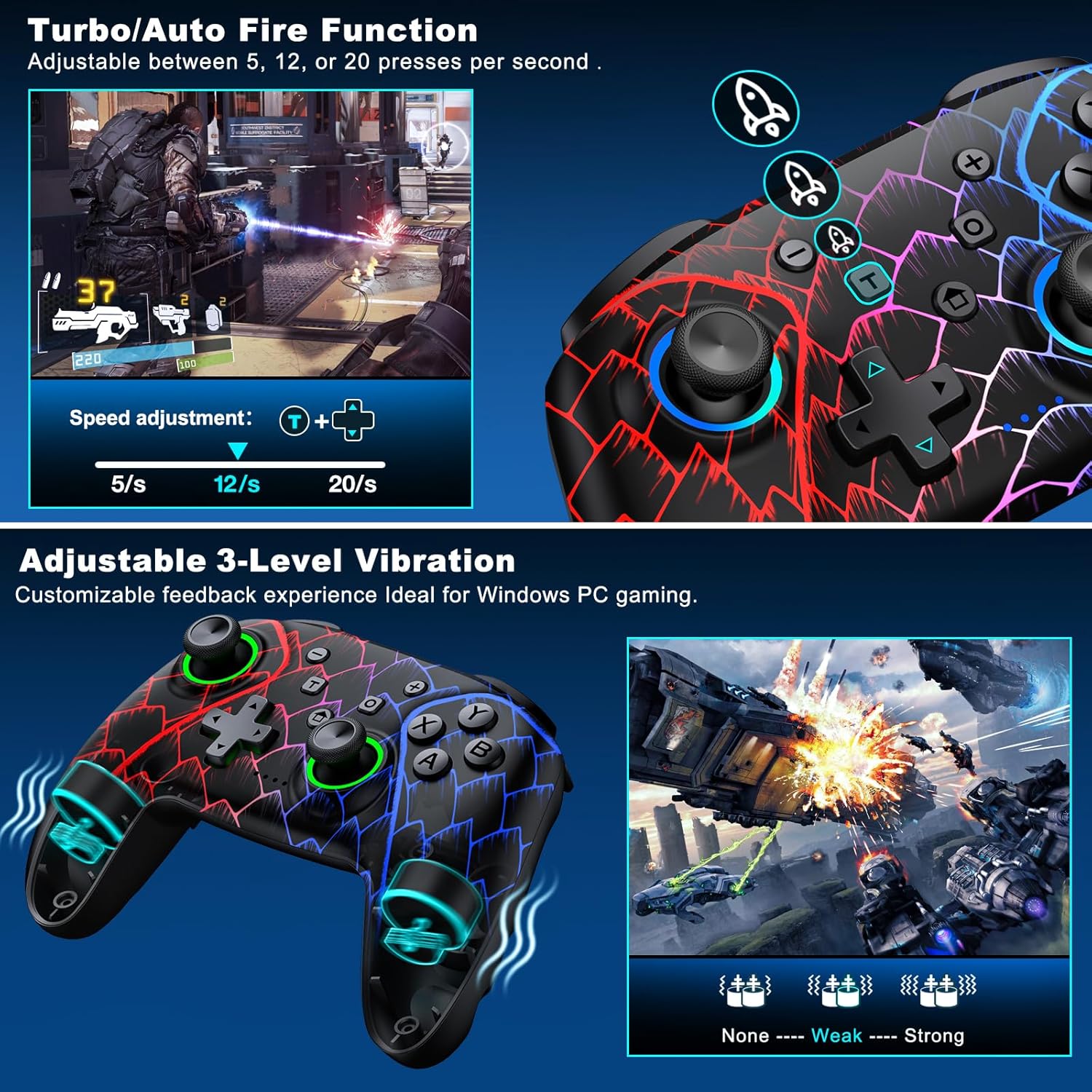
Figure 5.3: Visual representation of the Turbo/Auto Fire function and the adjustable 3-level vibration feature.
- Активировать Турбо: Нажмите Турбо button + the desired action button.
- Отрегулируйте скорость: Нажимать Турбо + Up arrow (increase) or Вниз arrow (decrease) on the D-pad.
- Очистить Турбо: Держите Минус кнопка + Вниз arrow on the D-pad to instantly clear all Turbo binds.
5.4 Регулировка вибрации
Experience immersive feedback with dual vibration motors offering 3 intensity levels.
- Adjust intensity by pressing L + R + ZL + ZR simultaneously. Cycle through levels: None, Weak, Strong.
- Note: Vibration is disabled on mobile platforms. Gyro functionality works only with Nintendo systems.
5.5 Hair Trigger Locks
Shorten trigger pulls for faster response times in games requiring quick inputs, such as first-person shooters.
5.6 Управление сроком службы батареи
The controller is equipped with a 1000mAh battery, providing over 20 hours of continuous gameplay on a single charge. Charging takes approximately 3 hours via USB-C.

Figure 5.4: The ELISWEEN controller's 1000mAh battery provides extended playtime with quick charging capabilities.
5.7 Динамические световые эффекты
Customize the controller's lighting effects via the Keylinker App (search "NC300").
5.8 Автоматическое выключение
To conserve battery, the controller will automatically power off after 20 minutes of inactivity.
6. Техническое обслуживание
- Уборка: Для очистки контроллера используйте мягкую сухую ткань. Не используйте абразивные чистящие средства или растворители.
- Хранилище: Храните контроллер в прохладном, сухом месте, вдали от прямых солнечных лучей и экстремальных температур.
- Уход батареи: Избегайте частой полной разрядки аккумулятора. Регулярная зарядка продлит срок его службы.
7. Поиск Неисправностей
- Контроллер не подключается:
- Убедитесь, что контроллер заряжен.
- Verify the correct connection method for your device (2.4GHz dongle for PC, Bluetooth for mobile, pairing for Switch).
- Try restarting the controller and the device you are connecting to.
- For PC, try a different USB port for the dongle or wired connection.
- Stick drift or inaccurate input:
- Activate the 0 deadzone mode (T + R3/L3) to recalibrate.
- Ensure the controller firmware is up to date via the Keylinker App.
- Кнопки не отвечают:
- Проверьте правильность подключения контроллера.
- Убедитесь, что под кнопками не скопился мусор.
- Perform a factory reset if issues persist (refer to Keylinker App or contact support).
- Проблемы с зарядкой:
- Попробуйте использовать другой кабель USB-C и источник питания.
- Ensure the USB-C port on the controller is clean and free of obstructions.
8. Технические характеристики
| Связность | Bluetooth 5.2, 2.4 ГГц (беспроводной), USB-C (проводной) |
| Совместимость | PC, Nintendo Switch, Android, iOS (iOS 13+ MFi) |
| Емкость аккумулятора | 1000мАч |
| Время игры | 20+ часа (ок.) |
| Время зарядки | 3 часов (приблизительно) |
| Джойстики | Hall Effect (Drift-Proof) |
| Программируемые кнопки | 4 Back Buttons (M1/M2) |
| Вибрация | Два двигателя, 3 регулируемых уровня |
| Размеры | 6.38 x 4.72 x 2.64 дюйма |
| Масса | 11.99 унций (приблизительно 340 г) |
| Производитель | Цисун Тех |
| Страна происхождения | Китай |
9. Гарантия и поддержка
The ELISWEEN Wireless PC Gaming Controller comes with a standard manufacturer's warranty. For specific warranty terms and conditions, please refer to the product packaging or contact our customer support.
For any technical assistance, troubleshooting, or inquiries, our 24/7 Expert Support team is available to help. Please refer to the contact information provided on the product packaging or our official webсайт.


