Введение
The Grandstream GRP2613W is a powerful 6-line carrier-grade IP phone designed for efficient deployment and easy management. It integrates advanced features such as a 2.8-inch color display, built-in Wi-Fi 6, dual Gigabit Ethernet ports with Power-over-Ethernet (PoE), and enterprise-level security. This manual provides essential information for setting up, operating, maintaining, and troubleshooting your GRP2613W IP Phone.
Настраивать
1. Содержимое упаковки
Прежде чем начать, убедитесь, что в посылке присутствуют все предметы:
- GRP2613W IP Phone Unit
- Телефонная трубка и шнур телефонной трубки
- Подставка для телефона
- Адаптер питания 5 В
- Сетевой кабель (Ethernet)
- Краткое руководство по установке
2 Физическое соединение
Follow these steps to connect your IP phone:
- Прикрепите подставку для телефона: Securely attach the phone stand to the back of the GRP2613W unit. The stand allows for adjustable viewуглы.
- Подключите трубку: Plug one end of the coiled handset cord into the handset and the other end into the handset port on the phone unit.
- Подключение к сети и питанию:
- Использование PoE (питание через Ethernet): Connect one end of the Ethernet cable to the LAN port on the GRP2613W and the other end to a PoE-enabled switch or injector. The phone will power on automatically.
- Использование адаптера питания: If PoE is not available, connect the 5V power adapter to the power port on the GRP2613W and then plug the adapter into a power outlet. Connect one end of the Ethernet cable to the LAN port on the GRP2613W and the other end to your network router/switch.

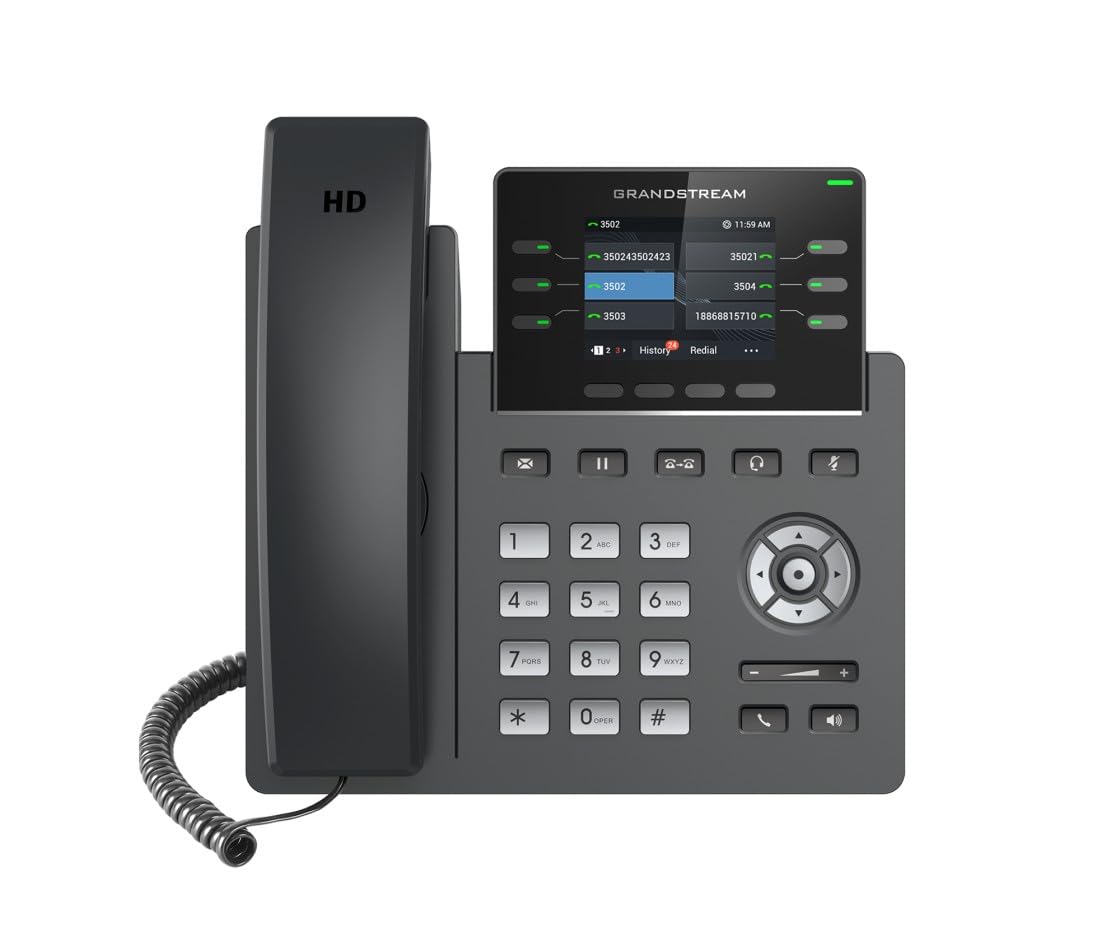
Image: Grandstream GRP2613W IP Phone, showing the main unit with the handset attached and the phone stand.
3. Первоначальная загрузка
Upon successful connection, the phone will boot up. The LCD screen will display Grandstream's logo, followed by network information and the main idle screen. The phone will attempt to obtain an IP address via DHCP by default. If successful, the IP address will be displayed on the screen.
Основные характеристики
The GRP2613W IP Phone offers a robust set of features for enhanced communication:
- SIP-аккаунты: Supports up to 6 SIP accounts and 6 versatile line keys.
- Сетевое подключение: Dual 10/100/1000 Mbps Gigabit Ethernet ports with auto-sensing and integrated PoE.
- Отображать: 2.8-inch (320x240) color LCD display.
- Настройка: Replaceable faceplate for easy logo customization.
- Качество звука: HD audio compatible with major codecs (G.722, Opus broadband) and noise cancellation technology.
- Программируемые ключи: Up to 24 digital BLF (Busy Lamp Field) keys.
- Беспроводное подключение: Built-in dual-band Wi-Fi (2.4GHz and 5GHz, 802.11a/b/g/n/ac/ax) and Bluetooth.
- Безопасность: Enterprise-level protection including secure boot, dual firmware images, and encrypted data storage.
Инструкция по эксплуатации
1. Звонок
You can make a call using the handset, speakerphone, or a connected headset:
- Pick up the handset, press the Speakerphone button
 , or press the Headset button .
 - Наберите нужный номер с помощью клавиатуры.
- Press the Send button or a Line key to initiate the call.
2. Ответ на звонок
Когда звонит телефон:
- Поднимите трубку.
- Нажмите кнопку громкой связи .
- Нажмите кнопку гарнитуры .
- Нажмите мигающую клавишу Line.
3. Управление вызовами
- Держать: During an active call, press the Hold button . Press it again to resume the call.
- Перемещение: During an active call, press the Transfer button , dial the new number, and press the Transfer button again.
- Конференция: During an active call, press the Conference button , dial the third party's number, and then press the Conference button again to join all parties.
- Немой: Нажмите кнопку отключения звука to mute your microphone during a call. Press it again to unmute.
4. Регулировка громкости
Use the Volume Up (+) and Volume Down (-) buttons on the phone to adjust the ringtone volume when idle, or the call volume during an active call.
5. Wi-Fi и Bluetooth
The GRP2613W supports built-in dual-band Wi-Fi and Bluetooth. These features can be configured via the phone's menu or web interface for wireless network connectivity and pairing with Bluetooth headsets.
Обслуживание
1. Уборка
To clean your GRP2613W IP Phone, use a soft, dry cloth. Avoid using liquid cleaners or aerosol sprays directly on the device. Ensure the phone is powered off before cleaning.
2. Обновления прошивки
Firmware updates are crucial for maintaining optimal performance and security. The GRP2613W supports updates over the air (OTA) and can be managed centrally via Grandstream's Device Management System (GDMS). Consult your network administrator or Grandstream's official documentation for the latest firmware and update procedures.
Поиск неисправностей
If you encounter issues with your GRP2613W, try the following common troubleshooting steps:
- Нет питания: Убедитесь, что адаптер питания надежно подключен как к телефону, так и к работающей розетке, или что кабель Ethernet подключен к порту с поддержкой PoE.
- Нет сигнала готовности: Check network cable connections. Verify that the phone has obtained a valid IP address (check the LCD screen). Contact your VoIP service provider to confirm SIP account registration.
- Плохое качество звука: Check network connection stability. Ensure the handset cord is securely connected. Adjust the call volume.
- Проблемы с подключением к Wi-Fi: Verify Wi-Fi settings in the phone's menu. Ensure the phone is within range of your Wi-Fi network.
- Phone Not Registering: Confirm SIP account details (username, password, server address) are correctly configured. Check network firewall settings.
For more complex issues, refer to the comprehensive online documentation or contact Grandstream support.
Технические характеристики
| Особенность | Деталь |
|---|---|
| SIP-аккаунты | 6 |
| Клавиши линий | 6 versatile line keys |
| Отображать | 2.8 inch (320x240) color LCD |
| Ethernet-порты | Dual 10/100/1000 Mbps Gigabit Ethernet with PoE |
| Wi-Fi | Built-in dual-band Wi-Fi (802.11a/b/g/n/ac/ax) |
| Bluetooth | Встроенный Bluetooth |
| Аудио | HD audio, noise cancellation, G.722, Opus codecs |
| BLF Keys | Up to 24 digital BLF keys |
| Размеры | 1.1 x 9.7 x 6.5 дюйма |
| Масса | 2.1 фунта |
Информация о гарантии
Grandstream products typically come with a limited manufacturer's warranty. Please refer to the warranty card included in your product packaging or visit the official Grandstream website for detailed warranty terms and conditions specific to the GRP2613W model.
Поддерживать
For technical assistance, product documentation, or further inquiries, please visit the Grandstream support portal on their official website. You can find FAQs, firmware downloads, and contact information for customer service.


