1. Введение
Welcome to the DETONGER DP23 Portable Thermal Label Printer. This device offers a convenient and inkless solution for creating various labels for home, office, and business use. Its compact design and Bluetooth connectivity allow for flexible labeling on the go, supporting a wide range of applications from organizing household items to retail product labeling.

The DETONGER DP23 Portable Thermal Label Printer, shown here in pink, is a compact and efficient device for all your labeling needs.
2. Особенности продукта
- No Sign-Ups and No Hassle: Enjoy instant access to a vast collection of built-in templates, fonts, borders, icons, and multiple languages—no registration or in-app subscriptions required. This label printer supports all non-chip label paper, as long as the size fits, giving you the freedom to choose the most suitable labels for your needs. Simple, flexible, and hassle-free labeling for home, office, and business.
- Широкое применение: DETONGER DP23 Label Maker supports label width up to 48mm, which can be widely used for food labels, spice jars, bottles, clothing storage boxes in the home, price labels, jewellery labels, product information, QR codes, bar codes, brand logos in small businesses, name labels, clothing labels in schools, and office supply labels. Not only in life but also in work, it can meet our different needs very well.
- Inkless and Bluetooth Label Maker: Using direct thermal technology with a high-speed chip, it provides 203 DPI print quality. Enjoy high speed and convenient printing without relying on ink or toner. This printing solution is economical, making it ideal for home and small business use. No buttons needed, all functions can be controlled via Bluetooth connection to our 'WePrint' APP.
- Powerful APP: Without login, registration, or subscription required, you can use a vast array of built-in templates for industrial, home, school, retail, jewellery, supermarket, clothing, food, cables and many other different scenarios. It also supports a variety of fonts, symbols, frames, and icons, giving you more freedom to customize your own personalized labels.
- Portable Label Printer: 1500mAh*7.4V rechargeable battery, it can work continuously for 4-5 hours in fully charged condition. Controls directly from your phone, no need to plug in cables like traditional printers allows you to take it to any different usage scenarios.
3. Начало работы
3.1. Содержимое упаковки
Пожалуйста, проверьте содержимое упаковки, чтобы убедиться в наличии всех предметов:
- DETONGER DP23 Label Maker
- Thermal Label Roll (2'' x 1.18'', 200pcs/roll)
- Зарядный кабель USB Type-C
- Руководство пользователя
3.2. Зарядка устройства
Before first use, fully charge your label maker. Connect the provided USB Type-C cable to the printer's charging port and a compatible USB power adapter (not included). The battery indicator on the printer's display will show the charging status.
3.3. Загрузка этикеточной бумаги
Follow these steps to correctly load the label paper into your DP23 printer:
- Open the printer cover by gently lifting the top latch.
- Insert the label roll with the printable side facing upwards. Ensure the labels feed smoothly through the slot.
- Закройте крышку принтера до щелчка.

Image illustrating the process of opening the printer cover and inserting the label paper roll. Ensure the printable side of the label paper faces up.
This video demonstrates the process of loading label paper into the DETONGER DP23 printer and performing a test print.
3.4 Установка приложения и подключение по Bluetooth
The DETONGER DP23 operates via the 'WePrint' mobile application. Follow these steps to connect your printer:
- Download the 'WePrint' app from your device's app store (App Store for iOS, Google Play for Android).
- Turn on the label maker by pressing the power button.
- Включите Bluetooth на вашем смартфоне.
- Open the 'WePrint' app. The app will automatically detect and connect to your DP23 printer. Do not connect via your phone's Bluetooth settings directly.

Image showing the 'WePrint' app interface on a smartphone, demonstrating how to download the app, edit label content, and connect to the printer via Bluetooth.
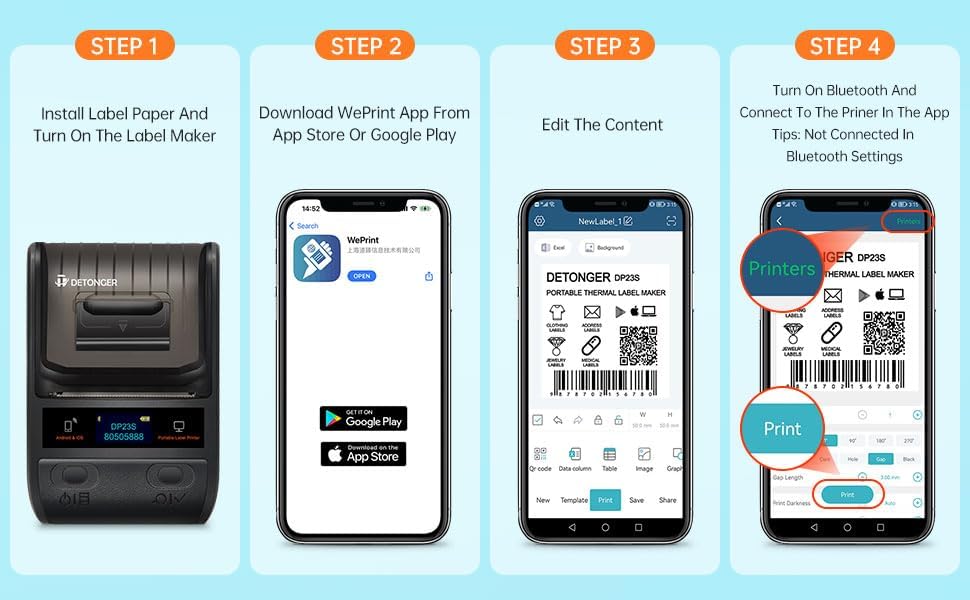
A four-step visual guide demonstrating how to install label paper, download the WePrint app, edit content, and connect to the printer via Bluetooth.
4. Operating Your Label Maker
4.1. Creating and Editing Labels
The 'WePrint' app provides a wide range of templates, fonts, symbols, and frames to customize your labels:
- In the 'WePrint' app, select a pre-designed template or create a new label from scratch.
- Enter your desired text, add barcodes, QR codes, images, or other elements using the app's editing tools.
- Adjust font size, style, and alignment as needed to achieve your desired label design.

Screenshot of the 'WePrint' app interface, highlighting various design options including logos, custom fonts, and barcode generation. An example barcode shown is 0690123456787.

Надview of the 'WePrint' app features, including templates, logos, multiple languages, and various fonts. An example barcode shown is 0690123456787.
4.2. Печать этикеток
После завершения разработки дизайна этикетки:
- Review этикетка предview in the app to ensure accuracy.
- Select the desired number of copies and print orientation (if applicable).
- Tap the "Print" button. The printer will feed and print the labels.

Diagram illustrating data synchronization across iOS, Android, and Windows PC platforms, allowing for cloud-saved templates and online sharing.
4.3. Supported Label Types and Applications
The DP23 supports various non-chip thermal label papers up to 48mm width, making it versatile for many uses:
- Food labels, spice jars, bottles for kitchen organization.
- Clothing storage boxes, jewelry labels for retail and personal use.
- Price labels, product information, QR codes, and barcodes for small businesses.
- Name labels, clothing labels for schools and personal identification.
- Office supply labels for improved organization.

Examples of various label sizes and types compatible with the DP23 printer, including food labels, transparent labels, and nutrition facts labels. An example barcode shown is 4901111874220.

The DP23 label maker can be used for organizing items in storage boxes, crispers, file boxes, and even for labeling green plants.
5. Техническое обслуживание
5.1. Очистка печатающей головки
To ensure optimal print quality and prolong the life of your printer, regularly clean the print head. Power off the device before cleaning. Gently wipe the print head with an alcohol wipe or a soft, lint-free cloth lightly dampПропитан изопропиловым спиртом. Дайте ему полностью высохнуть, прежде чем закрыть крышку и включить устройство.
5.2. Уход за аккумулятором
To maximize battery life, avoid fully discharging the battery frequently. Charge the device regularly, especially if it will not be used for extended periods. Store the printer in a cool, dry place when not in use.
6. Поиск Неисправностей
6.1. Принтер не подключается через Bluetooth
- Ensure the printer is powered on and within close range of your smartphone.
- Убедитесь, что Bluetooth включен на вашем телефоне.
- Connect through the 'WePrint' app, not directly via your phone's Bluetooth settings.
- Restart both the printer and your smartphone, then try connecting again.
6.2. Низкое качество печати
- Check if the label paper is loaded correctly with the printable side facing up.
- Очистите печатающую головку, как описано в разделе «Техническое обслуживание».
- Adjust print darkness settings within the 'WePrint' app.
- Ensure you are using compatible thermal label paper.
6.3. "No Paper" Error
- Verify that label paper is loaded correctly and there is enough paper on the roll.
- Убедитесь, что крышка принтера надежно закрыта.
7. Технические характеристики продукта
| Особенность | Спецификация |
|---|---|
| Бренд | ДЕТОНЖЕР |
| Название модели | ДП23 |
| Номер модели товара | DP23P203 |
| Размеры продукта | 5.8"Д x 5.1"Ш x 3.2"В |
| Вес товара | 12 унций (0.34 килограмма) |
| Технология связи | Bluetooth |
| Технология печати | Термальный |
| Максимальное разрешение копирования (черно-белое) | 203 точек на дюйм |
| Максимальный размер носителя | 1.97 x 3.94 inch (50mm x 100mm) |
| Тип контроллера | WePrint App |
| аппаратный интерфейс | USB-тип C |
| Аккумулятор | 1500mAh*7.4V rechargeable battery (1 AA battery included) |
| Специальная характеристика | Легкий, портативный |
8. Гарантия и поддержка клиентов
Your DETONGER DP23 Portable Thermal Label Printer comes with a standard manufacturer's warranty. For warranty details, technical support, or further assistance, please visit the official DETONGER store on Amazon: DETONGER Amazon Store. You may also contact customer service through the Amazon platform for product-related inquiries.


