
1. Введение
The MOREGAX A3Pro is a versatile 2-in-1 Bluetooth 5.2 adapter designed to seamlessly integrate wireless audio into your existing devices. It functions as both a Bluetooth transmitter (TX mode) and a Bluetooth receiver (RX mode), allowing you to connect non-Bluetooth audio sources to Bluetooth-enabled devices, or vice versa. This manual provides detailed instructions for setting up, operating, and maintaining your A3Pro device.

Image: The MOREGAX A3Pro Bluetooth Transceiver Adapter, highlighting its dual functionality as a receiver and transmitter.
2. Содержимое упаковки
Пожалуйста, отметьте галочкой следующие пункты:
- 1x A3Pro Bluetooth Adapter
- 1x аудиокабель AUX 3.5 мм
- 1x аудиокабель RCA
- 1x кабель для зарядки Type-C
- 1x Руководство пользователя

Image: A visual representation of all items included in the A3Pro package, including the adapter, various cables, and the user manual.
3. Продукт закончилсяview
The A3Pro features a compact design with intuitive controls and clear indicator lights for easy operation. It supports both transmitting and receiving audio signals.

Изображение: Подробный view of the A3Pro device, showing its buttons, ports (RX, TX, DC 5V), and indicator lights (A, B, RX, TX).
3.1. Кнопки и порты
- Кнопка питания / Воспроизведение/Пауза: Long press to power on/off. Short press to play/pause audio.
- Предыдущий трек / Уменьшить громкость: Короткое нажатие — предыдущий трек. Длительное нажатие — уменьшение громкости.
- Следующий трек / Увеличить громкость: Короткое нажатие — переход на следующий трек. Длительное нажатие — увеличение громкости.
- Кнопка поиска: Короткое нажатие для входа в режим сопряжения.
- Порт RX: 3.5mm audio input for Receiver (RX) mode.
- Порт передачи: 3.5mm audio output for Transmitter (TX) mode.
- Порт постоянного тока 5 В: Порт зарядки USB Type-C.
3.2. Индикаторные лампы
- Индикатор питания: Показывает состояние зарядки и уровень заряда батареи.
- A/B-индикаторы: Indicate connection status for two paired devices.
- RX Indicator: Загорается в режиме приемника.
- Индикатор TX: Загорается в режиме передатчика.

Image: A visual comparison of the A3Pro's Receiver (RX) and Transmitter (TX) modes, illustrating typical use cases like connecting to speakers or headphones.
4. Технические характеристики
| Особенность | Описание |
|---|---|
| Номер модели | А3Про |
| Версия Bluetooth | 5.2 |
| Bluetooth-чип | Qualcomm |
| Поддерживаемые протоколы | SBC, AAC, aptX, aptX-LL, aptX-HD |
| Емкость аккумулятора | 300мАч |
| Время зарядки | Приблизительно 1.5 часов |
| Время непрерывного использования | До 25 часов |
| Рабочее расстояние Bluetooth | Примерно 15 метра / 50 фута |
| Размеры | 4.02 x 3.98 x 1.26 дюйма |
| Масса | 3.84 унций (0.11 килограмма) |
| Специальная характеристика | Регулятор громкости |

Image: An illustration highlighting the A3Pro's upgraded Bluetooth 5.2 chip, emphasizing its 24-bit word depth and 48kHz sampling frequency for high-fidelity audio.

Image: A graphic detailing the A3Pro's 300mAh lithium battery, showcasing its ultra-long standby time and endurance compared to other devices.
5. Настройка и работа
5.1. Зарядка устройства
Before first use, fully charge the A3Pro using the provided Type-C charging cable. Connect the Type-C end to the DC 5V port on the A3Pro and the USB-A end to a standard USB power adapter (not included) or a computer USB port.
- Индикатор питания будет показывать состояние зарядки.
- Полная зарядка занимает около 1.5 часов.
- Устройство поддерживает зарядку во время использования.
5.2. Настройка режима передатчика (TX)
In TX mode, the A3Pro transmits audio from non-Bluetooth devices (e.g., TV, MP3 player) to Bluetooth headphones or speakers.
- Подключите источник звука: Plug one end of the 3.5mm AUX cable (or RCA cable if applicable) into the audio output port of your non-Bluetooth device (e.g., TV headphone jack).
- Connect to A3Pro: Plug the other end of the audio cable into the TX port on the A3Pro.
- Включение питания: Long press the power button on the A3Pro to turn it on. The TX indicator light will illuminate.
- Войдите в режим сопряжения: Short press the search button on the A3Pro. The TX light will flash, indicating it's in pairing mode.
- Сопряжение с устройством Bluetooth: Put your Bluetooth headphones or speaker into pairing mode. They should automatically connect to the A3Pro. Once connected, the A and/or B indicator lights on the A3Pro will turn solid.
- Наслаждайтесь аудио: Play audio on your non-Bluetooth source, and it will be wirelessly transmitted to your Bluetooth headphones/speaker.

Image: A step-by-step visual guide demonstrating how to connect the A3Pro in Transmitter (TX) mode to a TV and pair with Bluetooth headphones for wireless listening.

Image: The A3Pro in Transmitter Mode (TX), illustrating its ability to connect to a TV or computer and transmit audio to two pairs of Bluetooth headphones simultaneously.
5.3 Настройка режима приемника (RX)
In RX mode, the A3Pro receives audio from Bluetooth-enabled devices (e.g., smartphone, tablet) and transmits it to non-Bluetooth speakers or car stereos.
- Подключите аудиовыход: Plug one end of the 3.5mm AUX cable into the audio input port of your non-Bluetooth speaker or car stereo.
- Connect to A3Pro: Plug the other end of the audio cable into the RX port on the A3Pro.
- Включение питания: Long press the power button on the A3Pro to turn it on. The RX indicator light will illuminate.
- Войдите в режим сопряжения: Short press the search button on the A3Pro. The RX light will flash, indicating it's in pairing mode.
- Сопряжение с устройством Bluetooth: On your smartphone or tablet, enable Bluetooth and search for "A3Pro" in the list of available devices. Select it to connect. Once connected, the A and/or B indicator lights on the A3Pro will turn solid.
- Наслаждайтесь аудио: Play audio on your Bluetooth device, and it will be transmitted to your wired speakers or car stereo.

Image: A step-by-step visual guide demonstrating how to connect the A3Pro in Receiver (RX) mode to a speaker system and pair with a smartphone for wireless music playback.
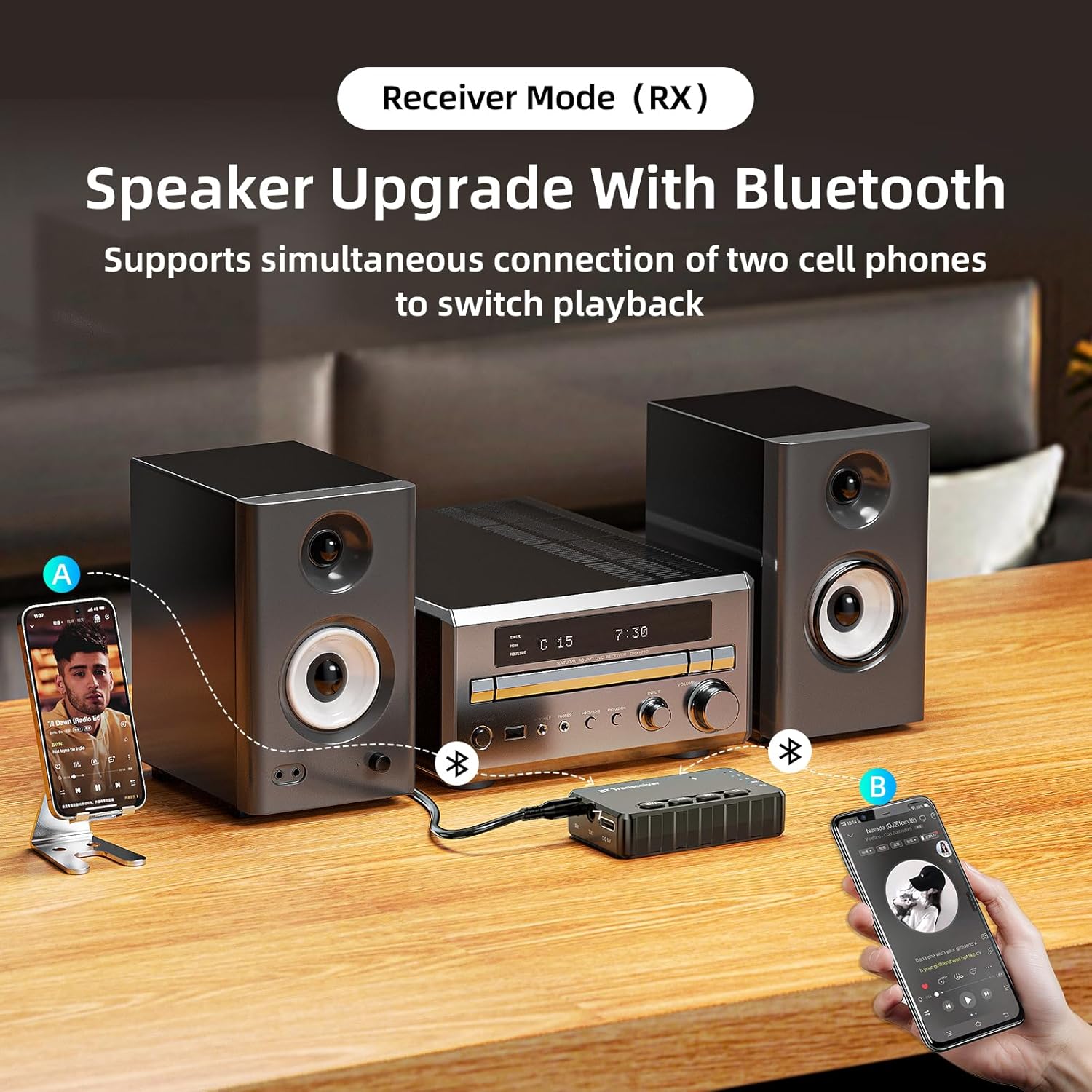
Image: The A3Pro in Receiver Mode (RX), connected to a home stereo system, demonstrating its ability to receive audio from two mobile phones simultaneously, allowing for easy switching of playback.
5.4. Connecting Two Devices Simultaneously (Dual Link)
The A3Pro supports connecting two Bluetooth devices at once, both in TX and RX modes, without compromising sound quality.
- В режиме передачи: After connecting the first pair of headphones/speaker, put the A3Pro back into pairing mode (short press search button) and pair the second device. Audio will be transmitted to both.
- В режиме приема: After connecting the first smartphone/tablet, connect the second device via Bluetooth. You can switch playback between the two connected devices.

Image: A graphic illustrating the A3Pro's dual-link capability, showing how two mobile phones can connect in Receiver mode and two Bluetooth headsets can connect in Transmitter mode simultaneously.
5.5. Громкая связь (режим приема)
When used in RX mode with a car audio system or home stereo, the A3Pro can facilitate hands-free calling if your connected audio system supports it.
- Ensure your smartphone is paired with the A3Pro in RX mode.
- Incoming calls will be routed through your connected speakers.
- Use the A3Pro's buttons to answer/end calls (if supported by the device's firmware and connected phone).

Image: The A3Pro integrated into a car's audio system, demonstrating its support for listening to music, making phone calls, and using navigation audio wirelessly.
6. Техническое обслуживание
To ensure the longevity and optimal performance of your MOREGAX A3Pro, follow these maintenance guidelines:
- Уборка: Для чистки устройства используйте мягкую сухую ткань. Не используйте жидкие чистящие средства или аэрозоли.
- Хранилище: Храните устройство в прохладном, сухом месте, вдали от прямых солнечных лучей и экстремальных температур.
- Избегайте попадания влаги: Держите устройство подальше от воды и высокой влажности.
- Обращаться с осторожностью: Не роняйте устройство и не подвергайте его сильным ударам.
7. Поиск Неисправностей
If you encounter issues with your A3Pro, please refer to the following common problems and solutions:
| Проблема | Возможное решение |
|---|---|
| Устройство не включается. | Убедитесь, что устройство заряжено. Подключите его к источнику питания с помощью кабеля Type-C. |
| Невозможно выполнить сопряжение с устройством Bluetooth. |
|
| Нет звука или плохое качество звука. |
|
| Короткий радиус действия Bluetooth. |
|
| Only one mode (TX or RX) works at a time. | The A3Pro is designed to operate in only one mode (TX or RX) at a time. Ensure you are using the correct port for your desired mode. |
8. Гарантия и поддержка
MOREGAX products are designed with quality and customer satisfaction in mind. For any questions, technical support, or warranty claims, please refer to the contact information provided on the product packaging or visit the official MOREGAX webсайт. Сохраните чек о покупке для гарантийных целей.