Введение
The RadioMaster GX12 is a state-of-the-art radio controller designed for advanced remote control applications, featuring ExpressLRS Gemini-XROSSBAND (GEM-X) technology. This manual provides essential information for the safe and effective operation, setup, and maintenance of your GX12 radio controller.

Изображение: Спереди view of the RadioMaster GX12 radio controller, showcasing its dual antennas, central display, gimbals, and various control switches and buttons.

Image: A promotional graphic for the GX12, emphasizing its advanced features such as dual 1W RF output, dual-band antenna, Gemini Xrossband technology, and high-precision gimbals.
Информация по безопасности
Please read the user instructions carefully before operating the device.
- Always ensure the radio controller is fully charged before use.
- Operate the device in a safe environment, away from obstacles and other radio interference sources.
- Не подвергайте устройство воздействию экстремальных температур, влаги или прямых солнечных лучей.
- Хранить в недоступном для детей месте.
- Only use approved batteries and charging methods.
Что в коробке?
После вскрытия упаковки убедитесь в наличии всех перечисленных ниже компонентов:
- GX12 Radio Controller
- Чехол для переноски
- Battery Tray (Battery Cells Not Included)
- Replacement Switch Panels
- Кабель типа C
- Аксессуары
- User Instructions (Quick Start Guide)

Image: All items included in the GX12 Radio Controller package, neatly laid out, showing the controller, its grey carry case, battery tray, USB-C cable, and other small accessories.
Настраивать
1. Установка аккумулятора
The GX12 Radio Controller requires a 7.4V 2-cell Lithium-Polymer battery, two 3.7V 18650 Lithium-Ion cells, or a 21700 5000mAh battery (batteries not included). Locate the battery compartment on the back of the controller.

Изображение: сзади view of the GX12 radio controller, highlighting the battery compartment cover with a "PUSH" indicator and the RadioMaster strap.
- Откройте крышку батарейного отсека.
- Insert the compatible battery into the tray, ensuring correct polarity.
- Плотно закройте крышку батарейного отсека.
2. Зарядка
The GX12 supports 2S Smart Balance Charging via its USB-C port.
- Connect the supplied Type-C cable to the USB-C port on the controller and to a suitable USB power source.
- The OLED display will indicate charging status.
3. Настройка антенны
The GX12 features dual folding 2.4GHz/Sub-G 900MHz omnidirectional antennas.
- For optimal performance, unfold the antennas to an upright position before operation.
- Fold them down for compact storage and transport.

Изображение: Спереди view of the GX12 radio controller with its dual antennas folded down, demonstrating its compact form factor for storage.
4. Gimbal Sticks
The GX01 gimbals feature folding sticks for easy transport.
- To fold, gently push the stick downwards and then fold it into the gimbal housing.
- To unfold, pull the stick out until it locks into the upright position.

Изображение: взорванный view diagram showing how the gimbal sticks on the GX12 can be folded for transport, highlighting the mechanism for compact storage.
Инструкция по эксплуатации
1. Включение и выключение
- Для включения нажмите и удерживайте кнопку питания, пока не загорится OLED-дисплей.
- Для выключения нажмите и удерживайте кнопку питания, пока дисплей не погаснет.
2. Контроль надview
The GX12 features a comprehensive set of controls for precise operation:
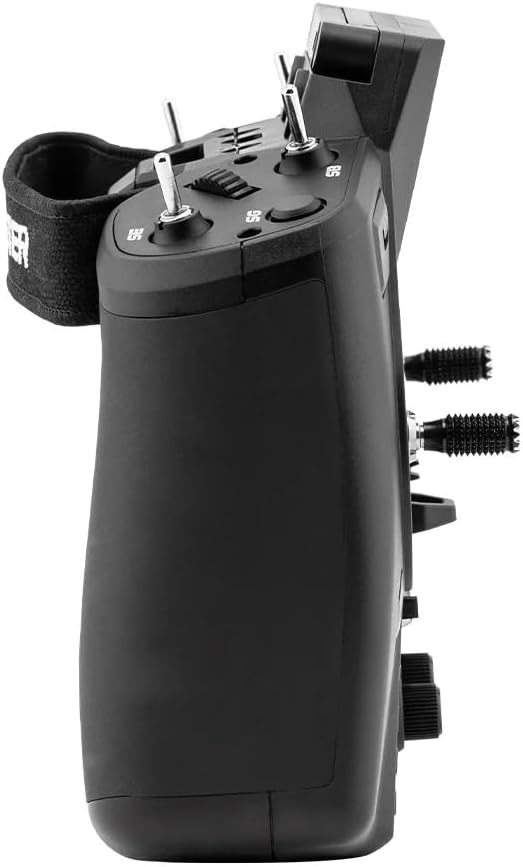
Изображение: вид сбокуfile of the GX12 radio controller, illustrating its ergonomic design and the placement of additional switches and controls on the side.
- GX01 1000Hz, 3D Digital CNC Hall Effect Gimbals: Provide precise control inputs.
- Switches (SA, SD, T1-T6): Настраивается для различных функций.
- Buttons (SYS, RTN, PAGE, TELE): For navigating the EdgeTX firmware menu.
- Pots (P1, P2): Rotary potentiometers for fine adjustments.
- 128*64 Monochrome OLED Display: Shows telemetry data, menu options, and settings.

Изображение: Подробный разрез view of the GX01 Digital 1000Hz 12-bit Gimbal, highlighting its CNC aluminum construction, quad ball bearings, and 3D Digital Hall Effect Sensors for exceptional precision.
3. ExpressLRS Gemini-XROSSBAND (GEM-X)
The GX12 is the first radio to feature ExpressLRS Gemini-XROSSBAND (GEM-X), allowing for simultaneous transmission on both 2.4GHz and 915MHz. This ensures unmatched interference rejection and extended range.
- The internal RF module supports ELRS 2.4GHz / Sub-G 900MHz.
- It is compatible with all current 2.4GHz and 900MHz ExpressLRS receivers, as well as the new generation of Gemini Xrossband (Gem-X) receivers.
4. EdgeTX Firmware
The radio operates on EdgeTX firmware, providing a highly customizable and powerful user interface. Refer to the official EdgeTX documentation for detailed instructions on model setup, binding, and advanced configurations.
- Channels: Max 16 channels (Receiver dependent).
- Upgrade Method: USB / EdgeTX Companion PC software.
Обслуживание
- Уборка: Для очистки корпуса радиоприемника используйте мягкую сухую ткань. Избегайте использования агрессивных химикатов или абразивных материалов.
- Охлаждающий вентилятор: The GX12 includes a cooling fan to manage heat during operation. Ensure the fan vents are clear of obstructions.
- Хранилище: When not in use, store the radio controller in its carry case in a cool, dry place, away from direct sunlight and extreme temperatures.
- Уход за стабилизатором: The GX01 gimbals are precision components. Avoid applying excessive force or exposing them to dust and debris.
Поиск неисправностей
- Радио не включается:
- Проверьте уровень заряда батареи.
- Убедитесь, что батарея установлена правильно, с соблюдением полярности.
- Проблем с сигналом/привязкой нет:
- Verify that the receiver is compatible with ExpressLRS.
- Ensure both radio and receiver are in binding mode.
- Check antenna orientation on both devices.
- Дисплей не работает:
- Убедитесь, что радио включено.
- Если проблема не устранена, обратитесь в службу поддержки.
- Проблемы с обновлением прошивки:
- Убедитесь, что USB-кабель надежно подключен.
- Use the official EdgeTX Companion PC software for updates.
- Refer to EdgeTX documentation for detailed update procedures.
Технические характеристики
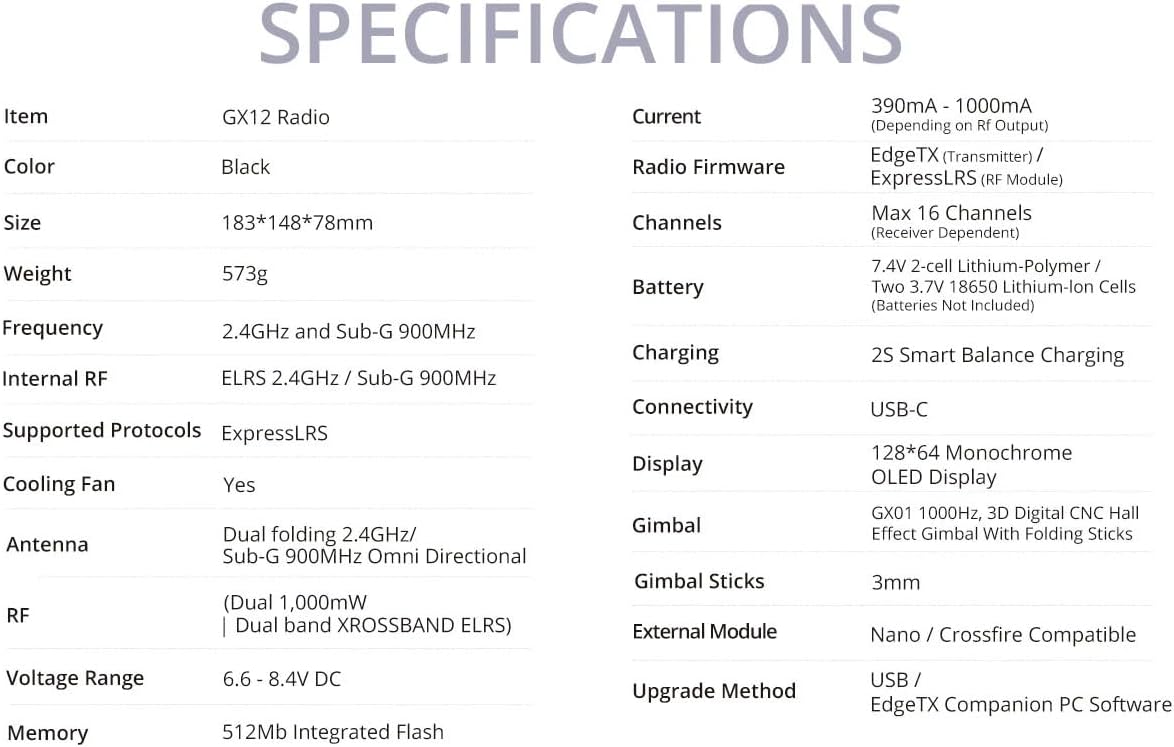
Image: A comprehensive table detailing the specifications of the GX12 Radio, including dimensions, weight, frequency, internal RF, battery, and display type.
| Особенность | Деталь |
|---|---|
| Частота | 2.400 ГГц и Sub-G 900 МГц |
| Внутренний РФ | ELRS 2.4 ГГц / Sub-G 900 МГц |
| Поддерживаемые протоколы | Экспресс-ЛРС |
| Охлаждающий вентилятор | Да |
| Антенна | Dual folding 2.4GHz/ Sub-G 900MHz Omni directional |
| RF | Dual 1,000mW | Dual band XROSSBAND ELRS |
| Томtage Диапазон | 6.6 - 8.4 В постоянного тока |
| Текущий | 390mA - 1000mA (Depending on Rf output) |
| Прошивка радио | EdgeTX (Transmitter) / ELRS (RF module) |
| Каналы | Макс. 16 каналов (зависит от приемника) |
| Аккумулятор | 7.4 В 2-элементный литий-полимерный аккумулятор / два 3.7 В 18650 литий-ионных аккумулятора / 21700 аккумулятор емкостью 5000 мА·ч (аккумуляторы в комплект не входят) |
| Зарядка | 2S Smart Balance Charging |
| Связность | USB-C |
| Отображать | Монохромный OLED-дисплей 128*64 |
| Карданный подвес | GX01 1000 Гц, 3D цифровой ЧПУ-карданный шарнир с эффектом Холла и складными ручками |
| Стики для подвеса | 3 мм |
| Внешний модуль | Совместимость с Nano/Crossfire |
| Метод обновления | USB / EdgeTX Companion PC software |
| Память | 512 Мб встроенной флэш-памяти |
| Размеры продукта | 7.2 x 5.8 x 3 дюйма |
| Вес товара | 1.26 фунта |
| Страна происхождения | Китай |
| Производитель | РадиоМастер |


