1. Введение
This manual provides essential information for setting up, operating, and maintaining your JVC LT-55NQ7165C AI Vision Series QLED Google TV. Please read it thoroughly before use to ensure proper functionality and safety.

The JVC LT-55NQ7165C is a 55-inch 4K Ultra HD QLED Google TV, featuring a 60Hz refresh rate, AI Vision technology, and integrated smart functionalities. It offers a vibrant display with HDR and HLG support, powerful 60 Watts Dolby Atmos sound, and extensive connectivity options.
Надview of JVC AI Vision Series QLED Android TV features.
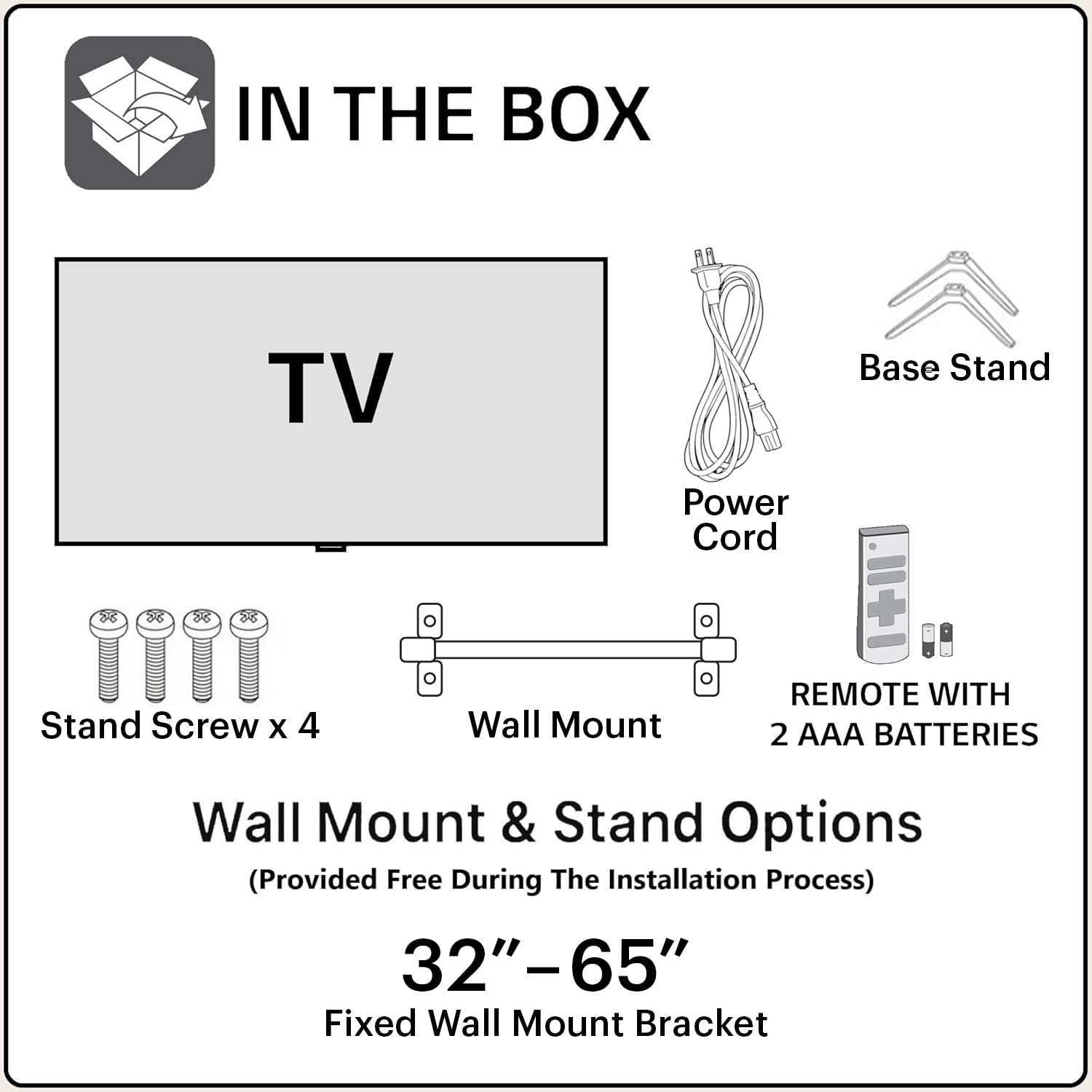
2. Что в коробке
После вскрытия упаковки убедитесь, что все следующие компоненты присутствуют:
- 1N JVC LT-55NQ7165C LED TV
- 1N Remote Control (with 2 AAA batteries included)
- 1N Wall Mount Bracket
- 1N Table Top Stand (Base Stand)
- 4x винты стойки
- Шнур питания 1N
- Руководство пользователя (этот документ)
3. Настройка и установка
Your JVC TV offers both table-top and wall-mount installation options. Ensure the TV is placed on a stable surface or securely mounted to a wall.
3.1. Table-Top Installation
- Осторожно положите телевизор экраном вниз на мягкую чистую поверхность, чтобы не поцарапать его.
- Attach the two base stands to the bottom of the TV using the provided screws. Ensure they are firmly secured.
- Place the TV on a flat, stable surface, ensuring adequate ventilation around the unit.
3.2. Установка на стену
For wall-mount installation, it is recommended to seek professional assistance. The provided wall mount bracket is suitable for this model.
- Identify a suitable wall location, ensuring it can support the weight of the TV.
- Follow the instructions provided with the wall mount bracket to securely attach it to the wall.
- Carefully attach the TV to the wall mount bracket. Ensure all connections are secure before releasing телевизор.
Осторожность: Improper wall mounting can result in serious injury or damage to your TV. Always follow safety guidelines.
3.3. Первоначальное включение
- Подключите шнур питания к телевизору, а затем к розетке.
- Вставьте прилагаемые батарейки типа ААА в пульт дистанционного управления.
- Нажмите кнопку питания на пульте дистанционного управления или на телевизоре, чтобы включить его.
- Follow the on-screen instructions for initial setup, including language selection, network connection, and Google account login.
4. Связь
The JVC LT-55NQ7165C offers a variety of ports for connecting external devices and network access.

- Порты HDMI (3): Connect gaming consoles, set-top boxes, Blu-ray players, and other HDMI-enabled devices. Supports ALLM (Auto Low Latency Mode) and eARC (Enhanced Audio Return Channel).
- USB-порты (2): Подключайте жесткие диски, USB-накопители и другие USB-устройства для воспроизведения мультимедиа.
- Двухдиапазонный Wi-Fi: Connect to your home network wirelessly (2.4GHz / 5GHz).
- Порт Ethernet (LAN): Для проводного подключения к Интернету.
- Bluetooth 5.0: Подключайте беспроводные наушники, колонки или другие аксессуары с поддержкой Bluetooth.
- Оптический аудиовыход: Connect to external sound systems or soundbars for high-quality audio.

5. Управление телевизором
5.1. Дистанционное управление
The included remote control allows you to navigate the TV's features. It includes dedicated buttons for popular streaming services and Google Assistant voice control.

- Кнопка питания: Включает и выключает телевизор.
- Кнопка Google Ассистента: Активирует голосовые команды.
- Панель навигации: Для навигации по меню.
- Увеличение/уменьшение громкости: Регулирует громкость звука.
- Канал вверх/вниз: Переключает каналы ТВ.
- Кнопки Netflix, Prime Video, YouTube: Прямой доступ к этим потоковым приложениям.
5.2. Функции Google TV
Your JVC TV runs on the Google TV operating system, providing access to a vast library of content and smart features.
- Доступ к приложению: Download and install over 10,000 apps and games from the Google Play Store, including Netflix, Prime Video, YouTube, Zee5, Disney+ Hotstar, SonyLIV, MX Player, JioCinema, Apple TV, and Voot.
- Google Ассистент: Use voice commands to search for content, control smart home devices, get answers, and more. Press the Google Assistant button on your remote and speak into the microphone.
- Screen Mirroring (Chromecast built-in): Транслируйте контент со своего совместимого смартфона, планшета или компьютера прямо на экран телевизора.
- Персональные рекомендации: Google TV изучает ваши предпочтения и предлагает контент, подобранный специально для вас.


5.3. Функции дисплея
Experience stunning visuals with the TV's advanced display technologies.
- Разрешение 4K Ultra HD: Enjoy incredibly sharp and detailed images with 3840 x 2160 pixels.
- Технология QLED: Quantum Dot LED display delivers vibrant colors and improved brightness.
- HDR (High Dynamic Range) & HLG: Provides enhanced contrast, brightness, and a wider color gamut for a more lifelike picture.
- AI Vision Series: AI-powered processing optimizes picture quality for various content types.
- 1.1 Billion Colours: Experience a rich and extensive color palette.
- Частота обновления 60 Гц: Smooth motion for most content.


5.4. Аудиовозможности
Immerse yourself in rich and clear audio with the TV's integrated sound system.
- Выходная мощность 60 Вт: Powerful audio delivery for an engaging listening experience.
- Dolby Digital Plus & Dolby Atmos: Provides immersive, multi-dimensional sound that moves around you.
- DTS-TruSurround: Enhances surround sound effects for a cinematic audio experience.

5.5. Игры
The TV is designed to enhance your gaming experience with features like ALLM (Auto Low Latency Mode) and a responsive display.

6. Поиск Неисправностей
В этом разделе вы найдете информацию о распространенных проблемах и способах их решения.
6.1. Нет питания
- Убедитесь, что шнур питания надежно подключен как к телевизору, так и к исправной розетке.
- Проверьте работоспособность розетки, подключив к ней другое устройство.
- Verify that the remote control batteries are correctly inserted and not depleted.
6.2. No Picture / Poor Picture Quality
- Проверьте все кабельные соединения (HDMI, антенна и т. д.), чтобы убедиться в их надежности.
- Выберите правильный источник входного сигнала с помощью пульта дистанционного управления.
- Отрегулируйте настройки изображения (яркость, контрастность, цветность) в меню телевизора.
- If using an external device, check its output settings.
6.3. Нет звука / Плохое качество звука
- Убедитесь, что громкость не отключена и не установлена на слишком низкий уровень.
- Проверьте соединения аудиокабелей с внешними звуковыми системами.
- Настройте параметры звука в меню телевизора.
- При использовании внешних динамиков убедитесь, что они включены и исправно работают.
6.4. Проблемы с сетевым подключением
- Убедитесь, что ваш Wi-Fi-роутер включен и работает.
- Перезагрузите маршрутизатор и модем.
- Откройте сетевые настройки телевизора и попробуйте повторно подключиться к сети Wi-Fi.
- При использовании проводного соединения убедитесь, что кабель Ethernet надежно подключен.
7. Технические характеристики
| Особенность | Деталь |
|---|---|
| Название модели | LT-55NQ7165C |
| Размер экрана | 55 дюйма (140 см) |
| Технология отображения | QLED, IPS Display |
| Разрешение | 4K Ultra HD (3840 x 2160) |
| Частота обновления | 60 Гц |
| Особые возможности | Dolby Digital Plus, HDR, DTS-TruSurround, Google Assistant, Dolby Atmos, AI Vision Series |
| Операционная система | Гугл ТВ |
| БАРАН | 2 ГБ |
| Память (ПЗУ) | 16 ГБ |
| Аудиовыход | 60 Вт |
| Связность | Dual Band Wi-Fi, 3 HDMI, 2 USB, Bluetooth 5.0, Optical, Ethernet |
| Размеры продукта (ДxШxВ) | 124 х 12 х 71 см |
| Вес товара | 10.4 кг |
| Источник питания | AC |
| Viewугол наклона | 178 градусов |
| Коэффициент контрастности изображения | 4000:1 |

8. Гарантия и поддержка
Your JVC LT-55NQ7165C TV comes with a standard manufacturer's warranty.
- Гарантия на продукцию: 1 год со дня покупки.
- Гарантия на аксессуары для пульта ДУ: 6 месяцев с момента покупки.
To avail warranty services, please retain your purchase invoice. The user manual can also be accessed from the brand's webсайте в разделе сведений о продукте.
Исключения из гарантии: The warranty does not cover light bleeding and dot issues (Mura issues) occurring on a certain Grey scale, as per the Mura Inspection standard, this is considered acceptable. As per ND (Neutral Density) Filter 2% guideline, this is not considered a panel defect.
For further assistance or technical support, please refer to the contact information provided on the official JVC webсайте или в документации о покупке.


