1. Введение
Спасибо за покупкуasing the XO F41 Mirror Bluetooth Speaker. This device combines a digital clock display with a portable Bluetooth speaker, offering multiple playback options including Bluetooth, TF card, and FM radio. Please read this manual carefully before use to ensure proper operation and to maximize your experience with the product.

Image 1.1: The XO F41 Mirror Bluetooth Speaker in use, showing its digital clock display.
2. Особенности продукта
- Bluetooth 5.3 Для стабильной и эффективной беспроводной потоковой передачи аудио.
- Зеркальное отображение: Clear digital time display with adjustable brightness.
- Несколько режимов воспроизведения: Supports Bluetooth, TF card, and FM radio.
- Встроенный микрофон: Для звонков в режиме громкой связи.
- Длительное время воспроизведения: Up to 8 hours at 50% volume, 5 hours at 100% volume.
- Компактная и портативная конструкция: Easy to carry and place anywhere.
- Зарядка USB-C: Современный и удобный зарядный порт.
3. Содержимое упаковки
Проверьте комплектацию на наличие следующих предметов:
- XO F41 Mirror Bluetooth Speaker
- Зарядный кабель USB-C
- Руководство пользователя

Image 3.1: The XO F41 Mirror Bluetooth Speaker packaging.
4. Компоновка устройства и элементы управления
Ознакомьтесь с кнопками и портами динамика:
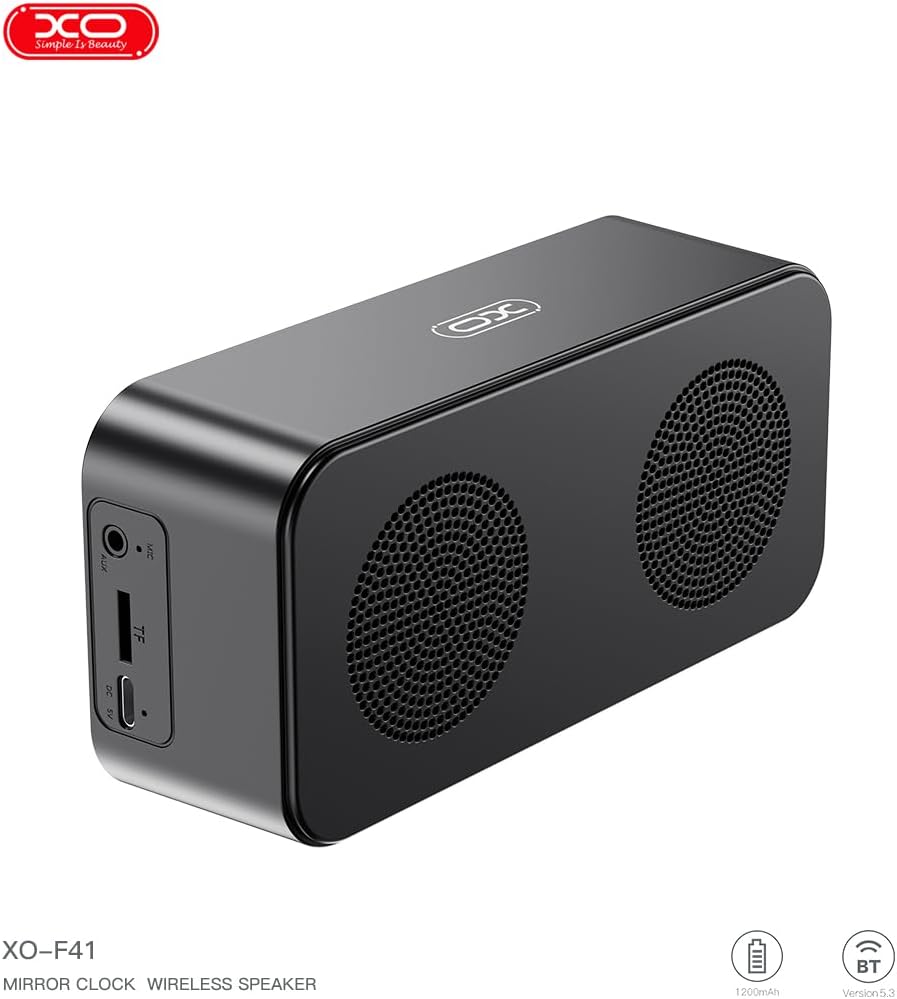
Изображение 4.1: вид сбоку view of the XO F41 with ports labeled.
- Кнопка питания: Нажмите и удерживайте для включения/выключения. Короткое нажатие для переключения режимов.
- Кнопка воспроизведения/паузы: Воспроизведение или пауза аудио. Ответ/завершение вызова.
- Увеличение громкости / следующий трек: Короткое нажатие — увеличение громкости, долгое нажатие — переход к следующему треку.
- Уменьшение громкости / Предыдущая дорожка: Короткое нажатие — уменьшение громкости, длинное нажатие — переход к предыдущему треку.
- Порт USB-C: Для зарядки устройства.
- Слот для TF-карты: Вставьте карту памяти TF (MicroSD) для воспроизведения музыки на локальном устройстве.
- Порт AUX: Для проводного аудиовхода.
5. Настройка
5.1 Зарядка динамика
- Подключите прилагаемый кабель USB-C к порту зарядки на колонке.
- Другой конец кабеля подключите к USB-адаптеру питания (не входит в комплект) или к USB-порту компьютера.
- The charging indicator will illuminate. It takes approximately 3 hours for a full charge.
- The indicator will turn off or change color once fully charged.
5.2 Включение/выключение питания
- Для включения: Нажмите и удерживайте кнопку питания примерно 3 секунды. Вы услышите звуковой сигнал.
- Чтобы выключить: Нажмите и удерживайте кнопку питания примерно 3 секунды. Вы услышите звуковой сигнал.
6. Инструкция по эксплуатации
6.1 Сопряжение по Bluetooth
- Ensure the speaker is powered on and in Bluetooth mode. If not, short press the Power button to cycle through modes until "BT" or a Bluetooth icon appears on the display.
- На своем мобильном устройстве включите Bluetooth и выполните поиск доступных устройств.
- Select "XO-F41" from the list of devices.
- После сопряжения динамик сообщит об успешном подключении, и вы сможете начать воспроизведение звука с вашего устройства.
6.2 Режим TF-карты
- Вставьте карту TF (MicroSD) с аудиофайлами в формате MP3. files в слот для карт TF.
- The speaker will automatically switch to TF card mode and begin playing music. If not, short press the Power button to cycle to TF card mode.
- Use the Volume Up/Down buttons for track navigation and the Play/Pause button for playback control.
6.3 Режим FM-радио
- Short press the Power button to switch to FM radio mode. The display will show the FM frequency.
- Длительное нажатие кнопки «Воспроизведение/Пауза» позволяет автоматически сканировать и сохранять доступные FM-станции.
- Short press the Volume Up/Down buttons to switch between saved stations.
6.4 Настройки часов и будильника
The XO F41 features a digital clock display. Specific instructions for setting the time and alarm are typically found in the detailed manual included with the product. Generally, a dedicated 'M' (Mode) or 'Set' button is used to enter time/alarm setting mode, and volume buttons are used to adjust values.

Image 6.1: The XO F41 speaker functioning as a bedside clock.
6.5 Регулировка яркости дисплея
The display brightness is adjustable. Look for a dedicated button (often labeled with a sun icon or similar) or a combination of button presses (e.g., double-pressing the Power button) to cycle through brightness levels. Refer to the included quick start guide for exact steps.
7. Техническое обслуживание
- Уборка: Для очистки поверхности динамика используйте мягкую сухую ткань. Не используйте абразивные чистящие средства или растворители.
- Хранилище: Если динамик не используется в течение длительного времени, храните его в прохладном, сухом месте, вдали от прямых солнечных лучей и экстремальных температур.
- Водостойкость: Это устройство не является водонепроницаемым. Избегайте воздействия воды или чрезмерной влажности.
- Уход батареи: Чтобы продлить срок службы аккумулятора, избегайте его частой полной разрядки. Регулярно заряжайте устройство, даже если оно не используется постоянно.
8. Поиск Неисправностей
| Проблема | Возможная причина | Решение |
|---|---|---|
| Динамик не включается. | Низкий заряд батареи. | Заряжайте динамик не менее 30 минут. |
| Невозможно подключиться через Bluetooth. | Динамик не находится в режиме сопряжения; Bluetooth отключен на устройстве; слишком далеко от устройства. | Ensure speaker is in Bluetooth mode. Enable Bluetooth on your device. Move speaker closer to your device (within 10 meters). |
| No sound from TF card. | Карта TF вставлена неправильно; не поддерживается file format; no audio files on card. | Вставьте карту TF повторно. Убедитесь, что files are in MP3 format. Verify audio files are present on the card. |
| Плохой прием FM-радио. | Слабый сигнал; помехи окружающей среды. | Move the speaker to a different location. Re-scan for stations. |
9. Технические характеристики
| Особенность | Деталь |
|---|---|
| Номер модели | XO-F41 |
| Версия Bluetooth | Bluetooth V5.3 |
| Частота Bluetooth | 2.402 ГГц-2.480 ГГц |
| Емкость аккумулятора | 1200мАч |
| Вход для зарядки | USB-C, 5 В постоянного тока/0.5 А |
| Время зарядки | Примерно 3 часа |
| Время игры | 8H (50% volume); 5H (100% volume) |
| Эффективное расстояние | Менее 10 метров |
| Максимальная мощность | 5W |
| Громкоговоритель | 52 мм |
| Отношение сигнал / шум | >80дБ |
| Размеры продукта | 15 x 3.81 x 11 см (приблизительно 150 x 45 x 72 мм) |
| Вес продукта | 320 g (approx. 0.28 kg) |
| Материал | Пластик |
| Специальная характеристика | Регулируемая яркость |

Image 9.1: Detailed product parameters.
10. Информация о гарантии
The XO F41 Mirror Bluetooth Speaker comes with a standard manufacturer's warranty. Please refer to the warranty card included in your package for specific terms, conditions, and duration. Keep your purchase receipt as proof of purchase for any warranty claims.
11. Поддержка клиентов
For further assistance, technical support, or inquiries regarding your XO F41 Mirror Bluetooth Speaker, please contact the retailer or manufacturer's customer service department. Contact details are typically provided on the product packaging or the official brand webсайт.