1. Введение
This manual provides comprehensive instructions for the installation, operation, maintenance, and troubleshooting of your Fanvil 8-Port 2-Wire PoE Switch (Model PN8). Please read this manual thoroughly before using the device to ensure proper functionality and to prevent damage.
2. Продукт закончилсяview
The Fanvil PN8 is an 8-port 2-wire Power over Ethernet (PoE) switch designed to transmit both power and data over existing 2-wire cables. This unique capability simplifies installation, especially in environments where traditional Ethernet cabling is not feasible or cost-effective. It supports up to 8 PoE-enabled devices and can transmit data and power over distances up to 300 meters.
2.1 Основные характеристики
- 8 PoE ports for data and power transmission.
- Supports power and data over 2-wire connections.
- Long transmission distance of up to 300 meters.
- User-friendly setup with no complex configuration required.
2.2 Схема устройства
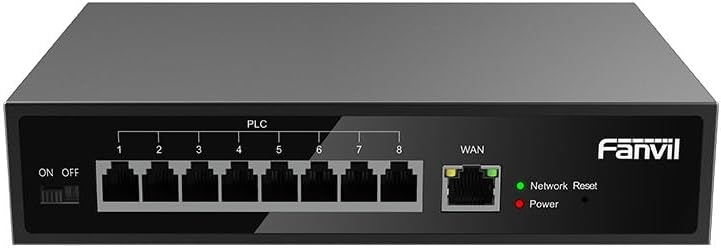
Рисунок 1: Передний view of the Fanvil PN8 switch, showing 8 PLC ports, a WAN port, ON/OFF switch, and LED indicators for Network Reset and Power.

Рисунок 2: Угловой view of the Fanvil PN8 switch, highlighting the side ventilation and port layout.
2.3 светодиодных индикатора
- Network Reset (Green LED): Indicates network activity or status. A steady light typically means a stable connection, while blinking indicates data transmission.
- Питание (красный светодиод): Illuminates when the device is powered on and receiving electrical current.
3. Инструкции по настройке
3.1 Содержимое упаковки
Перед установкой убедитесь, что все необходимые элементы находятся в комплекте:
- Fanvil 8-Port 2-Wire PoE Switch (PN8)
- Адаптер питания
- Руководство пользователя (этот документ)
- Монтажные аксессуары (если включены)
3.2 Подключение коммутатора
- Подключение питания: Connect the provided power adapter to the power input port on the switch and then plug it into a standard electrical outlet (100-240V AC). Ensure the ON/OFF switch is in the OFF position before connecting power.
- WAN-соединение: Connect your main network router or modem to the WAN port on the Fanvil PN8 switch using a standard Ethernet cable.
- Подключение PoE-устройства: Connect your 2-wire PoE-enabled devices (e.g., IP phones, cameras) to any of the 8 PLC ports on the switch. The switch will automatically detect and provide power and data to these devices.
- Включение питания: Flip the ON/OFF switch to the ON position. The Power LED should illuminate, indicating the switch is operational.
4. Эксплуатация переключателя
Once connected, the Fanvil PN8 switch operates automatically. It provides power and data to connected PoE devices without requiring additional configuration. The LED indicators provide visual feedback on the device's status.
4.1 Включение/выключение питания
- To power on the switch, ensure the power adapter is connected and flip the ON/OFF switch to the 'ON' position. The red Power LED will light up.
- To power off the switch, flip the ON/OFF switch to the 'OFF' position. The red Power LED will turn off.
5. Техническое обслуживание
To ensure optimal performance and longevity of your Fanvil PN8 switch, follow these maintenance guidelines:
- Уборка: Для очистки внешней поверхности коммутатора используйте мягкую сухую ткань. Не используйте жидкие или аэрозольные чистящие средства. Перед чисткой убедитесь, что устройство выключено.
- Вентиляция: Ensure the switch is placed in a well-ventilated area. Do not block the ventilation openings on the sides of the device.
- Среда: Избегайте воздействия на выключатель экстремальных температур, высокой влажности или прямых солнечных лучей.
6. Поиск Неисправностей
If you encounter issues with your Fanvil PN8 switch, refer to the following table for common problems and solutions:
| Проблема | Возможная причина | Решение |
|---|---|---|
| No power (Power LED off) | Power adapter not connected or faulty; ON/OFF switch is off. | Check power adapter connection and outlet. Ensure ON/OFF switch is in the 'ON' position. |
| Нет подключения к сети | WAN cable disconnected; faulty cable; upstream network issue. | Verify WAN cable connection. Test with a different cable. Check your router/modem. |
| PoE device not receiving power/data | Device not PoE-compatible; faulty 2-wire cable; device drawing too much power. | Ensure device is PoE-compatible. Test with a different 2-wire cable. Check device power requirements. |
| Низкая скорость сети | Качество кабеля; перегрузка сети; ограничения устройства. | Ensure high-quality 2-wire cables are used. Reduce network traffic if possible. |
7. Технические характеристики
| Спецификация | Ценить |
|---|---|
| Номер модели | ПН8 |
| Тип продукта | 2-Wire PoE Switch |
| Порты | 8 |
| Vol входtage | 100~240 В переменного тока |
| Рабочий объемtage | 28 Вольт |
| Длительное расстояние передачи | 300 метров |
| Размеры продукта | 5.91 x 78.74 x 5.91 дюйма |
| Вес товара | 2.49 фунта |
| Требуются батареи | 1 батарейки типа АААА (входят в комплект) |
| ASIN | B0DP5HXVQJ |
| СКП | 6937295605105 |
| Дата первой доступности | 27 ноября 2024 г. |
8. Гарантия и поддержка
Для получения информации о гарантии и технической поддержке, пожалуйста, ознакомьтесь с документацией, прилагаемой к вашей покупке, или посетите официальный сайт Fanvil. website. Contact their customer service for assistance with product issues, repairs, or further inquiries.