Введение
The MiBOXER PW5 5-in-1 LED Controller is designed for precise and convenient management of various LED lighting systems. It supports multiple LED types and offers dual wireless connectivity for seamless integration and control.
This manual provides essential information for the safe and efficient installation, operation, and maintenance of your PW5 LED Controller.
Основные характеристики
- Совместимость с устройствами 5-в-1: Supports Single Color, Dual White (CCT), RGB, RGBW, and RGB+CCT LED setups.
- Двойное беспроводное подключение: Features WiFi and 2.4GHz technology for stable operation and smart app integration.
- High Output Capacity: Handles up to 20A output, suitable for high-power LED installations.
- Умное управление: Compatible with "Tuya Smart" app and third-party voice control systems like Alexa and Google Assistant.
- Color and Dimming Control: Offers 16 million colors, adjustable color temperature, brightness, and saturation.
- Поддержка регулировки яркости нажатием кнопки: Allows for flexible dimming control.
- Функция памяти: Retains the last-used settings.
- Широкий объемtage Диапазон: Operates on DC12-24V.
Содержимое упаковки
- MiBOXER PW5 5-in-1 LED Controller
- Руководство пользователя

Image: The MiBOXER PW5 LED Controller shown alongside its retail packaging and a small instruction manual.
Настройка и установка
Меры предосторожности
- Перед установкой убедитесь, что питание отключено.
- Устанавливать в сухом месте, вдали от влаги и экстремальных температур.
- Проверьте правильность объемаtage (DC12-24V) and current ratings for your LED strips and power supply.
- Не превышайте максимальный выходной ток 20 А.
Схема электропроводки
Connect your LED strips and power supply to the controller as shown in the diagram below. Ensure correct polarity for all connections.

Image: Detailed wiring diagram of the MiBOXER PW5 controller. It shows the V+ and V- input terminals, GND and PUSH dimming terminals, and output terminals labeled V+, W, WW, CW, R, G, B for various LED strip types. An indicator output mode table is also visible, showing White for Single Color, Yellow for Dual White, Red for RGB, Green for RGBW, and Blue for RGB+CCT.
- Connect the DC12-24V power supply to the ВХОД V+ и V- терминалы.
- Connect your LED strip(s) to the corresponding ВЫХОД terminals based on your LED type:
- Один цвет: Connect to V+ and W (White)
- Dual White (CCT): Connect to V+, WW (Warm White), and CW (Cool White)
- РГБ: Connect to V+, R (Red), G (Green), and B (Blue)
- РГБВ: Connect to V+, R, G, B, and W (White)
- RGB+CCT: Connect to V+, R, G, B, WW, and CW
- For PUSH dimming functionality, connect a compatible PUSH switch to the Земля и ТОЛКАТЬ терминалы.
Монтаж
The controller is designed for tabletop mounting. Ensure it is placed on a stable, flat surface with adequate ventilation.

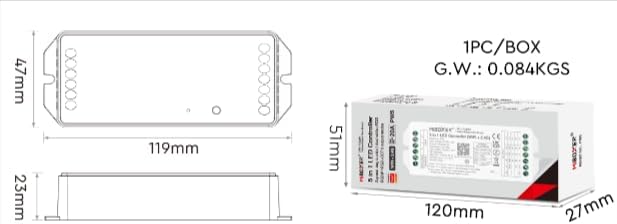
Image: Two diagrams illustrating the physical dimensions of the MiBOXER PW5 controller. The first shows a top-down view with a length of 119mm and width of 47mm. The second shows a side view with a height of 23mm, and also includes package dimensions of 120mm x 51mm x 27mm.
Операция
Switching Output Modes
The PW5 controller supports 5 different output modes. To switch between these modes:
- Нажмите "НАБОР" button once to cycle through the output modes.
- The indicator light on the controller will change color to reflect the current mode:
- White: Single Color
- Yellow: Dual White
- Red: RGB
- Green: RGBW
- Blue: RGB+CCT
Радиочастотный пульт 2.4G
The controller can be linked to a compatible 2.4G RF remote control (sold separately).
- To link: Power on the controller. Within 3 seconds, press the "ON" button on the remote control 3 times. The LED strip will flash to confirm successful linking.
- To unlink: Power on the controller. Within 3 seconds, press the "ON" button on the remote control 5 times. The LED strip will flash to confirm unlinking.
WiFi and App Control (Tuya Smart)
The PW5 controller integrates with the "Tuya Smart" app for advanced control via WiFi.
- Download the "Tuya Smart" app from your device's app store.
- Зарегистрируйтесь или войдите в свою учетную запись Tuya Smart.
- To activate WiFi pairing mode: Long press the "НАБОР" button for 3 seconds until the indicator flashes quickly.
- In the Tuya Smart app, follow the instructions to add a new device. Select the appropriate lighting device type.
- Once connected, you can control brightness, color, color temperature, saturation, and set up group/multi-zone control.
- The app also supports music rhythm functions.
Voice Control (Alexa, Google Assistant)
After successful integration with the Tuya Smart app, you can link your account to voice assistants like Amazon Alexa or Google Assistant for hands-free control.
- Откройте приложение Alexa или Google Home.
- Перейдите в раздел «Навыки» или «Работает с Google».
- Искать and enable the "Tuya Smart" skill/service.
- При появлении соответствующего запроса подключите свою учетную запись Tuya Smart.
- Discover devices. Your MiBOXER PW5 controller should appear.
- Теперь вы можете использовать голосовые команды, такие как:
- «Алекса, включи свет в гостиной».
- "Hey Google, set the kitchen lights to blue."
- "Alexa, dim the bedroom lights to 50%."
Обслуживание
- Содержите контроллер в чистоте и не допускайте попадания на него пыли. Для чистки используйте мягкую сухую ткань.
- Не используйте агрессивные химикаты или абразивные чистящие средства.
- Обеспечьте надлежащую вентиляцию вокруг устройства во избежание перегрева.
- Regularly check wiring connections for security and integrity.
Поиск неисправностей
| Проблема | Возможная причина | Решение |
|---|---|---|
| Светодиоды не горят | No power to controller; incorrect wiring; faulty LED strip. | Check power supply connection; verify input/output wiring polarity; test LED strip with another power source. |
| Пульт дистанционного управления не работает | Remote not linked; remote battery low; interference. | Re-link the remote control; replace remote battery; reduce interference sources. |
| Управление приложением не работает | Controller not connected to WiFi; incorrect app settings; WiFi signal weak. | Ensure controller is in WiFi pairing mode and connected to your network; check app settings; move controller closer to WiFi router. |
| Incorrect colors or dimming | Wrong output mode selected; incorrect wiring for LED type. | Press "SET" button to cycle to the correct output mode; verify LED strip wiring matches the selected mode. |
Технические характеристики
| Номер модели | PW5 |
| Vol входtage | DC12-24В |
| Выходной ток | Макс 20А |
| Количество каналов | 5 |
| Связность | WiFi, 2.4GHz RF |
| Control Distance (2.4G) | 30м |
| Рабочая температура | -10°С до 40°С |
| Размеры | 119 мм x 47 мм x 23 мм (прибл. 4.68 x 1.85 x 0.9 дюйма) |
| Вес товара | 3.2 унций (приблизительно 90 г) |
| Производитель | Мибоксер |
Гарантия и поддержка
Информацию о гарантии и технической поддержке можно получить на официальном сайте MiBOXER. webна сайте или обратитесь к продавцу. Сохраните чек о покупке для предъявления гарантийных претензий.
Для получения дополнительной помощи вы можете посетить Магазин MiBOXER на Amazon.


