1. Введение
Thank you for choosing the Inskam 451 Handheld Endoscope. This device is designed for visual inspection in hard-to-reach areas, offering clear imaging and ease of use. Please read this manual carefully before operating the device to ensure proper usage and to maximize its lifespan.
Основные характеристики:
- 4.5-дюймовый IPS-экран: Provides instant, high-definition viewing of images and videos.
- 720p Camera: Captures clear visuals for detailed inspection.
- 5-meter Rigid Cable: Allows access to deep or distant areas.
- Водонепроницаемая камера IP67: Suitable for use in wet or submerged environments.
- 6 регулируемых светодиодных ламп: Illuminates dark inspection areas.
- Аккумулятор емкостью 2000 мАч: Обеспечивает увеличенное время работы.
- Интегрированный стенд: Frees your hands for easier operation.
2. Продукт закончилсяview и комплектация
Familiarize yourself with the components of your Inskam 451 Endoscope.

Рисунок 2.1: The Inskam 451 Handheld Endoscope, showing the main display unit and the attached flexible camera cable with its LED-equipped lens.
Содержимое упаковки:
- 1 x Inskam 451 Handheld Endoscope Unit
- 1 x Lens Cable (5-meter rigid cable)
- 1 x USB Type-C Зарядный кабель
3. Настройка
3.1 Зарядка устройства
Before first use, fully charge the endoscope. Connect the provided USB Type-C charging cable to the device's charging port and a suitable USB power adapter (not included).

Рисунок 3.1: The endoscope features a 2000mAh battery, providing approximately 3 hours of use on a full charge, with a charging time of about 2 hours.
3.2 Inserting TF Card (Optional)
To save images and videos, insert a Micro SD (TF) card (up to 32GB, not included) into the designated TF card slot on the side of the device. Ensure the device is powered off before inserting or removing the card.

Рисунок 3.2: Detail showing the USB Type-C charging port and the hidden TF card slot, covered by a silicone flap for protection.
3.3 Attaching the Lens Cable
Connect the rigid lens cable to the main unit. Ensure it clicks securely into place. The cable is detachable for easy storage and replacement.
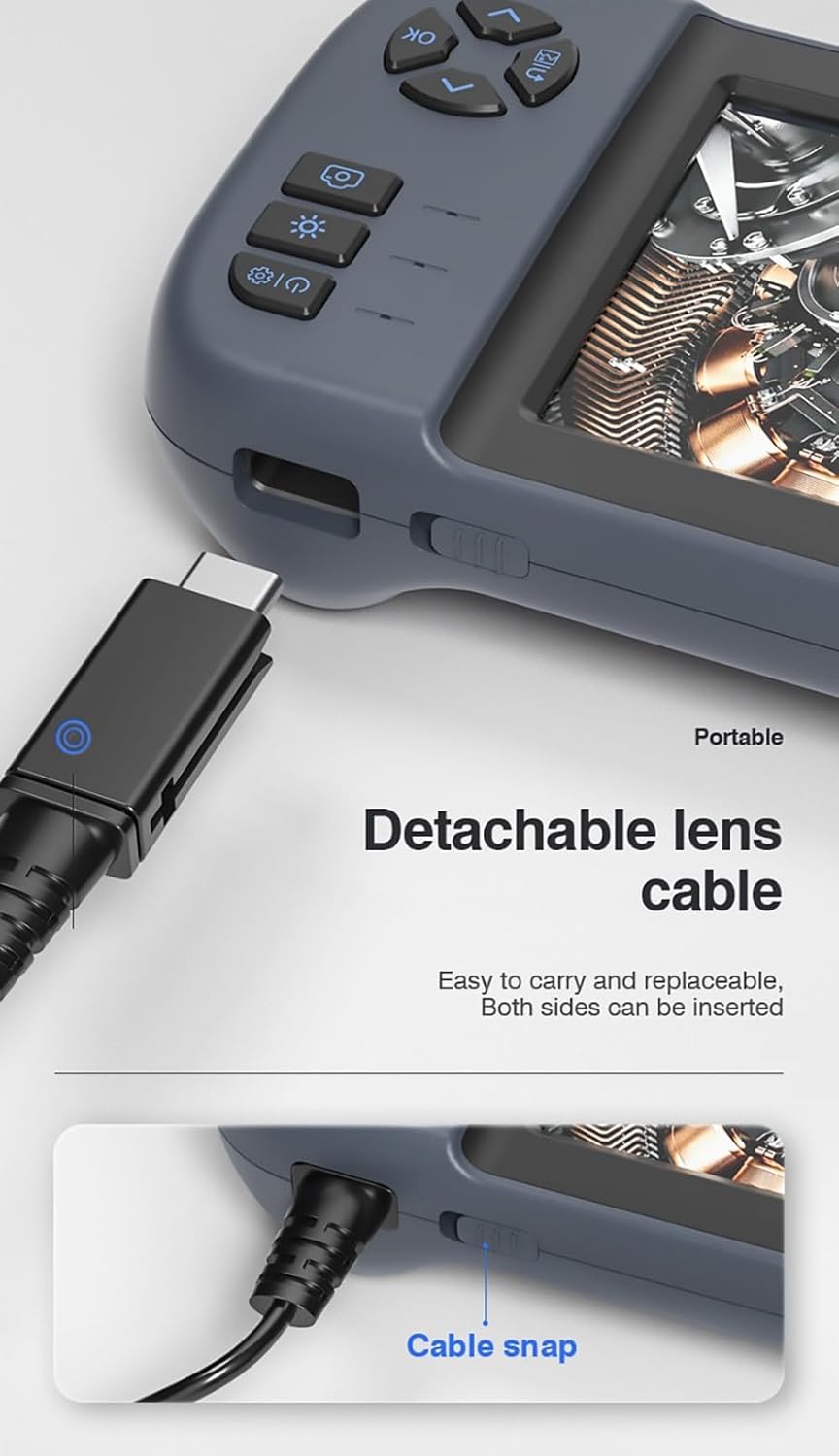
Рисунок 3.3: The detachable lens cable, designed for easy connection and removal. Both sides of the connector can be inserted.
3.4 Использование встроенной подставки
The Inskam 451 features a built-in bracket on the back, allowing it to stand upright on a flat surface. This frees your hands during inspection tasks.

Рисунок 3.4: The integrated bracket on the back of the device, which can be extended to allow the endoscope to stand on a desktop.
4. Инструкция по эксплуатации
4.1 Включение/выключение питания
Press and hold the power button (usually marked with ⑂) to turn the device on or off. The IPS screen will illuminate upon startup.

Рисунок 4.1: The 4.5-inch IPS HD screen provides vivid colors and a wide viewугол обзора для четкого осмотра.
4.2 Регулировка яркости светодиодов
The camera head is equipped with 6 adjustable LED lights. Use the dedicated brightness control button (often marked with an asterisk or light icon) to cycle through different brightness levels or turn the lights off.

Рисунок 4.2: The IP67 waterproof camera head with 6 adjustable LED lights, suitable for harsh environments including submerged conditions.
4.3. Фото- и видеосъемка.
Once the device is powered on and the camera is positioned, use the dedicated buttons to capture still images or start/stop video recording. Refer to the on-screen icons for current mode (photo/video).
4.4 ViewСМИ
Navigate to the playback mode using the menu buttons to review captured images and videos stored on the TF card. You can scroll through files and play videos directly on the screen.
5. Техническое обслуживание
5.1 Очистка объектива и экрана
Gently wipe the camera lens and the IPS screen with a soft, lint-free cloth. For stubborn smudges, a small amount of lens cleaning solution can be applied to the cloth (not directly to the lens/screen).
5.2 Уход за аккумулятором
Чтобы продлить срок службы батареи, избегайте частой полной разрядки. Регулярно заряжайте устройство, даже если оно не используется в течение длительного времени (например, раз в 3 месяца).
5.3 Хранение
Store the endoscope in a cool, dry place, away from direct sunlight and extreme temperatures. Ensure the lens cable is neatly coiled without sharp bends.
5.4 Меры предосторожности по водонепроницаемости
While the camera head is IP67 waterproof, the main unit is not. Do not submerge the main unit in water or expose it to heavy rain. Ensure the USB and TF card ports are properly sealed with their silicone covers when not in use, especially in damp среды.
6. Поиск Неисправностей
| Проблема | Возможная причина | Решение |
|---|---|---|
| Устройство не включается. | Низкий заряд батареи; Кнопка питания нажата недостаточно долго | Зарядите устройство; нажмите и удерживайте кнопку питания в течение 3-5 секунд. |
| Нет изображения на экране | Lens cable not connected properly; Camera lens obstructed | Ensure lens cable is securely connected; Clean the camera lens |
| Невозможно сохранить изображения/видео | No TF card inserted; TF card full or corrupted; TF card not supported | Вставьте TF-карту; Удалите старую files or use a new card; Use a TF card up to 32GB, formatted to FAT32 |
| Светодиодные фонари не работают | Яркость установлена на минимум; Неисправность | Press the LED brightness button to increase illumination; Contact support if issue persists |
7. Технические характеристики
| Особенность | Спецификация |
|---|---|
| Модель | 451 |
| Размер экрана | 4.5 дюймов IPS |
| Разрешение экрана | 480 x 854 пикселей |
| Разрешение изображения | 1920 x 1080 (JPG) |
| Разрешение видеозаписи | 1280 x 720 (AVI) |
| Рейтинг водонепроницаемости камеры | IP67 |
| Длина кабеля | 5 meters (Rigid) |
| Глубина резкости | 4-10 см |
| Viewугол наклона | 70 градусов |
| Источник света | 6 регулируемых светодиодных фонарей |
| Емкость аккумулятора | 2000 мАч |
| Рабочая температура | -10 ℃ до 50 ℃ |
| Связность | USB-порт типа C |
| Поддержка хранения | TF-карта (до 32 ГБ) |
| Сертификаты | CE/RoHS/ISO9001 |
| Вес продукта | 488 грамм |
| Размеры продукта (Д x Ш x В) | 18 х 11 х 7 см |
8. Гарантия и поддержка
The Inskam 451 Handheld Endoscope comes with a standard manufacturer's warranty. Please refer to your purchase documentation for specific warranty terms and duration. For technical support, troubleshooting assistance, or warranty claims, please contact the retailer or manufacturer directly.
Производитель: Инскам
ASIN: B0DNFSDNXC
For further assistance, please visit the official Inskam webсайт или свяжитесь с их службой поддержки.


