Введение
This manual provides detailed instructions for the installation, operation, and maintenance of your HUPEJOS V50-4CH 4-Channel Dash Cam. Please read this manual thoroughly before using the device to ensure proper functionality and safety.
Продукт болееview
The HUPEJOS V50-4CH is a compact 4-channel dash camera system designed to provide comprehensive vehicle surveillance. It features front, left, right, and rear cameras, offering 360-degree coverage. Key features include:
- Трехканальная запись: Simultaneous recording from front, left, right, and rear cameras.
- Высокое разрешение: Front camera records at 2K, rear at 1080p, and left/right at 720p.
- Встроенный GPS: Записывает данные о скорости и местоположении транспортного средства.
- Wi-Fi 5 ГГц: For fast playback and sharing via smartphone app.
- Голосовое управление: Hands-free operation for various functions.
- G-сенсор: Automatic locking of important video fileво время столкновений.
- Циклическая запись: Непрерывная запись с перезаписью более старых записей. files, когда SD-карта заполнена.
- Круглосуточный режим парковки: Requires a hardwire kit (not included) for continuous surveillance when parked.
- Ночное видение: Enhanced low-light recording with F1.8 aperture and IR lights.
- Фильтр CPL: Reduces glare and reflections for improved image quality.
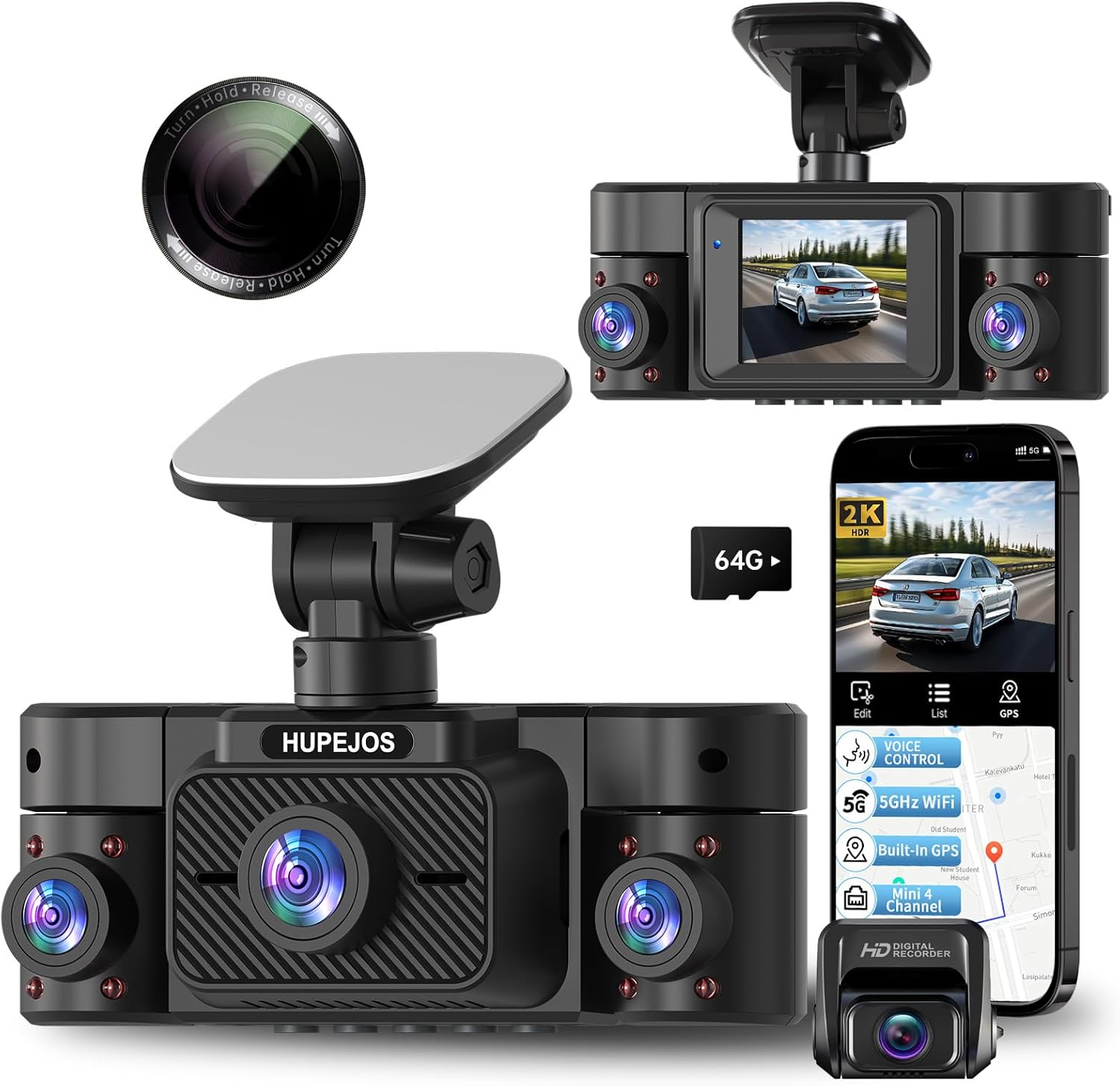
Image: The HUPEJOS V50-4CH dash cam, showing its compact design, multiple camera lenses, and the included CPL filter. A smartphone screen displays the companion app interface with recording and GPS features.

Image: An illustration highlighting the key features of the HUPEJOS V50-4CH dash cam, including 360-degree all-round protection, voice control, 5GHz Wi-Fi, built-in GPS, G-sensor lock, loop recording, 2-inch IPS screen, 4K UHD video recording (note: product description states 2K front, 1080p rear, 720p side), night vision, WDR/HDR, 24-hour parking mode, and included 64GB micro SD card.
Что в коробке?
После распаковки, пожалуйста, проверьте наличие всех компонентов:
- Видеорегистратор HUPEJOS V50-4CH
- CPL фильтр
- Mounting Hardware (e.g., suction cup mount, adhesive mount)
- Автомобильное зарядное устройство
- USB-кабель
- Руководство пользователя (этот документ)
- 64GB Micro SD Card (as indicated in feature image)
Настройка и установка
- Подготовьте SD-карту: Insert the provided 64GB Micro SD card into the dash cam's SD card slot. It is recommended to format the SD card within the dash cam settings before first use.
- Установка видеорегистратора:
- Очистите область лобового стекла в том месте, где будет установлен видеорегистратор.
- Attach the mounting hardware (suction cup or adhesive mount) to the dash cam.
- Надежно закрепите видеорегистратор на лобовом стекле, убедившись, что он не мешает обзору. view. Position it centrally for optimal front camera coverage.
- Adjust the camera angles for the front, left, right, and rear lenses to cover desired areas.
- Подключение питания:
- Подключите автомобильное зарядное устройство к разъему питания видеорегистратора.
- Подключите другой конец автомобильного зарядного устройства к 12-вольтовой розетке вашего автомобиля (гнезду прикуривателя).
- Route the power cable neatly along the windshield and dashboard edges to avoid interference with driving.
- CPL Filter Installation:
- Gently attach the CPL filter to the front camera lens.
- Rotate the CPL filter while observing the screen to reduce glare from the dashboard or reflections from the windshield.

Image: The HUPEJOS V50-4CH dash cam mounted on a car's windshield, demonstrating its compact size and how it integrates into the vehicle's interior without obstructing the driver's view.

Image: A close-up of the CPL filter, showing its design for attachment to the dash cam lens. The text on the filter indicates "Turn Hold Release" for adjustment.
Инструкция по эксплуатации
Основная операция
- Включение/выключение питания: The dash cam will automatically power on and begin recording when the vehicle's ignition is turned on. It will power off automatically when the ignition is turned off.
- Режимы записи: The dash cam supports continuous loop recording. When the memory card is full, the oldest unprotected files будет перезаписан.
- Экран дисплея: The 2-inch IPS screen displays live views from the cameras. You can switch between different camera views or display all four simultaneously via the menu settings.
Голосовое управление
The V50-4CH supports voice commands for hands-free operation. Common commands include:
- "Начало видео"
- "Видеоостановка"
- "Показать фронтальную камеру"
- "Включите Wi-Fi"
- "Включить экран"
- "Сделать фото"

Image: A driver interacting with the HUPEJOS V50-4CH dash cam using voice commands, illustrating the hands-free operation feature for safe driving.
Подключение к Wi-Fi и использование приложений
The dash cam features built-in 5GHz Wi-Fi for quick connection to your smartphone. Download the dedicated app (refer to the dash cam's screen or packaging for app name/QR code) to:
- View жить фуtage.
- Воспроизведение записанных видео.
- Загрузите видео на свой телефон.
- Отрегулируйте настройки.
- Поделиться едойtage.

Image: Demonstrates the built-in 5GHz Wi-Fi for fast data transfer to a smartphone and the built-in GPS feature, which allows viewing real-time vehicle speed and tracking data in recordings on a laptop or smartphone.
Функции GPS
The integrated GPS module records your vehicle's speed and location data. This information is embedded in the video fileс и может быть viewed using the dedicated playback software on a computer or through the smartphone app, providing crucial evidence in case of an incident.
G-сенсор (аварийная запись)
The built-in G-sensor detects sudden impacts or rapid acceleration/deceleration. When triggered, it automatically locks the current video segment, preventing it from being overwritten by loop recording. These emergency fileхранятся в отдельной папке на SD-карте.

Image: Illustrates the loop recording function (every 3 minutes, oldest files overwritten), the G-sensor for automatic locking of important files during impacts, and the 24-hour parking mode with radar precision monitoring (requires separate hardwire kit).
Режим круглосуточной парковки
For continuous surveillance when your vehicle is parked, the dash cam supports a 24-hour parking mode. This feature requires a separate hardwire kit (not included, suggested ASIN: B0DMR2SLFH) to provide constant power to the dash cam. In parking mode, the dash cam can detect motion or impacts and record automatically.
CPL Filter Adjustment
The CPL (Circular Polarizing Lens) filter helps reduce reflections and glare from the windshield, dashboard, and other shiny surfaces, improving video clarity and color saturation. To adjust, gently rotate the outer ring of the CPL filter until reflections are minimized on the dash cam's screen. This adjustment is best done during daylight hours.
Обслуживание
- Очистка объектива: Use a soft, lint-free cloth to gently clean the camera lenses. Avoid abrasive materials or harsh chemicals.
- Обслуживание SD-карты: Regularly format the SD card (at least once a month) within the dash cam's settings to ensure optimal performance and prevent data corruption. Replace the SD card if you notice frequent errors or reduced performance.
- Обновления прошивки: Проверьте производителя webПериодически проверяйте наличие обновлений прошивки на сайте. Обновление прошивки может повысить производительность и добавить новые функции.
- Рабочая температура: Избегайте длительного воздействия на видеорегистратор экстремальных температур.
Поиск неисправностей
| Проблема | Возможное решение |
|---|---|
| Видеорегистратор не включается. |
|
| Запись неожиданно останавливается. |
|
| Качество видео низкое или размытое. |
|
| Проблемы с подключением к Wi-Fi. |
|
| Голосовое управление не отвечает. |
|
Технические характеристики
| Особенность | Деталь |
|---|---|
| Название модели | В50-4Ч |
| Бренд | УПЕХОС |
| Разрешение видеозахвата | Front: 2K, Rear: 1080p, Left/Right: 720p |
| Особые возможности | 360 Degree Coverage, 4 Channel Recording, CPL Filter, Built-in GPS, 5GHz Wi-Fi, Voice Control, G-Sensor, Loop Recording, 24-Hour Parking Mode, Night Vision (WDR/HDR, F1.8 aperture, 8 IR lights) |
| Технология связи | USB, беспроводная связь (Wi-Fi) |
| Тип крепления | Windshield Mount, Dashboard Mount |
| Метод контроля | Прикосновение, Голос |
| Включенные компоненты | CPL Filter, Mounting Hardware, Car Charger, USB Cable, 64GB Micro SD Card |
| Цвет | Черный |
| Размеры (приблизительные) | Length: 4.8 Inch, Height: 1.8 Inch |

Image: Illustrates the 4-channel recording capabilities of the HUPEJOS V50-4CH dash cam, showing simultaneous views from the front (2K), rear (1080p), and left/right (720p) cameras, providing comprehensive coverage.

Изображение: Подробный view of the HUPEJOS V50-4CH dash cam, emphasizing its 360-degree full protection with four cameras. It shows the approximate viewing angles for the front (150°), left (150°), right (150°), and rear cameras.
Гарантия и поддержка
For warranty information, technical support, or service inquiries, please refer to the contact details provided on the product packaging or visit the official HUPEJOS webСохраните чек о покупке в качестве подтверждения покупки для предъявления гарантийных претензий.


