1. Введение
This manual provides instructions for the setup, operation, and maintenance of your Hama WK-200 Wireless Computer Keyboard. Please read this manual thoroughly before using the device to ensure proper function and longevity.
The Hama WK-200 is a full-size wireless keyboard designed for convenient control of your computer or laptop. It features a QWERTZ layout, 8 dedicated media keys, and an AI assistant button for enhanced productivity.

Изображение 1: The Hama WK-200 Wireless Keyboard integrated into a typical desk setup, demonstrating its compact and functional design.
2. Содержимое упаковки
- 1 x Hama WK-200 Wireless Keyboard
- 1 х USB-A приемник
- 1 батарейка типа АА Миньон
3. Настройка
3.1. Установка аккумулятора
- Найдите батарейный отсек на нижней стороне клавиатуры.
- Откройте крышку батарейного отсека.
- Insert the provided AA Mignon battery, ensuring correct polarity (+/-).
- Плотно закройте крышку батарейного отсека.
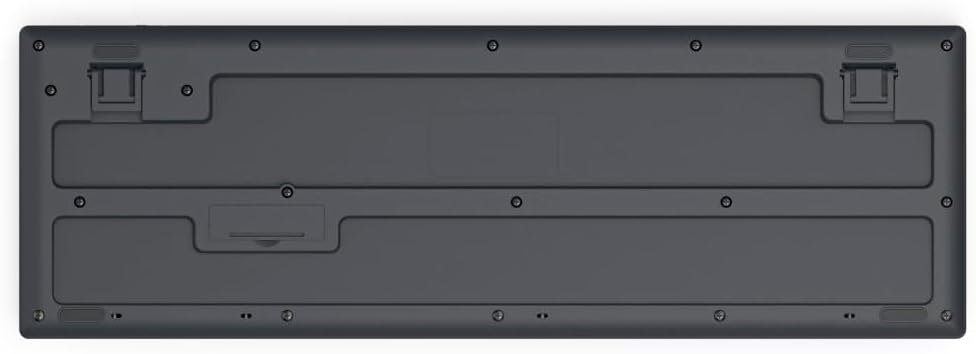
Изображение 2: Нижний view of the Hama WK-200 Wireless Keyboard, illustrating the battery compartment and receiver storage slot.
3.2. Подключение USB-приемника
- Locate the USB-A receiver, typically stored within the battery compartment or packaging.
- Plug the USB-A receiver into an available USB port on your computer or laptop.
- The keyboard should automatically connect. No driver installation is required (Plug & Play).

Изображение 3: Вершина view of the Hama WK-200 Wireless Keyboard, ready for use after connecting the USB receiver.
4. Работа с клавиатурой
4.1. Базовая печать
The Hama WK-200 features a standard QWERTZ layout. Begin typing once the keyboard is connected and recognized by your operating system.

Изображение 4: Подробный топ view of the Hama WK-200 Wireless Keyboard, highlighting the QWERTZ key layout and function keys.
4.2. Мультимедийные клавиши
The keyboard includes 8 dedicated multimedia keys for quick access to common functions. These keys are located above the function row (F1-F12).
- Убавить звук: Уменьшает громкость звука.
- Увеличить громкость: Увеличивает громкость звука.
- Немой: Включает или выключает звук.
- Предыдущий трек: Skips to the previous audio/video track.
- Воспроизведение/Пауза: Воспроизводит или приостанавливает воспроизведение медиафайлов.
- Следующий трек: Skips to the next audio/video track.
- Стоп: Останавливает воспроизведение медиафайлов.
- Web Браузер: Открывает ваш стандартный web браузер.
4.3. AI Assistant Button
The dedicated "Assist" button activates your multi-program AI assistant, if configured on your operating system, allowing for quick access to voice commands or smart features.
4.4. Регулируемый наклон
The keyboard features adjustable feet on the underside to change the typing angle for improved ergonomics.

Изображение 5: Сторона проfile of the Hama WK-200 Wireless Keyboard, showing the kickstand extended for an angled typing position.
5. Техническое обслуживание
Чтобы сохранить работоспособность и внешний вид вашей клавиатуры:
- Регулярно протирайте клавиатуру мягкой сухой тканью.
- Для удаления стойких загрязнений слегкаampСмочите ткань водой или мягким чистящим раствором. Избегайте чрезмерного увлажнения.
- Не используйте абразивные чистящие средства или растворители.
- Держите клавиатуру подальше от жидкостей и экстремальных температур.
6. Поиск Неисправностей
- Клавиатура не отвечает:
- Check if the battery is correctly inserted and has sufficient charge. Replace the battery if necessary.
- Ensure the USB-A receiver is securely plugged into a working USB port on your computer. Try a different USB port.
- Чтобы исключить проблемы с дальностью действия, переместите клавиатуру ближе к USB-приемнику.
- Перезагрузите компьютер.
- Keys are unresponsive or require hard presses:
- Ensure the keyboard is clean and free from debris under the keys.
- Verify battery charge. Low battery can sometimes affect key responsiveness.
- Incorrect key output (e.g., 'Z' types 'Y'):
- The Hama WK-200 uses a QWERTZ (немецкий) keyboard layout. Ensure your operating system's keyboard language setting matches this layout. If your system is set to QWERTY (US English) or another layout, key outputs may not correspond to the physical keycaps. Adjust your operating system's keyboard settings accordingly.
7. Технические характеристики
| Бренд | Хама |
| Номер модели | 00173055 |
| Технология связи | Беспроводная связь |
| Описание клавиатуры | Мультимедиа |
| Совместимые устройства | Ноутбук, ПК |
| Специальная характеристика | Легкий |
| Цвет | Черный |
| Материал | Пластик |
| Вес товара | 1.04 фунта (приблизительно 472 г) |
| Размеры упаковки | 18.94 x 6.02 x 1.26 дюйма (прибл. 48.1 x 15.3 x 3.2 см) |

Изображение 6: Diagram illustrating the dimensions of the Hama WK-200 Wireless Keyboard: 43.8 cm length, 14.5 cm width, and 2.6 cm height.
8. Гарантия и поддержка
Hama products are covered by a manufacturer's warranty. For specific warranty terms and conditions, please refer to the documentation included with your purchase or visit the official Hama webсайт.
For technical support, troubleshooting assistance, or warranty claims, please contact Hama customer service directly. Contact information can typically be found on the Hama webсайта или упаковки продукта.
9. Инструкции по технике безопасности
- Do not open the device. Improper repairs can lead to significant hazards for the user.
- Не используйте изделие, если оно явно повреждено.
- Защищайте изделие от грязи, влаги и перегрева.
- Используйте изделие только по назначению.
- Держите это изделие, как и все электрические изделия, в недоступном для детей месте.


