Введение
The Beatfoxx CDB-1016U Boombox is a versatile audio system designed for both home and portable use. It combines classic audio formats with modern connectivity options, offering a comprehensive listening experience. This manual provides detailed instructions for setting up, operating, and maintaining your device.

Рисунок 1: Передняя часть view of the Beatfoxx CDB-1016U BK Boombox, showing the speakers, control panel, and carrying handle.
Настраивать
Питание устройства
The Beatfoxx CDB-1016U Boombox can be powered using the included AC power cable or by batteries for portable use.
- Питание переменного тока: Insert the AC power cable into the AC IN jack on the back of the unit and plug the other end into a standard wall outlet (AC 230V ~ 50Hz).
- Мощность аккумулятора: For portable operation, open the battery compartment on the bottom of the unit. Insert six (6) Type C (UM-2) batteries, ensuring correct polarity (+/-). Close the battery compartment securely.

Figure 2: The boombox operating on AC power, with an illustration of the required Type C batteries for portable use.
Инструкция по эксплуатации
Контролируетview
Familiarize yourself with the main controls located on the top and front of the boombox.

Рисунок 3: Подробная информация view of the boombox's control panel, cassette compartment, carrying handle, and CD compartment.
- Кнопка питания: Включает / выключает устройство.
- Кнопка РЕЖИМ: Switches between CD, USB, Bluetooth, Radio (FM/AM), and AUX modes.
- Ручка VOLUME: Регулирует уровень вывода звука.
- Ручка настройки: Used for manual tuning in Radio mode.
- Кнопка ВОСПРОИЗВЕДЕНИЕ / ПАУЗА: Запускает или приостанавливает воспроизведение.
- Кнопка СТОП/ИЗВЛЕЧЕНИЕ: Stops playback and opens the CD compartment or ejects cassette.
- Кнопки ПРОПУСК/ПОИСК (<< / >>): Пропускает треки или позволяет быстро перематывать вперед/назад.
- Кнопка ПОВТОР/ПРОГРАММА: Repeats current track/all tracks or programs CD/USB playback order.
- Кнопка ПАПКА: Navigates through folders on USB.
- Кнопка REC: Initiates recording to cassette.
Selecting Playback Sources
The boombox supports multiple audio sources. Use the РЕЖИМ кнопку для циклического переключения между ними.

Figure 4: Visual representation of the seven available playback sources on the boombox.
Воспроизведение компакт-дисков
- Нажмите РЕЖИМ кнопку, чтобы выбрать режим компакт-диска.
- Нажмите СТОП/ИЗВЛЕЧЕНИЕ кнопка для открытия отсека для компакт-дисков.
- Place a CD (CD, CD-R, CD-RW, MP3 CD) onto the spindle with the label side facing up.
- Close the CD compartment. The display will show "READING" and then the total number of tracks.
- Нажмите ВОСПРОИЗВЕДЕНИЕ/ПАУЗА кнопку, чтобы начать воспроизведение.
- Используйте ПРОПУСТИТЬ / ПОИСК кнопки для навигации между треками.
- Нажимать ПОВТОРИТЬ для повтора текущего трека или всех треков.
Воспроизведение и запись на кассеты
The boombox features a built-in cassette player and recorder.

Figure 5: The cassette compartment of the boombox shown open, ready for tape insertion.
Воспроизведение:
- Откройте кассетный отсек.
- Вставьте кассету.
- Закройте отсек.
- Нажмите ИГРАТЬ button on the cassette controls to start playback.
- Использовать Вперед or РЭВ for fast forward or rewind.
- Нажимать СТОП/ИЗВЛЕЧЕНИЕ Чтобы остановить воспроизведение и извлечь ленту.
Запись:
You can record from CD, USB, Radio, or AUX input to a cassette tape.
- Вставьте чистую или записываемую кассету в отсек.
- Select the desired source (CD, USB, Radio, or AUX) using the РЕЖИМ кнопка.
- Start playback on the source (e.g., play a CD, tune to a radio station).
- Нажмите РЕК button on the cassette controls. The unit will automatically start recording the audio from the selected source onto the cassette.
- Нажимать ОСТАНАВЛИВАТЬСЯ on the cassette controls to end recording.
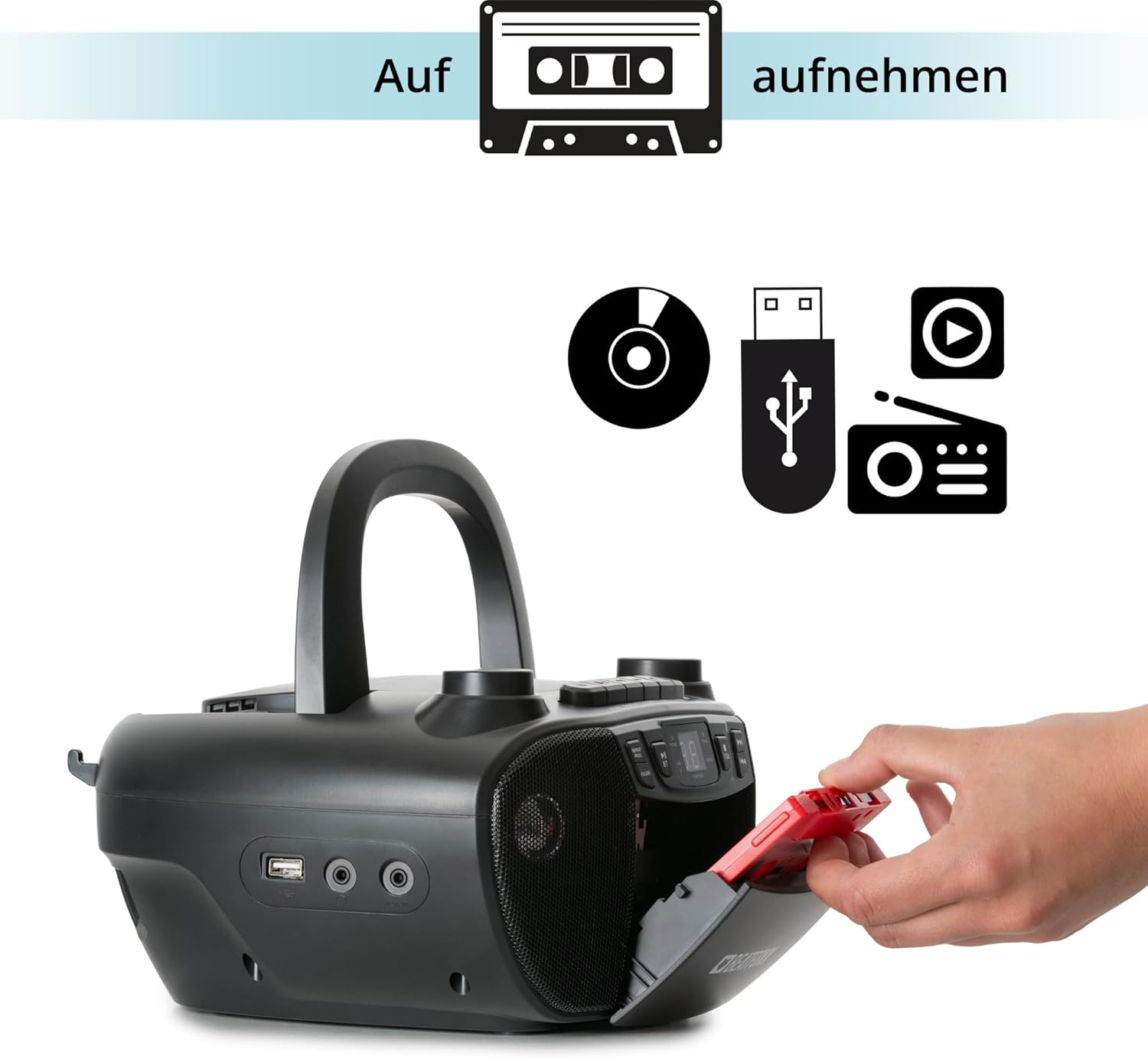
Figure 6: Illustration of the boombox's recording capability, showing a cassette tape being inserted for recording from CD, USB, or radio.
Радио (FM/AM)
- Extend the telescopic antenna for better FM reception.
- Нажмите РЕЖИМ button to select Radio mode (FM or AM).
- Используйте ТЮНИНГ knob to manually tune to your desired radio station.
Bluetooth-подключение
- Нажмите РЕЖИМ Кнопка для выбора режима Bluetooth. На дисплее отобразится «BT» и начнет мигать, указывая на то, что устройство находится в режиме сопряжения.
- На устройстве с поддержкой Bluetooth (смартфон, планшет) включите Bluetooth и выполните поиск доступных устройств.
- Select "Beatfoxx CDB-1016U" from the list of devices.
- Once paired, the "BT" indicator on the boombox will stop flashing and remain solid.
- Теперь вы можете передавать аудиопоток по беспроводной связи со своего устройства на портативную колонку.
Воспроизведение с USB-носителя
- Вставьте USB-флеш-накопитель с аудиофайлами в формате MP3. files в порт USB.
- Нажмите РЕЖИМ button to select USB mode. The unit will automatically start playing the first track.
- Используйте ПРОПУСТИТЬ / ПОИСК кнопки для навигации между треками.
- Используйте ПАПКА button to navigate through folders on the USB drive.

Рисунок 7: Подробная информация view of the boombox's connectivity options, including the USB port, headphone output, and AUX input.
Вход AUX
Connect external audio devices (e.g., MP3 players, smartphones without Bluetooth) to the boombox using a 3.5mm audio cable (not included).
- Connect one end of the 3.5mm audio cable to the AUX IN jack on the boombox.
- Другой конец подключите к разъему для наушников или аудиовыходу внешнего устройства.
- Нажмите РЕЖИМ кнопка для выбора режима AUX.
- Воспроизводите звук с внешнего устройства. Звук будет выводиться через динамики бумбокса.
Выход для наушников
For private listening, connect standard 3.5mm headphones to the HEADPHONE jack. Audio will automatically mute from the speakers when headphones are connected.
Обслуживание
Уборка
- Всегда отключайте устройство от источника питания перед очисткой.
- Для очистки внешних поверхностей используйте мягкую сухую ткань.
- Не используйте абразивные чистящие средства, воски или растворители, так как они могут повредить отделку.
- Для чистки линз CD используйте специализированное чистящее средство для линз CD.
- For the cassette head, use a cassette head cleaning kit.
Уход за аккумулятором
- Если устройство не будет использоваться в течение длительного времени, извлеките из него батарейки, чтобы предотвратить утечку.
- Не смешивайте старые и новые батареи или батареи разных типов.
- Утилизируйте использованные батареи ответственно в соответствии с местными правилами.
Поиск неисправностей
| Проблема | Возможная причина | Решение |
|---|---|---|
| Нет электричества | Кабель питания не подключен; Батарейки разряжены или неправильно вставлены. | Ensure AC cable is securely plugged in. Check battery polarity and replace if necessary. |
| Нет звука | Слишком низкая громкость; Выбран неправильный режим; Подключены наушники. | Increase volume. Press MODE button to select correct source. Disconnect headphones. |
| CD пропускает или не воспроизводится | Компакт-диск загрязнен или поцарапан; компакт-диск вставлен неправильно. | Clean CD with a soft cloth. Re-insert CD correctly. Try another CD. |
| Bluetooth не сопряжен | Бумбокс не находится в режиме сопряжения; устройство находится слишком далеко; Bluetooth отключен на устройстве. | Ensure boombox is in BT mode and "BT" is flashing. Move device closer. Enable Bluetooth on your device. |
| Плохой прием радиосигнала | Антенна не выдвинута; Слабый сигнал. | Fully extend the telescopic antenna. Adjust antenna position. Try tuning to a stronger station. |
Технические характеристики
| Особенность | Деталь |
|---|---|
| Бренд | Beatfoxx |
| Номер модели | CDB-1016U (Manufacturer Ref: 00104749) |
| Цвет | Черный |
| Технология связи | Вспомогательный кабель, USB, Bluetooth |
| Совместимые устройства | Portable audio devices, MP3 players, Smartphones, Tablets |
| Тип динамика | Стерео |
| Источник питания | AC Power Cable, 6 x Type C Batteries |
| Выходная мощность звука | 2 х 1.2 Вт |
| Поддерживаемые форматы | CD, MP3, CD-R, CD-RW, Cassette, FM/AM Radio, Bluetooth, USB |
| Вес товара | 1.6 Килограмма |
| Размеры (Ш x В x Г) | 24 x 13 x 22.5 см (приблизительно) |
Гарантия и поддержка
This Beatfoxx product comes with a standard manufacturer's warranty. Please refer to the warranty card included in your product packaging for specific terms and conditions.
For technical support, troubleshooting assistance, or warranty claims, please contact Beatfoxx customer service through their official webили в магазине, где был приобретен товар. Сохраните чек о покупке для подтверждения гарантии.